
1. Introduction
This user manual provides essential information for the safe and effective operation and maintenance of your T POWER 42V Battery Charger. Please read this manual thoroughly before using the product to ensure proper function and to prevent damage or injury.
The T POWER charger is designed to provide reliable power for compatible electric scooters and bikes, ensuring efficient charging with built-in safety features.
2. Safety Information and Precautions
Your safety is paramount. Adhere to all safety guidelines to prevent electric shock, fire, or damage to the charger or your device.
- The T POWER Adapter Charger is UL CE RoHS Certified for safety.
- It provides Over Voltage Protection, Over Current Protection, and Short-circuit Protection.
- Always ensure the charger is compatible with your device's voltage requirements. Note: 36V is the battery's voltage, NOT the charger's voltage. This charger is designed for 42V output.
- Do not expose the charger to water, moisture, or extreme temperatures.
- Do not disassemble or modify the charger. Refer all servicing to qualified personnel.
- Keep out of reach of children.

Image: Overview of T POWER charger's superior safety features, including protections against over-current, over-temperature, over-voltage, and short circuits.
3. Product Overview

Image: The T POWER 42V Battery Charger, showing the main adapter unit and its attached power cord with a barrel connector.

Image: Close-up of the T POWER charger highlighting the LED indicator and its meanings: Green flashing for charging, Green solid for fully charged, Red fast flashing for defective, and Red fast & slow flashing for temperature anomaly.
LED Indicator Status:
- GREEN (Flashing): Charging in progress
- GREEN (Solid): Charge full or disconnected
- RED (Flashes Fast): Defective
- RED (Flashes Fast & Slow): Temperature anomaly
4. Setup and Connection
- Verify Compatibility: Ensure your electric scooter or bike requires a 42V DC input for charging. This charger is compatible with models such as NAVEE N20, N30, N40 Smart Electric Scooters, URBANMAX C1 Pro, C1 450W, and X2 Electric Scooters.
- Connect to Device: Insert the barrel connector of the charger firmly into the charging port of your electric scooter or bike.
- Connect to Power Outlet: Plug the AC adapter into a standard AC 100V - 240V wall outlet.
- Observe LED Indicator: The LED indicator on the charger will illuminate to show the charging status.
Compatible Devices:
- NAVEE N20 Smart Electric Scooter
- NAVEE N30 Smart Electric Scooter
- NAVEE N40 Smart Electric Scooter (including 36V 10Ah Battery E-Scooter)
- URBANMAX C1 Pro Electric Scooter
- URBANMAX C1 450W Electric Scooter (36V 37V 7.5Ah Li-ion Battery Pack Commuter Bike)
- URBANMAX X2 Electric Scooter (550W Motor 36V 7.8Ah Lithium-ion Battery Commuting E-scooter)
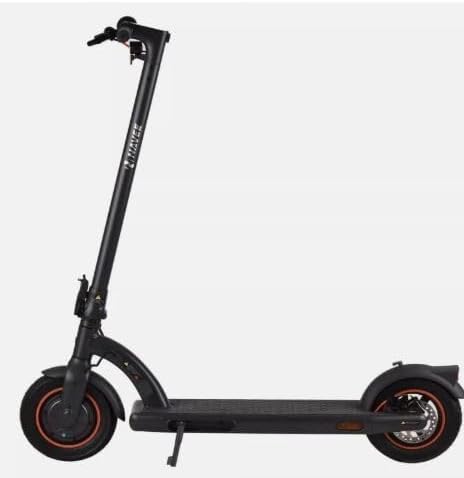
Image: A Navee N40 Smart Electric Scooter, one of the compatible devices for this charger.
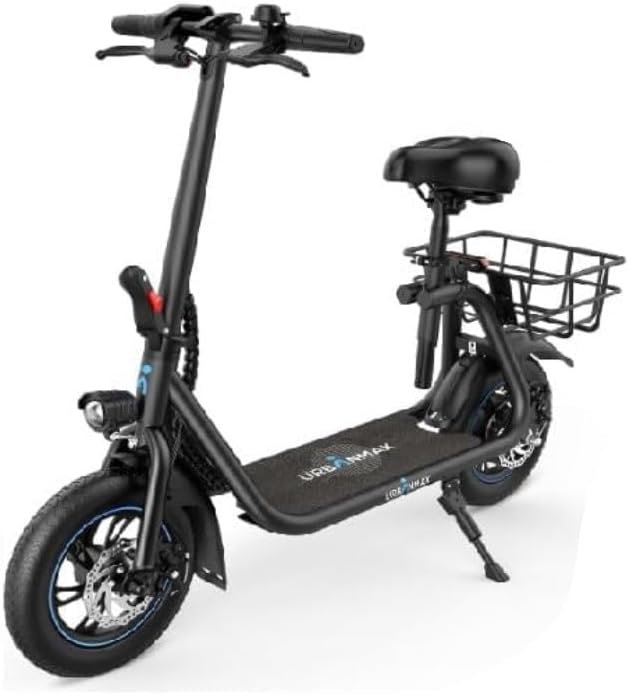
Image: An Urbanmax C1 Pro Electric Scooter, another compatible device for this charger.
5. Operating Instructions
Once connected, the charger will automatically begin charging your device. Monitor the LED indicator for charging status:
- When the LED is GREEN (Flashing), charging is in progress.
- When the LED turns GREEN (Solid), the battery is fully charged, or the charger is disconnected from the device.
- Disconnect the charger from the device once charging is complete to conserve energy and prolong charger lifespan.
- Always unplug the charger from the wall outlet when not in use.
6. Maintenance and Storage
- Cleaning: Use a soft, dry cloth to clean the charger. Do not use liquid cleaners or aerosols.
- Storage: Store the charger in a cool, dry place away from direct sunlight and extreme temperatures.
- Cable Care: Avoid bending or crimping the power cord excessively. Do not place heavy objects on the cord.
- Inspection: Periodically inspect the charger and its cables for any signs of damage, such as frayed wires or cracked casing. If damage is found, discontinue use immediately.
7. Troubleshooting
| Problem | Possible Cause | Solution |
|---|---|---|
| Charger LED not lighting up. | No power from outlet; loose connection; charger malfunction. | Check wall outlet with another device. Ensure all connections are secure. If problem persists, charger may be defective. |
| LED flashes RED rapidly. | Charger is defective. | Discontinue use immediately. Contact customer support for assistance. |
| LED flashes RED fast and slow. | Temperature anomaly. | Unplug the charger and allow it to cool down in a well-ventilated area. Ensure it's not covered during use. |
| Device not charging. | Incorrect voltage; faulty device battery; loose connection. | Verify device voltage compatibility (should be 42V input). Check connection to device. Test device with another known-good charger if possible. |
8. Specifications
- Model: FY0634201550, XHK-800-4215 XHK8004215
- Input Voltage Range: AC 100V - 240V
- Output: DC 42V - 1.5A (2A Compatible)
- Wattage: 80 watts
- Amperage: 1.5 Amps
- Product Dimensions: 4.5 x 2 x 1.25 inches
- Item Weight: 8 ounces
- Connectivity Technology: DC
- Connector Type: Barrel Connector
- Special Feature: Fast Charging
- Included Components: AC Adapter
9. Warranty and Support
- 30-Day Return Policy: You may return your undamaged product and packaging within 30 days of purchase to receive a full refund for any reason.
- 1-Year Limited Manufacturer Warranty: T POWER provides a 1-year limited manufacturer warranty covering quality-related issues. Easy exchange with a replacement is offered.
- Technical Support: For any questions, concerns, or technical assistance, please contact T POWER customer support. If you received the wrong item, or if the charger doesn't fit your device, please reach out for help.
For further assistance, please refer to the contact information provided with your purchase or visit the official T POWER website.