
Rohent R4
User Manual
Rohent HD 1080P Wired RV Backup Camera System
Model: R4
1. Introduction
Thank you for choosing the Rohent HD 1080P Wired RV Backup Camera System. This system is designed to enhance your driving safety by providing clear, real-time rear visibility for large vehicles such as RVs, trucks, and trailers. With its robust construction and advanced features, it ensures reliable performance in various conditions.
Key features include:
- Real-Time Monitoring: Enjoy zero signal delay for smooth, uninterrupted footage.
- Crystal-Clear HD 1080P Display: A 7-inch monitor provides crisp visuals with built-in night vision for low-light conditions.
- Expandable System: The 7-inch display supports two channels, allowing for the addition of a second camera.
- Wide Compatibility: Ideal for large vehicles and heavy equipment including RVs, trucks, trailers, campers, and tractors.
- IP69 Waterproof Rating: Designed to withstand heavy rain and high-pressure washes.
- 170° Wide-Angle Lens: Maximizes rear visibility and eliminates blind spots.
- Plug-and-Play Installation: Simple setup without the need for professional assistance.
- Durable Construction: Built from premium materials for longevity in tough conditions.

Figure 1.1: Rohent HD 1080P Wired RV Backup Camera System components.
2. Package Contents
Please verify that all items listed below are included in your package. If any items are missing or damaged, please contact customer support.
- 1 x 7 inch Monitor
- 1 x RV Camera
- 1 x 66ft Video Cable
- 1 x Cigarette Lighter Power Adapter
- 1 x User Manual (this document)
- Bracket
- Power Cable
- Extension Wire
- T-Taps
- Screws

Figure 2.1: All components included in the product package.
3. Setup and Installation
The Rohent RV Backup Camera System features a plug-and-play design for easy installation. Follow these steps for a quick setup.
3.1. Pre-Installation Test
Before permanent installation, it is recommended to test the system to ensure all components are functioning correctly.
- Connect the camera to the 66ft video cable.
- Connect the other end of the video cable to the monitor's video input.
- Connect the monitor to the cigarette lighter power adapter.
- Plug the cigarette lighter adapter into your vehicle's 12V DC accessory outlet.
- Power on the monitor and verify that the camera displays a clear image.
3.2. Mounting the Monitor
Choose a suitable location on your dashboard or windshield that does not obstruct your view or interfere with driving controls. Use the provided bracket to securely mount the 7-inch monitor.

Figure 3.1: Example of monitor placement in a vehicle.
3.3. Mounting the Camera
Install the RV camera at the rear of your vehicle (RV, truck, or trailer) in a position that provides the best possible view of the area behind the vehicle. Ensure the camera is securely fastened using the provided screws and bracket.
3.4. Wiring Connections
Route the 66ft video cable from the camera to the monitor. Ensure the cable is secured along its path to prevent damage or entanglement. Connect the video cable to the appropriate input on the monitor. For power, connect the monitor to the cigarette lighter adapter or hardwire it to your vehicle's power system (e.g., reversing light circuit for automatic activation when reversing).
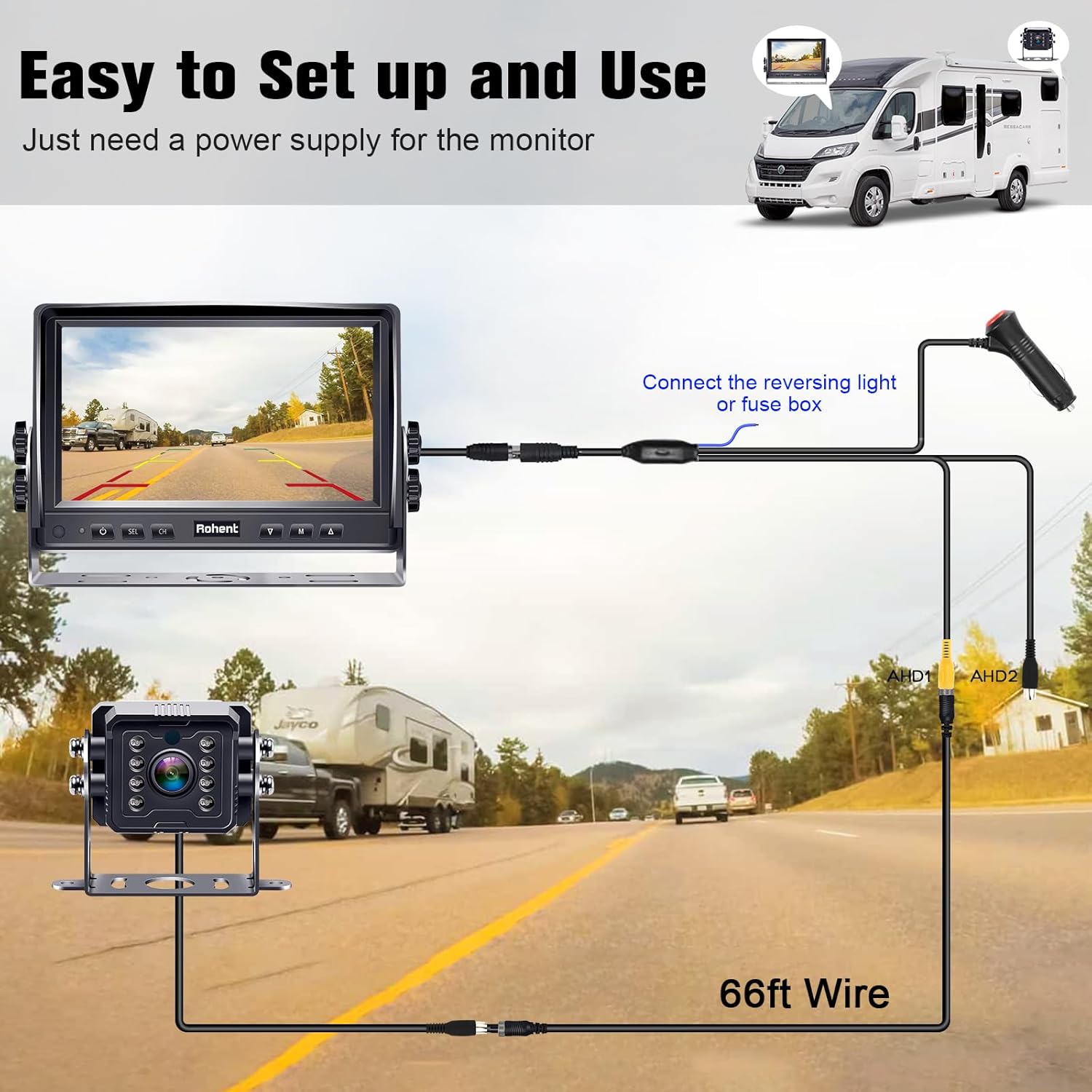
Figure 3.2: Wiring diagram for the backup camera system.

Figure 3.3: Overview of the system's easy installation and expandability.
4. Operating Instructions
This section details how to operate your Rohent backup camera system effectively.
4.1. Powering On/Off
The monitor will power on automatically when connected to a power source and the vehicle's ignition is on, or when the reverse gear is engaged if wired to the reverse light circuit. To manually power on/off, use the power button on the monitor.
4.2. Display Modes and Channels
The 7-inch monitor supports two video input channels (CH1 and CH2). Use the 'CH' button on the monitor to switch between connected cameras if you have a dual-camera setup.
4.3. Adjusting Image Settings
Use the 'M' (Menu) button to access display settings such as brightness, contrast, and color. Navigate through the menu using the arrow buttons (▲ / ▼) and confirm selections with the 'SEL' button.
4.4. Parking Lines and Image Flip
The system allows you to toggle parking guidelines on or off and to flip the image horizontally or vertically, which is useful for different camera mounting orientations.

Figure 4.1: Backup lines and image flip functions.
4.5. Night Vision Capability
The camera is equipped with advanced night vision technology, including IR infrared lights and upgraded chips, to provide clear visibility in low-light or dark conditions.

Figure 4.2: Crystal Night Vision technology.

Figure 4.3: Enhanced night vision for clear images in the dark.
5. Maintenance
Proper maintenance ensures the longevity and optimal performance of your Rohent backup camera system.
5.1. Cleaning
Regularly clean the camera lens and monitor screen with a soft, damp cloth. Avoid using abrasive cleaners or solvents that could damage the surfaces.
5.2. Weather Resistance
The camera boasts an IP69 waterproof rating, making it highly resistant to water, dust, and extreme temperatures. While designed for all-weather performance, ensure all cable connections are secure and properly sealed during installation to maintain water resistance.

Figure 5.1: IP69K Waterproof Rating for all-weather performance.

Figure 5.2: Camera's resistance to rain and harsh weather.
5.3. Durability
The system is constructed with high-quality metal materials, providing excellent resistance to cold, high temperatures, and shock, ensuring high durability and consistent performance under demanding conditions.

Figure 5.3: Temperature resistance of the camera system.
6. Troubleshooting
If you encounter issues with your Rohent backup camera system, refer to the following common problems and solutions.
- No Image on Monitor:
- Ensure all power connections are secure and the monitor is receiving power.
- Check the video cable connection between the camera and the monitor. Ensure it is fully inserted and not damaged.
- Verify that the correct video input channel (CH1/CH2) is selected on the monitor.
- Blurry or Distorted Image:
- Clean the camera lens.
- Check for any obstructions in front of the camera lens.
- Ensure the video cable is not kinked or damaged.
- Adjust the brightness, contrast, and color settings on the monitor.
- No Night Vision:
- Ensure there is sufficient power supply to the camera.
- Check if the IR lights on the camera are functioning (they may emit a faint red glow in the dark).
- Intermittent Signal:
- Inspect all cable connections for looseness or corrosion.
- Ensure the video cable is not routed near strong electromagnetic interference sources.
If the problem persists after trying these solutions, please contact Rohent customer support for further assistance.
7. Specifications
| Feature | Specification |
|---|---|
| Model Number | R4 |
| Product Dimensions | 12.01 x 8.46 x 3.54 inches |
| Item Weight | 3.52 pounds |
| Screen Size | 7 Inches |
| Display Technology | LCD |
| Video Capture Resolution | 1080p |
| Voltage | 12 Volts |
| Optical Sensor Technology | CMOS |
| Lens Type | Wide Angle (170°) |
| Installation Type | Surface Mount |
| Waterproof Rating | IP69 |
| Compatible Devices | RVs, Trucks, and Trailers |
8. Warranty and Support
Rohent provides a 36-month limited warranty for this product, covering defects in materials and workmanship under normal use. Please retain your purchase receipt as proof of purchase.
For technical support, warranty claims, or any questions regarding your Rohent HD 1080P Wired RV Backup Camera System, please contact Rohent customer service through the retailer's platform or the official Rohent website. Provide your product model number (R4) and a detailed description of the issue for prompt assistance.
Ask a question about this manual
Ask about setup, troubleshooting, compatibility, parts, safety, or missing instructions. Manuals+ will review the question and use this page’s manual context to help answer it.