Important Safety Information
Please read all instructions carefully before using this appliance. Failure to follow these instructions may result in electric shock, fire, or serious injury.
- Always place the air fryer on a stable, heat-resistant surface, away from walls and other appliances to allow for proper air circulation.
- Do not immerse the appliance, cord, or plug in water or other liquids.
- Keep hands and face away from the steam and hot air vents when operating.
- Do not block any ventilation openings.
- Unplug the air fryer from the outlet when not in use and before cleaning. Allow it to cool completely before handling.
- This appliance is not intended for use by persons with reduced physical, sensory, or mental capabilities, or lack of experience and knowledge, unless they have been given supervision or instruction concerning use of the appliance by a person responsible for their safety.
- Do not operate any appliance with a damaged cord or plug, or after the appliance malfunctions or has been damaged in any manner.
- Do not use accessories or attachments not recommended by the manufacturer.
- Extreme caution must be used when moving an appliance containing hot oil or other hot liquids.
Product Overview
The Generic 3 Qt Digital Air Fryer with TurboCrisp Technology is designed to provide a versatile cooking experience with less oil. It features a digital interface and multiple cooking modes.
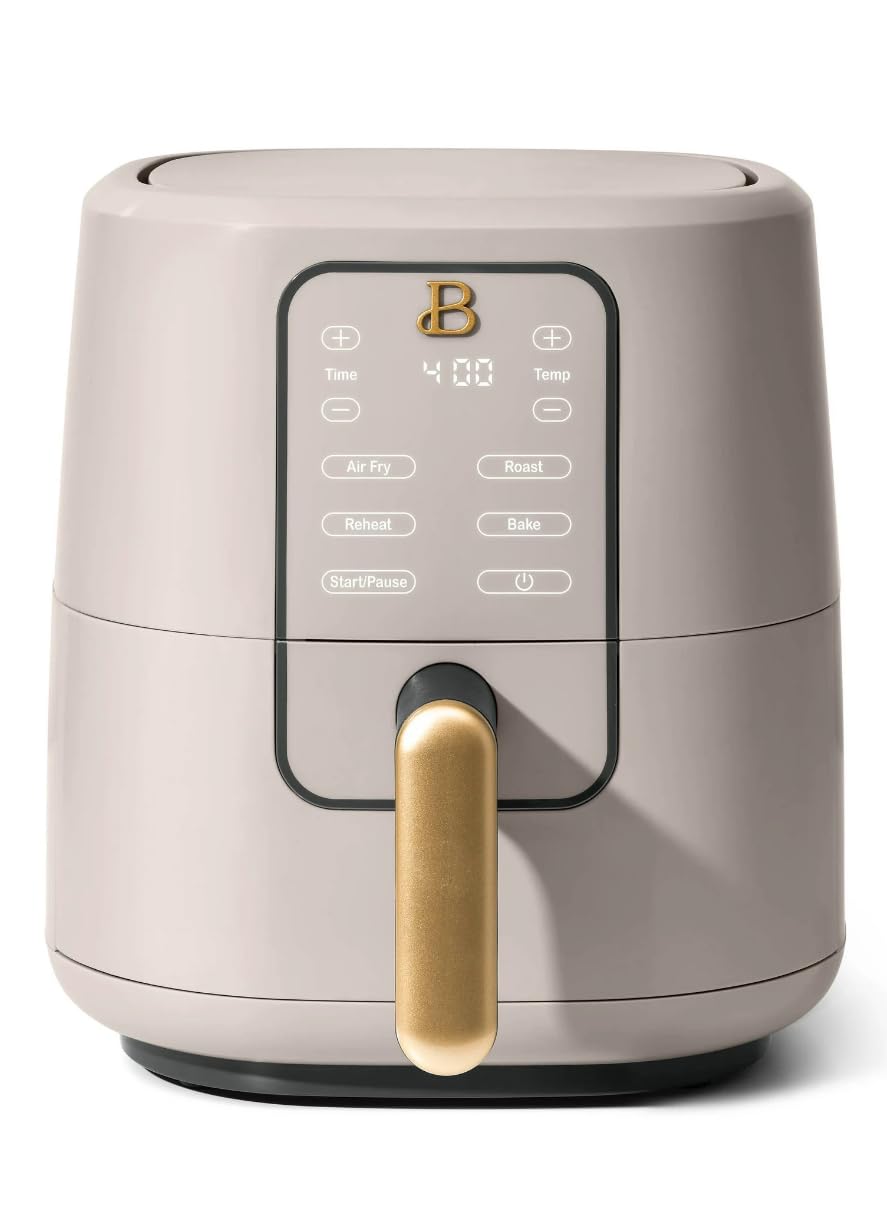
Image of the Generic 3 Qt Digital Air Fryer, showcasing its porcini taupe finish and digital control panel.
Key Components:
- Main Air Fryer Unit
- Removable Cooking Basket
- Crisper Tray (inside the basket)
- Digital Control Panel
Setup
1. Unpacking
- Remove all packaging materials, stickers, and labels from the air fryer.
- Check that all components are present and undamaged.
2. Initial Cleaning
- Wipe the exterior of the air fryer with a damp cloth.
- Wash the cooking basket and crisper tray with hot, soapy water. Rinse thoroughly and dry completely.
- Do not use abrasive cleaners or scouring pads, as this may damage the non-stick coating.
3. Placement
- Place the air fryer on a stable, level, heat-resistant surface.
- Ensure there is at least 6 inches (15 cm) of clear space around the back and sides of the appliance for proper ventilation.
- Do not place the air fryer near flammable materials or heat sources.
4. Power Connection
- Plug the power cord into a grounded electrical outlet.
- The air fryer is now ready for use.
Operating Instructions
1. Control Panel Overview
The digital control panel allows you to select cooking modes, adjust time, and set temperature.
- Power Button: Turns the appliance on/off.
- Mode Selection: Cycles through Air Fry, Roast, Reheat, and Bake.
- Temperature Control: Adjusts cooking temperature.
- Time Control: Adjusts cooking time.
- Start/Pause: Begins or temporarily stops the cooking cycle.
2. Preheating (Optional)
For best results, preheating is recommended for most recipes.
- Plug in the air fryer and press the Power Button.
- Select your desired cooking mode (e.g., Air Fry).
- Adjust the temperature to the recipe's recommendation.
- Set the time for 3-5 minutes for preheating.
- Press Start. The air fryer will beep when preheating is complete.
3. Cooking Food
- Place the crisper tray into the cooking basket.
- Arrange food evenly on the crisper tray. Do not overfill the basket to ensure even cooking.
- Slide the cooking basket firmly back into the air fryer.
- Press the Power Button.
- Select the desired cooking mode (Air Fry, Roast, Reheat, Bake).
- Adjust the temperature and time according to your recipe.
- Press Start. The air fryer will begin cooking.
- Some recipes may require shaking or flipping food halfway through cooking. The air fryer may beep to remind you. Carefully remove the basket, shake/flip food, and reinsert.
- When the cooking cycle is complete, the air fryer will beep. Carefully pull out the basket and remove food using heat-resistant tongs.
Maintenance and Cleaning
Regular cleaning ensures optimal performance and extends the life of your air fryer.
1. Before Cleaning
- Always unplug the air fryer from the power outlet.
- Allow the appliance to cool down completely before cleaning.
2. Cleaning the Basket and Crisper Tray
- Wash the cooking basket and crisper tray in hot, soapy water.
- For stubborn food residue, soak the basket and tray in warm water for about 10 minutes before cleaning.
- Use a non-abrasive sponge or brush to clean.
- Rinse thoroughly and dry completely before storing or reusing.
3. Cleaning the Interior
- Wipe the interior of the air fryer with a damp cloth.
- For any baked-on grease, use a mild dish soap on a damp cloth.
- Do not use abrasive cleaners or metal scouring pads.
4. Cleaning the Exterior
- Wipe the exterior of the air fryer with a soft, damp cloth.
- Ensure no water enters the control panel area.
5. Storage
- Ensure the air fryer is clean and completely dry before storing.
- Store the appliance in a cool, dry place.
Troubleshooting
If you encounter any issues, please refer to the following common problems and solutions:
| Problem | Possible Cause | Solution |
|---|---|---|
| Air fryer does not turn on. | Not plugged in. Power outlet malfunction. | Ensure the power cord is securely plugged into a working outlet. Try a different outlet. |
| Food is not cooked evenly. | Basket is overfilled. Food not shaken/flipped. | Do not overfill the basket. Shake or flip food halfway through cooking. |
| White smoke coming from the appliance. | Grease residue from previous use. High-fat food. | Clean the basket and crisper tray thoroughly. For high-fat foods, drain excess oil during cooking. |
| Food is not crispy. | Basket is overfilled. Temperature too low or time too short. | Cook in smaller batches. Increase temperature or cooking time. Ensure food is dry before air frying. |
If the problem persists after trying these solutions, please contact customer support.
Specifications
| Feature | Specification |
|---|---|
| Model Number | Ek-30z131 |
| Capacity | 3 Quarts |
| Product Dimensions | 10 x 10 x 12 inches |
| Item Weight | 8 pounds |
| Color | Porcini Taupe |
| Cooking Modes | Air Fry, Roast, Reheat, Bake |
Warranty and Support
This product comes with a standard manufacturer's warranty. For specific warranty details, please refer to the documentation included with your purchase or contact the retailer.
For technical support, troubleshooting assistance, or to inquire about replacement parts, please contact the manufacturer's customer service department. Contact information can typically be found on the product packaging or the manufacturer's official website.


