
Introduction
The Eujgoov iG-10Pro is a compact and portable 10W desktop electric guitar practice amplifier. Designed for convenience and versatility, it features dual channels (clean and distortion), adjustable effects, Bluetooth 5.0 connectivity, and a built-in rechargeable battery for extended use. This manual provides essential information for setting up, operating, and maintaining your amplifier.
Safety Information
- Read all instructions before operating the amplifier.
- Do not expose the amplifier to rain or moisture.
- Avoid placing the amplifier near heat sources or in direct sunlight.
- Use only the provided charging cable and a DC 5V power source.
- Do not attempt to open or modify the amplifier. Refer all servicing to qualified personnel.
- Keep out of reach of children.
Package Contents
Please check the box for the following items:
- 1 x Small Guitar Amplifier (iG-10Pro)
- 1 x Charging Cable (USB)
- 1 x Shoulder Strap
- 1 x User Manual
Product Overview
Familiarize yourself with the controls and connections of your iG-10Pro amplifier.

Figure 1: Input and Gain Controls. This image shows the 1/4-inch input jack for your guitar, along with the CLN/DIST (Clean/Distortion) switch and the GAIN knob to adjust input sensitivity and distortion level.

Figure 2: Tone and Effect Controls. This image displays the BASS, TREBLE, and DELAY knobs for tone shaping and effect adjustment. Also visible are the AUX input, Bluetooth indicator, DC-5V charging port, and MASTER volume knob.

Figure 3: Rear View and Accessories. The rear of the amplifier, showing its compact design, along with the included shoulder strap and USB charging cable.
Setup
- Charging the Amplifier: Connect the provided USB charging cable to the DC 5V port on the amplifier and to a compatible USB power adapter (not included). The charging indicator light will illuminate. A full charge provides 4-8 hours of normal music playback.
- Attaching the Shoulder Strap: If desired, attach the shoulder strap to the designated points on the sides of the amplifier for portability.
- Power On: Turn the MASTER volume knob clockwise to power on the amplifier.
Operating Instructions
1. Guitar Connection and Sound
- Connect your electric guitar to the INPUT jack using a standard 1/4-inch instrument cable.
- Adjust the MASTER volume to a low level before playing.
- Clean Channel: Ensure the CLN/DIST switch is in the 'CLN' position. Adjust the GAIN knob for desired input level.
- Distortion Channel: Flip the CLN/DIST switch to the 'DIST' position. Adjust the GAIN knob to control the amount of overdrive/distortion.
- Use the BASS and TREBLE knobs to shape your guitar's tone.
- The DELAY knob controls the intensity of the reverb effect.
2. Bluetooth Connectivity
- With the amplifier powered on, the Bluetooth indicator will blink, indicating it's ready for pairing.
- On your smartphone or other Bluetooth device, search for available devices and select "iG-10Pro".
- Once paired, the Bluetooth indicator will glow solid. You can now play audio from your device through the amplifier.
- Adjust the volume of the Bluetooth audio independently using the volume controls on your connected device. The amplifier's MASTER volume will affect both guitar and Bluetooth audio.
3. AUX Input
- Connect an external audio source (e.g., MP3 player, phone) to the AUX input jack using a 3.5mm audio cable.
- Adjust the volume of the AUX audio independently using the volume controls on your external device. The amplifier's MASTER volume will affect both guitar and AUX audio.
Maintenance
- Cleaning: Wipe the amplifier with a soft, dry cloth. Do not use liquid cleaners or abrasive materials.
- Battery Care: For optimal battery life, avoid fully discharging the battery frequently. Recharge the amplifier regularly, even if not in use for extended periods.
- Storage: Store the amplifier in a cool, dry place away from direct sunlight and extreme temperatures.
Troubleshooting
| Problem | Possible Cause | Solution |
|---|---|---|
| No sound from guitar. | Amplifier not powered on; Master volume too low; Guitar cable faulty; Guitar volume off. | Ensure amplifier is on and charged. Increase MASTER volume. Check guitar cable and guitar's volume knob. |
| Bluetooth not connecting. | Amplifier not in pairing mode; Device too far; Previously paired device connected. | Ensure Bluetooth indicator is blinking. Move device closer. Disconnect from other devices. Restart amplifier and device. |
| Low volume or distorted sound. | Low battery; Incorrect GAIN setting; External device volume too low/high. | Charge the amplifier. Adjust GAIN knob. Check volume on connected Bluetooth/AUX device. |
| Amplifier not charging. | Faulty charging cable; Power adapter issue; Charging port damage. | Try a different USB cable and power adapter. Ensure cable is securely connected. |
Specifications
| Feature | Specification |
|---|---|
| Model | iG-10Pro (Eujgoovag63v2r4i1) |
| Rated Power | 10W |
| Speaker Unit | 3 inch |
| Frequency Response | 40-16kHz +8dB |
| Effects | Clean, Distortion, Reverb (Delay knob) |
| Bluetooth Version | V5.0 |
| Bluetooth Range | Up to 15 meters (no barrier) |
| Power Supply | Built-in 2000mAh Lithium-ion battery |
| Charging Voltage | DC 5V |
| Battery Life | 4-8 hours (normal music playback) |
| Material | Beech wood |
| Product Dimensions | 10.24 x 8.27 x 5.91 inches (26 x 21 x 15 cm) |
| Item Weight | 3.67 pounds (1.66 kg) |
| Compatible Devices | Guitar |
| Connector Type | 3.5mm Jack (AUX), USB (Charging) |
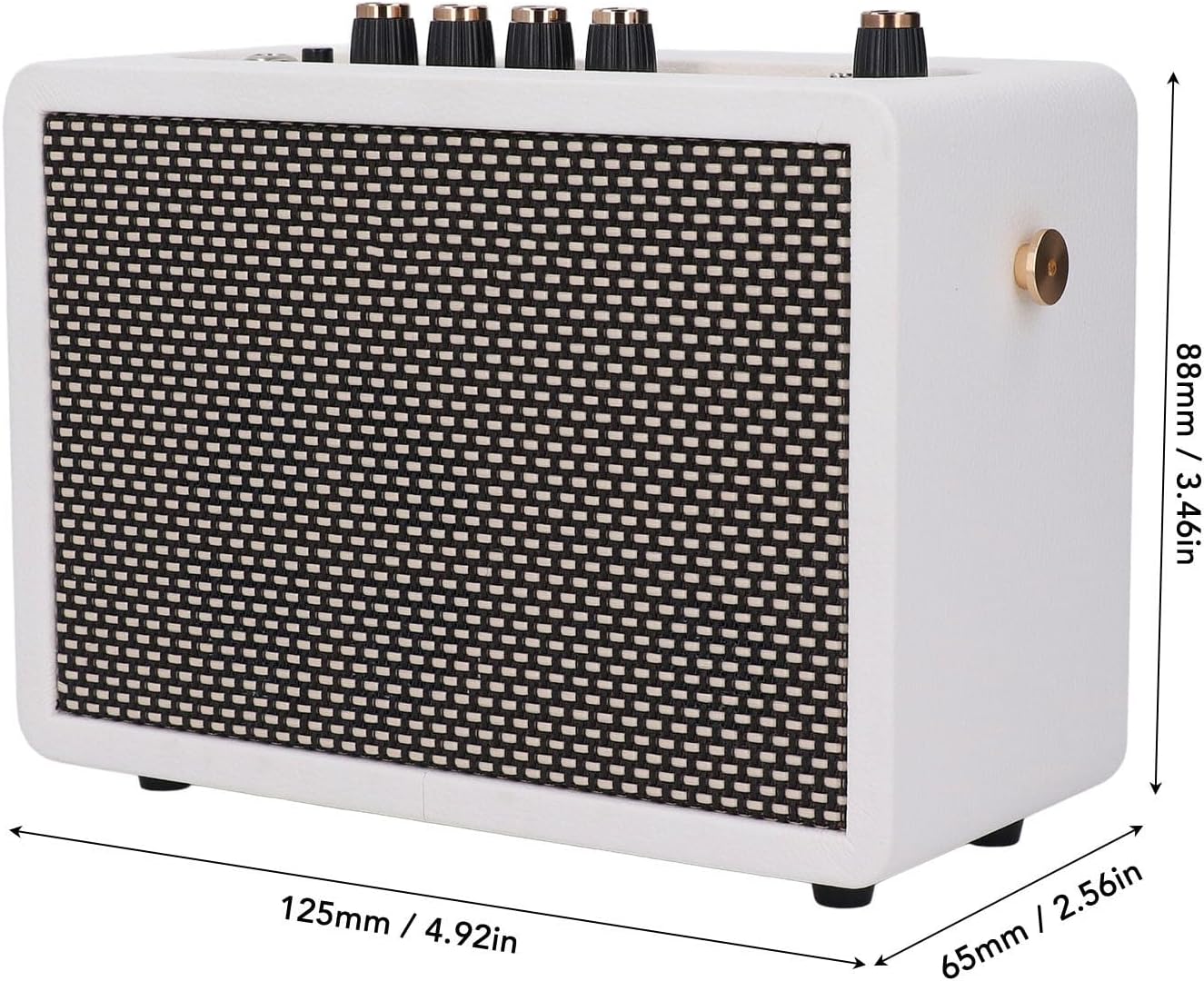
Figure 4: Amplifier Dimensions. This image illustrates the physical dimensions of the iG-10Pro amplifier.
Warranty and Support
Eujgoov products are designed for reliability and performance. For warranty information, technical support, or service inquiries, please refer to the contact information provided with your purchase or visit the official Eujgoov website. Please retain your proof of purchase for warranty claims.