Product Overview
The Winix 5520 Air Purifier is designed to provide clean and healthy indoor air. It features a comprehensive 4-stage air purification system capable of capturing 99.99% of airborne allergens and pollutants as small as 0.01 microns. This includes dust, pollen, pet dander, and smoke. The unit incorporates Smart Sensors for real-time air quality monitoring and an Auto Mode for efficient operation. PlasmaWave® Technology further enhances air cleaning by breaking down pollutants at a molecular level.

Figure 1: Front view of the Winix 5520 Air Purifier.
Setup
1. Unpacking and Filter Preparation
Before initial use, remove the air purifier from its packaging. Open the front panel to access the filters. The True HEPA filter and Carbon filter come sealed in plastic bags. It is crucial to remove these plastic bags before operating the unit. The washable Fine Mesh Pre-Filter does not come in a bag.

Figure 2: Filters being removed from the Winix 5520 Air Purifier for initial setup.
2. Filter Installation Order
- Insert the True HEPA Filter first.
- Place the Advanced Odor Control (AOC) Carbon Filter on top of the HEPA filter.
- Finally, secure the Washable Fine Mesh Pre-Filter.
Close the front panel securely.
3. Placement
Place the air purifier on a firm, level surface. Ensure there is at least 6-12 inches of space from walls or furniture to allow for optimal airflow. The unit is designed to clean rooms up to 1,882 sq ft in 1 hour (based on 1 Air Change Per Hour).

Figure 3: Optimal placement of the air purifier in a large room.
4. Power Connection
Plug the power cord into a standard electrical outlet.
Operating Instructions
Control Panel Overview
The Winix 5520 features capacitive touch buttons that illuminate upon touch. The control panel includes:
- Power Button: Turns the unit On/Off. Plays a short tune when activated.
- Air Quality Indicator: An LED light bar on the front of the unit that visually displays real-time air quality.
- Fan Speed Button: Toggles between four fan speed settings (Low, Medium, High, Turbo), Sleep Mode, and Auto Mode.
- Wi-Fi Button: Enables Wi-Fi connectivity for app control.
- PlasmaWave® Button: Activates or deactivates the PlasmaWave® Technology.
- Filter Replacement Indicator: Illuminates when filters need replacement. Press and hold for 5 seconds to reset after filter replacement.
Air Quality Indicator
The air quality indicator provides immediate feedback on your indoor air quality:
- Red: Indicates poor air quality.
- Orange: Indicates fair air quality.
- Blue: Indicates very good air quality.

Poor Air Quality (Red)

Fair Air Quality (Orange)

Good Air Quality (Blue)
Modes of Operation
- Auto Mode: The unit's built-in Smart Sensors detect and monitor the quality of air and automatically adjust fan speeds to ensure efficient cleaning.
- Sleep Mode: Automatically activated when the room is darkened, providing quiet, energy-efficient operation by dimming LEDs and reducing fan speed.
- Manual Fan Speed: Cycle through Low, Medium, High, and Turbo speeds using the fan speed button.
Wi-Fi and App Control
The Winix 5520 can be controlled remotely via the Winix Smart App. Press the Wi-Fi button on the unit to enable connectivity. Through the app, you can:
- Schedule cleaning times.
- Track air quality history in real-time.
- Toggle PlasmaWave® on/off.
- Adjust fan speeds.
- Power the unit on/off.

Figure 4: Control your Winix 5520 via the Winix Smart App.
Maintenance
Filter System Overview
The Winix 5520 utilizes a 4-stage filtration system:
- Washable Fine Mesh Pre-Filter: Captures larger airborne particles. Clean approximately once a month.
- Advanced Odor Control (AOC) Carbon Filter: Reduces VOCs and household odors. Helps prolong True HEPA Filter life.
- True HEPA Filter: Captures 99.99% of airborne allergens as small as 0.01 microns.
- PlasmaWave® Technology: Breaks down pollutants at the molecular level.

Figure 5: Advanced 4-Stage Filtration with PlasmaWave® Technology.
Filter Replacement
The Filter Replacement Indicator LED will illuminate when the filters need to be replaced. The True HEPA and Carbon filters typically last up to one year, depending on usage and air quality.
- Open the front panel.
- Remove the used filters.
- Insert the new filters in the correct order (HEPA first, then Carbon, then Pre-Filter).
- Close the front panel.
- Press and hold the Filter Replacement Indicator button for approximately 5 seconds to reset the indicator.
Troubleshooting
If your Winix 5520 Air Purifier is not operating as expected, please check the following:
- No Power: Ensure the power cord is securely plugged into a working electrical outlet.
- Reduced Airflow: Check if the filters are clean and properly installed. Ensure plastic bags have been removed from new filters.
- Unusual Noise: Verify that no foreign objects are obstructing the fan.
- Air Quality Indicator Not Changing: Ensure the air quality sensor is clean.
- Wi-Fi Connectivity Issues: Refer to the Winix Smart App instructions for troubleshooting connection problems.
For persistent issues, please contact Winix customer support.
Specifications
| Feature | Specification |
|---|---|
| Brand | Winix |
| Model Number | 5520 |
| Color | Black |
| Product Dimensions | 8.3"D x 13.6"W x 22.7"H |
| Floor Area Coverage | Up to 1882 sq ft (1 air change/hr) |
| Noise Level | 27 dB |
| Particle Retention Size | 0.01 Micron |
| Controller Type | Amazon Alexa, Wi-Fi |
| Wattage | 50 watts |
| Item Weight | 13.3 pounds |
| Included Components | 1 AOC Carbon Filter, 1 Pre-Filter, 1 True HEPA Filter, 5510 Air Purifier |
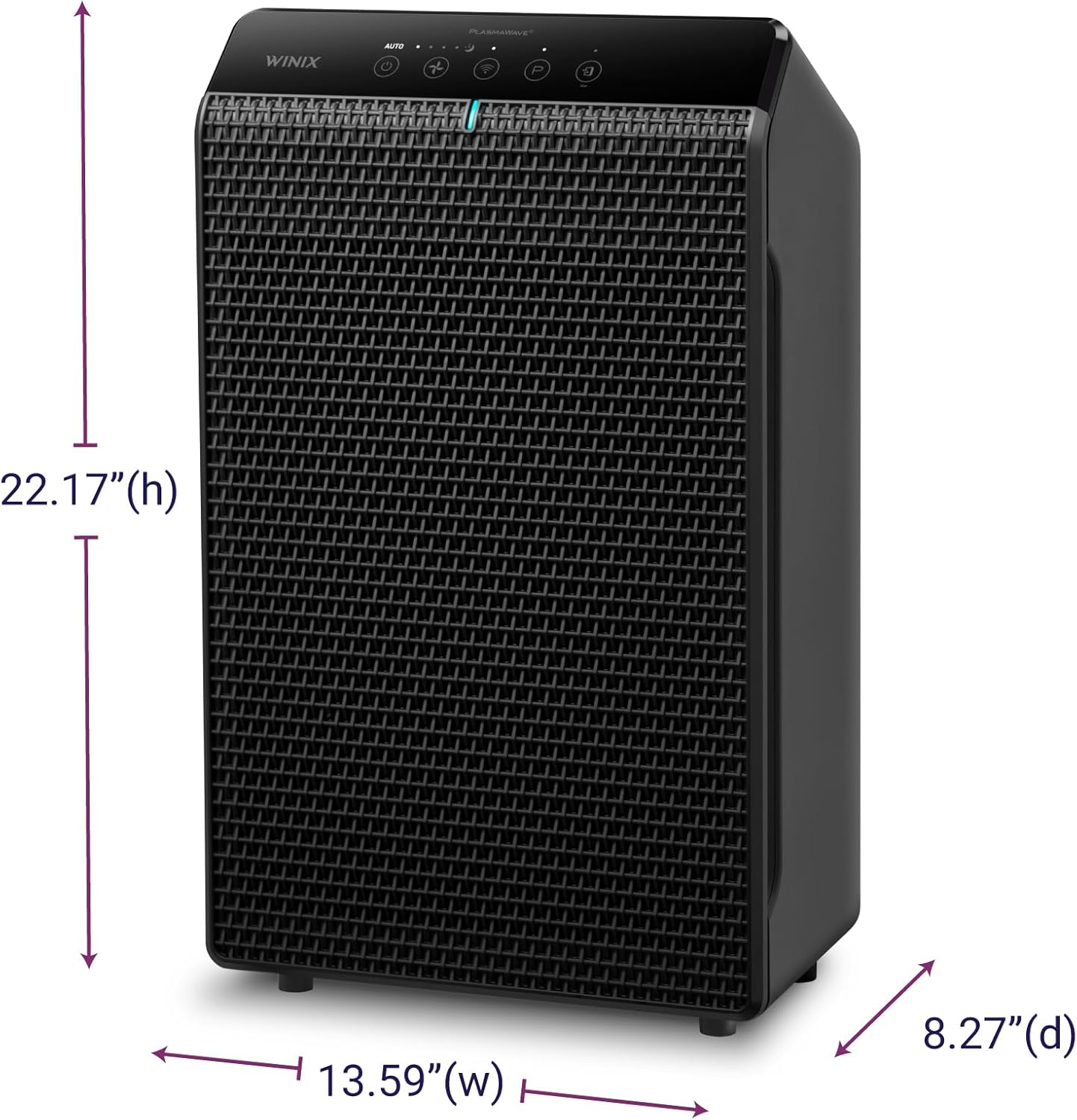
Figure 6: Dimensions of the Winix 5520 Air Purifier.
Warranty and Support
Warranty Information
The Winix 5520 Air Purifier is backed by a 2-year warranty. Winix will repair or replace your unit if it meets the qualifying conditions.
Additional Support
For further assistance, you may refer to the official user manual PDF: Winix 5520 User Manual (PDF).
Visit the official Winix Store for more products and support: Winix Store on Amazon.


