
Lekaby Q26
Lekaby Q26 Wireless Bluetooth 5.3 Earbuds Instruction Manual
Model: Q26
1. Product Overview
The Lekaby Q26 Wireless Bluetooth 5.3 Earbuds offer a high-quality audio experience with advanced features. This manual provides detailed instructions for optimal use and maintenance.
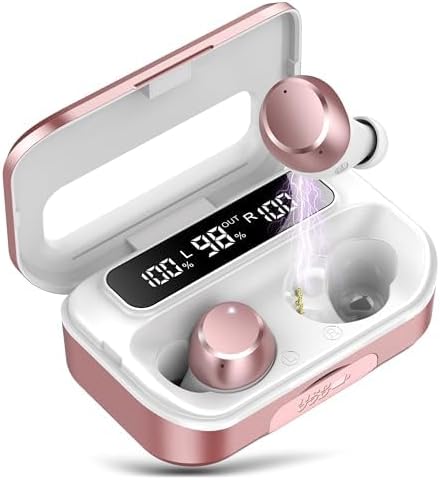
Image 1.1: Lekaby Q26 Earbuds in their charging case, displaying battery levels. The earbuds are rose gold and white, nestled in a matching case with a digital LED display showing "100% L", "98% OUT", and "100% R".
2. Package Contents
Ensure all items are present in your package:
- Earbuds (x2)
- 2600 mAh Charging Case (x1)
- Type-C Cable (x1)
- Ear Caps (S/M/L, x6)
- User Manual (x1)
3. Setup
3.1 Initial Charging
Before first use, fully charge the earbuds and charging case.
- Remove the protective film from the charging contacts on the earbuds.
- Place both earbuds into the charging case.
- Connect the provided Type-C cable to the charging case and a power source. The LED display will show charging progress.
- Allow approximately 2 hours for a full charge of the case and earbuds.

Image 3.1: The rose gold charging case with earbuds inside, showing the digital LED display indicating battery percentages for both earbuds (L and R) and the case itself ("OUT"). A Type-C charging port is visible.
3.2 Pairing with Your Device
The earbuds feature one-step automatic pairing after the initial connection.
- Ensure Bluetooth is enabled on your device (smartphone, tablet, laptop).
- Open the charging case. The earbuds will automatically enter pairing mode.
- On your device, search for Bluetooth devices and select "Q26" from the list.
- Once connected, the earbuds will automatically pair with your device when removed from the case for future use.
Video 3.2: This video demonstrates the one-step pairing process of the Lekaby Q26 earbuds with a smartphone. It shows opening the charging case, selecting "Q26" from the Bluetooth device list, and confirming the connection.

Image 3.3: A smartphone screen showing the Bluetooth settings with "Q26" listed as a connected device, next to the open charging case with earbuds inside. This illustrates the successful pairing of the earbuds.
4. Operating Instructions
The Lekaby Q26 earbuds feature smart touch controls for various functions.
4.1 Basic Controls
- Play/Pause: Double-click either the Left (L) or Right (R) earbud.
- Next Track: Press and hold the Right (R) earbud for 2 seconds.
- Previous Track: Press and hold the Left (L) earbud for 2 seconds.
- Volume Up: Single-click the Right (R) earbud.
- Volume Down: Single-click the Left (L) earbud.
4.2 Call Management
- Answer/End Call: Single-click either the L or R earbud.
- Reject Incoming Call: Press and hold either the L or R earbud for 2 seconds.
4.3 Voice Assistant
- Activate Voice Assistant (Siri, Google Assistant, etc.): Triple-click either the L or R earbud.
Video 4.1: This video demonstrates the touch controls for the Lekaby Q26 earbuds, including play/pause, next/previous track, and volume adjustment, shown in conjunction with a smartphone music player.
5. Maintenance
5.1 Cleaning
Regularly clean your earbuds and charging case to ensure optimal performance and hygiene.
- Use a soft, dry, lint-free cloth to wipe the earbuds and charging case.
- Gently clean the charging contacts on both the earbuds and the case with a cotton swab.
- Remove ear caps and clean them with mild soap and water, then dry thoroughly before reattaching.
5.2 Waterproofing (IPX7)
The earbuds are IPX7 waterproof, meaning they can withstand immersion in water up to 1 meter for 30 minutes. This makes them suitable for sports and outdoor activities, but they are not designed for swimming or prolonged submersion.

Image 5.1: The Lekaby Q26 earbuds are shown with water splashing around them, highlighting their IPX7 waterproof feature. This indicates resistance to sweat and rain.
6. Troubleshooting
| Problem | Solution |
|---|---|
| Earbuds not pairing. |
|
| One earbud has no sound. |
|
| Charging case not charging. |
|
| Poor sound quality. |
|
7. Specifications
| Feature | Detail |
|---|---|
| Model Name | Q26 |
| Connectivity Technology | Wireless (Bluetooth) |
| Bluetooth Version | 5.3 |
| Bluetooth Range | 15 Meters |
| Battery Life (Earbuds) | 8 Hours |
| Charging Case Capacity | 2600 mAh (provides up to 120 hours additional use) |
| Charging Time | 2 Hours (full charge for case) |
| Water Resistance Level | IPX7 Waterproof |
| Noise Control | Hybrid Noise Cancellation (ENC for calls) |
| Audio Driver Type | Dynamic Driver (13.44mm) |
| Control Method | Touch |
| Emergency Power Feature | Charging case can charge other devices via USB-A port. |
8. Warranty and Support
Your satisfaction is important to Lekaby. For any product issues or questions, please refer to the following:
- Product Support: Contact the official Lekaby support team for assistance. They are available 24/7.
- Customer Questions & Answers: For general inquiries, you may post questions on the product page, and the team will respond within one day.
- Returns: All products are eligible for a full, hassle-free return within 30 days of purchase if you are dissatisfied or unable to resolve an issue through support.
Ask a question about this manual
Ask about setup, troubleshooting, compatibility, parts, safety, or missing instructions. Manuals+ will review the question and use this page’s manual context to help answer it.