
Wonderlit MAX116
Wonderlit Jellyfish Mood Lamp User Manual
Model: MAX116
Introduction
Thank you for purchasing the Wonderlit Jellyfish Mood Lamp. This innovative device combines a mesmerizing jellyfish aquarium simulation with a high-quality Bluetooth speaker, creating a unique ambiance for any room. Enjoy the enchanting visual display and immersive audio experience.
This manual provides detailed instructions for setup, operation, and maintenance to ensure optimal performance and longevity of your device.
Safety Information
- Keep the device away from water and moisture.
- Do not disassemble or attempt to repair the device yourself. Refer to qualified service personnel.
- Use only the provided USB-C charging cable.
- Avoid placing the lamp in direct sunlight or near heat sources.
- This product is designed for indoor use only.
- Keep out of reach of small children to prevent accidental damage or injury.
What's in the Box
- Wonderlit Jellyfish Mood Lamp (Model: MAX116)
- USB-C Charging Cable
- User Manual (this document)

Image: The retail packaging of the Wonderlit Jellyfish Mood Lamp, showing the lamp inside and highlighting features like "Simulated Motion Tentacles" and "Multiple Color Modes."
Product Overview
Familiarize yourself with the components of your Jellyfish Mood Lamp.

Image: A clear front view of the Wonderlit Jellyfish Mood Lamp, showcasing its transparent dome, the illuminated jellyfish, and the speaker base with control buttons.
Control Panel and Ports
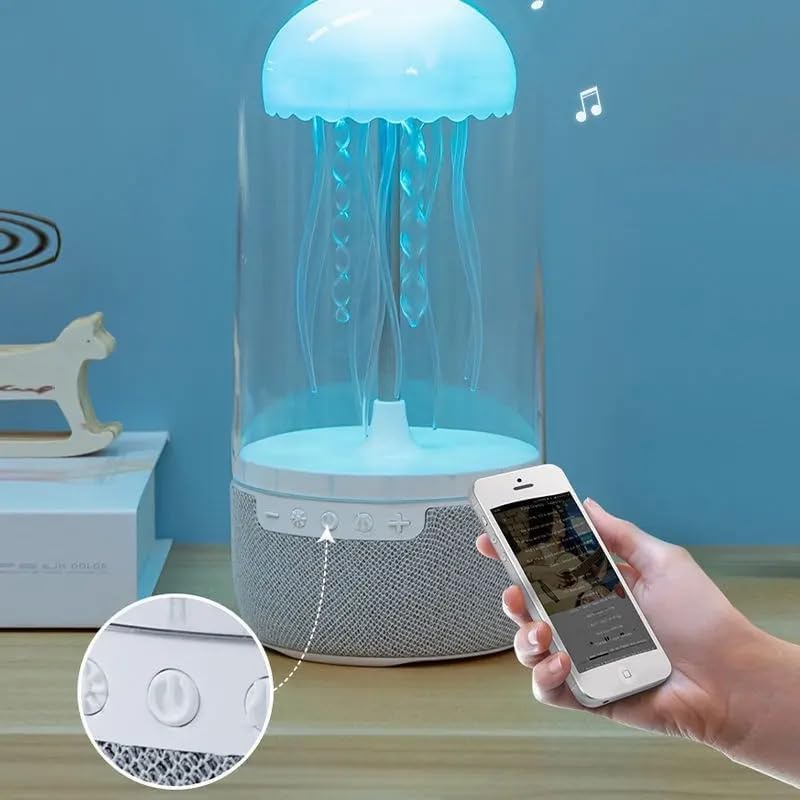
Image: A close-up view of the control buttons located on the base of the lamp, including power, volume, and mode controls.
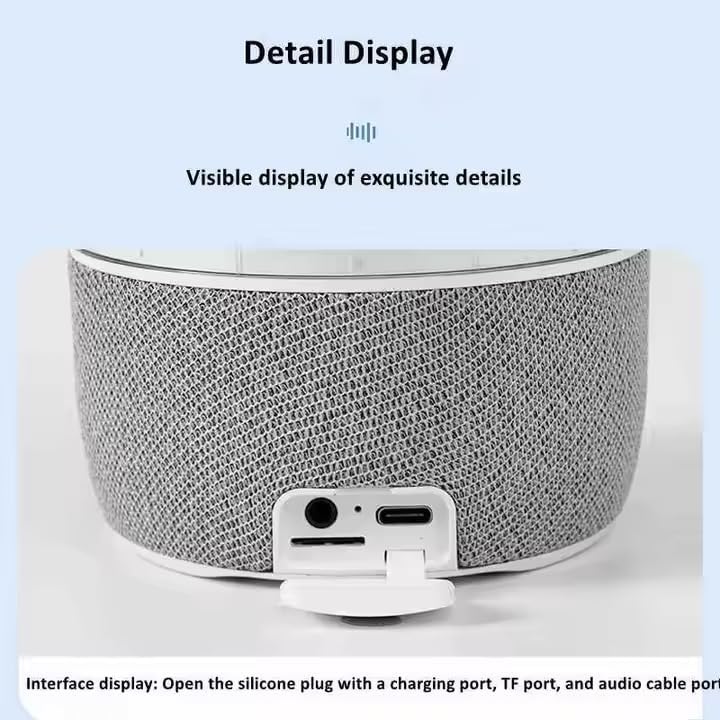
Image: A detailed view of the interface display, showing the silicone plug opened to reveal the charging port (USB-C), TF card slot, and audio cable port.
- Power Button: Turns the lamp on/off.
- Mode Button: Switches between light modes and sound-activated mode.
- Volume Down / Previous Track: Decreases volume or skips to the previous song.
- Volume Up / Next Track: Increases volume or skips to the next song.
- USB-C Charging Port: For power input.
- TF Card Slot: For playing music directly from a memory card.
- Audio Input Port: For connecting external audio devices via AUX cable.
Setup
- Unpacking: Carefully remove all components from the packaging.
- Placement: Place the Jellyfish Mood Lamp on a stable, flat surface. It can also be hung if desired.
- Power Connection: Connect the provided USB-C charging cable to the lamp's charging port and plug the other end into a USB power adapter (not included) or a computer USB port. The lamp will begin charging.
- Initial Charge: For best performance, fully charge the lamp before first use.
Operating Instructions
Power On/Off
- Press and hold the Power Button to turn the lamp on or off.
Light Modes
The lamp features full-color gradient lighting and dynamic tentacle movement.
- Press the Mode Button to cycle through different light colors and gradient effects.
- The jellyfish tentacles will move gently, simulating real jellyfish.

Image: The Jellyfish Mood Lamp illuminated with a soft pink light, placed on a bedside table next to an aromatherapy diffuser.
Bluetooth Speaker Function
- Pairing:
- Turn on the Jellyfish Mood Lamp. It will automatically enter Bluetooth pairing mode.
- On your smartphone or audio device, enable Bluetooth and search for "Wonderlit Lamp" (or similar name).
- Select the device to pair. A confirmation sound will indicate successful pairing.
- Playing Music:
- Play music from your paired device.
- Use the Volume Up (+) and Volume Down (-) buttons on the lamp to adjust volume.
- Press and hold Volume Up (+) or Volume Down (-) to skip to the next or previous track.

Image: The Jellyfish Mood Lamp glowing with a blue light, with musical notes digitally added around it, indicating its speaker functionality.
Sound-Activated Mode
The lamp can synchronize its light effects with music or ambient sounds.
- Press the Mode Button repeatedly until the sound-activated mode is engaged. The lights will react to the rhythm of the music playing through the speaker or external sounds.

Image: The Jellyfish Mood Lamp displaying a vibrant blue light, with musical notes and sound waves indicating its ability to react to music and provide "Shocking sound quality."
Using TF Card / AUX Input
- TF Card: Insert a TF (microSD) card with MP3 audio files into the TF card slot. The lamp will automatically switch to TF card playback mode.
- AUX Input: Connect an external audio device (e.g., MP3 player, computer) to the lamp's audio input port using a 3.5mm AUX cable (not included). The lamp will switch to AUX input mode.
Maintenance
- Cleaning: Wipe the exterior of the lamp with a soft, dry cloth. Do not use abrasive cleaners or immerse the device in water.
- Storage: When not in use for extended periods, store the lamp in a cool, dry place away from direct sunlight.
- Tentacles: The jellyfish tentacles are flexible. Handle them gently to avoid damage.
Troubleshooting
| Problem | Possible Cause | Solution |
|---|---|---|
| Lamp does not turn on. | Battery is depleted. | Connect the USB-C charging cable and charge the lamp. |
| No sound from speaker. | Bluetooth not connected; Volume too low; Incorrect input mode. | Ensure Bluetooth is paired. Increase volume on both lamp and source device. Check if TF card or AUX cable is properly inserted/connected. |
| Jellyfish not moving. | Motor malfunction; Obstruction. | Ensure no foreign objects are obstructing the tentacles. If problem persists, contact customer support. |
| Bluetooth pairing failed. | Device too far; Bluetooth not enabled; Interference. | Ensure lamp is in pairing mode and within range. Restart both devices and try again. |
Specifications
| Feature | Detail |
|---|---|
| Model Number | MAX116 |
| Brand | Wonderlit |
| Product Dimensions | 9"D x 4"W x 4"H |
| Item Weight | 1.39 pounds |
| Material | Plastic |
| Light Source Type | LED |
| Color Temperature | 5000 Kelvin |
| Power Source | USB Powered (5 Volts DC) |
| Connectivity | Bluetooth |
| Control Method | Touch |
| Special Features | Floating Jellyfish, Volume Control, Light Mode, On/Off, Skip Tracks, Color Changing LED Lights, Sound-Activated Mode |
| Indoor/Outdoor Usage | Indoor |
Warranty and Support
For warranty information and customer support, please refer to the contact details provided on the product packaging or visit the official Wonderlit website. Keep your purchase receipt as proof of purchase.
Manufacturer: TRUSTSTONE GROUP LLC
Related Documents - MAX116
 |
WONDERLIT Mushroom LED Light & Wireless Speaker Manual User manual for the WONDERLIT Mushroom LED Light & Wireless Speaker (Model: WL-MSLMSP-CLR), detailing product specifications, instructions for use, and maintenance. |
 |
WONDERLIT Jellyfish 4-in-1 TECHMATE User Manual User manual for the WONDERLIT Jellyfish 4-in-1 TECHMATE speaker, detailing its features, specifications, and operation, including Bluetooth connectivity, TF card/AUX modes, LED lighting, and white noise functions. |
 |
Slam Dunk Wireless Speaker User Manual User manual and operating instructions for the WONDERLIT Slam Dunk Wireless Speaker (Model: WL-BSKLDSPK-ORN). Includes specifications, pairing instructions, and FCC compliance information. |
 |
WONDERLIT Under the Sea Wireless Speaker & LED Lamp User Manual Explore the WONDERLIT Under the Sea Wireless Speaker & LED Lamp. This manual provides product specifications, setup instructions, and operational details for your device. |
 |
WONDERLIT EMBERGLO Wireless Speaker and Lamp User Guide Explore the WONDERLIT EMBERGLO wireless speaker and lamp (Model: WL-BTFL-BLK). This guide details features like Bluetooth, IP65 water resistance, flame lamp effect, TWS pairing, and usage instructions from Truststone Group LLC. |
Ask a question about this manual
Ask about setup, troubleshooting, compatibility, parts, safety, or missing instructions. Manuals+ will review the question and use this page’s manual context to help answer it.