
Introduction
Thank you for choosing the KOSGHO Portable Small Humidifier. This manual provides essential information for the safe and efficient operation of your device. Please read it thoroughly before use and retain it for future reference.

Image: The KOSGHO Portable Small Humidifier, a compact green device, emitting a fine mist, held gently in a hand.
Safety Information
- Ensure the humidifier operates on 5V and draws no more than 1A. Using a higher voltage power supply may shorten the product's lifespan or cause damage.
- Do not use essential oils directly in the water tank, as this may damage the device.
- Keep the device out of reach of children and pets.
- Do not immerse the device in water or other liquids.
- Unplug the humidifier when not in use or before cleaning.
- The device features an automatic shut-off function after 3.5 hours for safety.
- Use only clean tap water or distilled water.
Package Contents
- 1 x KOSGHO Portable Small Humidifier
- 1 x USB Power Cable (Note: No adapter is provided)
- 1 x Cotton Filter Stick (pre-installed or spare)
- 1 x User Manual (this document)
Product Overview
The KOSGHO Portable Small Humidifier is designed for personal use in various environments such as bedrooms, offices, and cars. It features quiet operation, two mist modes, and an integrated night light.

Image: A visual representation of the humidifier with its approximate dimensions: 3.1 inches (depth) x 3.1 inches (width) x 4.2 inches (height).

Image: Feature icons illustrating the humidifier's 350ml capacity, one-button control, filter-free design, multiple mist settings, auto shut-off, quiet operation, and nightlight function.
Setup Instructions
- Unscrew Top Cover: Gently rotate the top cover counter-clockwise to remove it from the base.
- Add Water: Fill the water tank with clean tap water or distilled water. Do not exceed the maximum fill line. Do not add essential oils directly into the water tank.
- Soak Filter Stick: Ensure the cotton filter stick inside the central tube is fully saturated with water. If it's new or dry, soak it for a few minutes before first use.
- Replace Top Cover: Carefully place the top cover back onto the base and rotate clockwise to secure it.
- Connect USB Power: Plug the provided USB cable into the humidifier's USB port and connect the other end to a 5V/1A USB power source (e.g., computer USB port, car charger, wall adapter - not included).
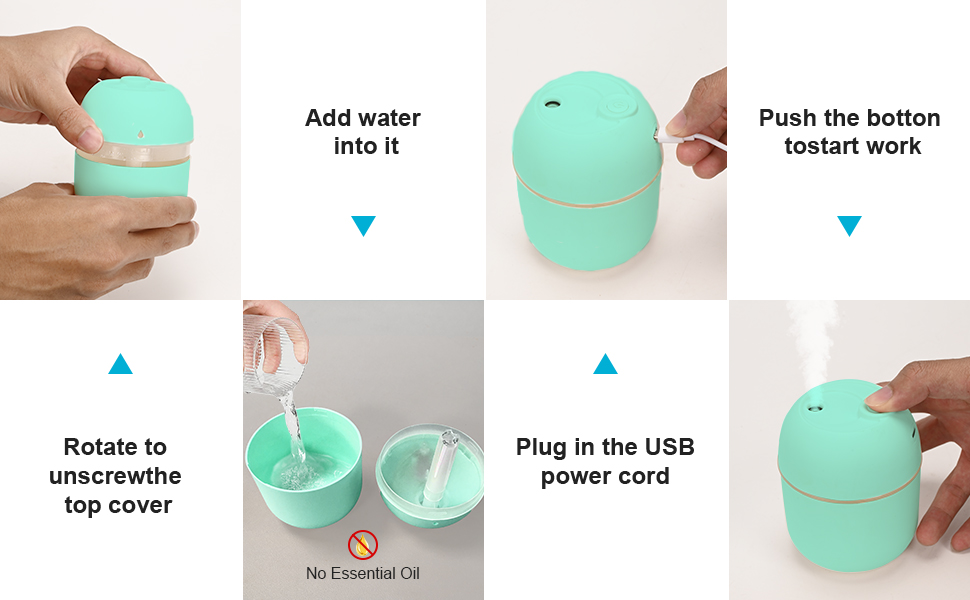
Image: Step-by-step visual guide for humidifier setup, including unscrewing the top, adding water (without essential oils), plugging in the USB cable, and pressing the power button.

Image: Illustration of multiple power supply methods for the USB humidifier, including car chargers, portable power banks, wall adapters, and computer USB ports.
Operating Instructions
The humidifier is operated using a single button control.
- Power On/Mist Mode 1 (Continuous Spray): Press the button once to turn on the humidifier. It will start in continuous spray mode.
- Mist Mode 2 (Intermittent Spray): Press the button a second time to switch to intermittent spray mode (sprays for 3 seconds, stops for 3 seconds).
- Power Off: Press the button a third time to turn off the humidifier.
- Night Light Activation: Press and hold the button for 2 seconds to activate the night light feature. The light will cycle through colors.
- Night Light Deactivation: Press and hold the button for another 2 seconds to turn off the night light.
Automatic Shut-Off: For safety, the humidifier will automatically shut off after approximately 3.5 hours of continuous operation.

Image: Visual comparison of the two adjustable spray modes: continuous mist and intermittent mist.
Maintenance
Regular cleaning ensures optimal performance and extends the lifespan of your humidifier. The humidifier utilizes a cotton filter stick (also referred to as a wick) which requires occasional replacement.
- Unplug Device: Always unplug the humidifier from the power source before cleaning.
- Empty Water Tank: Empty any remaining water from the tank.
- Clean Water Tank: Wipe the inside of the water tank with a soft, damp cloth. For stubborn mineral deposits, use a mild descaling solution (e.g., white vinegar diluted with water) and rinse thoroughly.
- Clean Atomizer Plate: Gently wipe the atomizer plate (the small disc inside the mist outlet) with a cotton swab dipped in water or vinegar to remove any buildup. Do not scratch the plate.
- Filter Stick Replacement: The cotton filter stick should be replaced every 1-3 months, depending on usage and water quality. To replace, pull out the old stick and insert a new one, ensuring it is fully saturated before use.
- Dry Thoroughly: Allow all parts to air dry completely before reassembling and storing or reusing the humidifier.
Troubleshooting
| Problem | Possible Cause | Solution |
|---|---|---|
| No mist or weak mist |
|
|
| Device does not power on |
|
|
| Unusual odor |
|
|
Specifications
| Brand | KOSGHO |
| Model Name | 1 |
| Color | GREEN |
| Operation Mode | Ultrasonic |
| Product Dimensions | 3.1"D x 3.1"W x 4.2"H |
| Item Weight | 3.2 ounces |
| Special Features | Auto Shut Off, Night Light, Quiet |
| Power Input | 5V/1A (USB Powered) |
| Water Capacity | 220ml (inferred from product title) |
| Noise Level | Approximately 20dB |
Warranty and Support
KOSGHO is committed to providing high-quality products. For any questions, concerns, or support needs regarding your humidifier, please refer to the retailer's return and support policies or contact KOSGHO customer service through their official channels. Specific warranty details may vary by region and retailer.
For more information, visit the KOSGHO Store on Amazon.