
YITAHOME MAYIHQCbe9
YITAHOME Electric Power Lift Recliner Chair User Manual
Model: MAYIHQCbe9
1. Introduction
Thank you for choosing the YITAHOME Electric Power Lift Recliner Chair. This manual provides essential information for the safe and effective assembly, operation, and maintenance of your new recliner. Please read all instructions carefully before use and retain this manual for future reference.
This recliner is designed to provide comfort and assistance, featuring a power lift mechanism, recline function, massage and heating capabilities, LED illumination, and a convenient phone stand.
2. Important Safety Information
WARNING: To reduce the risk of electric shock, fire, and injury, please adhere to the following safety guidelines:
- Always assemble the chair according to the instructions provided. Ensure all connections are secure before plugging into a power source.
- Be cautious when using the heating function to avoid burns. Do not use the heating function for prolonged periods or if you have sensitive skin.
- Do not leave the chair unattended while in use, especially with children or pets nearby.
- Keep all electrical cords away from heat sources, sharp edges, and moving parts.
- Do not operate the chair if the power cord or plug is damaged. Contact customer support for assistance.
- Ensure there is adequate clearance around the chair when reclining or lifting to prevent obstruction or injury.
- This chair is intended for indoor use only. Do not expose it to water or excessive humidity.
- Do not stand on the chair or use it as a step stool.
- Keep the controller in the side pocket to prevent accidental button presses.
3. Package Contents
Before assembly, please verify that all components are present and undamaged. If any parts are missing or damaged, contact YITAHOME customer support immediately.
- Chair Base
- Left Armrest
- Right Armrest
- Backrest
- Power Supply
- Power Source
- Anti-fall Brackets
4. Setup and Assembly
The YITAHOME Electric Power Lift Recliner Chair is designed for simple assembly with no additional tools required. Follow these general steps:
- Unpack all components from the boxes. The chair base may be heavy, so it is recommended to have assistance.
- Attach the backrest to the chair base. Ensure it clicks securely into place.
- Slide the left and right armrests onto their respective slots on the chair base.
- Connect all electrical cables. The cables are color-coded for easy matching. Ensure all connections are firm and properly seated.
- Connect the power supply to the chair and then plug it into a standard wall outlet.
- Place the anti-fall brackets as instructed in the detailed assembly guide provided in the packaging.
Refer to the assembly diagram for visual guidance:

Image: Detailed view of the chair's components and their connection points during assembly, including the backrest, armrests, and power connections.
5. Operating Instructions
Your YITAHOME recliner is equipped with a multi-functional remote control to operate its various features. Keep the remote control in the designated side pocket when not in use.
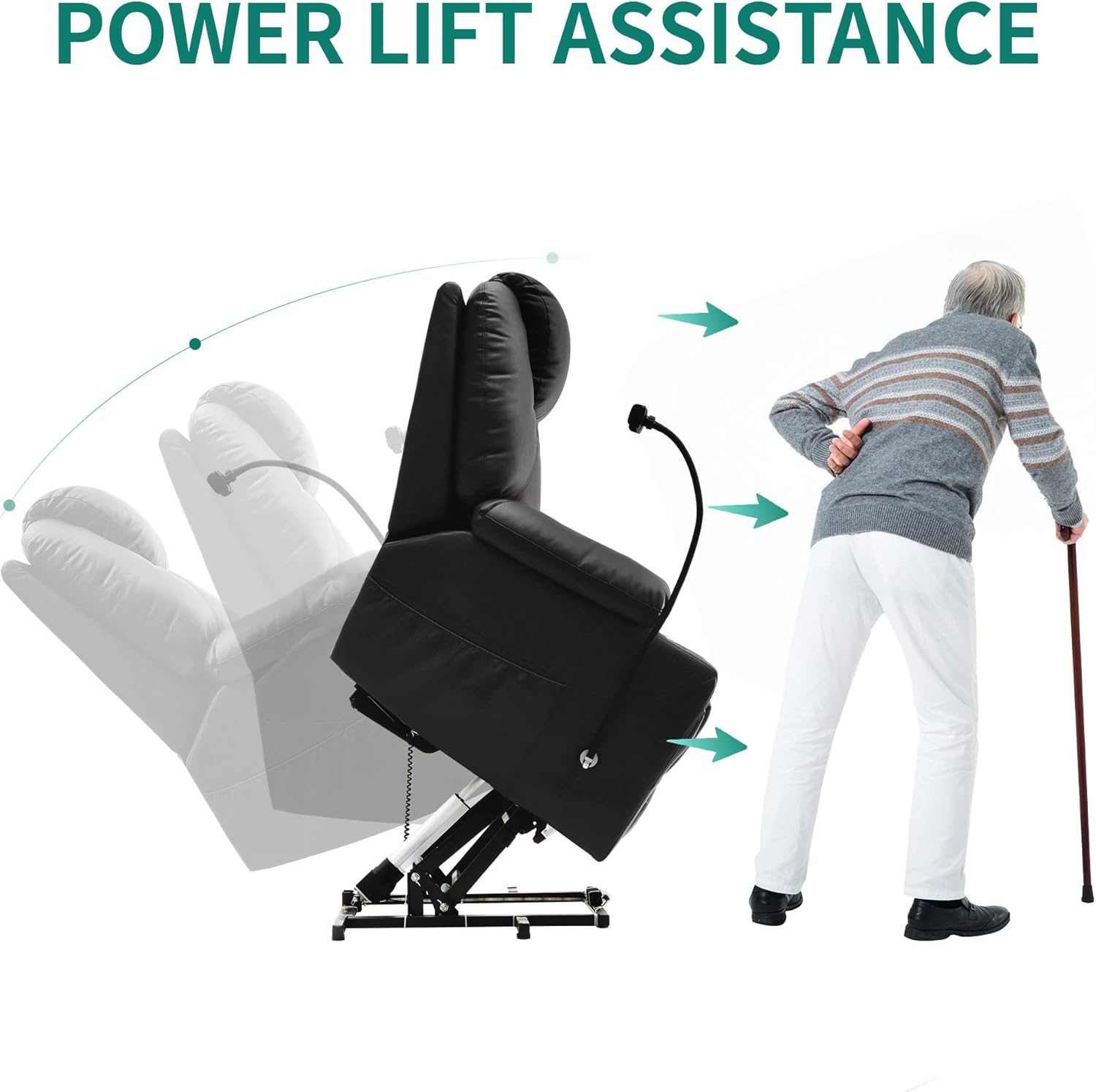
Image: The recliner's remote control, detailing buttons for lift, recline, power, heat, and five vibration modes. An accompanying diagram illustrates the 8 massage points and lumbar heating area on the body.
5.1. Power Lift Assistance
The power lift feature gently tilts the chair forward, assisting users in standing up without straining their knees or back. To activate:
- Press and hold the LIFT button (up arrow) on the remote control.
- The chair will slowly rise and tilt forward. Release the button when you reach a comfortable standing position.
Image: Illustration demonstrating the power lift assistance, showing the chair tilting forward to help a user transition from sitting to standing with ease.
5.2. Recline Function
The chair offers multiple reclining positions for optimal comfort, from an upright sitting position to a fully reclined sleeping position.
- To recline, press and hold the RECLINE button (down arrow) on the remote control.
- Release the button when the chair reaches your desired angle.
- To return to an upright position, press and hold the LIFT button.

Image: A user relaxing in the recliner, showcasing the chair's comfortable recline and the practical phone stand attachment.
5.3. Massage and Heating Function
Enjoy a relaxing massage with 8 vibration points and a soothing lumbar heating function.
- Press the POWER button to turn on the massage function.
- Use the MODE button to cycle through 5 massage modes: Pulse, Press, Wave, Auto, and Normal.
- Press the HEAT button to activate the lumbar heating. Press again to turn off.
- The BODY PART button allows you to select specific areas for massage: Back, Lumbar, Thighs, and Legs.
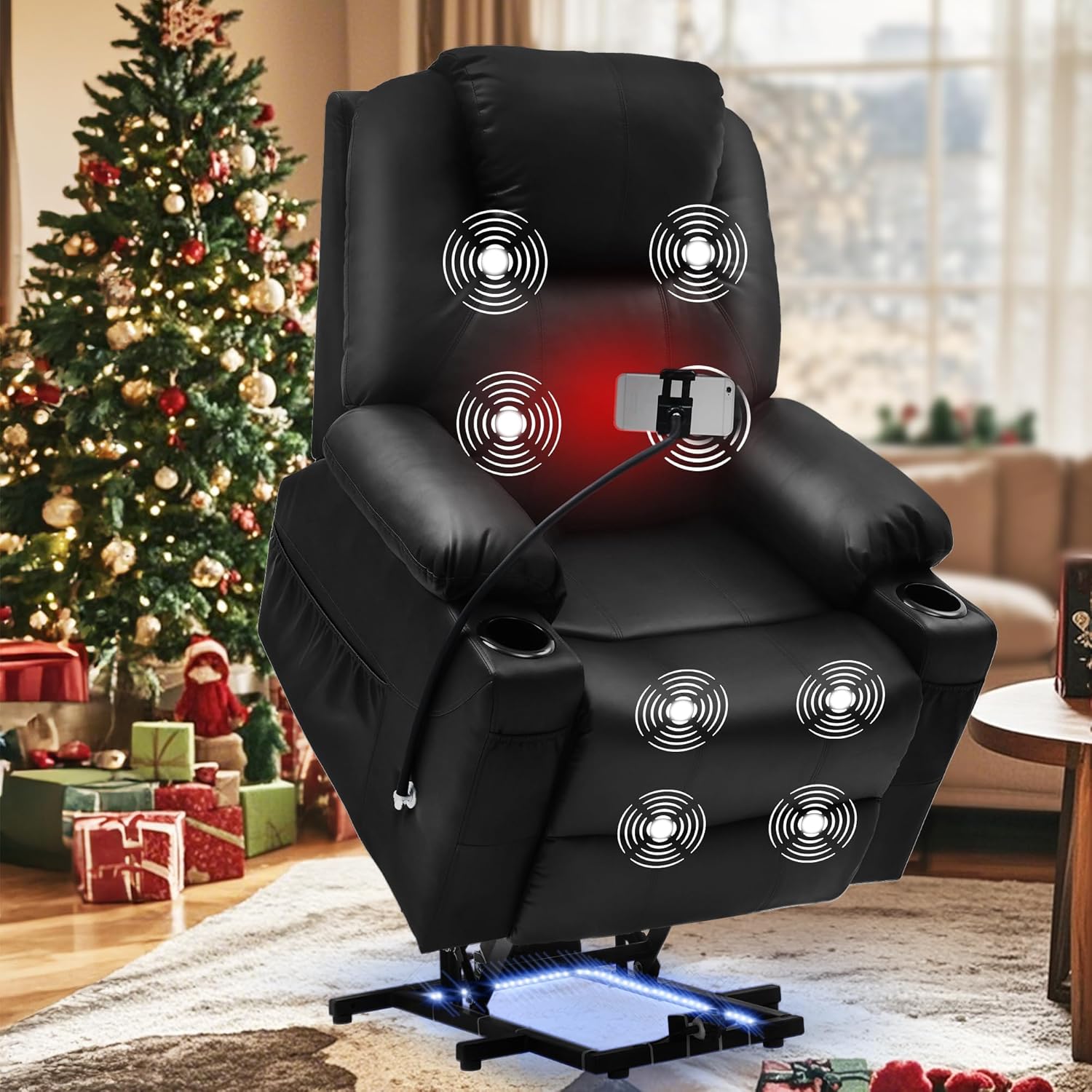
Image: The recliner highlighting its 8 vibration massage points and lumbar heating function, indicated by glowing circles and a red area on the chair.
5.4. Smartphone Holder Attachment
The chair includes a versatile phone mount compatible with 4-7 inch devices (excluding iPads). It offers 360° flexibility for optimal viewing angles.
- Insert your smartphone into the adjustable clamp.
- Adjust the flexible arm and rotate the holder to your preferred viewing angle.

Image: Detailed view of the 360° adjustable phone holder, demonstrating its arbitrary regulation for various viewing angles. Also shown are the motion sensor LED lights providing anti-collision safety.
5.5. Automatic LED Illumination
The recliner features contemporary LED lighting under the chair base, enhancing safety in low light conditions and creating a cinematic ambiance.
- The LED lights are motion-sensor activated, providing illumination when movement is detected near the base.
5.6. Storage Solutions & Cup Holders
The chair is equipped with two side pockets and two front pockets for storing essentials, and dual cup holders to keep your drinks conveniently within reach.
6. Maintenance
Proper care and maintenance will extend the life of your recliner.
- Cleaning: Wipe clean with a soft, damp cloth. Do not use harsh chemicals or abrasive cleaners, as they may damage the material.
- Spills: Blot spills immediately with a clean, dry cloth.
- Inspection: Periodically check all connections and fasteners to ensure they are tight.
- Power Cord: Inspect the power cord and plug regularly for any signs of damage. If damaged, discontinue use and contact customer support.
7. Troubleshooting
If you encounter any issues with your recliner, refer to the following common problems and solutions:
| Problem | Possible Cause | Solution |
|---|---|---|
| Chair does not respond to remote control. | Power cord not connected; loose electrical connections; power outage. | Ensure the power cord is securely plugged into the wall outlet and the chair. Check all internal electrical connections are firm. Verify power to the outlet. |
| Massage or heating function not working. | Function not activated; loose connection. | Press the respective buttons on the remote. Check the power connection to the chair. |
| Chair makes unusual noises during operation. | Loose components; obstruction in mechanism. | Inspect the chair for any loose screws or components. Ensure no objects are obstructing the lift or recline mechanism. |
| Chair feels unstable or wobbly. | Improper assembly; uneven floor. | Recheck assembly steps, especially the connection of the backrest and armrests. Ensure the chair is placed on a flat, stable surface. |
If the problem persists after attempting these solutions, please contact YITAHOME customer support for further assistance.
8. Specifications
Detailed specifications for your YITAHOME Electric Power Lift Recliner Chair:
| Feature | Description |
|---|---|
| Brand | YITAHOME |
| Model Name | Recliner Chair |
| Item Model Number | MAYIHQCbe9 |
| UPC | 197839726000 |
| Color | Black |
| Product Dimensions | 28.2"D x 33"W x 42.5"H |
| Item Weight | 101.4 pounds |
| Frame Material | Engineered Wood |
| Fill Material | Polyurethane Foam |
| Reclining Position Count | 3 |
| Product Care Instructions | Wipe Clean |
| Assembly Required | Yes |
| Batteries Required | No |
For detailed dimensions, please refer to the diagram:

Image: Comprehensive dimension diagram of the YITAHOME recliner, illustrating its overall size and key measurements for proper placement and fit.
9. Warranty and Support
YITAHOME is committed to providing high-quality products and customer satisfaction.
- Returns: This product is eligible for 30-day easy returns. Please refer to your purchase platform's return policy for detailed instructions.
- Customer Support: For any questions, concerns, or assistance with assembly, operation, or troubleshooting, please contact YITAHOME customer support. Contact information can typically be found on the seller's page or your order details.
We recommend keeping your purchase receipt or order number handy when contacting support.
Ask a question about this manual
Ask about setup, troubleshooting, compatibility, parts, safety, or missing instructions. Manuals+ will review the question and use this page’s manual context to help answer it.