Introduction
This manual provides detailed instructions for the installation, operation, and maintenance of your new electrosmart Android 13 Car Stereo. Please read this manual thoroughly before using the product to ensure proper function and safety. Keep this manual for future reference.
Product Features
- Android Auto
- Built-In Bluetooth 5.2
- 10.2-inch IPS Touchscreen Display
- Wireless Carplay/Android Auto
- GPS Navigation (Online/Offline)
- WiFi Connectivity
- Split Screen Mode
- Voice Control
- FM/RDS Radio
- 32-Band Equalization (DSP)
What's in the Box
- Android 13 Car Stereo Unit
- RCA Cables
- Backup Camera & Cable
- Power Cable
- GPS Antenna
- Instruction Manual
Setup and Installation
Proper installation is crucial for optimal performance. It is recommended to have this unit installed by a professional. Refer to the detailed wiring demonstration video below for guidance.
Video: Central Control Wiring Demonstration-A7246. This video provides a step-by-step guide on how to wire the central control unit for installation.

Image: Before and After Installation. This image illustrates the appearance of the car dashboard before and after the stereo unit is installed, showing proper fitment.
Operating Instructions
Wireless Carplay/Android Auto Connection
Connect your smartphone wirelessly for seamless integration of navigation, music, and communication apps.
Video: How to set up Carplay & Android Auto. This video demonstrates the process of connecting your smartphone to the car stereo for Carplay and Android Auto functionality.

Image: Carplay, Android Auto, and Mirrorlink. This image shows the various smartphone integration options available on the stereo display.
Voice Control & Bluetooth 5.2
Utilize voice commands for hands-free operation and connect your devices via Bluetooth 5.2 for calls and audio streaming.
Video: How to set up WiFi & Bluetooth. This video guides you through the steps to configure Wi-Fi and Bluetooth connections on the car stereo.

Image: Voice Control & Bluetooth 5.2. This image highlights the voice command interface and Bluetooth connection status.
FM/RDS Radio
Access your favorite radio stations with clear FM/RDS reception.
Image: FM/RDS Radio. The lower section of this image displays the radio tuning interface.
GPS Navigation & WiFi Connection
Navigate with pre-installed GPS or connect to Wi-Fi for online maps and app downloads.

Image: GPS Navigation & WiFi Connection. This image shows both the navigation screen and the app selection available with Wi-Fi.
Split Screen Mode
Run two applications simultaneously on the screen for enhanced multitasking.

Image: Split Screen Mode. The top section of this image demonstrates the stereo operating two applications side-by-side.
Reverse Camera & Steering Wheel Control
Enhance safety with the reverse camera display and control stereo functions directly from your steering wheel.
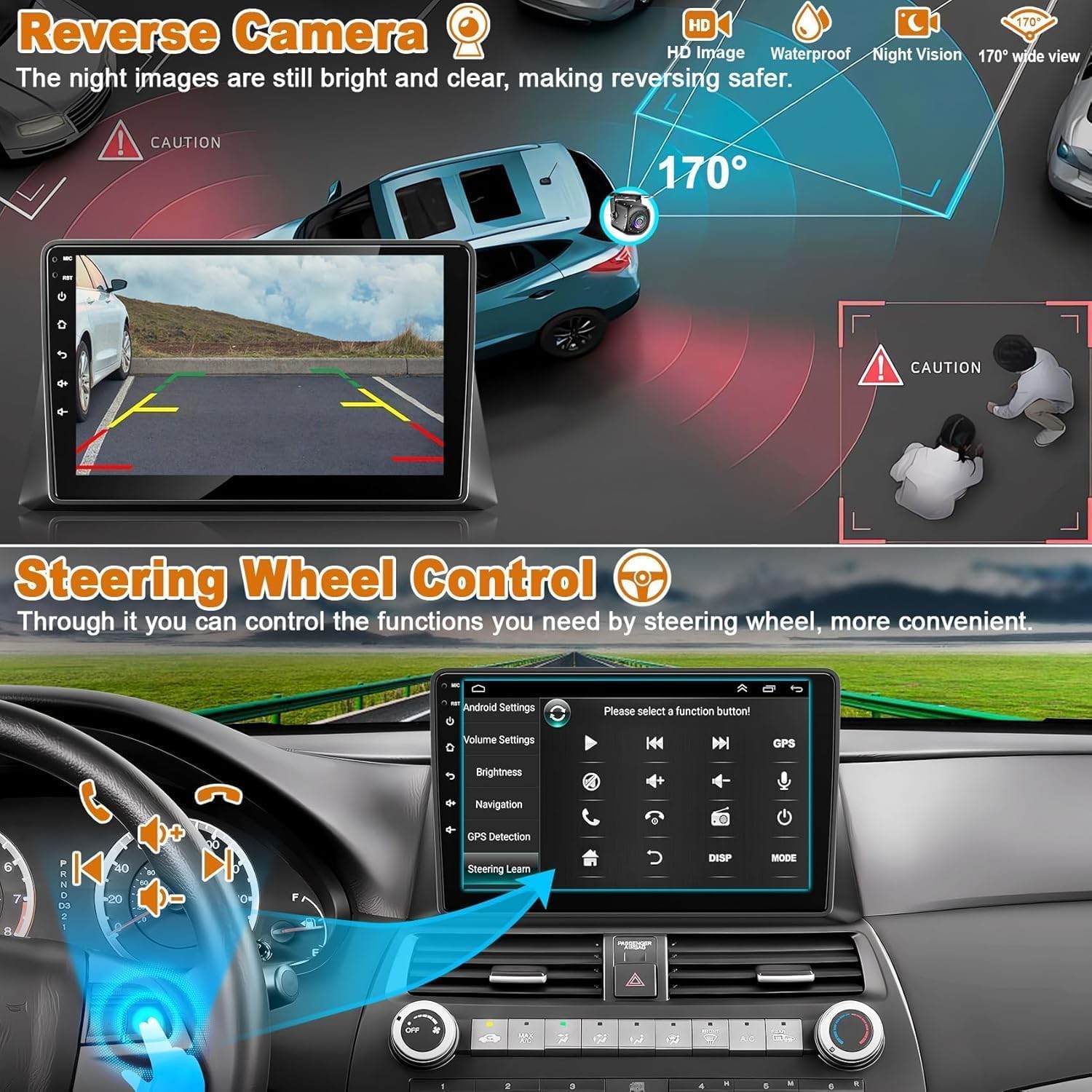
Image: Reverse Camera & Steering Wheel Control. This image shows the reverse camera feed and the menu for configuring steering wheel controls.
32EQ DSP
Fine-tune your audio experience with the built-in 32-band equalizer and Digital Sound Processor (DSP).
Video: SIXTOP 8 Core CPU Android Car Stereo GPS Head Unit. This video provides an overview of the stereo's features, including the 32EQ DSP for audio customization.
Troubleshooting
- No Power: Check all power connections and fuses. Ensure the ignition is on.
- No Sound: Verify speaker connections. Check volume levels on both the stereo and your connected device. Ensure the correct audio input (e.g., AUX) is selected.
- Bluetooth/Carplay/Android Auto Connectivity Issues: Ensure Bluetooth is enabled on both devices. Forget and re-pair the device. Restart both the stereo and your smartphone.
- GPS Signal Loss: Ensure the GPS antenna is properly installed and has a clear view of the sky.
- Touchscreen Unresponsive: Restart the unit. If the issue persists, perform a factory reset (refer to settings menu).
Maintenance
To ensure the longevity and optimal performance of your car stereo, follow these maintenance guidelines:
- Cleaning: Use a soft, dry cloth to clean the screen and exterior. Avoid abrasive cleaners or solvents.
- Temperature: Avoid exposing the unit to extreme temperatures for extended periods.
- Software Updates: Periodically check for and install software updates to ensure the latest features and bug fixes.
Specifications
- Brand: electrosmart
- Model: Electrosmart A13Honda102
- Operating System: Android 13
- Memory Storage Capacity: 64 GB
- Screen Size: 10.2 Inches
- Display Type: LCD, Color Screen
- Audio Output Mode: Stereo
- Speaker Surround Sound Channel Configuration: 5.1
- Connectivity Technology: Bluetooth 5.2, USB, Wi-Fi
- Compatible Devices: Smartphone
- Special Features: Android Auto, Built-In Bluetooth, Touchscreen
- Item Model Number: Electrosmart A13Honda102
- Parcel Dimensions: 36.09 x 28.19 x 14.4 cm; 2.29 kg
Warranty and Support
For warranty information or technical support, please refer to the documentation included with your purchase or contact electrosmart customer service. Keep your proof of purchase for warranty claims.