
1. Introduction
The Godox iA32 Mini Flash Camera is a compact and portable hot shoe flash designed to provide additional illumination for your photography. It features a guide number of GN15, offering versatile lighting options with both automatic and manual control modes. This manual provides detailed instructions for setting up, operating, and maintaining your iA32 flash to ensure optimal performance.

Image 1.1: The Godox iA32 Mini Flash Camera, showcasing its compact design and included storage bag.
2. Product Overview
The iA32 flash is engineered for portability and ease of use, making it suitable for various shooting environments. Its key features include:
- Compact and Portable Design: Weighing approximately 117g (without batteries) and featuring a flat body, the iA32 is designed for easy transport and minimal footprint on your camera.
- Adjustable Flash Head: The flash head can be adjusted from -7° to 90°, allowing for direct or bounce flash effects to achieve varied lighting.
- Auto and Manual Modes: Offers flexibility with both automatic exposure assistance and full manual control over flash power.
- Adjustable Power Levels: In manual mode, choose from 8 power output levels, ranging from 1/128 to full power (1/1), in 1/3-step increments.
- Wide Compatibility: Equipped with a single contact hot shoe, it is compatible with most camera models from brands like Canon, Fuji, Nikon, and Sony.
- AA Battery Powered: Operates on two AA batteries, providing a recycling time of approximately 2.5 seconds at full power.
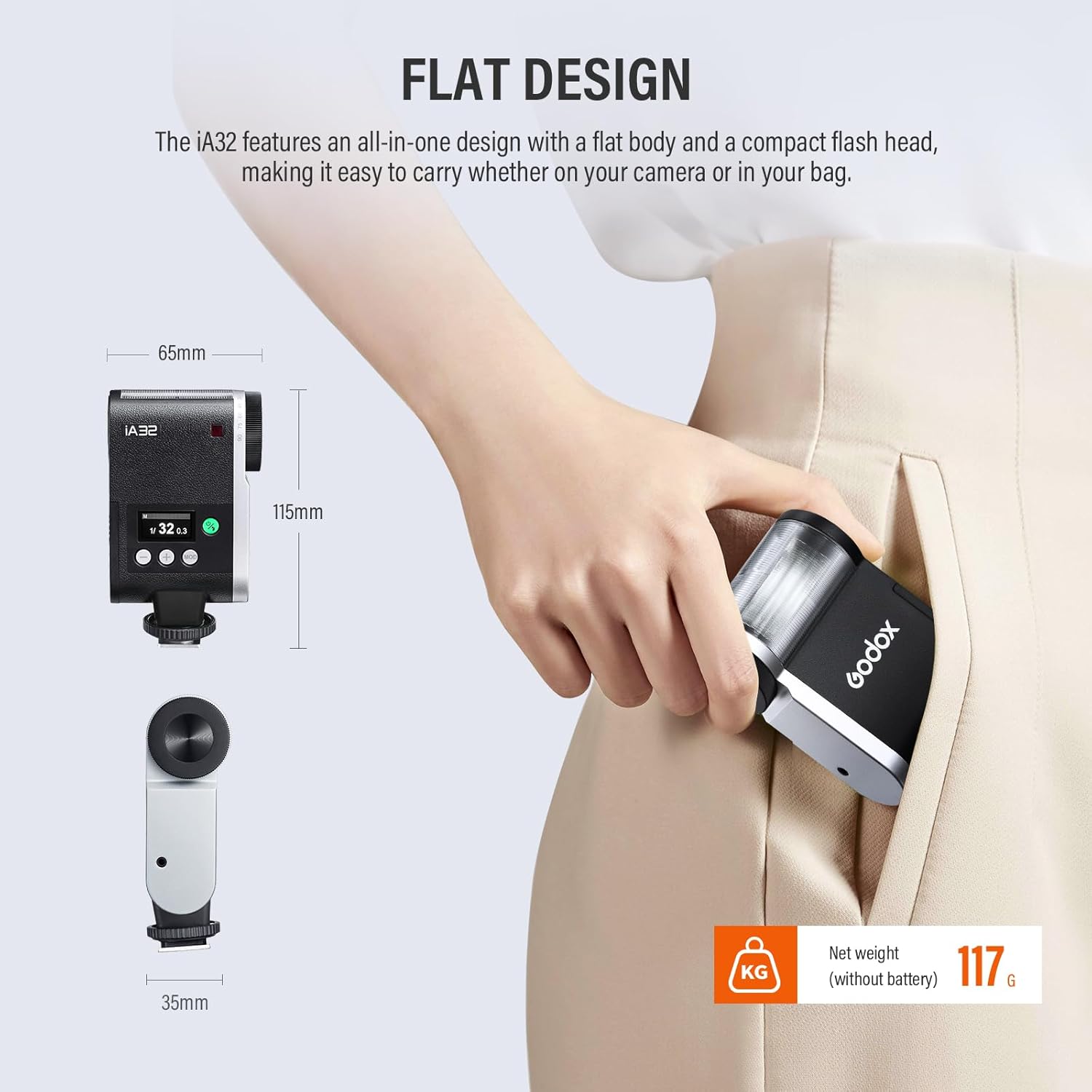
Image 2.1: The compact and flat design of the Godox iA32, showing its dimensions (65mm x 115mm x 35mm) and net weight of 117g (without battery).
3. What's in the Box
Upon unpacking, please verify that all the following items are included:
- Godox iA32 Flash Body x1
- Storage Bag x1
- AA Batteries x2 (Included for initial use)

Image 3.1: Contents of the Godox iA32 package, including the flash body and a storage bag.
4. Setup
4.1. Inserting Batteries
- Locate the battery compartment on the side of the flash unit.
- Open the compartment cover.
- Insert two AA batteries, ensuring correct polarity (+/-) as indicated inside the compartment.
- Close the battery compartment cover securely.
4.2. Mounting the Flash on Your Camera
- Ensure your camera is powered off.
- Slide the flash's hot shoe foot into your camera's hot shoe mount.
- Tighten the locking ring or lever on the flash unit to secure it firmly to the camera. Do not overtighten.

Image 4.1: Illustration of the single contact hot shoe, demonstrating compatibility with various camera brands including Canon, Nikon, Fuji, Sony, Pentax, and Olympus.
5. Operating Instructions
5.1. Power On/Off
Press and hold the power button (usually marked with an 'On/Off' symbol or a circle) to turn the flash unit on or off. The display screen will illuminate when powered on.
5.2. Mode Selection (Auto/Manual)
The iA32 offers two primary operating modes: Auto and Manual.
- Auto Mode: In this mode, the flash assists in setting ISO and aperture values, displaying a recommended shooting distance on the panel. This mode simplifies operation for quick shots.
- Manual Mode: Provides full control over the flash power output, allowing for precise adjustments to suit specific lighting requirements.
Use the 'MODE' button to switch between Auto and Manual modes. The current mode will be displayed on the flash's screen.

Image 5.1: The flash display showing Auto Mode (left) with recommended ISO and aperture, and Manual Mode (right) with adjustable flash power output.
5.3. Adjusting Power Levels (Manual Mode)
In Manual Mode, you can adjust the flash output from 1/128 to 1/1 (full power) in 1/3-stop increments. Use the '+' and '-' buttons to increase or decrease the power level. The selected power level will be shown on the display.

Image 5.2: Visual representation of different flash power levels (1/1, 1/2, 1/4, 1/8, 1/16, 1/32, 1/64) and their effect on illumination.
5.4. Adjusting Flash Head Angle
The flash head can be tilted to direct light. Adjust the angle from -7° to 90° by gently rotating the flash head. This allows for bounce flash techniques, where light is reflected off a ceiling or wall for softer illumination.

Image 5.3: Demonstrates the adjustable flash head, which can be tilted from -7° to 90° for various lighting angles.
5.5. Optical Trigger Modes (S1/S2)
The iA32 includes optical trigger modes (S1/S2) for use as an off-camera slave flash. These modes are typically available in Manual (M) mode.
- S1 Mode: The flash will fire in response to the first flash from a master flash. This is suitable for manual master flashes.
- S2 Mode: The flash will ignore the pre-flash from a master flash and fire in response to the main flash. This is suitable for master flashes that emit a pre-flash for TTL metering.
6. Battery Information
The Godox iA32 flash operates on two AA batteries. For best performance and consistent recycling times, it is recommended to use high-quality alkaline or NiMH rechargeable AA batteries.
- Recycle Time: Approximately 2.5 seconds at full power (1/1) with fresh batteries.
- Flash Times: Provides approximately 490 full power flashes on a single charge/set of batteries.
Always carry spare batteries, especially during extended shooting sessions, to avoid interruptions.

Image 6.1: The battery compartment of the Godox iA32, indicating it is powered by two AA batteries and has a recycle time of approximately 2.5 seconds.
7. Compatibility
The Godox iA32 Mini Flash is designed with a universal single-contact hot shoe, ensuring broad compatibility with a wide range of camera brands and models that feature a standard hot shoe. This includes, but is not limited to, cameras from:
- Canon
- Fuji
- Nikon
- Sony
- Pentax
- Olympus
Please note that while the flash will physically mount and fire on compatible cameras, advanced TTL (Through-The-Lens) metering functions are not supported due to its single-contact design. Operation is primarily in Auto or Manual modes.
8. Maintenance
To ensure the longevity and optimal performance of your Godox iA32 flash, follow these maintenance guidelines:
- Cleaning: Use a soft, dry cloth to clean the exterior of the flash. For stubborn dirt, a slightly damp cloth can be used, followed by immediate drying. Avoid using harsh chemicals or solvents.
- Storage: When not in use, store the flash in its provided storage bag in a cool, dry place, away from direct sunlight and extreme temperatures. Remove batteries if storing for extended periods to prevent leakage.
- Handling: Handle the flash with care. Avoid dropping it or subjecting it to strong impacts, which can damage internal components.
- Moisture: Keep the flash away from water and high humidity. If it gets wet, power it off immediately and allow it to dry completely before attempting to use it again.
9. Troubleshooting
If you encounter issues with your Godox iA32 flash, refer to the following common problems and solutions:
| Problem | Possible Cause | Solution |
|---|---|---|
| Flash does not power on. | Dead or incorrectly inserted batteries. | Check battery polarity; replace with fresh AA batteries. |
| Flash does not fire. | Flash not securely mounted; camera not sending trigger signal; flash in sleep mode. | Ensure flash is securely mounted and locked. Check camera settings. Press test button on flash to wake it up. |
| Long recycle time. | Low battery power; high power setting. | Replace batteries. Use lower power settings if possible. |
| Inconsistent flash output. | Low battery power; flash head not properly aimed. | Replace batteries. Adjust flash head for direct or bounce lighting. |
If the problem persists after trying these solutions, please contact Godox customer support for further assistance.
10. Specifications
Detailed technical specifications for the Godox iA32 Mini Flash Camera:
| Feature | Specification |
|---|---|
| Model | iA32 |
| Guide Number | GN15 (ISO100, in meters) |
| Flash Modes | Manual (M) Mode / Auto Mode |
| Flash Power Steps | 1/128 to 1/1 (8 settings) |
| Optical Trigger | S1/S2 (available in M mode) |
| Battery | Two AA batteries required |
| Flash Times (at 1/1 step) | Approx. 490 |
| Recycle Time (at 1/1 step) | Approx. 2.5s |
| Dimension | Approx. 2.56" x 4.53" x 1.38" (65mm x 115mm x 35mm) |
| Net Weight | Approx. 117g (without batteries) |
| Compatible Mountings | Canon, Fuji, Nikon, Sony (Universal Hot Shoe) |
| Flash Sync Speed | 1/125 |

Image 10.1: A summary of the Godox iA32's key specifications, including model, guide number, battery type, and dimensions.
11. Safety Information
Please read and adhere to the following safety precautions to prevent damage to the product or injury to yourself:
- Do not disassemble or modify the flash unit.
- Keep the flash away from water, flammable gases, and corrosive substances.
- Do not operate the flash in environments with high temperatures or humidity.
- Avoid direct eye exposure to the flash light, especially at close range, as it can cause temporary vision impairment.
- Ensure proper ventilation when using the flash for extended periods to prevent overheating.
- Dispose of used batteries according to local regulations.
12. Warranty and Support
For information regarding warranty coverage, technical support, or service, please refer to the official Godox website or contact your authorized dealer. Keep your purchase receipt as proof of purchase for warranty claims.


