
Introduction
Thank you for choosing the KDG Cordless Rechargeable LED Wall Sconces. These modern wall lamps are designed to provide versatile lighting with convenience, featuring a built-in rechargeable battery, touch control, remote operation, and stepless dimming. This manual will guide you through the setup, operation, and maintenance of your new wall sconces.
Safety Information
Please read all safety instructions before installation and use. Keep this manual for future reference.
- Do not expose the product to water or excessive moisture.
- Do not attempt to disassemble or modify the product. This may void the warranty and pose a safety risk.
- Use only the provided USB-C charging cable. Ensure the power adapter (not included) is 5V-2A.
- Keep the product away from heat sources and direct sunlight.
- Ensure the power button on the battery pack is ON before charging.
- Dispose of batteries according to local regulations.
Package Contents
Verify that all items are included in your package:
- KDG Cordless Wall Sconce (2 units)
- Remote Control (1 unit)
- USB-C Charging Cable (2 units)
- Instruction Manual (This document)
- Mounting Hardware (screws, anchors)
Specifications
| Feature | Detail |
|---|---|
| Brand | KDG |
| Model Number | AMZ-TBL-037 |
| Color | Gold |
| Material | Acrylic, Metal |
| Power Source | Battery Powered (5200mAh) |
| Control Method | Remote, Touch |
| Light Source | LED |
| Light Color | Warm (2700K) |
| Brightness | 190 Lumen (5%-100% Stepless Dimmable) |
| Wattage | 1.57 watts |
| Voltage | 5 Volts (DC) |
| Charging Port | Type-C |
| Charging Time | 4-6 hours (approx.) |
| Operating Time | 13 hours (max brightness), 30+ hours (min brightness) |
| Item Dimensions (L x W x H) | 4.3"L x 4.3"W x 23.6"H |
| Item Weight | 3.53 Pounds |

Figure 1: Product dimensions and technical specifications. Note the Type-C charging port on the base.
Setup and Installation
The KDG wall sconces are designed for easy, cordless installation. No electrical wiring is required.
- Prepare the Mounting Location: Choose a suitable wall location. Ensure the surface is clean and dry.
- Install the Base Plate: Screw the provided base plate securely to the wall using the included screws and anchors.
- Attach the Sconce: Align the wall sconce with the installed base plate and secure it. The sconce is designed to be easily removed for charging.
- Initial Charge: Before first use, fully charge the sconce. Remove the light bar from the base. Connect the USB-C charging cable to the port on the battery pack. The indicator light will flash red during charging and turn solid red when fully charged.

Figure 2: Visual guide for quick installation. The light bar detaches from the base for charging.
Video 1: This video demonstrates the installation process and key features of the KDG Cordless Wall Sconces, including charging and operation.
Operating Instructions
Your KDG wall sconce can be operated via touch control or the included remote control.
Touch Control:
- Power On/Off: Lightly touch the sensitive button on the sconce to turn it on or off.
- Stepless Dimming: Long press the touch button to adjust the brightness from 5% to 100%. Release when the desired brightness is reached.
Remote Control:
The remote control offers additional functions. Ensure two AAA batteries (not included) are installed in the remote.
- Power On/Off: Press the power button to turn the sconce on or off.
- Brightness Adjustment: Use the '+' and '-' buttons to increase or decrease brightness.
- Preset Brightness: Select 20%, 50%, or 100% brightness directly.
- Timer Function: Set the sconce to turn off automatically after 30 minutes, 1 hour, 2 hours, or 4 hours using the corresponding timer buttons.
360° Rotation:
The light bar can be rotated 360 degrees to direct light as needed, allowing for versatile illumination for wall paintings, ambient lighting, or task lighting.
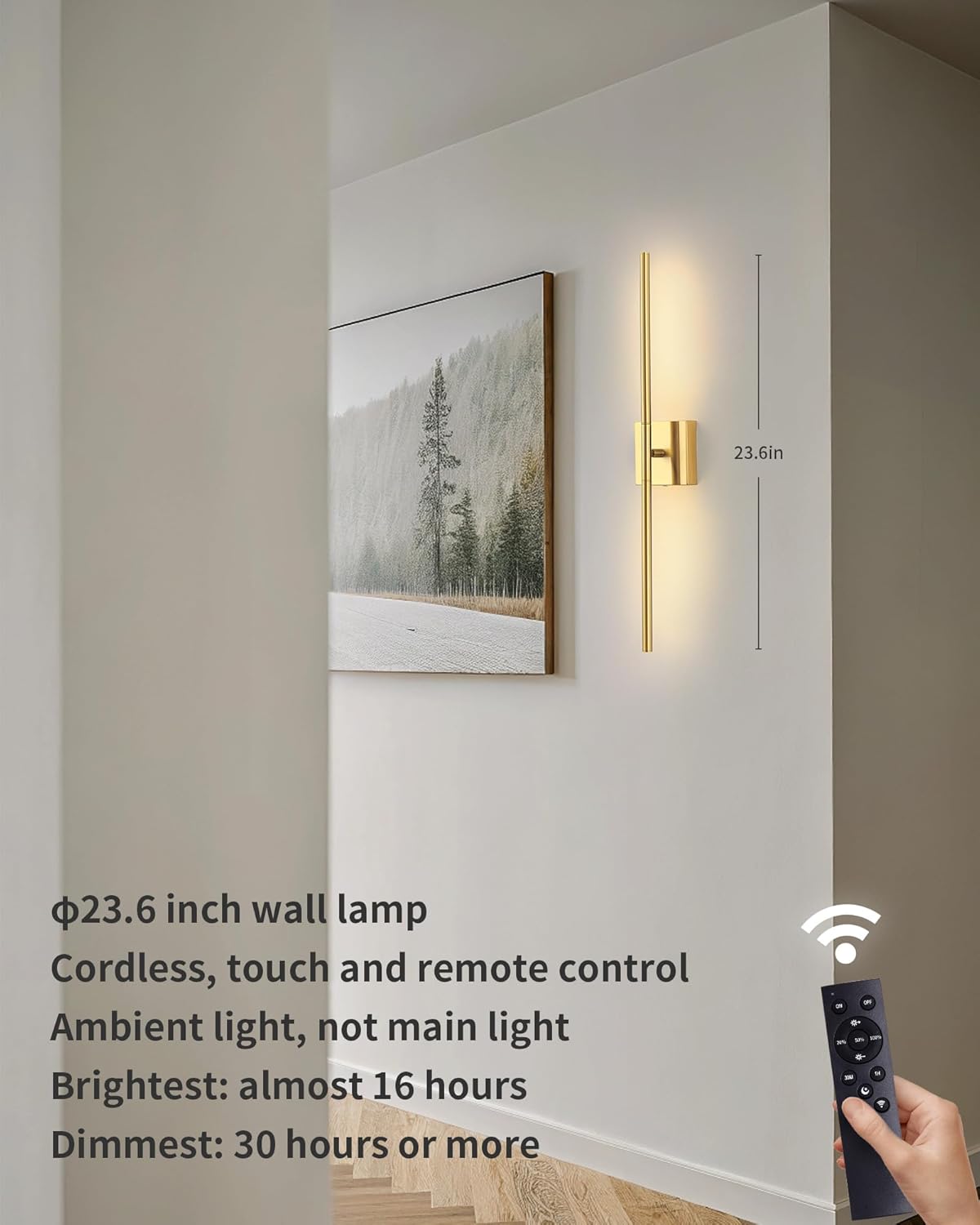
Figure 3: The wall sconce in operation, highlighting the remote control functionality.
Maintenance
- Cleaning: Wipe the sconce with a soft, dry cloth. Do not use abrasive cleaners or solvents.
- Battery Care: Recharge the battery when the light dims significantly or stops working. Avoid completely draining the battery frequently to prolong its lifespan.
- Storage: If storing the sconce for an extended period, ensure the battery is partially charged (around 50%) and recharge it every few months to prevent deep discharge.
Troubleshooting
| Problem | Possible Cause / Solution |
|---|---|
| Light does not turn on. |
|
| Remote control not responding. |
|
| Short battery life. |
|
Warranty and Support
This KDG product comes with a 1-year manufacturer's warranty from the date of purchase. This warranty covers defects in materials and workmanship under normal use.
For warranty claims, technical support, or any questions regarding your product, please contact KDG customer service. Refer to the contact information provided on the product packaging or the official KDG website.
Please have your model number (AMZ-TBL-037) and proof of purchase ready when contacting support.