
Introduction
Thank you for choosing the Lehoo Castle 68-Piece Wooden Train Set. This set provides an engaging construction-themed play experience with an electric train, a multi-function crane, and various accessories. It is designed to foster creativity, problem-solving skills, and fine motor development in children aged 3 years and older. Please read this manual carefully before assembly and use to ensure safe and optimal enjoyment of the product.
Safety Information
- Age Recommendation: This toy is suitable for children aged 36 months to 12 years. Small parts may pose a choking hazard for younger children.
- Adult Supervision: Adult supervision is recommended during play, especially during initial assembly and operation of the electric train and crane.
- Battery Safety: The electric train requires 2 AAA batteries (not included). Ensure batteries are inserted with correct polarity. Do not mix old and new batteries, or different types of batteries. Remove batteries if the toy is not used for an extended period. Dispose of used batteries responsibly.
- Material Safety: The wooden components are made from high-quality natural wood with smooth, rounded edges. Wooden track components are FSC-certified.
- Indoor Use: This toy is designed for indoor use only.
Package Contents
The Lehoo Castle 68-Piece Wooden Train Set includes the following components:
- Wooden track pieces (various shapes including straight, curved, and ramps)
- Electric train engine
- Train wagons (e.g., cargo wagon)
- Multi-function crane with magnetic attachment
- Construction vehicles (e.g., dump truck, excavator, road roller)
- Road cones and barriers
- Road warning signs
- Small figures (e.g., construction workers)
- Other assorted accessories for a construction site theme
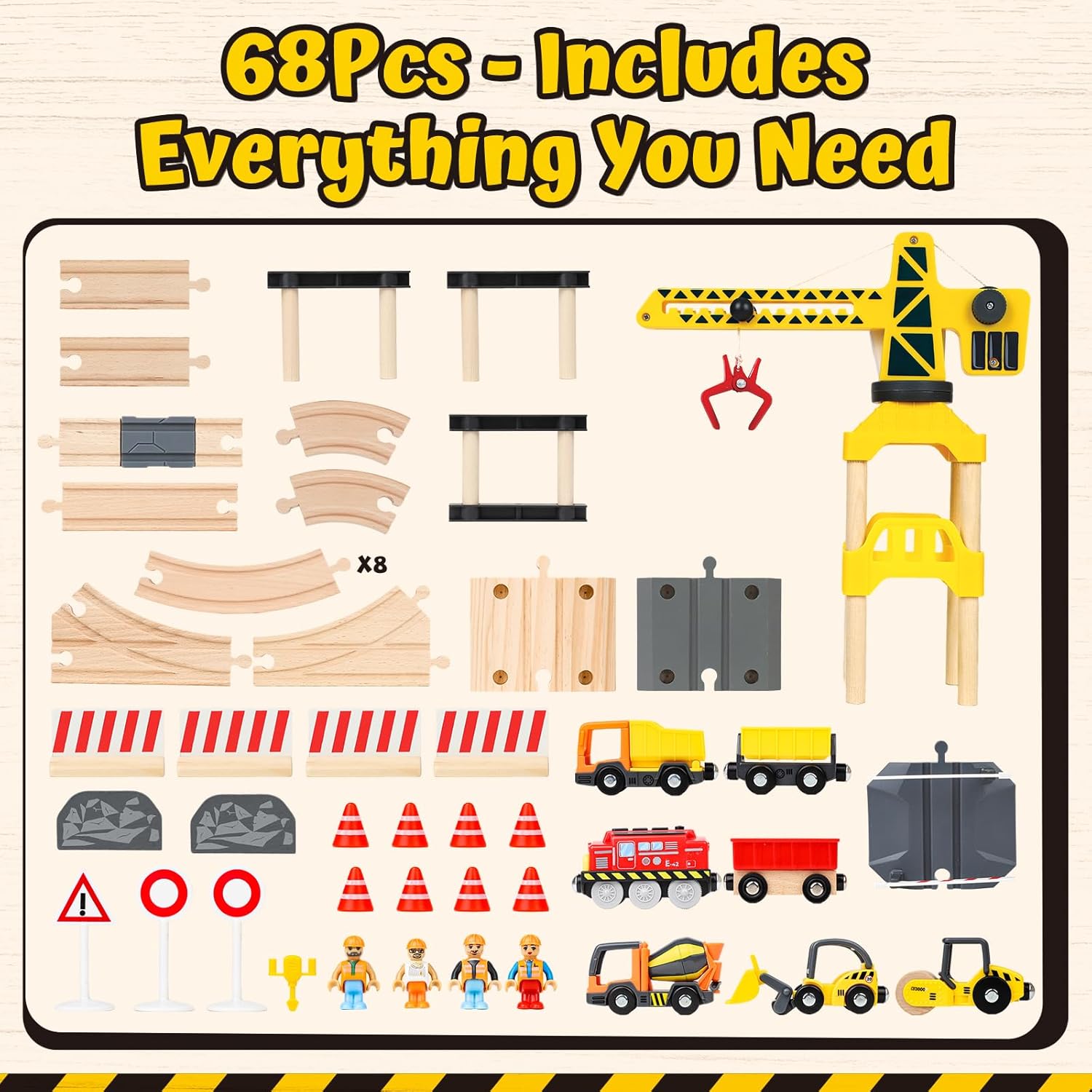
Image: All 68 pieces included in the set, showing tracks, vehicles, crane, and figures.
Setup Instructions
Assembly is designed to be straightforward, typically taking about 10 minutes. No special tools are required.
- Unpack Components: Carefully remove all pieces from the packaging. Verify that all 68 pieces are present using the package contents list.
- Assemble Tracks: Connect the wooden track pieces by aligning the interlocking grooves. The modular design allows for various track configurations. Refer to the image below for example layouts. The tracks are compatible with other major wooden train sets like Brio and Hape.
- Position Crane: Place the multi-function crane on a flat surface or a designated track piece. Ensure it is stable.
- Place Accessories: Arrange the construction vehicles, road cones, barriers, warning signs, and figures around the track to create your desired construction site scene.
- Install Train Batteries: Locate the battery compartment on the electric train engine. Open it and insert 2 AAA batteries, ensuring correct polarity (+/-). Close the compartment securely.

Image: Examples of different track configurations that can be created with the modular track pieces.

Image: Illustration of track compatibility with other wooden train sets.
Operating Instructions
Electric Train Operation
The electric train engine is battery-powered and features simple controls:
- On/Off Switch: Locate the switch on the top or side of the train engine. Slide it to the 'ON' position to activate the train.
- Forward/Backward/Stop: The train typically has buttons or a slider to control its movement. Press 'Forward' to move the train forward, 'Backward' to move it in reverse, and 'Stop' to halt its movement.
- Connecting Wagons: The train and wagons feature magnetic connectors. Simply bring them close together to connect them.
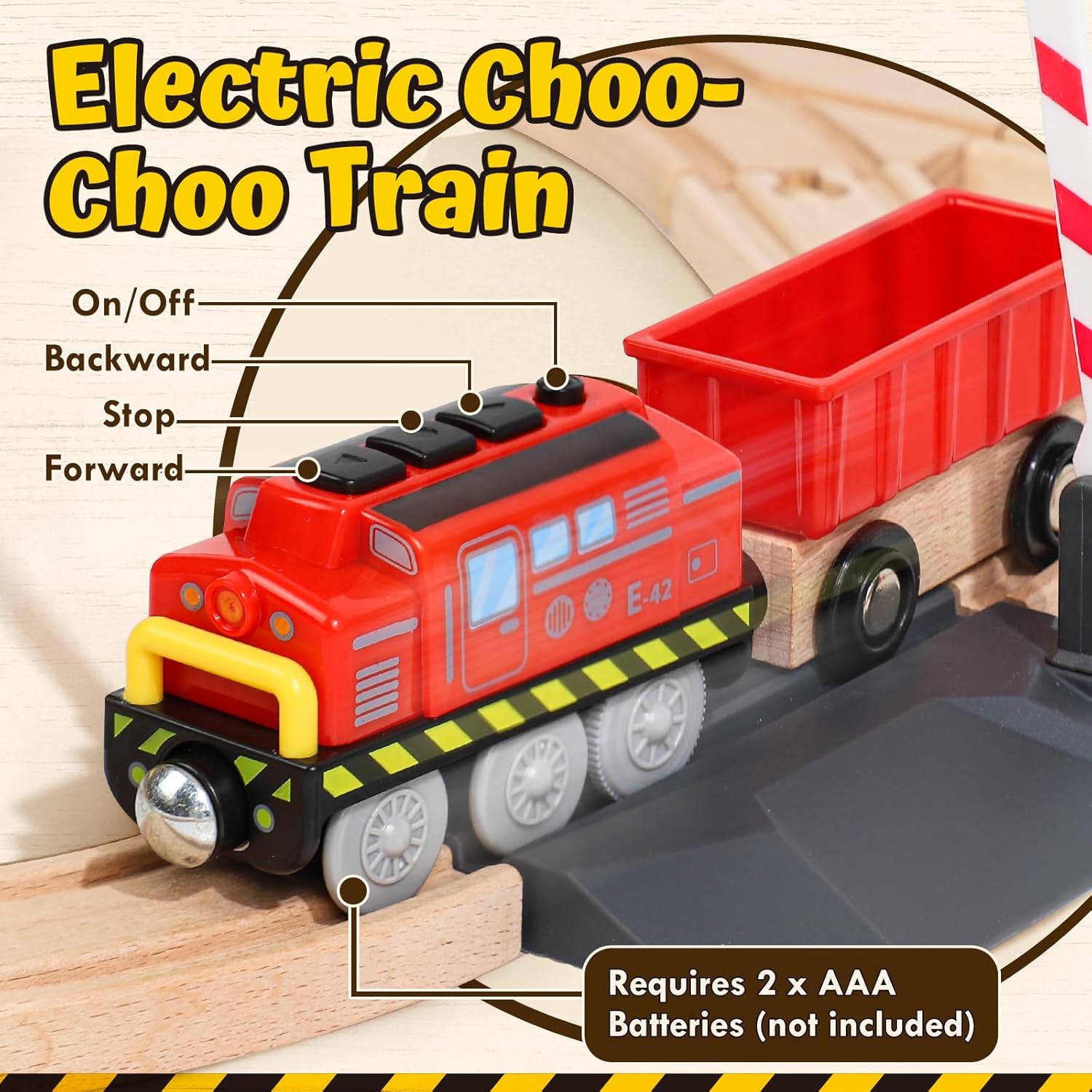
Image: Electric train engine with controls labeled for On/Off, Forward, Stop, and Backward, and battery requirement.
Multi-function Crane Operation
The crane is designed for interactive play, simulating real construction tasks:
- 360° Rotation: The crane's arm can rotate a full 360 degrees manually, allowing it to reach different areas of the construction site.
- Adjustable Length and Height: Use the manual controls (knobs or levers) on the crane to adjust the length of the boom and the height of the magnetic hook.
- Picking Up Cargo: The crane features a magnetic attachment. Position the magnet over a metallic cargo piece (e.g., included cargo blocks or vehicles with magnetic points) to lift and transport it.
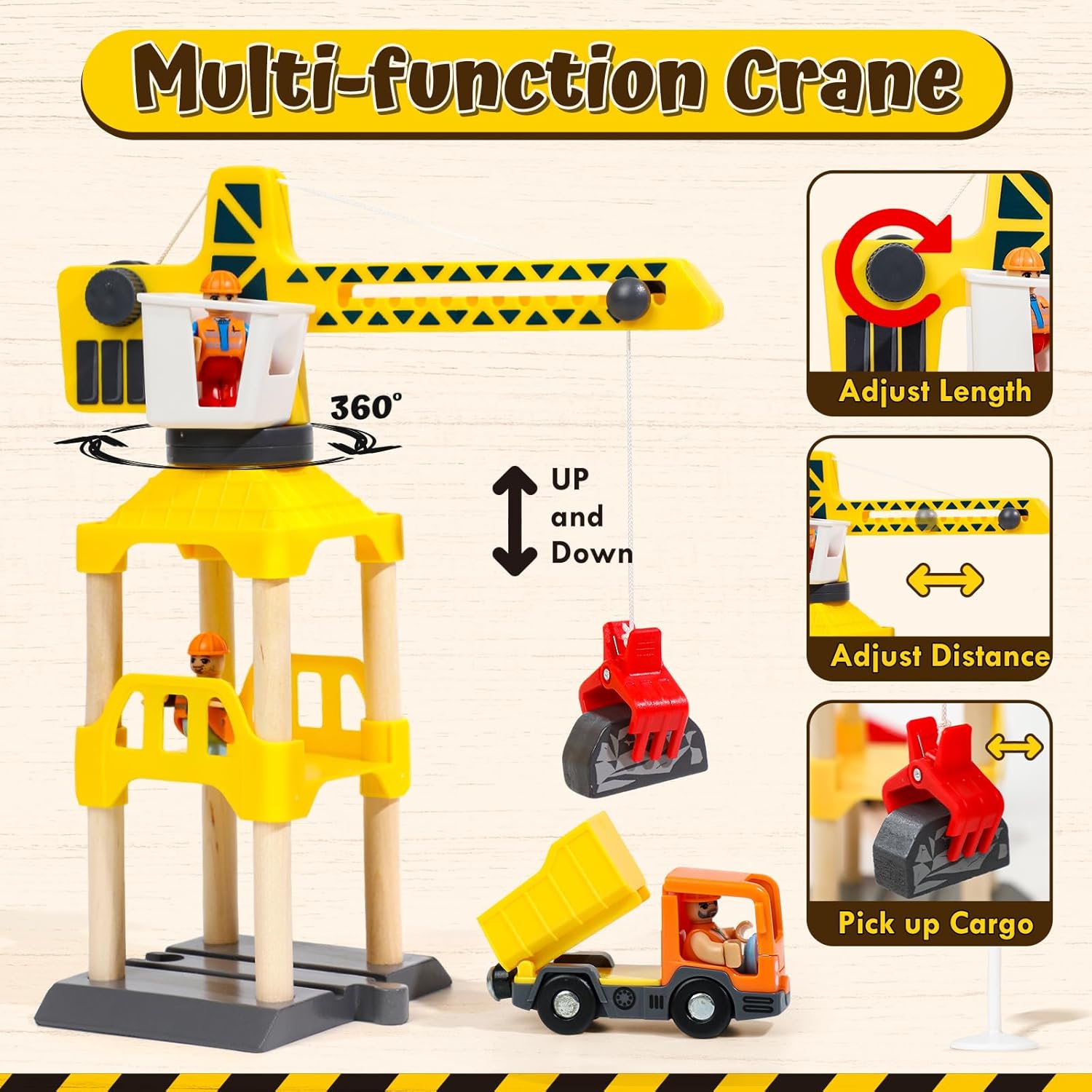
Image: Multi-function crane demonstrating 360-degree rotation, adjustable boom, and magnetic lifting capability.
Interactive Play Zones
The set includes elements to create various interactive play zones:
- Crane Station: Use the crane to load and unload cargo from train wagons or construction vehicles.
- Construction Zone: Deploy construction vehicles like excavators and dump trucks to simulate building activities.
- Railroad Crossing: Operate the train through the railroad crossing, managing traffic with barriers and signs.
- Vehicle Operation: Engage with the various construction vehicles, pushing them along the tracks or play area.

Image: Examples of interactive play zones including crane, construction, railroad crossing, and vehicle operation.
Maintenance
- Cleaning: Wipe all components with a soft, dry cloth. For stubborn dirt, a slightly damp cloth can be used, followed by immediate drying. Do not immerse wooden parts in water.
- Storage: Store the train set in a dry place, away from direct sunlight and extreme temperatures, to prevent warping or damage to the wooden components.
- Battery Replacement: Replace batteries in the electric train when its speed decreases or it stops moving.
Troubleshooting
- Electric Train Not Moving:
- Check if the On/Off switch is in the 'ON' position.
- Ensure batteries are inserted correctly with the proper polarity.
- Replace old or depleted batteries with new AAA batteries.
- Check for any obstructions on the track or wheels.
- Track Pieces Not Connecting:
- Ensure the grooves are properly aligned.
- Apply gentle pressure to connect pieces. Do not force them.
- Crane Magnet Not Picking Up:
- Ensure the cargo piece is metallic and within the magnet's range.
- Check if the magnet is clean and free of debris.
Specifications
| Model Number | GB2135 |
| Brand | Lehoo Castle |
| Number of Pieces | 68 |
| Material | High-Quality Natural Wood (FSC-certified for track components) |
| Color | Yellow (main crane color), Multi-color (vehicles and accessories) |
| Product Dimensions (L x W x H) | 33.8 x 27 x 9 cm (13.3 x 10.6 x 3.5 inches) |
| Item Weight | 1.75 Kilograms (3.86 lbs) |
| Power Source | Battery Powered (Electric Train) |
| Batteries Required | 2 x AAA (for electric train, not included) |
| Recommended Age | 36 Months - 12 Years |
| Compatibility | Compatible with Brio, Hape, and most major wooden train sets |
| Educational Objective | Problem Solving Skill, Concentration, Imagination Development |
| Special Features | Magnetic connections, 360° rotating crane, realistic construction vehicles |
Warranty and Support
For any questions, concerns, or support regarding your Lehoo Castle 68-Piece Wooden Train Set, please refer to the contact information provided with your purchase or visit the official Lehoo Castle website. Please retain your proof of purchase for any warranty claims.