
1. Introduction
This manual provides detailed instructions for the installation, operation, and maintenance of your GTRUI 10.25-inch Car Stereo. This advanced system upgrades your vehicle's multimedia capabilities, offering a large touch screen display with wireless Apple CarPlay and Android Auto integration while retaining your original car's functions.
2. Compatible Models
This unit is exclusively designed for the following Audi models with the Audi Concert / Symphony system (Left Hand Drive only):
- Audi A4 (2009-2016)
- Audi S4 (2009-2016)
- Audi RS4 (2012-2015)
- Audi A5 (2008-2016)
- Audi S5 (B8) (2008-2016)
- Audi RS5 (2010-2015)
Please ensure your vehicle has the Audi Concert or Symphony system for proper compatibility. This unit is not compatible with Audi CD Changer, Audi Multimedia, or Audi Chorus systems.
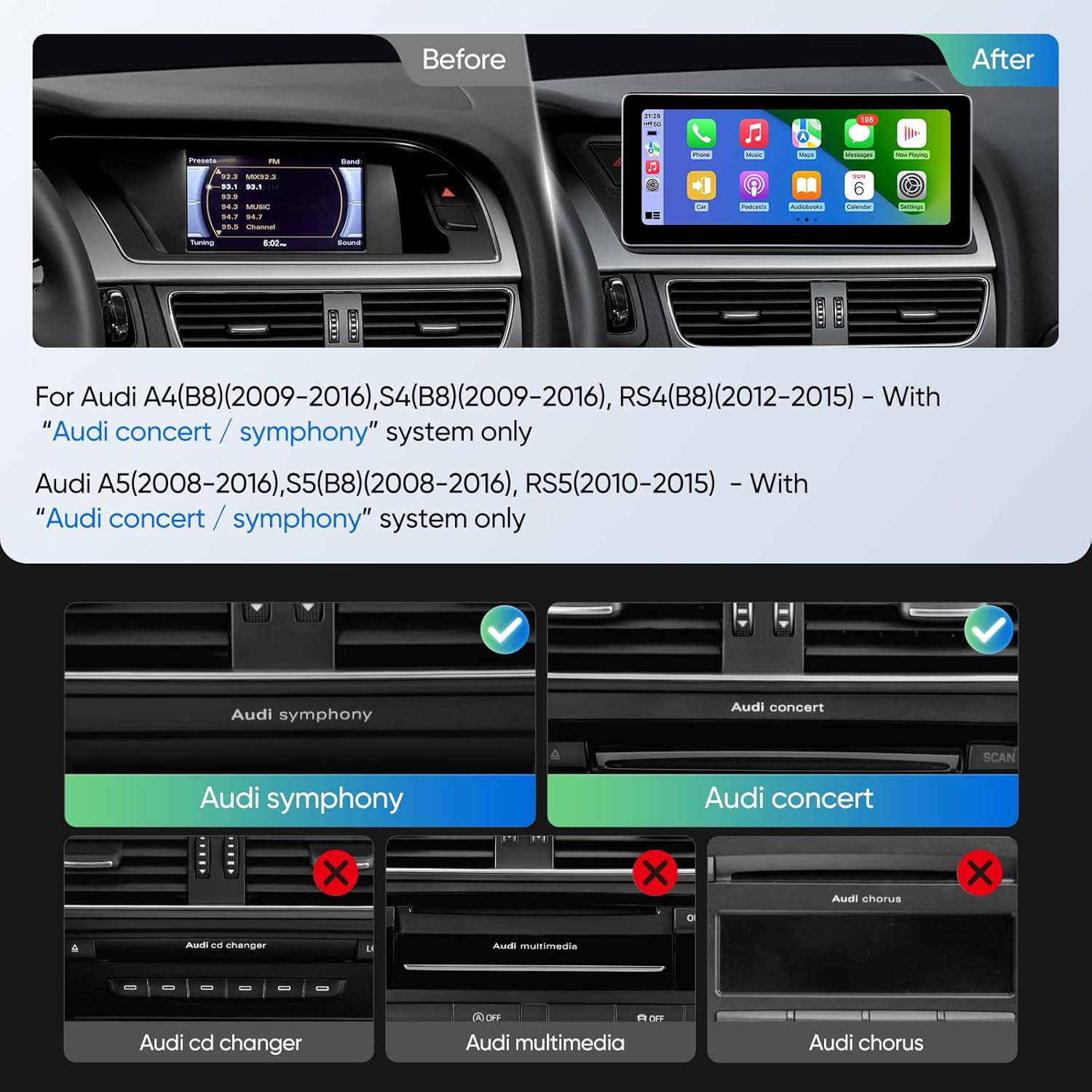
Image: Before and after installation of the GTRUI 10.25-inch car stereo, illustrating the upgrade from the original small screen to the new large touch screen.

Image: The GTRUI 10.25-inch car stereo seamlessly integrated into an Audi dashboard, showcasing the vibrant CarPlay interface.
3. What's in the Box
Please check the package contents to ensure all items are present:
- 10.25" Head Unit
- Wiring Harness Cable, LVDS Cable
- AUX to AMI Adaptor
- USB Cable
- User Manual

Image: A visual representation of the 10.25-inch head unit and all accompanying accessories, including cables, brackets, and the user manual.
4. Setup and Installation
Professional installation is recommended. Ensure the vehicle's power is off before beginning installation. Refer to the detailed installation videos below for guidance.
4.1. Installation Overview
The installation involves replacing your car's original screen and connecting the new head unit using the provided wiring harness adapter. This process integrates the new touch screen while retaining existing vehicle functions.
4.2. Installation Videos
Video: Detailed installation instructions for the GTRUI 10.25-inch car stereo in an Audi A4 with Concert or Symphony system. This video guides users through the step-by-step process of replacing the original screen and connecting the new unit.
Video: An installation guide for the 10.25-inch touch screen in an Audi, demonstrating the physical steps involved in mounting the screen and connecting the necessary cables.
4.3. Fiber Optic Cable Transfer (if applicable)
If your vehicle uses fiber optic cables for audio, ensure they are correctly transferred to the new wiring harness to prevent sound issues. Refer to the specific video for this process if you encounter no sound after installation.
Video: Instructions on how to properly transfer fiber optic cables to ensure sound functionality after installing the car stereo upgrade.
5. Operating Instructions
5.1. Wireless CarPlay & Android Auto
The unit supports both wireless and wired Apple CarPlay and Android Auto. Simply pair your smartphone via Bluetooth, and the system will automatically connect. Use voice commands like "Hey Siri" or "OK Google" for navigation, calls, messages, and music playback.

Image: Illustration of wireless CarPlay and Android Auto connectivity, highlighting the seamless integration with your smartphone via Bluetooth.

Image: A user interacting with the system using voice commands, demonstrating the convenience of Siri and Google Assistant for various functions.
Video: Demonstration of the Road Wireless CarPlay Module for Audi cars, showcasing its features and user interface.
Video: A guide on how to set up AirPlay, allowing for screen mirroring from your iPhone to the car stereo display.
5.2. Retained Original Functions
The GTRUI car stereo is designed to work seamlessly with all original Audi functions, including:
- MMI System
- Original Audi Sound System
- Original Radio
- CD Player
- Bluetooth
- Backup Camera Display
- Steering Wheel Control Function

Image: A collage demonstrating the continued functionality of original Audi features such as steering wheel controls, CD player, and backup camera after the stereo upgrade.
Video: A demonstration of the operating system, showing how to navigate through various car settings and multimedia options, including the original OEM system.
6. Key Features
6.1. High-Resolution Touch Screen Display
Experience outstanding clarity, contrast, and brightness with the 10.25-inch IPS touch screen, boasting a 1920*720p resolution. The glass-to-glass touch screen design ensures a clear and vibrant picture from any angle.

Image: A detailed view of the 10.25-inch IPS touch screen, emphasizing its 1920x720p resolution and superior visual quality.
7. Troubleshooting
7.1. No Audio After CarPlay Connection
If you experience no audio after connecting to CarPlay, please check the original car system's playback source settings. Navigate to: OEM -> Media -> Source -> (AUX) External audio input. Ensure the external audio input is active.
Video: A troubleshooting guide addressing the common issue of no audio after connecting to CarPlay, detailing how to adjust the original car system's audio source settings.
7.2. General Sound Issues
For any other sound-related problems, verify all wiring connections, especially the fiber optic cables if your vehicle uses them. Incorrect connections can lead to audio loss.
8. Specifications
| Item Weight | 4.53 pounds |
| Package Dimensions | 16.14 x 8.74 x 6.97 inches |
| Item Model Number | 10.25" concert/symphony |
| Display Size | 10.25 Inches |
| Screen Resolution | 1920*720p |
| Special Feature | Glass to Glass touch screen, Wireless Apple CarPlay & Android Auto |
| Connectivity Technology | Bluetooth, USB, Wireless Android Auto, Wireless Car Play |
| Vehicle Service Type | Car |
9. Warranty and Support
9.1. 1-Year Warranty
GTRUI provides a 1-year manufacturer's warranty for this product, covering defects in materials and workmanship under normal use.
9.2. Technical Support
For any technical assistance or inquiries, please contact us via Amazon email. Our professional technical support team will respond as soon as possible to help resolve any issues you may encounter.