
artfone ARFC1+001
artfone C1+ 4G User Manual
Model: ARFC1+001
1. Introduction
This manual provides detailed instructions for the artfone C1+ 4G Unlocked Volte Big Button Cell Phone. Designed with seniors in mind, this phone offers ease of use, clear communication, and essential safety features. Please read this manual thoroughly to ensure proper operation and maintenance of your device.
2. Package Contents
Before you begin, please verify that all items are present in your package:
- 1 x artfone C1+ 4G Mobile Phone
- 1 x 1800mAh Li-ion Battery
- 1 x USB-C Charging Cable
- 1 x US Charger Adapter
- 1 x Charging Dock
- 1 x Instruction Manual

Image: All components included in the artfone C1+ 4G package, including the phone, charging dock, battery, charger, USB cable, and manual.
3. Product Overview
Familiarize yourself with the key components of your artfone C1+ 4G phone.
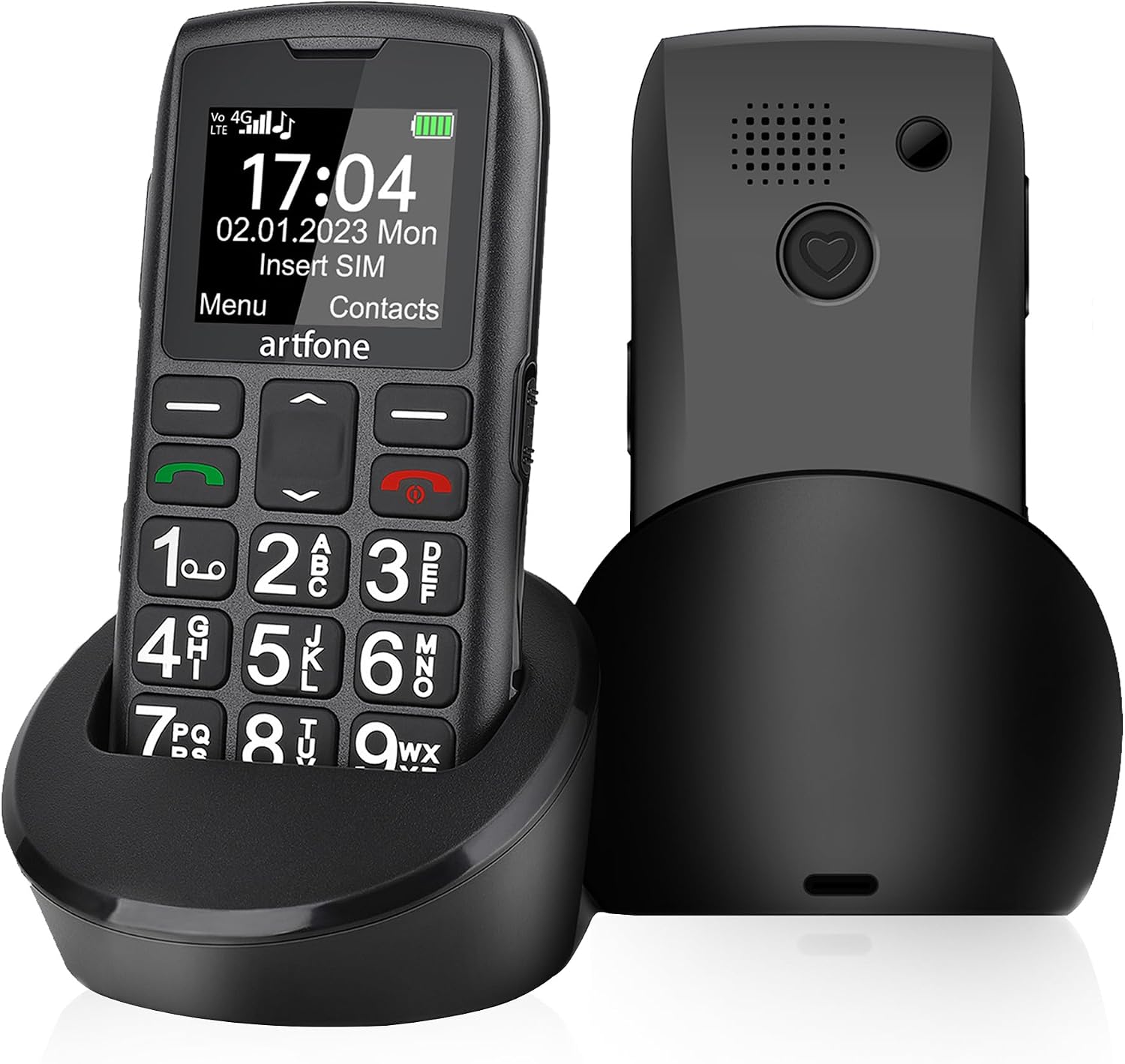
Image: Front view of the artfone C1+ 4G phone seated in its charging dock, alongside a rear view of the phone showing the speaker and SOS button.
Key Features:
- Large Buttons with Backlighting: Easy to see and press, even in low light.
- Large Font and Symbols: Clear display for improved readability.
- SOS Emergency Button: Quickly contact up to 5 preset emergency contacts.
- Loud and Clear Sound: Enhanced audio for calls and speakerphone.
- Flashlight: Convenient side button activation for illumination.
- Charging Dock: Simple and convenient charging without fumbling with cables.
- Talking Number Function: Reads out dialed digits for visual impairment assistance.

Image: Close-up of the artfone C1+ 4G phone highlighting its large, backlit buttons and clear, large font display for easy visibility.

Image: Visual representation of various phone features including Calendar, Bluetooth, Key lock, MP3/FM, Calculators, Alarm Clock, Flashlight, and Loud Bell/Speaker.
4. Setup
4.1. SIM Card and Battery Installation
The artfone C1+ 4G uses a Nano SIM card. Ensure your SIM card is activated by your carrier before installation. This phone is compatible with T-Mobile, SpeedTalk, Tello, MetroPCS, and RedPocket. It is not compatible with Verizon.
- Remove the back cover of the phone by gently prying it open from the notch.
- Insert the Nano SIM card into the designated SIM slot (refer to the diagram below for correct orientation).
- If desired, insert a microSD card (up to 64GB) into the microSD slot for expanded memory.
- Insert the 1800mAh battery into the battery compartment, aligning the gold contacts.
- Replace the back cover, pressing firmly until it clicks into place.

Image: Internal view of the artfone C1+ 4G phone, illustrating the locations for Micro SD card, Nano SIM card, and the 1800mAh battery.
4.2. Initial Charging
It is recommended to fully charge the phone before first use. The phone can be charged using the included charging dock or directly via the USB-C cable.
- Using the Charging Dock: Place the phone into the charging dock, ensuring the charging contacts align. The charging indicator on the phone will illuminate.
- Using USB-C Cable: Connect the USB-C cable to the phone's charging port and the other end to the US charger adapter. Plug the adapter into a power outlet.
A full charge typically takes approximately 2 hours. The 1800mAh battery provides up to 7-8 hours of talk time and about a week of standby time.

Image: The artfone C1+ 4G phone charging in its desktop dock, highlighting the 1800mAh Li-ion battery, USB Type-C compatibility, and 10-12 days standby time.

Image: Depiction of the two charging methods: direct charging via USB-C cable and charging via the convenient desktop charging station.
5. Operating Instructions
5.1. Power On/Off
- To Power On: Press and hold the red End Call/Power button (✆) until the screen illuminates.
- To Power Off: Press and hold the red End Call/Power button (✆) until the power off options appear on the screen. Select 'Power Off'.
5.2. Making and Receiving Calls
- To Make a Call: Dial the desired number using the keypad. Press the green Call button (✆) to initiate the call.
- To Receive a Call: When the phone rings, press the green Call button (✆) to answer.
- To End a Call: Press the red End Call/Power button (✆).
5.3. Contacts
The phone can store up to 1000 contacts. To add, edit, or delete contacts, navigate to the 'Contacts' menu from the main screen.
5.4. SOS Emergency Function
The SOS button on the rear of the phone provides a quick way to contact emergency numbers. You can preset up to 5 emergency contacts.
- Setting up SOS Contacts: Go to 'Settings' > 'SOS Settings' to add or modify emergency numbers.
- Activating SOS: Press and hold the SOS button on the back of the phone for 3 seconds. The phone will automatically dial the preset emergency contacts in sequence until one answers. It will also send an emergency text message to these contacts.
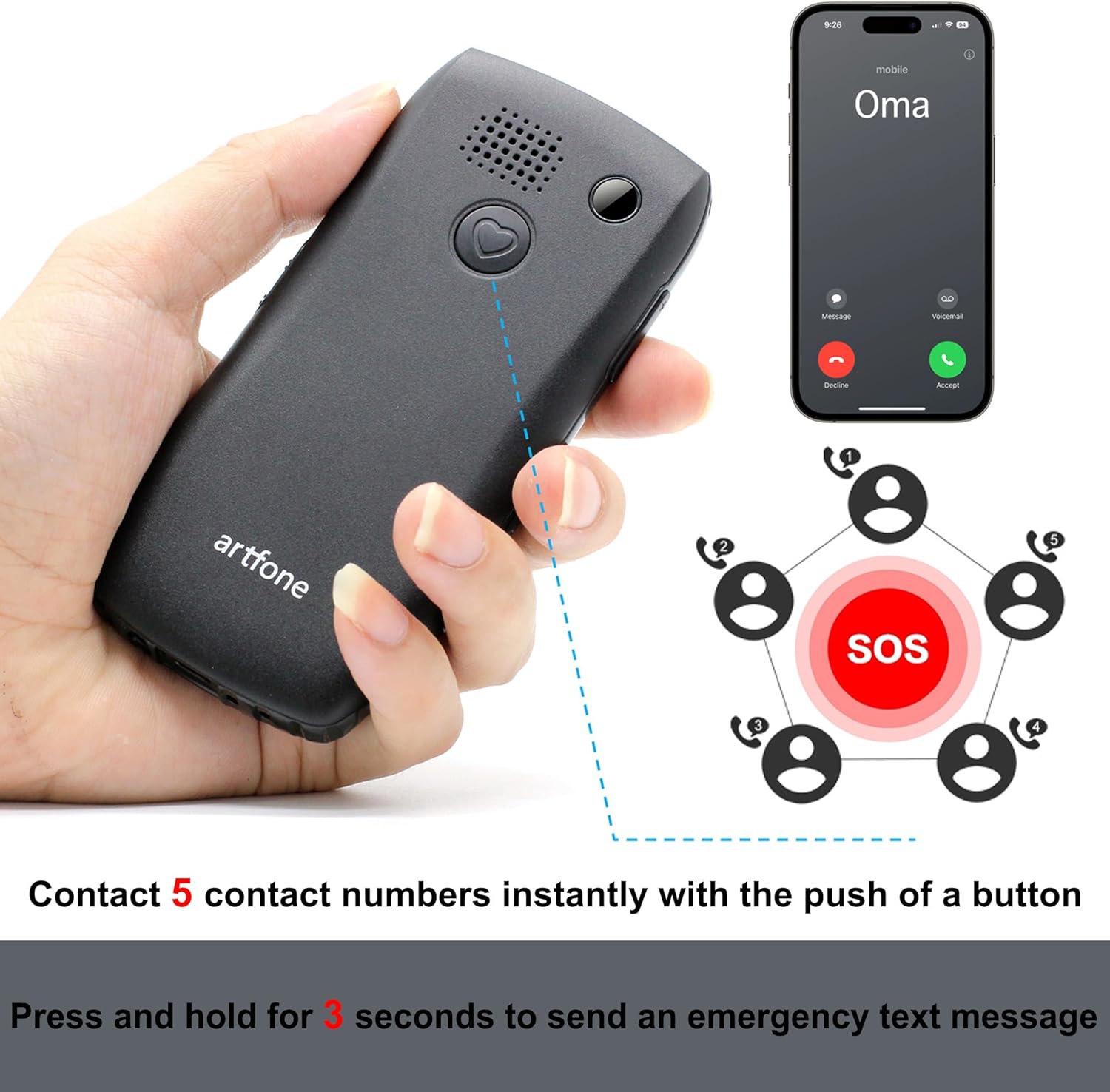
Image: A hand holding the artfone C1+ 4G phone, pointing to the rear SOS button, with a diagram illustrating how it contacts up to 5 emergency numbers instantly.
5.5. Flashlight
The flashlight can be activated quickly using a dedicated side button. Locate the flashlight button on the side of the phone and slide it up or down to turn the flashlight on or off.
5.6. One-Touch Time Display
For convenience, you can quickly check the time. Press and hold the '+' button for two seconds to hear the time announced. This feature is particularly useful for users with visual impairments.

Image: The artfone C1+ 4G phone demonstrating the one-touch time display feature, where pressing the '+' button announces the current time.
6. Maintenance
6.1. Cleaning
To clean your phone, use a soft, dry cloth. Avoid using liquid cleaners or abrasive materials, as they may damage the device.
6.2. Battery Care
- Do not expose the battery to extreme temperatures.
- Avoid fully discharging the battery frequently to prolong its lifespan.
- If the phone will not be used for an extended period, charge it to about 50% before storing.
7. Troubleshooting
If you encounter issues with your artfone C1+ 4G, please refer to the following common problems and solutions:
| Problem | Possible Cause | Solution |
|---|---|---|
| Phone does not power on | Battery is low or not installed correctly. | Ensure battery is charged and correctly inserted. Press and hold power button for several seconds. |
| No network signal | SIM card not inserted, not activated, or phone is out of network coverage. | Check SIM card installation. Verify SIM card is active with your carrier. Move to an area with better signal. |
| Cannot hear caller / Caller cannot hear me | Volume too low, microphone blocked, or network issue. | Adjust call volume. Ensure microphone and speaker are not covered. Try calling from a different location. |
| SOS function not working | Emergency contacts not set up or incorrect numbers. | Verify that emergency contacts are correctly saved in SOS settings. Ensure numbers are valid. |
8. Specifications
Detailed technical specifications for the artfone C1+ 4G phone:
| Feature | Specification |
|---|---|
| Model Name | ARFC1+001 |
| Product Dimensions | 4.8 x 2.05 x 0.55 inches (122.1 x 59.3 x 13.9 mm) |
| Item Weight | 5.3 ounces (150 Grams) |
| Display Size | 1.8 Inches |
| Resolution | 854 x 480 |
| Operating System | artfone Mocor RTOS |
| CPU Model | 80C31 |
| CPU Speed | 128 MHz |
| RAM Memory Installed Size | 48 MB |
| Memory Storage Capacity | 64 GB (expandable with microSD) |
| Battery Capacity | 1800 Milliamp Hours |
| Phone Talk Time | 10 Hours |
| Charging Time | 2 Hours |
| Connectivity Technologies | Bluetooth, USB |
| Special Features | Basic Phone, Expandable Memory, Talking Number, Charging Cradle, SOS Function, Big Buttons, Big Fonts |
| Audio Jack | 3.5 mm |
| Color | BLACK |
| Wireless Carrier | Unlocked |

Image: Detailed product dimensions of the artfone C1+ 4G phone, showing side, back, and front views with measurements in millimeters.
9. Warranty and Support
Your artfone C1+ 4G phone comes with a manufacturer's warranty. For specific warranty terms and conditions, please refer to the warranty card included in your package or contact artfone customer support directly. If you require technical assistance or have questions not covered in this manual, please reach out to the manufacturer's support team.
Related Documents - ARFC1+001
 |
Artfone CS181 User Manual: Features and Operation Guide Comprehensive guide to the Artfone CS181 mobile phone, covering setup, features like SOS, calling, volume control, and frequently asked questions for easy operation. |
 |
Artfone CS182 Senior Phone User Manual E945 User manual for the Artfone CS182 senior-friendly mobile phone, detailing product features, usage instructions, button functions, icon descriptions, warnings, and disposal information. |
 |
artfone G3 (4G VoLTE) User Manual and Instructions This user manual provides instructions and guidance for the artfone G3 (4G VoLTE) mobile phone, covering setup, features, and operation in multiple languages. |
 |
artfone CS181 User Manual - Simple GSM Mobile Phone Guide User manual for the artfone CS181, a simple and easy-to-use GSM mobile phone. Includes setup, features, SOS function, call handling, and FAQ. |
 |
Artfone CS181 User Manual and Features Comprehensive guide to the Artfone CS181 mobile phone, covering features, operation, settings, and frequently asked questions. Includes details on SOS function, calls, volume, and network compatibility. |
 |
Artfone CS188 User Manual: Features, Operation, and FAQs Comprehensive user manual for the Artfone CS188 mobile phone, detailing its features, how to use it, SOS function, call making, settings, and troubleshooting. Designed for ease of use, especially for elderly users. |
Ask a question about this manual
Ask about setup, troubleshooting, compatibility, parts, safety, or missing instructions. Manuals+ will review the question and use this page’s manual context to help answer it.