
1. Introduction
This manual provides essential information for the safe and effective use of your Gmmhhs Replacement Ni-MH Battery, Model CS-CHM700MD. This battery is designed as a direct replacement for ChoiceMMed MMED6000DP-M7 devices, with Part Number MMED6000DP. Please read this manual thoroughly before installation and use.
2. Safety Information
WARNING: Failure to follow these safety instructions may result in fire, electric shock, injury, or damage to the battery or device.
- Do not attempt to disassemble, open, or service the battery pack.
- Replace only with the battery pack designated for this product. Verify compatibility before installation.
- Do not crush, puncture, short external contacts, or dispose of in fire or water.
- Do not store above 60°C (140°F).
- A new battery pack must be fully charged before its first use.
- Read the instructions in your device's operating guide before using this battery to reduce the risk of fire or burns.
- The battery features built-in safety protection against over-charge, over-discharge, over-heat, over-current, and short-circuit.
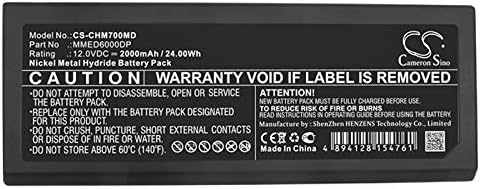
Image: Battery label displaying important safety warnings and specifications.
3. Setup and Installation
Before installing the new battery, ensure your device is powered off and disconnected from any power source.
- Verify Compatibility: Double-check that the battery model (CS-CHM700MD) and part number (MMED6000DP) match your device's requirements.
- Remove Old Battery: Carefully open the battery compartment of your ChoiceMMed MMED6000DP-M7 device according to its original instruction manual. Remove the old battery.
- Insert New Battery: Align the Gmmhhs replacement battery with the battery compartment's contacts. Gently push the battery into place until it is securely seated.
- Close Compartment: Close the battery compartment cover.
- Initial Charge: Connect your device to its charger and allow the new battery to fully charge before its first use. This ensures optimal performance and battery life.

Image: Top view of the Gmmhhs replacement battery.
4. Operating Instructions
Once the battery is installed and fully charged, your device is ready for operation. Refer to your ChoiceMMed MMED6000DP-M7 device's original instruction manual for specific operating procedures.
- Always ensure the battery is adequately charged before critical use.
- Monitor the device's battery indicator to avoid complete discharge, which can shorten battery lifespan.

Image: Bottom view of the Gmmhhs replacement battery, highlighting the contact points for device connection.
5. Maintenance and Storage
Proper maintenance and storage can extend the life of your battery.
- Charging: Recharge the battery when the device indicates low power. Avoid frequent deep discharges.
- Temperature: Store the battery in a cool, dry place, away from direct sunlight and extreme temperatures. Do not expose to temperatures above 60°C (140°F).
- Cleaning: Keep battery contacts clean. Use a dry, soft cloth to wipe away any dust or debris.
- Long-Term Storage: If storing the battery for an extended period, charge it to approximately 50% capacity. Recharge every 3-6 months to prevent over-discharge.
6. Troubleshooting
If you encounter issues with your Gmmhhs replacement battery, consider the following:
- Device Not Powering On:
- Ensure the battery is correctly installed and fully charged.
- Check if the battery contacts are clean and free of obstruction.
- Verify that the battery is compatible with your device model.
- Battery Not Charging:
- Confirm the charger is functioning correctly and properly connected to the device and power source.
- Ensure the battery is securely seated in the compartment.
- Try charging for a longer period, especially for the initial charge.
- Short Battery Life:
- Ensure the battery has undergone a full initial charge cycle.
- Review device usage patterns; high-power applications consume battery faster.
- Check for extreme operating temperatures.
If problems persist after attempting these steps, please contact customer support.
7. Specifications
| Feature | Specification |
|---|---|
| Model Number | CS-CHM700MD |
| Part Number | MMED6000DP |
| Battery Type | Ni-MH (Nickel Metal Hydride) |
| Voltage | 12.0V |
| Capacity | 2000mAh / 24.00Wh |
| Product Dimensions | 2.79 x 0.96 x 7.22 inches (70.8 x 24.5 x 183.4 mm) |
| Item Weight | 1.14 pounds (approx. 517g) |
| Manufacturer | Gmmhhs |
| Recommended Use | Replacement Battery for ChoiceMMed MMED6000DP-M7 |
8. Warranty and Support
This product is covered by a return policy allowing for refund or replacement within 30 days of purchase. For any questions related to this product, including pre-sales and after-sales service, please contact us via email. We aim to reply within 24 hours.
Contact Information: Refer to your purchase documentation or the seller's contact details for support.