
Introduction
This manual provides essential information for the installation, operation, maintenance, and troubleshooting of the SQJZWOD DCMD57, DCMD57P, and DCMD57NP series treadmill speed controller motherboards. This specific model is designed for 220V systems with a 3-pin connection. Please read these instructions carefully before proceeding with any installation or repair to ensure safe and correct usage.
Important Safety Information
- Electrical Hazard: Always disconnect power to the treadmill before attempting any installation, repair, or maintenance. Failure to do so can result in serious injury or death.
- Professional Installation Recommended: Installation and repair of treadmill control boards should ideally be performed by qualified technicians.
- Voltage Compatibility: Ensure the replacement board's voltage (220V) matches your treadmill's requirements. Using an incompatible board can cause damage or malfunction.
- Component Handling: Handle the circuit board with care to avoid damage to sensitive electronic components. Avoid touching components directly with bare hands to prevent electrostatic discharge.
- Ventilation: Ensure adequate ventilation around the control board once installed to prevent overheating.
Product Overview
The SQJZWOD DCMD57 series treadmill speed controller motherboard serves as the central control unit for your treadmill. It manages motor speed, adjusts the running belt's speed and incline, and processes data from various sensors to provide real-time exercise feedback. This particular model is an original 220V board with a 3-pin power connection.

Figure 1: General view of the SQJZWOD DCMD57 series treadmill control board, highlighting the 3-pin power connection.

Figure 2: Detailed view showing the model identification (DCMD57P) on the circuit board. This board supports both 3-pin and 5-pin configurations, though this specific product is for 3-pin.
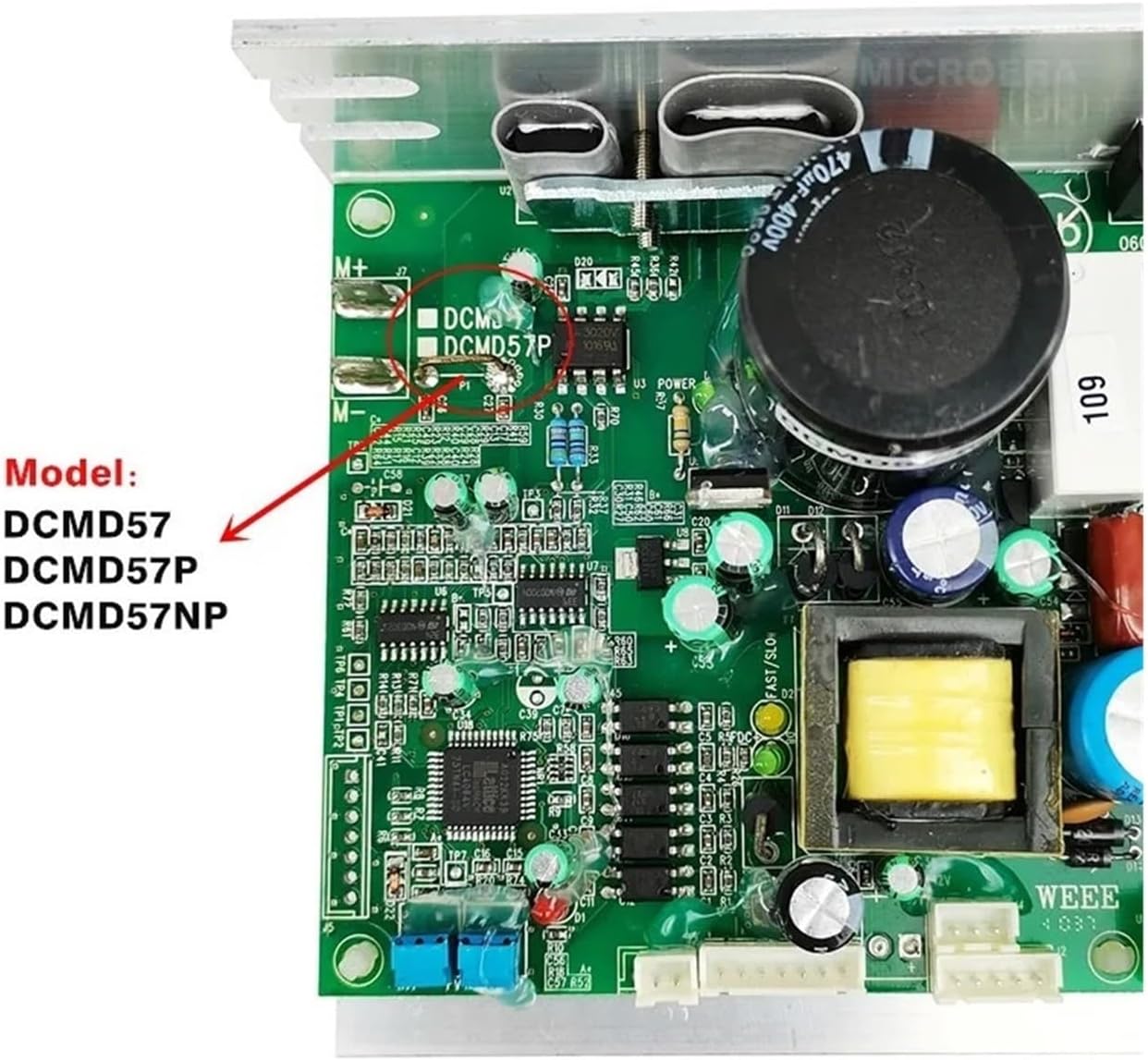
Figure 3: Close-up indicating the compatible model numbers: DCMD57, DCMD57P, and DCMD57NP.
Specifications
| Part Model | DCMD57 / DCMD57P / DCMD57NP |
| Application | Treadmill repair and speed control |
| Voltage Compatibility | 220V (Original) |
| Pin Configuration | 3-pin |
| Package Dimensions | 1.18 x 0.79 x 0.39 inches |
| Item Weight | 1.76 ounces |
| Assembly Required | No (replacement part) |
Setup and Installation
This section outlines the general steps for replacing a treadmill control board. Due to the electrical nature of this component, it is highly recommended that installation be performed by a qualified technician.
- Disconnect Power: Before beginning, ensure the treadmill is unplugged from the main power outlet.
- Access Control Board: Locate and carefully remove the treadmill's motor cover or console panel to access the existing control board.
- Document Connections: Take clear photos or make a diagram of all existing wiring connections to the old control board. Pay close attention to the AC power input, motor connections, and sensor/incline cables.
- Remove Old Board: Disconnect all wires from the old board and unmount it from its housing.
- Install New Board: Mount the new SQJZWOD DCMD57 series control board in the same location.
- Reconnect Wiring: Carefully reconnect all wires to the new board according to your documentation. Ensure the 220V AC power input is connected correctly to the designated terminals (ACN, ACL). Connect the 3-pin incline cable to the appropriate COM, UP, and DOWN terminals.

Figure 4: Connection points for 220V AC power (ACN, ACL) and the 3-pin incline cable (COM, UP, DOWN) on the control board.
- Secure Connections: Double-check all connections to ensure they are secure and correctly seated.
- Test Functionality: Before reassembling the treadmill, plug it in and perform a brief test to ensure basic functionality (power on, motor response, speed control).
- Reassemble: Once confirmed operational, reattach the motor cover or console panel.
Operation
The SQJZWOD DCMD57 series control board operates by receiving commands from the treadmill's console and translating them into actions for the motor and incline system. It precisely controls the motor's speed to adjust the running belt's movement and manages the incline motor for elevation changes. The board's integrated processor continuously monitors sensor data (e.g., speed, distance, heart rate) and relays this information to the display, allowing users to track their workout progress.
No direct user interaction with the control board is required during normal operation. All controls are managed via the treadmill's console.
Maintenance
Proper maintenance can extend the lifespan of your treadmill's control board and ensure consistent performance.
- Keep Clean: Periodically inspect the control board area for dust and debris. Use compressed air to gently clean the board, ensuring no moisture is introduced.
- Ensure Ventilation: Confirm that the treadmill's motor compartment has adequate airflow to prevent the control board from overheating.
- Avoid Moisture: Keep the treadmill and its components away from liquids and high humidity environments.
- Regular Inspections: During routine treadmill maintenance, visually inspect the control board for any signs of damage, such as burnt components or loose connections.
Troubleshooting Common Error Codes
The treadmill's console may display error codes indicating issues with the control board or connected components. Below are common error codes and their potential causes:
- E01: Indicates a communication failure or sensor failure. Check all sensor connections and wiring.
- E02: Often points to a motor issue. It is recommended to test the motor first. If the motor functions normally, the control board may need replacement.
- E03: Signifies a sensor fault. The treadmill may run for a few seconds before displaying E03. Inspect all sensor connections and the sensors themselves.
- E04: Typically an over-current fault. This situation often suggests burnt components on the control board, requiring board replacement.
- E08: May indicate a lift motor control fault. Check the incline motor and its connections to the control board.
If troubleshooting steps do not resolve the issue, or if you are unsure about diagnosing the problem, consult a qualified technician.
Warranty and Support
For warranty information or technical support regarding your SQJZWOD DCMD57, DCMD57P, or DCMD57NP treadmill speed controller motherboard, please refer to the documentation provided with your purchase or contact the seller directly. Ensure you have your purchase details and product model information available when seeking support.
The manufacturer aims to respond to inquiries within 24 hours.