
1. Important Safety Information
Please read this entire instruction manual carefully before using the KGHKGH 11-in-1 Steam Mop. Failure to follow these instructions may result in electric shock, fire, or serious injury.
- Always ensure the appliance is unplugged from the power outlet before filling or emptying the water tank, or when not in use.
- Do not leave the steam mop unattended while it is powered on.
- Use only distilled or demineralized water in the water tank. Do not add cleaning solutions, perfumes, or other chemicals, as this may damage the appliance and void the warranty.
- Keep the appliance out of reach of children and pets.
- Do not direct steam at people, animals, or electrical appliances.
- The cleaning effect of this product may vary depending on different environments and types of stains.
2. Product Overview
The KGHKGH 11-in-1 Steam Mop Model C021 is a versatile cleaning appliance designed for deep cleaning various surfaces throughout your home using high-temperature steam. Its detachable design allows for use as both an upright steam mop and a handheld steamer, providing flexibility for different cleaning tasks.
Key Features:
- 11-in-1 Multi-Purpose Cleaning: Comes with 11 accessories for diverse cleaning needs, including floors, clothing, glass, furniture, stoves, sinks, carpets, and more.
- High-Temperature Deep Cleaning: Heats up to 260°F (126°C) to effectively remove 99.9% of stubborn stains without harsh chemicals.
- Removable Water Tank: 15.2 oz (450 ml) capacity provides up to 45 minutes of continuous steam. Easy to refill.
- Rapid Heat-Up: Ready to use in just 20 seconds.
- Adjustable Steam Control: Customize steam levels for different cleaning requirements.
- Adjustable Angles & Height: Mop head rotates 120° (left/right) and 90° (front/rear) for hard-to-reach areas. Adjustable height for comfortable use.
- Long Power Cord: 23-ft (7-meter) ultra-long power cord for extended reach.
- Self-Standing Design: Convenient for storage and breaks during cleaning.
3. What's Included
Your KGHKGH 11-in-1 Steam Mop package includes the following components:
- Steam Mop Main Unit (x1)
- Telescopic Rod and Grip (x1)
- Mop Head (x1)
- Removable Water Tank (x1)
- Microfiber Pads (x2)
- Carpet Glider (x1)
- Accessory Adaptor (x1)
- Angle Nozzle (x1)
- Small Cloth (x1)
- Window Cleaning Tool (x1)
- Scraping Tool (x1)
- Round Brush (x1)
- Flat Brush (x1)
- Ironing Brush (x1)
- Large Round Brush (x1)
- 23 ft Power Cord (integrated)

Image: All included accessories for the KGHKGH 11-in-1 Steam Mop, laid out neatly on a surface.
4. Assembly and Setup
4.1 Assembling the Upright Steam Mop:
- Connect Telescopic Rod: Insert the lower part of the telescopic rod into the main unit until it clicks securely into place.
- Attach Handle: Connect the handle to the upper part of the telescopic rod, ensuring it clicks into position.
- Attach Mop Head: Secure the mop head to the bottom of the main unit.
- Attach Microfiber Pad: Place a microfiber pad onto the mop head, ensuring it adheres firmly with the Velcro strips.
4.2 Filling the Water Tank:
- Ensure the steam mop is unplugged.
- Remove the water tank from the main unit by pressing the release button and sliding it out.
- Open the water tank cap.
- Fill the water tank with clean, distilled, or demineralized water up to the "MAX" line. Do not overfill.
- Close the water tank cap securely and reinsert the tank into the main unit until it clicks.
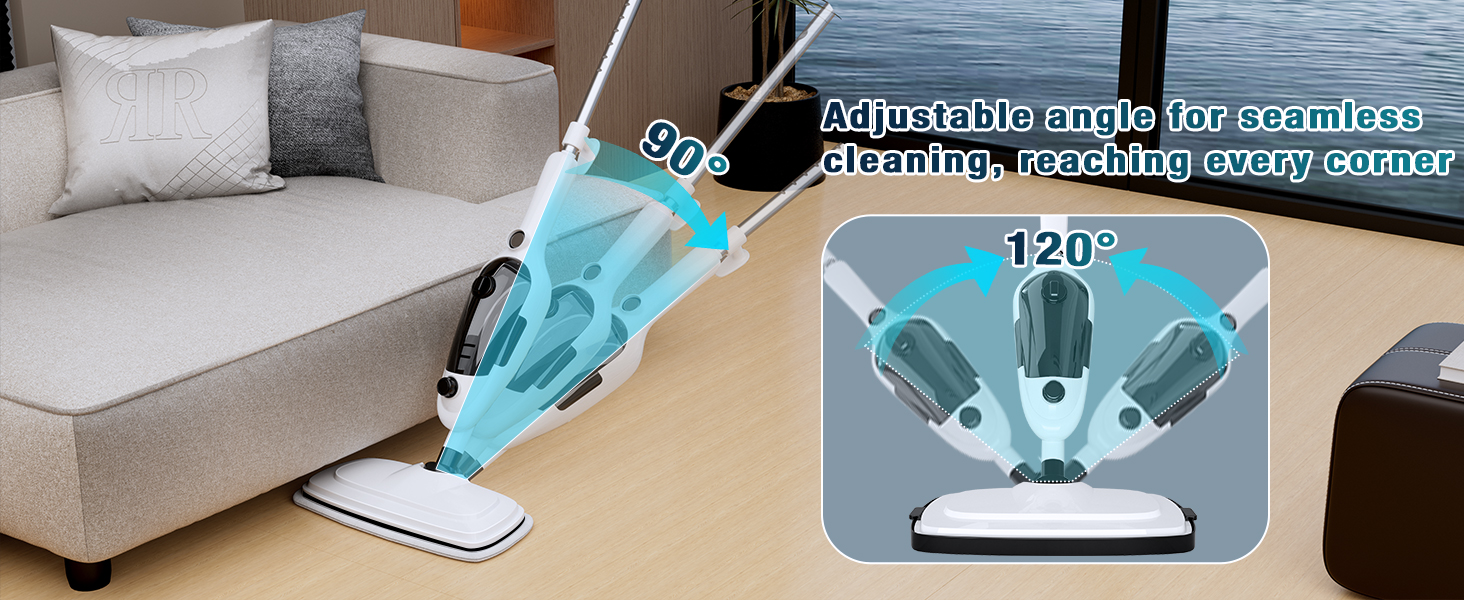
Image: Detailed steps on how to remove and fill the water tank for the steam mop.
Video: A user demonstrates the assembly of the steam mop, including connecting the handle and mop head, and attaching the microfiber pad. The video also shows how to remove and fill the water tank.
5. Operating Instructions
5.1 Powering On and Steam Selection:
- Plug the power cord into a grounded electrical outlet. The indicator light will illuminate.
- Wait approximately 20 seconds for the mop to heat up. The indicator light will change to solid when ready.
- Press the steam control button to select your desired steam level (e.g., low, medium, high).

Image: The steam mop's control panel with options for adjustable steam settings (Min to Max).
5.2 Cleaning Floors:
- For hard floors (hardwood, tile, laminate, sealed stone, marble), ensure the microfiber pad is attached.
- For carpets, attach the carpet glider over the mop head with the microfiber pad.
- Move the mop slowly and steadily over the surface to allow the steam to penetrate and clean effectively.
- The mop head's 120° and 90° rotating angles allow for easy maneuverability around furniture and into corners.

Image: The steam mop effectively cleaning different floor types including sealed hardwood, sealed stone, tile, laminate, carpet, and marble.
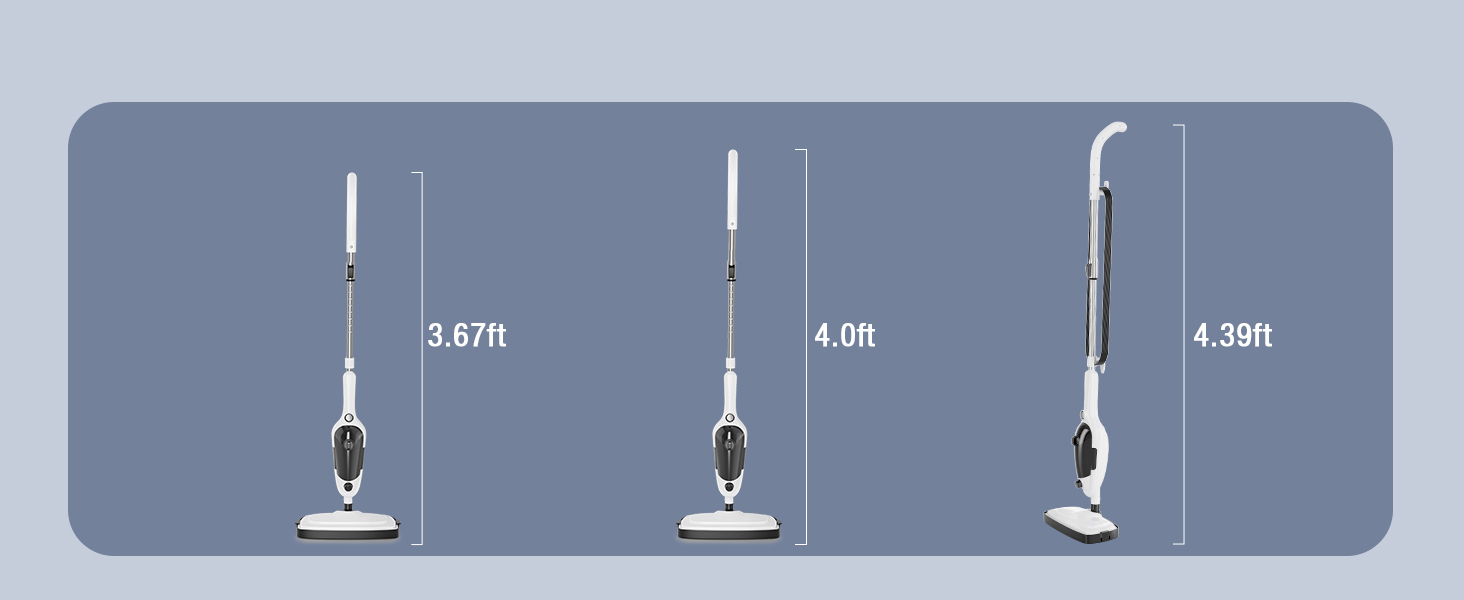
Image: The steam mop head demonstrating its 90° and 120° adjustable angles for seamless cleaning in tight corners and under furniture.
6. Multi-Purpose Cleaning
The detachable main unit transforms into a handheld steamer, allowing you to tackle various cleaning tasks with specialized attachments:
- Angle Nozzle & Brushes: Ideal for cleaning grout lines, sink fixtures, stove tops, and hard-to-reach crevices.
- Window Cleaning Tool: Perfect for streak-free cleaning of windows, mirrors, and glass surfaces.
- Ironing Brush & Small Cloth: Use for steaming garments, curtains, and upholstery to remove wrinkles and refresh fabrics.
- Scraping Tool: Helps remove tough, baked-on grime from ovens or grills.

Image: A visual guide to the various attachments included with the steam mop, demonstrating their uses for cleaning toys, sinks, garments, windows, furniture, and stoves.
Video: A user demonstrates the versatility of the steam mop, showing how to detach the handheld unit and use various attachments for cleaning different surfaces like dolls, tables, and windows.
7. Maintenance
7.1 Cleaning Microfiber Pads:
- Remove microfiber pads from the mop head after each use.
- Pads are machine washable. Wash with similar colors in warm water. Do not use bleach or fabric softener.
- Air dry or tumble dry on low.
7.2 Descaling the Water Tank:
To maintain optimal performance and prevent mineral buildup, descale the water tank periodically, especially if using tap water (though distilled water is recommended).
- Mix a solution of equal parts white vinegar and water.
- Fill the water tank with the solution and let it sit for 30 minutes.
- Empty the tank and rinse thoroughly with clean water.
7.3 Storage:
Unplug the appliance and allow it to cool completely before storing. Empty any remaining water from the tank. Store the steam mop and all accessories in a cool, dry place.
8. Troubleshooting
| Problem | Possible Cause | Solution |
|---|---|---|
| No steam produced. | Water tank is empty or not properly inserted. | Refill water tank and ensure it is securely clicked into place. |
| Steam is weak or inconsistent. | Mineral buildup in the tank or nozzle. | Descale the water tank and clean nozzles as per maintenance instructions. |
| Mop head leaves streaks. | Microfiber pad is dirty or worn out. | Replace with a clean microfiber pad. |
9. Specifications
| Feature | Specification |
|---|---|
| Brand | KGHKGH |
| Model Name | C021 |
| Item Weight | 6.32 Pounds (2.87 kg) |
| Tank Volume | 15.2 Fluid Ounces (450 ml) |
| Heat Time | 20 Seconds |
| Maximum Temperature | 260 Degrees Fahrenheit (126°C) |
| Power Source | Electric |
| Power Cord Length | 23 ft (7 meters) |
| Color | White |
| UPC | 797505404852 |
10. Warranty and Support
For warranty information or technical support, please refer to the contact details provided with your purchase documentation or visit the official KGHKGH website. Keep your proof of purchase for any warranty claims.

Image: KGHKGH customer service representatives wearing headsets, indicating 24-hour support availability.


