
YL80C
Ebike LCD Display Screen Meter YL80C User Manual
Model: YL80C
1. Introduction
This manual provides comprehensive instructions for the installation, operation, and maintenance of your YL80C Ebike LCD Display Screen Meter. The YL80C is a color LCD display designed to enhance your electric bicycle riding experience by providing essential information and control functions. It features a 5-pin waterproof connector and is compatible with 36V, 48V, and 52V power supplies.
Key functions include battery level display, motor power indication, power gear adjustment, speed display (real-time, maximum, average), mileage display (single trip, total), headlight control, and personalized parameter settings such as wheel diameter and speed limit.
2. Safety Information
Please read all safety warnings and instructions carefully before installation and operation to prevent injury or damage to the device. Keep this manual for future reference.
- Waterproof Connector: Ensure the 5-pin waterproof connector is securely and correctly connected to prevent short circuits or water damage.
- Power Supply: Only connect the display to compatible 36V, 48V, or 52V ebike power systems. Using an incorrect voltage may damage the unit.
- Installation: Professional installation is recommended. Ensure the display is securely mounted to the handlebar to prevent detachment during riding.
- Operation While Riding: Avoid making complex adjustments or settings changes while riding. Pull over to a safe location before interacting with the display's settings.
- Cleaning: Do not use abrasive cleaners or solvents. Refer to the Maintenance section for proper cleaning procedures.
- Temperature: Do not expose the display to extreme temperatures outside its operating range.
3. Product Overview
The YL80C display features a robust design with an ABS housing, tempered glass screen, and nylon base, built to withstand various terrains and weather conditions.
3.1 Components
- YL80C LCD Display Unit
- Control Panel (K5 or K6 button type)
- 5-pin Waterproof Connector Cable
- Flexible Mounting Bracket (for 22.2mm, 25.4mm, and 31.8mm handlebars)
3.2 Display Features
- Color LCD Screen
- Battery Level Indicator
- Motor Power Indication
- Power Assist Level Adjustment and Display
- Speed Display (Real-time, Max, Average)
- Mileage Display (Single Trip, Total Odometer)
- Headlight Control and Indicator
- Personalized Parameter Settings (e.g., wheel diameter, speed limit)
- Bluetooth Connection Indication (Customized)
- USB Interface (Customized)
- Factory Default Parameter Restoration Function
3.3 Product Views

Figure 3.3.1: Front view of the YL80C Display and Control Panel.

Figure 3.3.2: YL80C Display with K6 Button Control Panel.

Figure 3.3.3: Detail of the 5-pin Waterproof Connector.
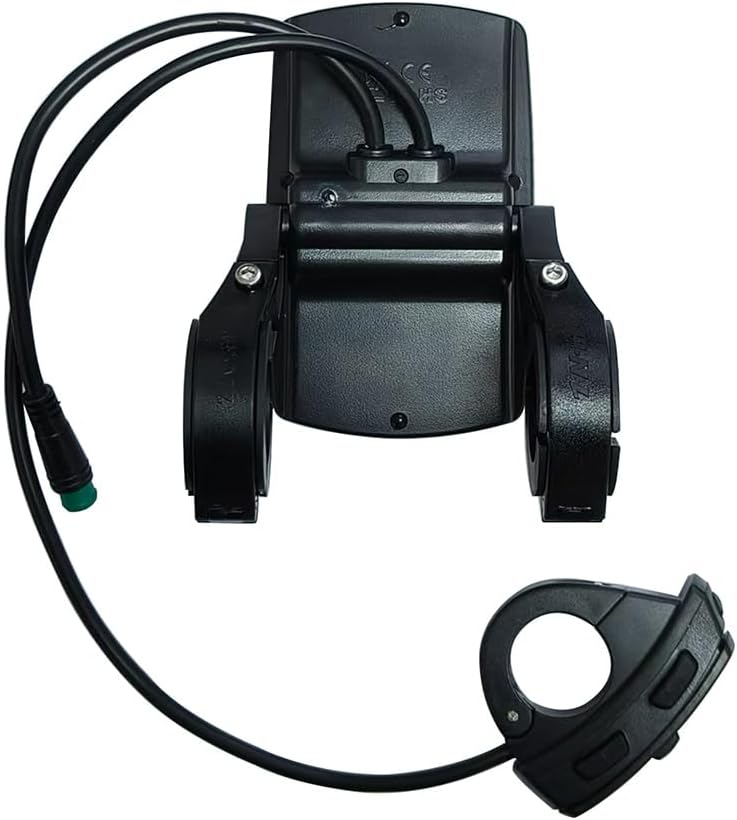
Figure 3.3.4: Rear View and Mounting Bracket.
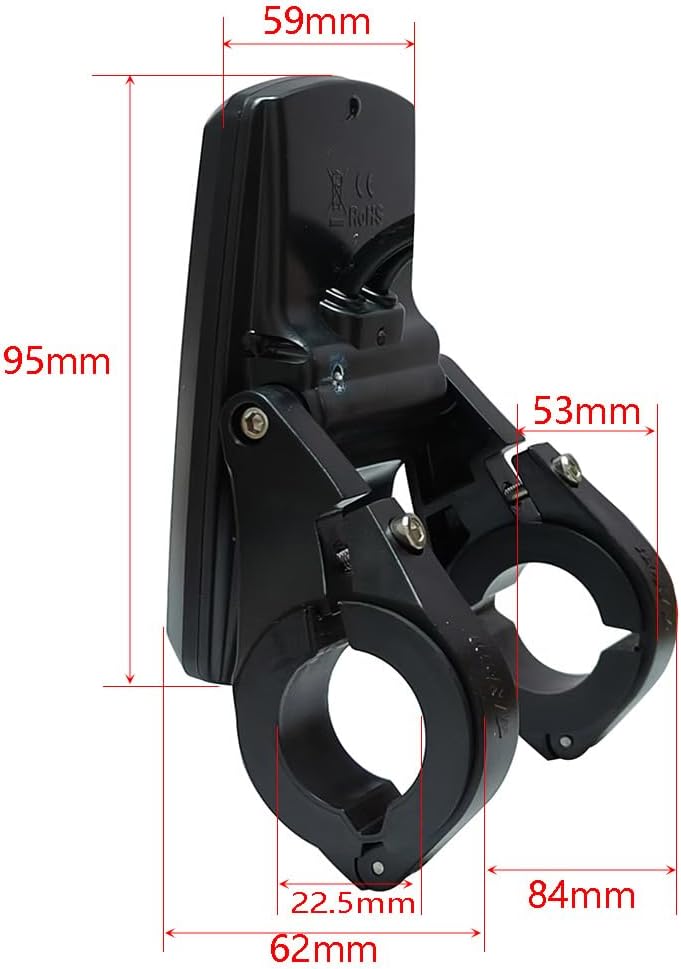
Figure 3.3.5: YL80C Display Dimensions.
4. Setup and Installation
Before installation, ensure your ebike's power is off. It is crucial to verify the communication protocol compatibility of your ebike system with the YL80C display. Contact customer service with your old display's serial number for verification if unsure.
4.1 Mounting the Display
- Select an appropriate position on your ebike handlebar. The flexible mounting bracket supports handlebar sizes of 22.2mm, 25.4mm, and 31.8mm.
- Loosen the screws on the mounting bracket.
- Place the bracket around the handlebar and tighten the screws securely, ensuring the display is stable and does not rotate freely.
- Adjust the display angle for optimal visibility.
4.2 Connecting the Cables
- Locate the corresponding 5-pin male waterproof connector on your ebike's wiring harness.
- Align the pins of the YL80C display's 5-pin female connector with the male connector on your ebike.
- Gently push the connectors together until they click into place, ensuring a firm and waterproof seal.
- Route the cables neatly and secure them with cable ties to prevent snagging or damage during riding.
Important Note: The YL80C LCD monitor has a variety of communication protocols. To ensure plug-and-play compatibility, please contact customer service after purchase and provide the serial number on the back of your old display. This will help ensure you receive the correct version for your ebike.
5. Operating Instructions
The YL80C display provides intuitive control over your ebike's functions. The control panel typically consists of power, mode, and up/down buttons.
5.1 Power On/Off
- To Power On: Press and hold the Power button (usually the middle button) for a few seconds until the display illuminates.
- To Power Off: Press and hold the Power button again for a few seconds until the display turns off.
5.2 Basic Display Functions
- Speed Display: Shows real-time speed, maximum speed, and average speed. Use the Mode button to cycle through these views.
- Mileage Display: Displays single trip mileage and total odometer. Cycle using the Mode button.
- Battery Level: Indicates the remaining battery charge.
- Motor Power: Shows the current power output of the motor.
- Power Assist Level: Adjust the level of motor assistance using the Up (+) and Down (-) buttons. Higher numbers indicate more assistance.
5.3 Headlight Control
To turn the ebike's headlights on or off, typically press and hold the Up (+) button for a few seconds. A headlight icon will appear or disappear on the display.
5.4 Parameter Settings
The YL80C allows for personalized parameter settings. Accessing these settings usually involves a specific button combination (e.g., holding both Up and Down buttons simultaneously for a few seconds while powered on). Consult your ebike's specific controller manual or contact customer service for detailed instructions on accessing and modifying these parameters.
- Wheel Diameter: Essential for accurate speed and mileage readings. Set this according to your ebike's wheel size.
- Speed Limit: Adjust the maximum assisted speed. Adhere to local regulations regarding ebike speed limits.
- Battery Voltage: Confirm the correct voltage setting (36V, 48V, 52V) for your ebike.
- Restore Factory Defaults: An option to reset all parameters to their original factory settings.
Note: Customized features like Bluetooth connectivity and USB charging ports may require specific activation or configuration steps not covered in this general manual. Refer to additional documentation or contact customer support for these features.
6. Maintenance
Proper maintenance ensures the longevity and optimal performance of your YL80C display.
- Cleaning: Wipe the display screen and housing with a soft, damp cloth. Do not use harsh chemicals, abrasive cleaners, or solvents, as these can damage the screen or housing.
- Water Exposure: While the display is waterproof, avoid submerging it. Ensure the connector is always securely sealed.
- Storage: When not in use for extended periods, store the ebike and display in a cool, dry place, away from direct sunlight and extreme temperatures.
- Cable Inspection: Periodically check the connecting cable and connector for any signs of wear, fraying, or damage. Replace if necessary.
- Mounting Security: Regularly check that the display is securely mounted to the handlebar and that all screws are tight.
7. Troubleshooting
If you encounter issues with your YL80C display, refer to the following common problems and solutions:
| Problem | Possible Cause | Solution |
|---|---|---|
| Display does not power on. |
|
|
| Incorrect speed or mileage readings. |
|
|
| Display shows error codes. |
|
|
| Buttons are unresponsive. |
|
|
For issues not listed here or if solutions do not resolve the problem, please contact customer support.
8. Specifications
| Feature | Specification |
|---|---|
| Model Name | YL80C |
| Display Type | Color LCD |
| Screen Size | 9.5 Centimeters |
| Connectivity | Wired (5-pin waterproof connector) |
| Compatible Voltage | 36V, 48V, 52V |
| Material | ABS Housing, Tempered Glass Screen, Nylon Base |
| Color | Black |
| Item Weight | 137 Grams |
| Dimensions (L x W x H) | 62mm x 59mm x 95mm (approx. 4.72 x 3.94 x 3.54 inches package dimensions) |
| Mounting Type | Handlebar Mount (22.2mm, 25.4mm, 31.8mm compatible) |
| Human Interface Input | Buttons (K5/K6 types) |
| Included Components | Display, Mounting Bracket |
9. Warranty and Support
9.1 Warranty Information
This YL80C Ebike LCD Display comes with a 1 Year Manufacturer Warranty from the date of purchase. This warranty covers defects in materials and workmanship under normal use. It does not cover damage resulting from misuse, accidents, unauthorized modifications, or improper installation.
Please retain your proof of purchase for warranty claims.
9.2 Customer Support
For technical assistance, troubleshooting, warranty claims, or inquiries regarding communication protocol compatibility, please contact our online customer service. When contacting support, please be prepared to provide:
- Your purchase details.
- The serial number located on the back of your YL80C display.
- A clear description of the issue or question.
We will endeavor to respond to your inquiries promptly.
Ask a question about this manual
Ask about setup, troubleshooting, compatibility, parts, safety, or missing instructions. Manuals+ will review the question and use this page’s manual context to help answer it.