
Introduction
The Taiyo PBR Bull Riding Showdown is a radio-controlled simulation game designed to replicate the experience of professional bull riding. This interactive game supports two players and features two distinct game modes: Challenge and Practice. It is an officially licensed product of PBR (Professional Bull Riders), offering competitive gameplay for users aged 6 years and up.
What's in the Box
- 1 Remote Control
- 1 Bull Riding Simulator (Base with Bull and Rider Figure)
Setup
Follow these steps to set up your Taiyo PBR Bull Riding Showdown game:
- Unpack Components: Carefully remove all items from the packaging. Ensure all listed components are present.
- Install Batteries in Main Unit: Locate the battery compartment on the underside of the bull riding simulator base. Insert the required batteries (not included) according to the polarity indicators. Secure the battery cover.
- Install Batteries in Remote Control: Locate the battery compartment on the back of the remote control. Insert the required batteries (not included) according to the polarity indicators. Secure the battery cover.
- Place on a Flat Surface: Position the bull riding simulator base on a stable, flat surface to ensure optimal performance during play.
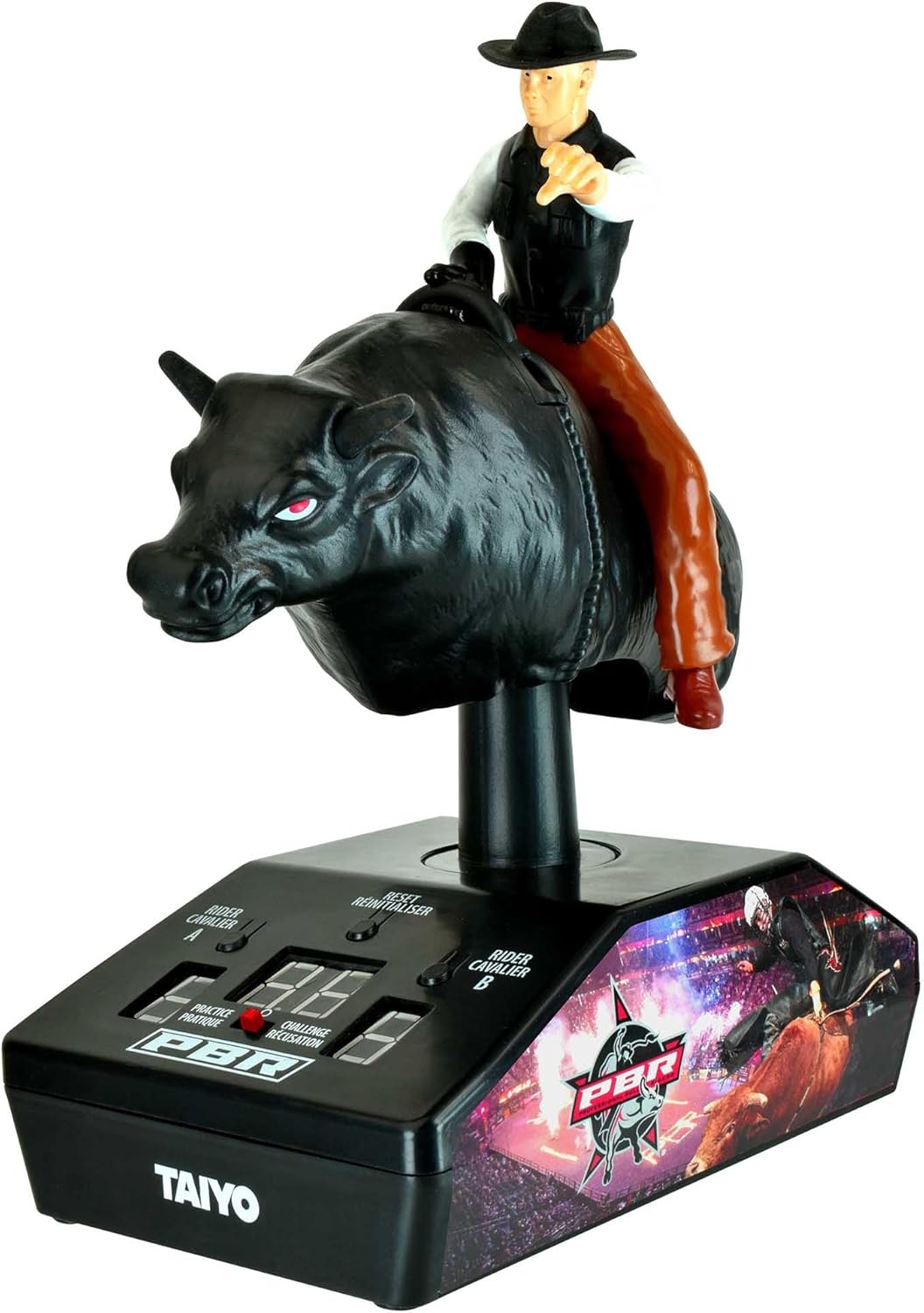
Image: The Taiyo PBR Bull Riding Showdown game, showing the bull and cowboy figure mounted on the control base.
Operating Instructions
To begin playing, ensure both the main unit and the remote control have fresh batteries installed and are powered on. The remote control operates the bull's movements, simulating a bull ride.
- Power On: Turn on the main unit using the power switch, typically located on the base. Turn on the remote control using its power switch.
- Pairing: The unit and remote should automatically pair. If not, refer to the troubleshooting section.
- Remote Control Functions:
- Left Joystick: Controls specific bull movements (e.g., spins, bucks).
- Right Joystick: Controls other bull movements (e.g., kicks, rolls).
- Mode Selector: Switch between Challenge and Practice modes.
- Reset Button: Resets the game or score.
- Controlling the Bull: Use the joysticks on the remote to manipulate the bull's movements. The goal is to keep the cowboy figure on the bull for as long as possible, or to achieve specific objectives depending on the selected game mode.

Image: The remote control for the Taiyo PBR Bull Riding Showdown, featuring dual joysticks for bull manipulation.
Game Modes
The Taiyo PBR Bull Riding Showdown offers two primary game modes:
- Challenge Mode: This mode provides a competitive experience, often involving a 3-in-1 challenge format that evaluates a player's time, speed, and skill. Players compete against the clock, the bull's movements, and potentially another opponent to achieve the highest score or longest ride duration.
- Practice Mode: Designed for skill development, this mode allows players to refine their control over the bull's movements without the pressure of a timed challenge. It is ideal for familiarizing oneself with the controls and different bull behaviors.
The game supports two-player competitive gameplay, allowing friends to challenge each other directly.

Image: Retail packaging illustrating the game's two-player capability and dual game modes.
Maintenance
Proper maintenance ensures the longevity and optimal performance of your game:
- Cleaning: Use a soft, dry cloth to wipe down the bull, cowboy figure, and base. Avoid using harsh chemicals or abrasive cleaners, as these can damage the finish.
- Battery Care: Always remove batteries from both the main unit and the remote control if the game will not be used for an extended period. This prevents battery leakage, which can damage the electronics.
- Storage: Store the game in a cool, dry place, away from direct sunlight and extreme temperatures. Keep it in its original packaging or a protective container to prevent dust accumulation and physical damage.
Troubleshooting
If you encounter issues with your Taiyo PBR Bull Riding Showdown, refer to the following common problems and solutions:
- Game Does Not Power On:
- Check that batteries are correctly installed in both the main unit and the remote control, observing polarity.
- Replace old or depleted batteries with fresh ones.
- Ensure power switches on both devices are in the 'ON' position.
- Bull Does Not Respond to Remote Control:
- Verify that both the main unit and remote control are powered on.
- Ensure the remote control is within operating range of the main unit.
- Check for any obstructions between the remote and the main unit.
- Replace batteries in both devices, even if they seem partially charged.
- Turn both devices off and then on again to re-establish connection.
- Cowboy Figure Falls Off Too Easily:
- Ensure the cowboy figure is securely seated on the bull.
- Practice in 'Practice Mode' to improve control over the bull's movements.
If problems persist after attempting these solutions, contact customer support.
Specifications
| Product Dimensions | 8.75 x 10 x 7 inches |
| Item Weight | 1.61 pounds |
| Model Number | 500015A |
| Manufacturer Recommended Age | 6 years and up |
| Manufacturer | Toy Shock |
Safety Information
Please read and adhere to the following safety guidelines:
- Choking Hazard: This product contains small parts and is not suitable for children under 3 years of age.
- Battery Safety: Do not mix old and new batteries. Do not mix alkaline, standard (carbon-zinc), or rechargeable (nickel-cadmium) batteries. Always insert batteries correctly according to polarity. Remove exhausted batteries promptly.
- Adult Supervision: Adult supervision is recommended during play, especially for younger children.
- Avoid Water: Keep the product away from water and moisture to prevent damage to electronic components.
Warranty and Support
For information regarding warranty coverage or technical support, please refer to the contact details provided on the product packaging or visit the official Toy Shock website. Keep your purchase receipt as proof of purchase.