
1. Introduction
Thank you for choosing the OUKITEL P2001 Plus Portable Power Station. This manual provides essential information for the safe and efficient operation, maintenance, and troubleshooting of your device. Please read this manual thoroughly before use and retain it for future reference.
2. Safety Instructions
Observe the following safety precautions to prevent injury or damage to the product:
- Do not disassemble, repair, or modify the unit.
- Avoid exposure to rain, moisture, or direct sunlight for extended periods.
- Keep the device away from heat sources, open flames, and flammable materials.
- Ensure proper ventilation during use and charging.
- Do not operate the device with wet hands.
- Keep out of reach of children and pets.
- Use only OUKITEL-approved accessories and charging cables.
3. What's in the Box
The OUKITEL P2001 Plus package includes the following components:
- OUKITEL P2001 Plus Portable Power Station
- 400W Solar Panel (if purchased as a bundle)
- AC Charging Cable
- Car Charging Cable
- Solar Charging Cable
- User Manual (this document)
Note: Due to the weight of the product, the power station and solar panel may be delivered separately.
4. Product Overview
The OUKITEL P2001 Plus is a high-capacity portable power station designed for various applications, including home backup, outdoor activities, and emergency power. It features multiple output ports and supports various charging methods.

Image 4.1: OUKITEL P2001 Plus Power Station with an accompanying solar panel, showcasing its compact design and connectivity options.
4.1. Main Unit Features
- 2048Wh LiFePO4 Battery: Provides long-lasting and safe power.
- 2400W AC Output (5000W Peak): Capable of powering most household appliances.
- Multiple Output Ports: Includes AC, USB-A, USB-C PD, DC, and Cigarette Lighter ports.
- Integrated Display: Shows real-time battery level, input/output power, and status.
- Adjustable Charging Speed: Allows selection of charging power (400W, 800W, 1200W, 1800W).
- APP Control: Monitor and control the power station via a smartphone application.
- Uninterruptible Power Supply (UPS): Provides seamless power transfer in less than 0.01 seconds during outages.

Image 4.2: Detailed view of the OUKITEL P2001 Plus output ports, including 4 AC outlets, 4 USB-C ports (20W, 45W, 100W), 2 USB-A ports (12W), 2 DC 36W ports, and 1 120W cigarette lighter port.
4.2. Solar Panel Features (if applicable)
- 400W Output: Efficient solar energy conversion.
- Durable ETFE Coating: Provides premium performance, is lighter than glass, offers 95% light transmittance, and is UV-resistant for extended lifespan.

Image 4.3: Diagram illustrating the durable ETFE coating of the solar panel, highlighting its lightweight, high light transmittance, UV resistance, and contribution to a longer lifespan.
5. Setup
5.1. Initial Charging
Before first use, fully charge the OUKITEL P2001 Plus. This ensures optimal battery performance and calibration.
- Connect the AC charging cable to the power station's AC input port.
- Plug the other end of the AC charging cable into a standard wall outlet.
- The display will indicate charging status. Charge until the battery indicator shows 100%.

Image 5.1: The OUKITEL P2001 Plus connected to a wall outlet for fast AC charging, illustrating the process of replenishing the power station's battery.
5.2. Connecting the Solar Panel (Optional)
To charge using solar power:
- Unfold the solar panel and place it in direct sunlight.
- Connect the solar charging cable to the solar panel's output port.
- Connect the other end of the solar charging cable to the power station's DC input port.
- The display will show solar charging input. Adjust the panel's angle for maximum efficiency.

Image 5.2: The OUKITEL P2001 Plus being charged by a solar panel outdoors, demonstrating its capability for renewable energy input.
6. Operating Instructions
6.1. Turning On/Off
- To Turn On: Press and hold the main power button for 3 seconds. The display will light up.
- To Turn Off: Press and hold the main power button for 3 seconds. The display will turn off.
6.2. Charging the Power Station
The P2001 Plus supports multiple charging methods:
- AC Wall Outlet: Connect the AC charging cable. Adjustable charging speeds (400W, 800W, 1200W, 1800W) can be selected via the knob or app.
- Solar Panel: Connect the solar charging cable to compatible solar panels (e.g., OUKITEL PV200, PV400).
- Car Charger: Use the car charging cable to charge from your vehicle's 12V/24V cigarette lighter port.
- AC + Solar Charging: Combine AC and solar input for the fastest charging times.

Image 6.1: The OUKITEL P2001 Plus connected to a wall outlet, demonstrating the adjustable charging speed knob. Users can select charging rates from 400W to 1800W to optimize charging time or extend battery life.
6.3. Using Output Ports
The P2001 Plus offers various output options:
- AC Outlets: Press the AC power button to enable AC output. Plug in your AC appliances.
- USB-A/USB-C Ports: These ports are typically active when the unit is on. Connect your USB-powered devices.
- DC/Cigarette Lighter Port: Press the DC power button to enable DC output. Connect compatible DC devices.

Image 6.2: The OUKITEL P2001 Plus powering various indoor appliances such as a microwave, coffee machine, refrigerator, air conditioner, washing machine, and television, indicating typical runtimes.
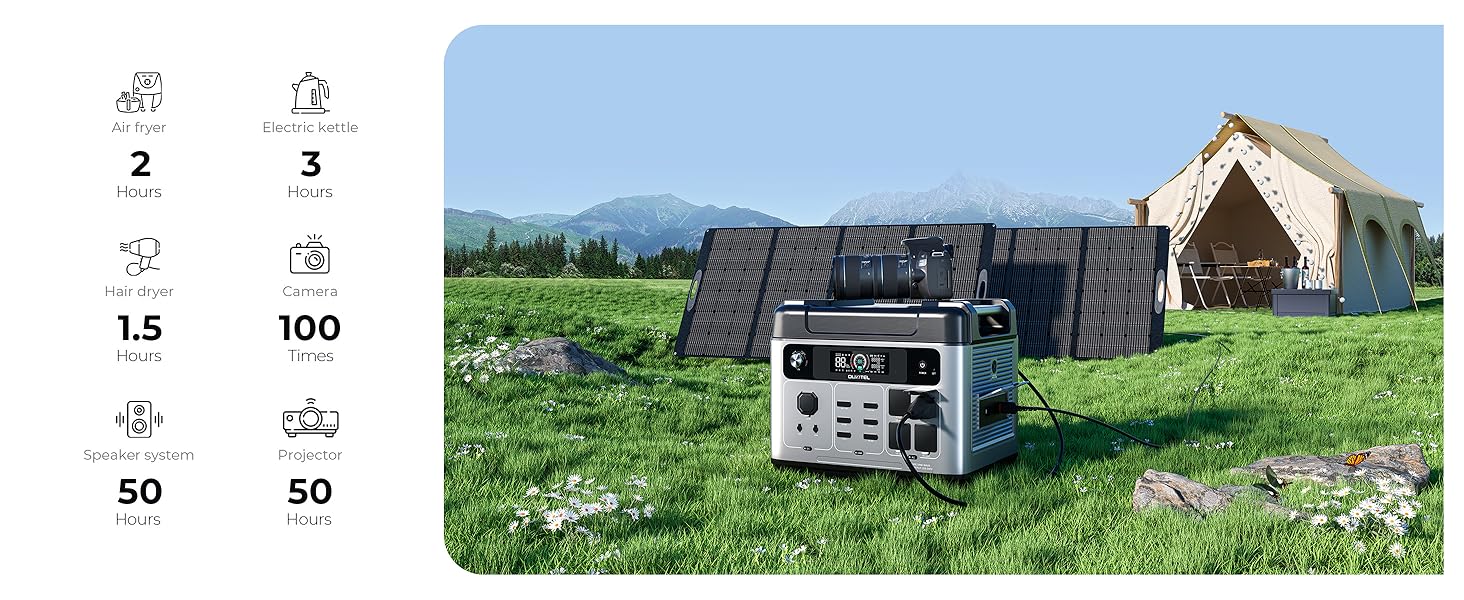
Image 6.3: The OUKITEL P2001 Plus powering outdoor devices like an air fryer, electric kettle, hair dryer, camera, speaker system, and projector, with estimated usage times.
6.4. App Control
Download the OUKITEL app to monitor and control your power station remotely:
- Scan the QR code in the manual or search for the OUKITEL app in your device's app store.
- Follow the in-app instructions to pair your P2001 Plus via Bluetooth or Wi-Fi.
- Through the app, you can check battery level, input/output power, charging time, temperature, and adjust settings.

Image 6.4: A smartphone displaying the OUKITEL app interface, showing real-time monitoring of the P2001 Plus power station's battery level, input/output power, and other vital statistics.
6.5. UPS Function
The Uninterruptible Power Supply (UPS) feature ensures continuous power for connected devices during a power outage.
- Connect the P2001 Plus to a wall outlet via the AC charging cable.
- Plug your critical devices (e.g., computers, medical equipment) into the AC outlets of the P2001 Plus.
- In the event of a power failure, the P2001 Plus will automatically switch to battery power in less than 0.01 seconds, preventing interruptions.

Image 6.5: The OUKITEL P2001 Plus acting as an Uninterruptible Power Supply (UPS), seamlessly providing power to a desktop computer setup during a simulated power outage.
7. Maintenance
7.1. Cleaning
- Ensure the power station is turned off and disconnected from all power sources and devices before cleaning.
- Use a soft, dry cloth to wipe the exterior. Do not use abrasive cleaners or solvents.
- Keep ventilation openings clear of dust and debris.
7.2. Storage
- Store the power station in a cool, dry place, away from direct sunlight and extreme temperatures.
- For long-term storage, charge the battery to approximately 50-80% every 3-6 months to maintain battery health.
- Avoid storing in areas with high humidity or corrosive gases.
7.3. Battery Care
The P2001 Plus uses LiFePO4 batteries, known for their longevity and safety. Proper care can extend its lifespan beyond 10 years and 3,500+ charge cycles.
- Avoid fully discharging the battery frequently.
- Do not expose the battery to temperatures outside its operating range.
- If the unit will not be used for an extended period, perform periodic charging as described in the storage section.

Image 7.1: Visual representation of the advanced LiFePO4 battery technology used in the OUKITEL P2001 Plus, highlighting its safety, 2048Wh capacity, 2400W output, and over 3500 cycles with 80% capacity retention for a lifespan exceeding 10 years.
8. Troubleshooting
If you encounter issues with your OUKITEL P2001 Plus, refer to the following common problems and solutions:
| Problem | Possible Cause | Solution |
|---|---|---|
| Unit does not turn on | Battery fully discharged; Power button not pressed long enough | Charge the unit; Press and hold the power button for 3 seconds. |
| AC output not working | AC output not enabled; Overload protection triggered; Device power exceeds 2400W | Press the AC power button; Disconnect some devices; Use devices within the rated power. |
| Slow charging speed | Charging speed set to low; Solar panel not in direct sunlight or obstructed | Adjust charging speed via knob or app; Reposition solar panel for optimal sunlight. |
| App not connecting | Bluetooth/Wi-Fi off; App not updated; Unit too far from phone | Ensure Bluetooth/Wi-Fi is on; Update app; Move phone closer to the unit. |
| Error code on display | Internal fault; Over-temperature; Under-voltage | Refer to the specific error code in the full manual (if available) or contact customer support. |
If the problem persists after attempting these solutions, please contact OUKITEL customer service for assistance.
9. Specifications
| Feature | Specification |
|---|---|
| Model Name | P2001 Plus |
| Battery Type | LiFePO4 |
| Capacity | 2048Wh |
| AC Output Power | 2400W (Pure Sine Wave, 5000W Peak) |
| AC Input Charging | 400W, 800W, 1200W, 1800W (Adjustable) |
| Solar Input | Max 500W |
| USB-A Output | 2 x 12W |
| USB-C Output | 4 ports (20W, 45W, 100W) |
| DC Output | 2 x 36W |
| Cigarette Lighter Output | 1 x 120W |
| UPS Switching Time | < 0.01 seconds |
| Lifespan | 3500+ Cycles to 80% capacity (10+ years) |
| Dimensions | 15.7"L x 11.3"W x 14"H |
| Weight | 65 Pounds |
10. Warranty and Support
OUKITEL provides a 2-year service warranty for the P2001 Plus Portable Power Station. For warranty claims, technical support, or any inquiries, please contact OUKITEL customer service through the official website or your purchase platform.
Please retain your proof of purchase for warranty validation.