1. Important Safety Instructions
Please read and follow all safety instructions before using your Maypug P7 Projector to prevent injury or damage to the device.
- Do not block ventilation openings. Ensure adequate airflow around the projector.
- Do not expose the projector to rain or moisture to reduce the risk of fire or electric shock.
- Avoid looking directly into the projector lens when the lamp is on, as this may cause eye damage.
- Use only attachments/accessories specified by the manufacturer.
- Unplug the projector during lightning storms or when unused for long periods.
- Refer all servicing to qualified service personnel.
2. Package Contents
Verify that all items are present in your package:
- Maypug P7 Projector
- Remote Control
- Power Cable
- User Manual
3. Product Overview
Familiarize yourself with the components and ports of your Maypug P7 Projector.

Figure 3.1: Front view of the Maypug P7 Projector with remote control and projected interface.
3.1. Ports and Connections
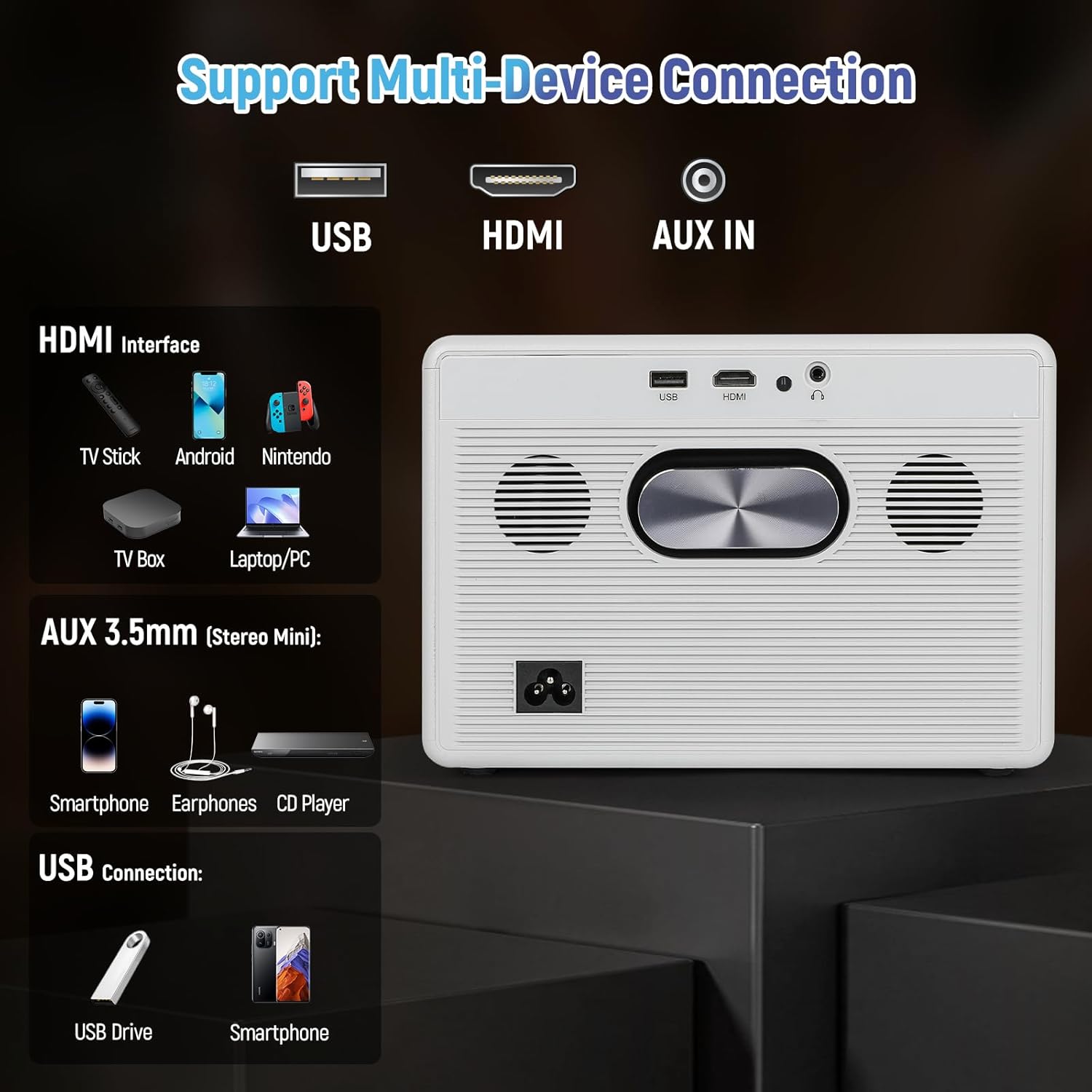
Figure 3.2: Rear panel connections including USB, HDMI, and AUX IN.
- USB Port: For connecting USB storage devices.
- HDMI Port: For connecting external video sources like TV sticks, gaming consoles, or laptops.
- AUX IN (3.5mm Audio Jack): For connecting external audio devices or headphones.
- Power Input: For connecting the power cable.
4. Setup
4.1. Power Connection
- Connect the power cable to the projector's power input.
- Plug the other end of the power cable into a wall outlet.
- Press the power button on the projector or remote control to turn it on.
4.2. Focus and Keystone Adjustment
The Maypug P7 features automatic vertical keystone correction and electric focus for a clear image from various angles.

Figure 4.1: Illustration of automatic keystone correction and electric focus features.
- Automatic Keystone: The projector will automatically adjust vertical distortion (±30°).
- Manual Keystone: For further adjustments, navigate to the settings menu to manually correct keystone up to ±50°.
- Electric Focus: Use the remote control to fine-tune the image sharpness.
4.3. Network Connection (WiFi & Bluetooth)
Connect your projector to a wireless network and Bluetooth devices.
- WiFi Connection:
- Go to the "Settings" menu on the Lilac OS interface.
- Select "WiFi" and choose your desired network.
- Enter the password if prompted. The projector supports dual-band WiFi 6.
- Bluetooth Connection:
- Go to the "Settings" menu.
- Select "Bluetooth" and turn it on.
- Select your Bluetooth device (e.g., external speakers, headphones) from the list to pair. The projector supports Bluetooth 5.4.
5. Operating Instructions
5.1. Navigating Lilac OS and Built-in Apps
The Maypug P7 runs on Lilac OS, providing a user-friendly interface with pre-installed streaming applications.

Figure 5.1: Lilac OS interface displaying pre-installed and downloadable applications.
- Use the Bluetooth remote control to navigate the interface.
- Access pre-installed apps like Netflix, Prime Video, and YouTube directly.
- Download additional applications from Google Play and the TV Store.
5.2. Wireless Projection
Mirror content from your mobile devices wirelessly.
- Miracast (Android): For Android devices, select Miracast from the apps menu and follow the on-screen instructions to connect.
- AumiCast (Android/iOS): For both Android and iOS devices, select AumiCast and follow the pairing instructions.
5.3. Connecting External Devices
Connect devices via HDMI or USB for expanded content options.
- HDMI: Connect TV sticks, gaming consoles, Blu-ray players, or laptops to the HDMI port. The projector supports 4K inputs and 120Hz refresh rates for gaming.
- USB: Insert a USB drive into the USB port to play media files directly.
5.4. Audio Settings
The projector includes built-in 5W stereo speakers. For external audio, use Bluetooth or the AUX IN port.

Figure 5.2: The projector's integrated 5W stereo speakers provide clear audio.
- Adjust volume using the remote control.
- Connect Bluetooth speakers/headphones as described in Section 4.3.
- Connect wired headphones or external speakers via the 3.5mm AUX IN port.
5.5. Zoom Function
Adjust the projected image size without moving the projector.
- Use the remote control to access the zoom function.
- The projector supports 50-100% digital zoom.
6. Maintenance
6.1. Cleaning
- Wipe the exterior of the projector with a soft, dry cloth.
- For the lens, use a lens cleaning cloth and specialized lens cleaning solution. Do not use abrasive cleaners.
6.2. Dust-Proof Sealed Optical Engine
The Maypug P7 features a fully sealed optical engine designed to prevent dust ingress, ensuring consistent performance and extending the lifespan of internal components. This reduces the need for frequent internal cleaning.
6.3. Storage
- Store the projector in a cool, dry place away from direct sunlight and extreme temperatures.
- If storing for an extended period, cover the projector to protect it from dust.
7. Troubleshooting
| Problem | Possible Cause | Solution |
|---|---|---|
| No image displayed | Power cable loose; Input source incorrect; Lens cap on. | Check power connection; Select correct input source (HDMI/USB); Remove lens cap. |
| Image is blurry | Focus not adjusted; Projector too far/close to screen. | Use electric focus via remote; Adjust projector distance. |
| Image is distorted (trapezoid shape) | Keystone not adjusted. | Allow auto keystone to correct; Adjust manual keystone in settings. |
| No sound | Volume too low; External audio device not connected/paired; Mute enabled. | Increase volume; Check Bluetooth/AUX connection; Disable mute. |
| WiFi/Bluetooth connection issues | Out of range; Incorrect password; Interference. | Move closer to router/device; Re-enter password; Reduce interference. |
8. Specifications
| Feature | Detail |
|---|---|
| Brand | Maypug |
| Model Number | M-P7 |
| Display Resolution | Native 1920 x 1080 (1080P), 4K Supported |
| Brightness | 2000 ANSI Lumens |
| Contrast Ratio | 20,000:1 |
| Refresh Rate | 60Hz (up to 120Hz for HDMI input) |
| Operating System | Lilac OS with built-in apps (Netflix, Prime Video, YouTube) |
| Wireless Connectivity | Dual-Band WiFi 6, Bluetooth 5.4, Miracast, AumiCast |
| Keystone Correction | Automatic Vertical (±30°), Manual (±50°) |
| Focus | Electric Focus |
| Zoom Function | 50-100% Digital Zoom |
| Audio | Built-in 5W Stereo Speakers with Hi-Fi audio |
| Optical Engine | Fully Sealed, Dust-Proof |
| LED Lifespan | 50,000 hours |
| Item Weight | 6.73 lbs |
| Dimensions | 10.5 x 9.15 x 9.15 inches (Package Dimensions) |
Note: Item weight and dimensions are approximate.
9. Warranty and Support
Your Maypug P7 Projector is backed by a 3-year warranty. For technical assistance or warranty claims, please contact our 24/7 US-based support team.
Contact information can typically be found on the official Maypug website or your purchase documentation.


