
1. Introduction and Overview
This BENNTOP 3000W 24V Hybrid Solar Inverter is a versatile device combining the functions of a pure sine wave inverter, an 80A MPPT solar charge controller, and a battery charger. It is designed for off-grid solar systems, converting 24V DC battery power to 230V AC for various applications. The inverter supports both lead-acid and lithium batteries and offers multiple charging and output modes to suit different energy needs.

Image 1.1: The BENNTOP 3000W 24V Hybrid Solar Inverter, highlighting its 3000W AC output, 80A MPPT charge current, 400VDC max PV voltage, and 60A max AC charging capability. It supports pure sine wave output and is compatible with lithium and lead-acid batteries.
2. Safety Information
Please read all instructions and warnings carefully before installation and operation. Improper installation or use can result in electric shock, fire, or serious injury. Keep this manual for future reference.
- Installation should be performed by qualified personnel only.
- Ensure all wiring is correctly sized and properly connected.
- Do not disassemble the inverter. There are no user-serviceable parts inside.
- Keep the inverter away from flammable materials, moisture, and direct sunlight.
- Ensure adequate ventilation around the inverter to prevent overheating.
- Always disconnect power before performing any maintenance or wiring.
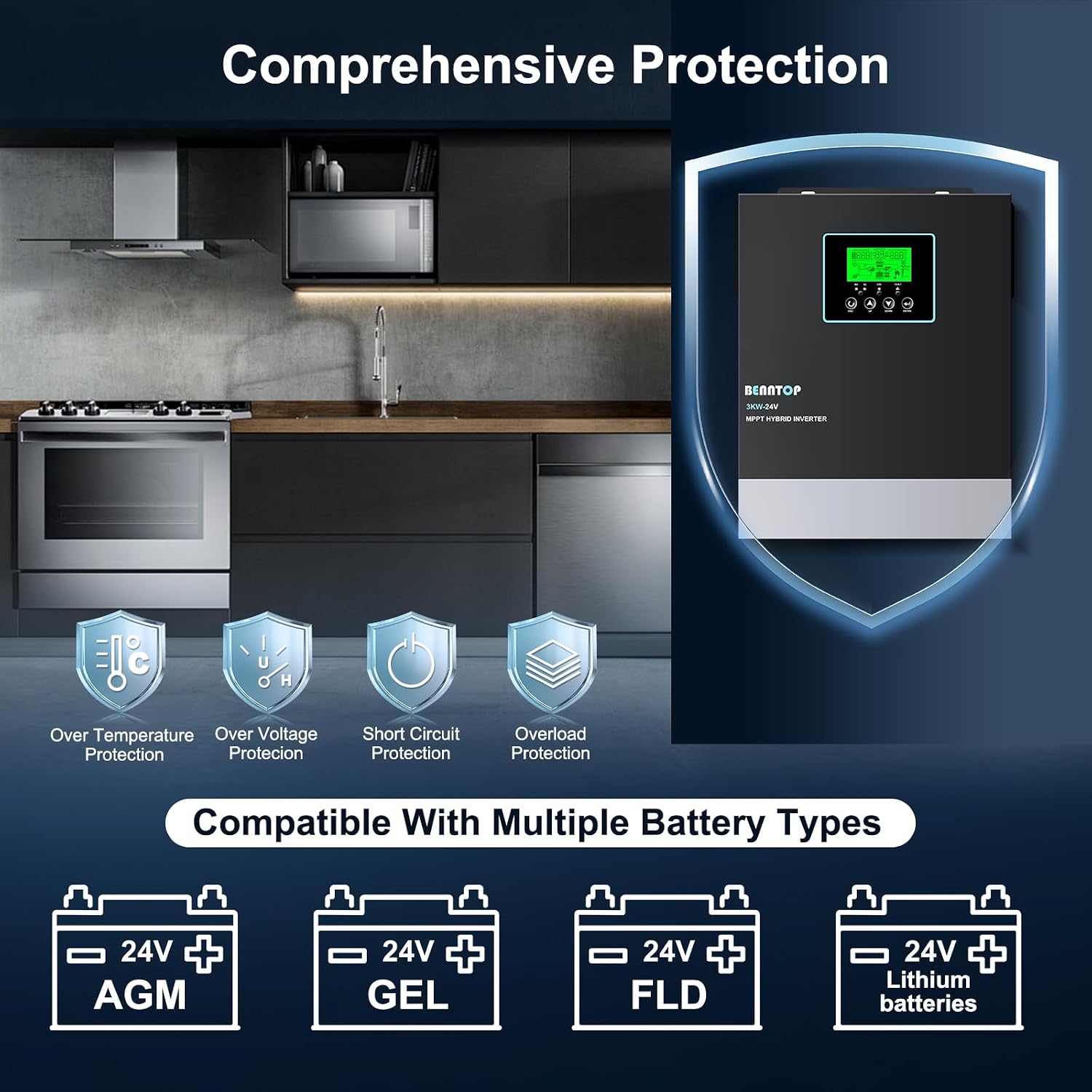
Image 2.1: The inverter features comprehensive protection mechanisms including over-temperature, over-voltage, short circuit, and overload protection, ensuring safe operation.
3. Product Features
The BENNTOP 3000W 24V Hybrid Solar Inverter offers a range of advanced features for efficient power management:
- Pure Sine Wave Output: Provides stable and clean power suitable for sensitive electronics.
- Integrated MPPT Solar Charge Controller: An 80A Maximum Power Point Tracking (MPPT) controller optimizes solar power harvesting.
- High PV Input: Supports a maximum PV array open circuit voltage of 400V DC and a maximum PV power of 3000W.
- Three-in-One Functionality: Combines inverter, solar charger, and battery charger into a single unit.
- Multiple Charging Modes: Four selectable modes: Solar Priority, Utility Priority, Solar and Utility Hybrid, and Solar Only.
- Multiple Output Modes: Three selectable modes: Solar Priority (SUB), Utility Priority (USB), and Solar-Battery-Utility Sequential Priority (SBU).
- Intelligent LCD Display: Provides real-time system data, operating status, and error codes.
- Dynamic LED Indicators: Three LEDs offer a quick visual status of operation.
- Comprehensive Protections: Includes overload, over-temperature, short circuit, overcurrent, and overvoltage protection.
- Automatic Restart: Features an automatic restart function when AC power is restored.
- Cold Start Function: Allows the inverter to start without AC input.
- Battery Compatibility: Compatible with 24V lead-acid and lithium batteries.
- Wide Application: Suitable for various household appliances, office equipment, and mobile applications like RVs and camping boats.

Image 3.1: Illustration of the four selectable charging modes (Solar Charging Only, Utility Priority, Solar Priority, Solar+Utility Charging) and three output modes (Solar Priority, Utility Priority, SBU Priority).
4. Setup and Installation
Proper installation is critical for the safe and efficient operation of your hybrid solar inverter. It is highly recommended that installation be performed by a certified electrician or solar professional.
4.1. Mounting the Inverter
- Choose a dry, well-ventilated area, away from direct sunlight and heat sources.
- Ensure sufficient clearance around the inverter for proper airflow.
- Mount the inverter vertically on a sturdy surface using appropriate fasteners.
4.2. Wiring Connections
Follow the connection diagram carefully. All connections must be secure and properly insulated.
- Battery Connection: Connect the 24V battery bank to the inverter's battery terminals. Ensure correct polarity (positive to positive, negative to negative). A 24V battery is required for operation.
- PV Input Connection: Connect your solar panel array to the PV input terminals. Observe the maximum PV input voltage (400V DC) and power (3000W).
- AC Input Connection: If connecting to a utility grid or generator, connect the AC input to the designated terminals.
- AC Output Connection: Connect your loads (appliances, office equipment) to the AC output terminals.
- Grounding: Ensure the inverter is properly grounded according to local electrical codes.
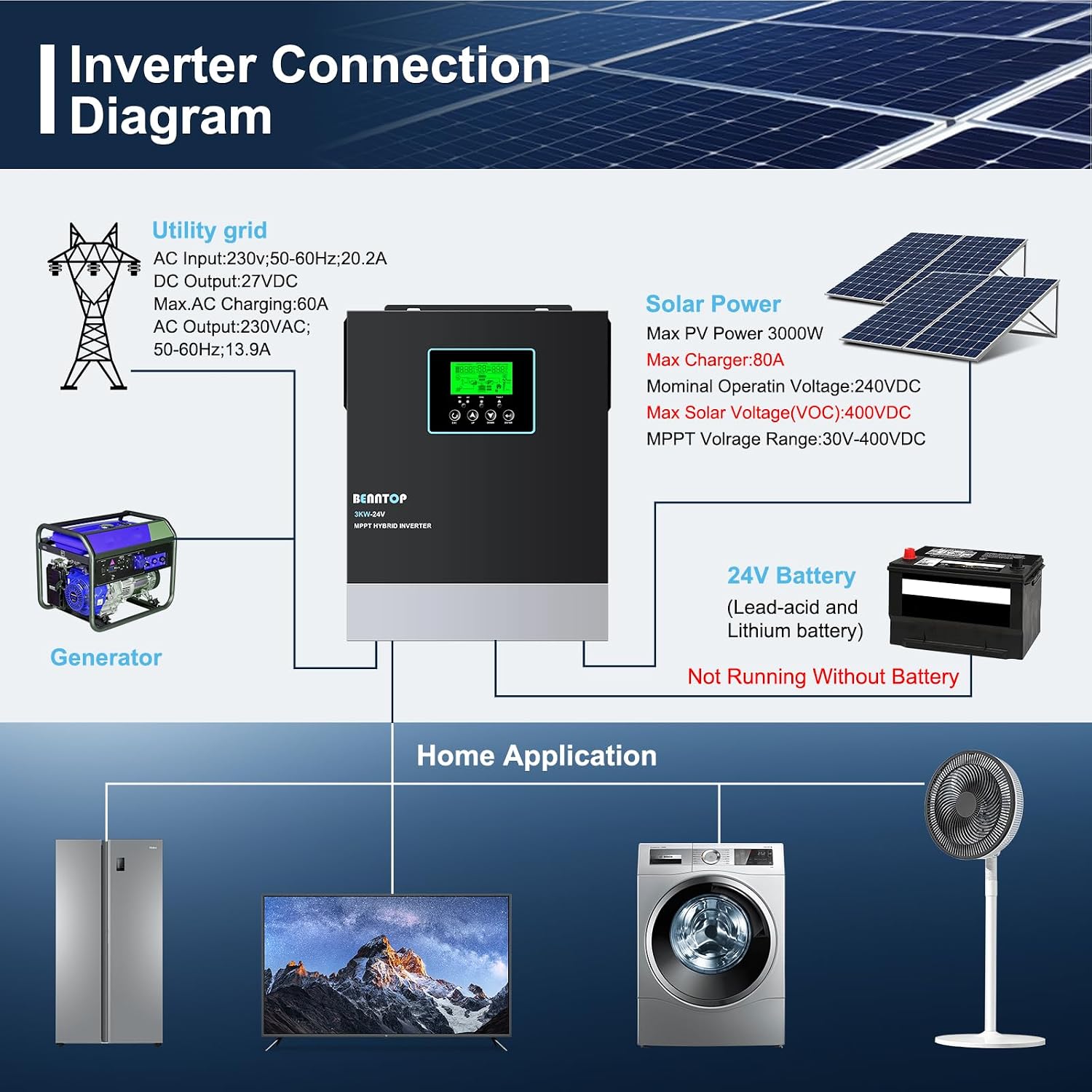
Image 4.1: Detailed connection diagram illustrating how to connect the inverter to the utility grid, solar panels, 24V battery, generator, and various home appliances. Note: The system requires a 24V battery to function.
5. Operating Instructions
The inverter features an intuitive LCD display and control buttons for easy operation and monitoring.
5.1. Control Panel Overview

Image 5.1: Close-up of the inverter's LCD display, status indicators, charging indicator, and fault indicator. It also shows the control buttons: ESC (Exit setting mode), UP/DOWN (Select programs), and ENTER (Long press to enter setting mode).
- LCD Display: Shows real-time system parameters, operational status, and error codes.
- Status Indicator: LED lights indicating the current operational status.
- Charging Indicator: LED lights indicating battery charging status.
- Fault Indicator: LED light to signal system errors.
- ESC Button: Used to exit the setting mode.
- UP/DOWN Buttons: Used to navigate through menu options and select programs.
- ENTER Button: Press and hold to enter the setting mode; short press to confirm selections.
5.2. Selecting Operating Modes
Use the UP/DOWN buttons to navigate through the menu on the LCD display and the ENTER button to select your desired charging and output modes.
- Charging Modes: Choose from Solar Priority, Utility Priority, Solar and Utility Hybrid, or Solar Only to optimize battery charging based on available power sources.
- Output Modes: Select Solar Priority (SUB), Utility Priority (USB), or Solar-Battery-Utility Sequential Priority (SBU) to determine the power source for your connected loads.
6. Maintenance
Regular maintenance ensures the longevity and optimal performance of your BENNTOP Hybrid Solar Inverter.
- Cleaning: Periodically clean the exterior of the inverter with a dry cloth. Ensure ventilation openings are free from dust and debris.
- Connection Checks: Annually inspect all electrical connections (battery, PV, AC input/output) for tightness and corrosion. Tighten any loose connections.
- Battery Inspection: For lead-acid batteries, check electrolyte levels and terminal condition as per battery manufacturer guidelines. For lithium batteries, follow manufacturer recommendations.
- Environment: Ensure the installation environment remains within the specified temperature and humidity ranges.
7. Troubleshooting
If you encounter issues with your inverter, refer to the LCD display for error codes. The following table provides general troubleshooting steps.
| Problem | Possible Cause | Solution |
|---|---|---|
| Inverter not turning on | No battery connected or low battery voltage. | Ensure 24V battery is properly connected and charged. |
| No AC output | Overload, short circuit, or over-temperature. | Reduce load, check for short circuits, ensure proper ventilation. Refer to LCD error codes. |
| Battery not charging | No PV input, low PV voltage, or AC input issue. | Check solar panel connections, ensure sufficient sunlight, verify AC input if using utility/generator charging. |
| Error code displayed | System fault. | Consult the specific error code in the full product manual (if available) or contact customer support. |
| Inductive loads not starting | Inductive loads (e.g., motors, refrigerators) require higher starting power. | Ensure the inverter's rated power is 3 to 5 times the starting power of the inductive load. |
8. Specifications
Technical specifications for the BENNTOP 3000W 24V Hybrid Solar Inverter:
| Feature | Specification |
|---|---|
| Model Number | 3000W24V |
| Output Power (Rated) | 3000 Watts |
| Input Voltage (DC) | 24 Volts |
| Output Voltage (AC) | 230 Volts (AC) |
| Output Waveform | Pure Sine Wave |
| MPPT Charge Controller | 80A |
| Max PV Input Voltage (VOC) | 400V DC |
| Max PV Power | 3000W |
| Energy Efficiency | 93% |
| Display Type | LCD |
| Product Dimensions (L x W x H) | 36 x 27 x 10 cm |
| Product Weight | 5.4 Kilograms |
| Recommended Uses | Home, Office, Vehicle |
| Certifications | CE, RoHS |
9. Warranty and Support
9.1. Warranty Information
This product comes with a warranty period of 3 (three) years. Please refer to the warranty card included with your product for specific terms, conditions, and registration details. Keep your proof of purchase for warranty claims.
9.2. Customer Support
For technical assistance, troubleshooting beyond this manual, or warranty inquiries, please contact BENNTOP customer support through the retailer where the product was purchased. Provide your model number (3000W24V) and purchase date for faster service.
10. Applications
The BENNTOP 3000W 24V Hybrid Solar Inverter is suitable for a variety of applications, providing reliable power wherever needed.

Image 10.1: The inverter is ideal for mobile applications such as motorhomes and camping, providing power for various devices in outdoor settings.
- Residential Use: Powering essential home appliances like fans, lights, refrigerators, and computers during outages or for off-grid living.
- Office Environments: Providing backup power for office equipment.
- Recreational Vehicles (RVs) & Camping: Enabling the use of electrical devices in remote locations.
- Emergency Power: A reliable solution for emergency power needs.