
Elite Kitchen Supply AKF-13781
Commercial Reach-In 2-Door Freezer
Model: AKF-13781 | Brand: Elite Kitchen Supply
Introduction
This manual provides essential information for the safe and efficient operation, installation, and maintenance of your Elite Kitchen Supply Commercial Reach-In 2-Door Freezer, Model AKF-13781. Please read this manual thoroughly before installation and operation to ensure proper use and to prevent injury or damage.
1. Setup and Installation
Proper installation is crucial for the performance and longevity of your freezer. Follow these steps carefully.
1.1 Unpacking and Inspection
Upon receiving your freezer, carefully inspect the packaging and the unit for any signs of shipping damage. Report any damage immediately to the carrier and your supplier. Remove all packaging materials, including tape and protective films.

Figure 1: Front view of the Commercial Reach-In 2-Door Freezer (Model AKF-13781).
1.2 Placement
Place the freezer on a strong, level surface capable of supporting its weight (approximately 287 pounds when empty, plus contents). Ensure adequate ventilation around the unit. Maintain a minimum clearance of 6 inches from walls or other equipment to allow for proper airflow to the condenser. Avoid direct sunlight or heat sources.
- Dimensions: 54 inches (Width) x 32.09 inches (Depth) x 81.30 inches (Height).

Figure 2: Key features including lockable casters for mobility and stability.

Figure 3: Detail of a heavy-duty lockable caster, allowing for easy movement and secure positioning.
1.3 Electrical Connection
The freezer requires a dedicated 115 Volt, 60Hz, 1-phase electrical supply. Ensure the outlet is properly grounded and matches the unit's plug type. Do not use extension cords or adapter plugs.

Figure 4: The pre-installed power cord with a standard plug, ready for connection to a compatible outlet.
1.4 Initial Cleaning
Before first use, clean the interior and exterior of the freezer with a mild soap and water solution. Rinse thoroughly and dry completely. Ensure all shelves are properly installed.
1.5 Setup Overview Video
Video 1: A detailed overview of the Commercial Reach-In 2-Door Freezer (AKF-13781), demonstrating its exterior, interior, dimensions, and key features like the digital controller and power connection.
2. Operating Instructions
Familiarize yourself with the controls and features for optimal performance.
2.1 Digital Temperature Control
The freezer is equipped with a digital controller and LED display for precise temperature monitoring and adjustment. The recommended operating temperature range is -8°F to 0°F (-22°C to -18°C).
Figure 5: The digital temperature controller with LED display for accurate temperature management.
2.2 Loading the Freezer
The freezer offers a spacious 41.9 cubic feet of storage with 6 adjustable shelves. Distribute items evenly on the shelves to allow for proper air circulation. Do not block the internal air vents.

Figure 6: Interior view showing the adjustable shelves loaded with various food items.

Figure 7: Detail of the heavy-duty PVC coated adjustable shelves, designed for durability and flexibility.
2.3 Door Operation and Locks
The unit features dual solid doors with integrated handles and locks for secure storage. Ensure doors are fully closed after each use to maintain optimal temperature and energy efficiency. The doors are reversible for flexible installation.
Figure 8: The integrated door locks provide enhanced security for stored contents.
2.4 Internal LED Lighting
The freezer is equipped with LED interior lighting to enhance visibility of contents. The lighting activates when the doors are opened.

Figure 9: Bright and energy-efficient LED lighting illuminates the freezer interior.
3. Maintenance
Regular maintenance ensures efficient operation and extends the lifespan of your freezer.
3.1 Cleaning
The stainless steel interior and exterior with rounded corners are designed for easy cleaning. Clean the interior and exterior surfaces regularly with a mild detergent and warm water. Avoid abrasive cleaners or scouring pads that could scratch the stainless steel. For the interior, ensure all food items are removed before cleaning. Rinse with clean water and dry thoroughly to prevent water spots.

Figure 10: Illustration of the high-quality material construction, emphasizing the stainless steel for durability and ease of cleaning.
3.2 Defrosting
This freezer features an automatic defrosting system, minimizing the need for manual defrosting. However, regularly check for excessive ice buildup, especially around the evaporator coils. If significant ice accumulates, manually defrost the unit by turning it off and leaving the doors open until all ice melts. Ensure the unit is completely dry before restarting.
3.3 Checking Temperature
While the digital display provides temperature readings, an internal thermometer is also provided for verification. Regularly check the temperature to ensure it remains within the optimal range for food safety.

Figure 11: The internal thermometer provides an additional means to verify the freezer's temperature.
3.4 Condenser Coil Cleaning
The condenser coils, located at the bottom of the unit, should be cleaned periodically (every 3-6 months) to maintain efficiency. Unplug the unit before cleaning. Use a stiff brush or vacuum cleaner to remove dust and debris from the coils. This prevents overheating and ensures proper cooling.

Figure 12: The ventilation grates at the bottom of the unit, covering the condenser coils that require periodic cleaning.

Figure 13: The compressor unit, a key component of the refrigeration system, located at the bottom of the freezer.
4. Troubleshooting
Before contacting service, review these common issues and solutions.
- Freezer Not Operating: Check if the power cord is securely plugged in. Verify the circuit breaker or fuse. Ensure the temperature control is set correctly.
- Temperature Too Warm: Check if the condenser coils are clean. Ensure doors are closing properly and seals are intact. Avoid overloading the freezer. Verify ambient temperature is within operating limits.
- Excessive Noise: Check if the unit is level. Ensure no objects are vibrating against the unit. Fan motor may require inspection if noise persists.
- Excessive Ice Buildup: Ensure doors are not left open frequently. Check door gaskets for proper seal.
If problems persist after attempting these solutions, contact qualified service personnel.
5. Specifications
Detailed technical specifications for the AKF-13781 Commercial Reach-In 2-Door Freezer.
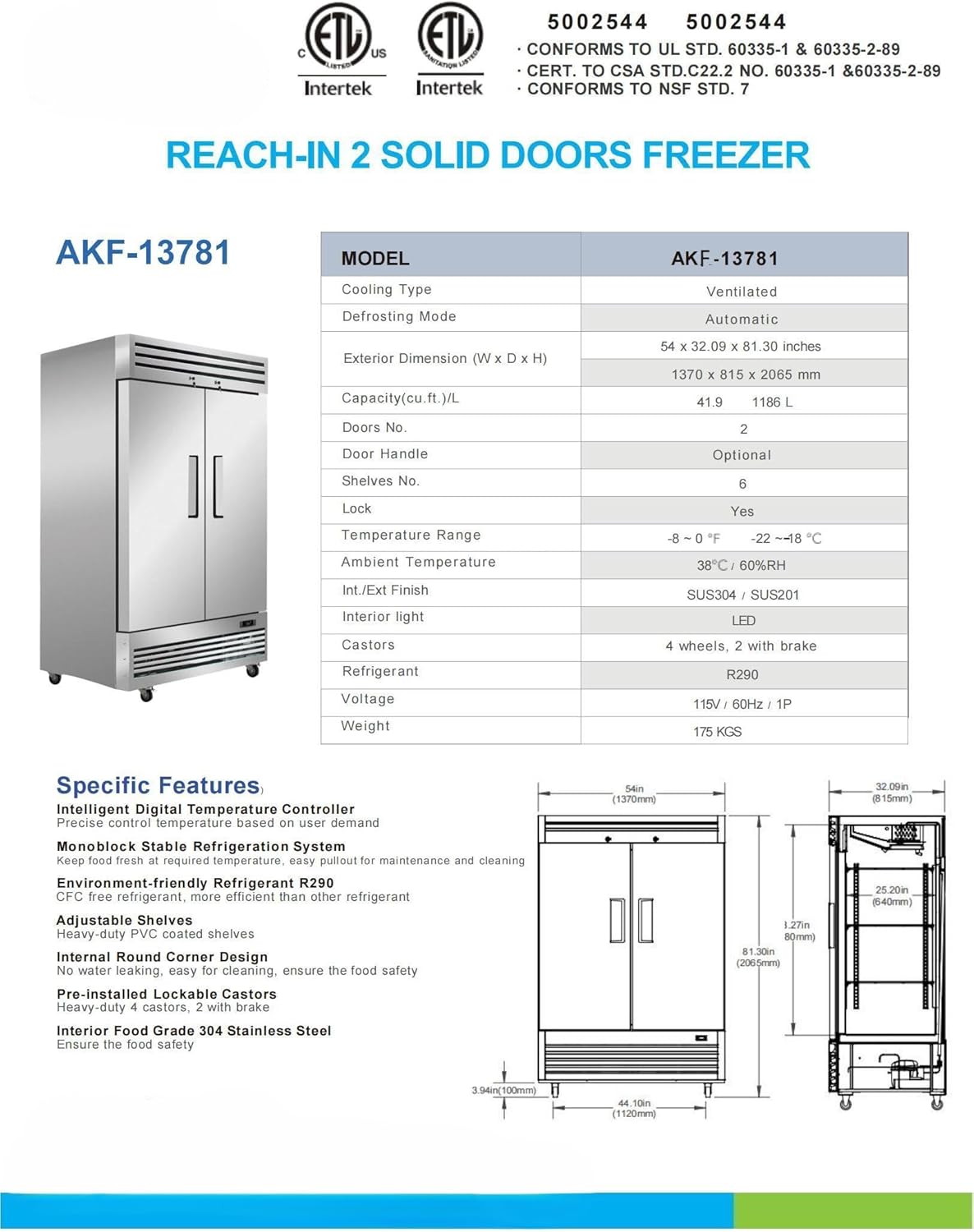
Figure 14: Official specifications table for the AKF-13781 model, including dimensions, capacity, and temperature range.

Figure 15: Product label displaying model number, electrical ratings, and certification details.
| Feature | Specification |
|---|---|
| Brand Name | Elite Kitchen Supply |
| Model Name | Freezer Solid Door (AKF-13781) |
| Capacity | 41.9 Cubic Feet |
| Temperature Range | -8°F to 0°F (-22°C to -18°C) |
| Cooling Type | Ventilated |
| Defrosting Type | Automatic |
| Exterior Dimensions (W x D x H) | 54" x 32.09" x 81.30" |
| Item Weight | 287 pounds |
| Voltage | 115 Volts |
| Wattage | 750 watts |
| Refrigerant | R290 |
| Interior/Exterior Finish | Stainless Steel (SUS304 / SUS201) |
| Doors | 2 Solid Doors with Locks |
| Shelves | 6 Adjustable, Heavy-Duty PVC Coated |
| Casters | 4 wheels, 2 with brake (Lockable) |
| Certification | ETL, ETL Sanitation, Conforms to UL Std. 60335-1 & 60335-2-89, Cert. to CSA Std. C22.2 No. 60335-1 & 60335-2-89, Conforms to NSF Std. 7 |
6. Warranty and Support
Elite Kitchen Supply stands behind the quality of its products.
- Warranty: This unit comes with a 3-year warranty on all parts, a 6-year warranty on the compressor, and a 1-year labor warranty.
- Warranty Exclusions: Please note that the warranty does not cover equipment used in food trucks, trailers, boats, residential addresses, islands, or built-in decorations.
- Customer Support: For technical assistance, warranty claims, or any other inquiries, please contact Elite Kitchen Supply customer service. Refer to your purchase documentation for specific contact details or visit the official Elite Kitchen Supply store on Amazon.

Figure 16: Elite Kitchen Supply brand logo. Click to visit the official store for support.
Related Documents - AKF-13781
 |
MOTAK Reach-In Refrigerator/Freezer Service, Installation, and Care Manual Comprehensive service, installation, and care manual for MOTAK commercial reach-in refrigerators and freezers (Model MSD-2DF-BAL-X). Covers safety guidelines, installation procedures, operational settings, maintenance routines, and troubleshooting for commercial kitchen environments. |
 |
ChefsFirst F1 One Door Reach-In Freezer - Commercial Kitchen Equipment Detailed overview of the ChefsFirst F1, a 21.50 cu ft one-door reach-in commercial freezer. Features stainless steel construction, energy efficiency, ETL certification, and robust warranty for commercial kitchens. |
 |
Cooler Depot Commercial Freezers: 48 cu. ft. Stainless Steel Reach-In & Upright Models Explore Cooler Depot's range of commercial freezers, including 48 cu. ft. stainless steel reach-in and upright models. Featuring auto-defrost, energy efficiency, and durable construction for foodservice businesses. |
 |
Commercial Upright Freezers: Cooler Depot & Elite Kitchen Supply Product Overview Detailed product information and specifications for commercial upright freezers from Cooler Depot and Elite Kitchen Supply, featuring stainless steel construction, auto/cycle defrost, R290 refrigerant, and various capacities suitable for foodservice environments. |
 |
MoTak MRIF-2D 2 Solid Door Reach-In Energy Star Freezer - Specifications and Features Detailed overview of the MoTak MRIF-2D, a 2-door Energy Star certified commercial reach-in freezer. Features include 46.7 cu ft capacity, -7°F to 0°F temperature range, stainless steel construction, R290 refrigerant, and digital controls. |
 |
Centerline CLBM-49F Reach-In Freezer: Specifications and Features Comprehensive product overview of the Centerline CLBM-49F two-section, bottom-mounted, self-contained reach-in freezer. Details standard features, optional accessories, available configurations, and technical specifications including electrical, refrigeration, and shipping data. |
Ask a question about this manual
Ask about setup, troubleshooting, compatibility, parts, safety, or missing instructions. Manuals+ will review the question and use this page’s manual context to help answer it.