
Samsung AR12DYFAAWKNAZ | AR12DYFAAWKXAZ
Samsung WindFree AI Inverter Split Air Conditioner 12,000 BTU (Cooling) User Manual
Model: AR12DYFAAWKNAZ | AR12DYFAAWKXAZ
1. Introduction
This manual provides essential information for the safe and efficient operation, installation, and maintenance of your Samsung WindFree AI Inverter Split Air Conditioner. Please read this manual thoroughly before using the appliance and retain it for future reference.
2. Safety Information
Always follow basic safety precautions to reduce the risk of fire, electric shock, or injury. This appliance is not intended for use by persons (including children) with reduced physical, sensory or mental capabilities, or lack of experience and knowledge, unless they have been given supervision or instruction concerning use of the appliance by a person responsible for their safety.
- Ensure the power supply matches the unit's specifications.
- Do not attempt to repair or modify the unit yourself. Contact qualified service personnel.
- Keep the area around the outdoor unit clear of obstructions.
- Do not insert fingers or objects into the air inlet/outlet.
- Turn off the power before cleaning or performing maintenance.
3. Product Overview
The Samsung WindFree AI Inverter Split Air Conditioner is designed for efficient cooling with advanced features.

Figure 3.1: Overview of the Samsung WindFree AI Inverter Split Air Conditioner, showing the indoor unit, outdoor unit, and the remote control.
Key Features:
- WindFree™ Technology: Disperses air gently through 23,000 micro-holes, eliminating direct cold drafts.
- AI Auto Comfort: Optimizes cooling based on user preferences and environmental conditions.
- Digital Inverter Compressor: Provides energy efficiency and precise temperature control.
- Anti-Bacterial Filter: Helps maintain cleaner air quality.
- SmartThings Connectivity: Control the unit remotely via Wi-Fi using the Samsung SmartThings app. Compatible with Bixby, Google Assistant, and Amazon Alexa.
- Silent Operation: Designed for quiet performance.

Figure 3.2: SmartThings connectivity allows remote control and voice command integration with popular smart home platforms.
4. Setup and Installation
Professional installation by a qualified technician is highly recommended to ensure proper functioning and safety. This section provides general guidelines.
4.1 Unpacking
Carefully unpack all components and check for any damage. Retain packaging materials for potential future transport or service.
4.2 Component Dimensions
Ensure adequate space for both indoor and outdoor units, considering airflow and maintenance access.

Figure 4.1: Indoor Unit Dimensions (Width: 820 mm, Height: 299 mm, Depth: 215 mm).

Figure 4.2: Outdoor Unit Dimensions (Width: 660 mm, Height: 475 mm, Depth: 242 mm).
4.3 Electrical Connection
The unit operates on 220 Volts. Ensure a dedicated and properly grounded electrical circuit is available. Consult an electrician for wiring requirements.
5. Operating Instructions
Your air conditioner can be operated using the wireless remote control or via the SmartThings app.
5.1 Remote Control Functions
The remote control allows you to adjust settings, change modes, and set timers.
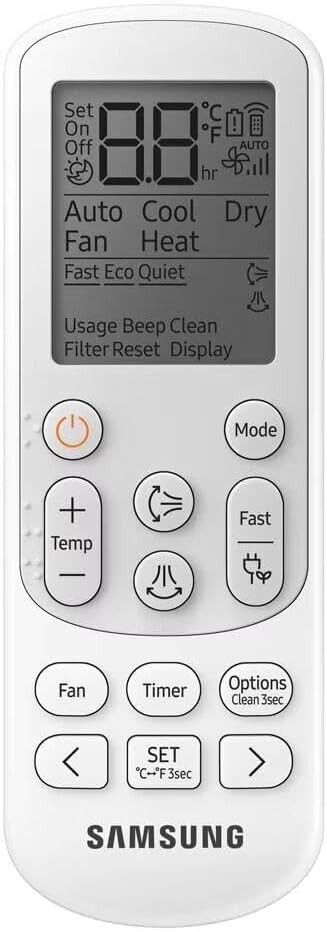
Figure 5.1: Wireless Remote Control for the Air Conditioner.
Key buttons and their functions:
- Power (On/Off): Turns the unit on or off.
- Mode: Cycles through operating modes (Cool, Fan, Dry).
- Temp (+/-): Adjusts the desired temperature.
- Fan: Changes fan speed.
- Timer: Sets the on/off timer.
- Options (Clean 3sec): Accesses additional functions, including the Self-Clean feature.
- Fast: Activates Fast Cooling mode.
- WindFree: Toggles WindFree mode for gentle air dispersion.
5.2 Operating Modes
- Cool Mode: Provides powerful cooling to reach the set temperature.
- WindFree™ Mode: Disperses air gently through micro-holes, preventing direct drafts and providing comfortable cooling.
- Fast Cooling Mode: Rapidly cools the room to the desired temperature.
- Good Sleep Mode: Optimizes temperature and airflow for a comfortable night's sleep.
- Fan Mode: Circulates air without cooling.
- Dry Mode: Reduces humidity in the room.
- AI Auto Comfort: Automatically adjusts settings based on room conditions and user preferences to maintain optimal comfort.

Figure 5.2: Silent Operation ensures a peaceful environment.

Figure 5.3: Fast Cooling Mode for quick temperature reduction.

Figure 5.4: Good Sleep Mode for enhanced comfort during rest.
5.3 SmartThings App Control
Download the Samsung SmartThings app to control your air conditioner from your smartphone. This allows for advanced scheduling, monitoring, and integration with other smart home devices.
- Welcome Cooling: Pre-cool your home before you arrive.
- Energy Monitoring: Track energy consumption.
- Voice Control: Use Bixby, Google Assistant, or Amazon Alexa for hands-free operation.

Figure 5.5: Welcome Cooling feature via SmartThings app.
6. Maintenance
Regular maintenance ensures optimal performance and extends the lifespan of your air conditioner.
6.1 Filter Cleaning
The anti-bacterial filter should be cleaned regularly (e.g., every two weeks or as needed) to maintain air quality and efficiency.
- Turn off the air conditioner and disconnect power.
- Open the front panel of the indoor unit.
- Remove the air filter(s).
- Clean the filter(s) with a vacuum cleaner or wash with lukewarm water and a mild detergent.
- Allow the filter(s) to dry completely in a shaded area before reinstalling.
- Close the front panel and restore power.

Figure 6.1: Powerful Anti-Bacterial Filter for cleaner air.
6.2 Freeze Wash Function
The Freeze Wash function helps to sterilize the heat exchanger by freezing and then thawing it, removing dirt and microorganisms.
- Activate the Freeze Wash function via the remote control or SmartThings app.
- The unit will perform a freezing cycle, followed by thawing and drying.
- The process takes approximately 30-60 minutes.
Figure 6.2: Freeze Wash function for heat exchanger sterilization.
6.3 Auto Clean Function
The Auto Clean function automatically dries the indoor unit's heat exchanger to prevent mold and bacteria growth, reducing odors.
- Activate Auto Clean via the remote control or SmartThings app.
- The indoor fan will continue to run for a short period after the unit is turned off to dry the internal components.
Figure 6.3: Auto Clean function for a consistently clean air conditioner.
7. Troubleshooting
If you encounter issues, refer to the following common problems and solutions. If the problem persists, contact customer support.
| Problem | Possible Cause | Solution |
|---|---|---|
| Unit does not turn on | No power supply; Remote control batteries low | Check power connection and circuit breaker; Replace remote control batteries. |
| Insufficient cooling | Dirty air filter; Obstruction of air intake/outlet; Room too large for unit capacity; Doors/windows open | Clean air filter; Remove obstructions; Ensure proper room size; Close doors and windows. |
| Unusual noise | Loose parts; Unit not level; Foreign object inside | Check for loose parts; Ensure unit is level; Contact service if noise persists. |
| Water leakage | Clogged drain hose; Improper installation | Clear drain hose; Contact installer for inspection. |
8. Specifications
| Feature | Specification |
|---|---|
| Brand | Samsung |
| Model Information | AR12DYFAAWKNAZ | AR12DYFAAWKXAZ |
| Product Dimensions (Indoor) | 21.5 x 81.99 x 30 cm |
| Product Weight | 31.2 kg (total) |
| Energy Efficiency | Procel A (High energy efficiency) |
| Cooling Capacity | 12,000 BTU |
| Noise Level | 38 Decibels |
| Installation Type | Split |
| Special Features | Wi-Fi Activated, Inverter Compressor, Remotely Controlled, Silent Mode |
| Voltage | 220 Volts |
| Refrigerant | R-32 |
9. Warranty and Support
Your Samsung WindFree AI Inverter Split Air Conditioner comes with a manufacturer's warranty. Specific warranty terms and conditions may vary by region and retailer.
9.1 Warranty Information
The Digital Inverter Compressor is covered by a 10-year warranty, ensuring long-term reliability.

Figure 9.1: Outdoor unit highlighting the 10-year warranty on the Digital Inverter Compressor and R32 refrigerant.
9.2 Customer Support
For technical assistance, warranty claims, or service requests, please contact Samsung customer support or your authorized dealer. Refer to the official Samsung website for contact details specific to your region.