
1. Introduction
Thank you for purchasing the CHOEZON Folding Side Table with Charging Station. This versatile 3-tier narrow end table features a unique folding top design, a built-in charging station, and ample storage, making it ideal for small spaces in living rooms or bedrooms. This manual provides detailed instructions for assembly, operation, and maintenance to ensure safe and efficient use of your new table.

Image 1.1: The CHOEZON Folding Side Table, showcasing its dual functionality with the top both folded and fully extended. The integrated charging cable is visible.
2. Safety Information
- Ensure the table is placed on a stable and even surface to prevent tipping.
- Keep fingers clear of the folding mechanism when adjusting the tabletop to avoid injury.
- Do not exceed the maximum weight recommendation of 22 pounds on the tabletop.
- Do not overload the storage shelf.
- Keep liquids away from the charging station to prevent electrical hazards.
3. Package Contents
Please verify that all components are present before beginning assembly:
- 1 x Side Table with Foldable Top
- 1 x Power Outlet Unit
- 1 x Accessory Kit (includes screws, screwdriver, adjustable feet)
- 1 x Instruction Manual
4. Assembly Instructions
Assembly typically requires two people. All necessary tools are included. Follow these steps carefully:
- Unpack and Identify Parts: Carefully remove all components from the packaging. Lay them out and compare them against the parts list in the included accessory kit to ensure everything is accounted for.
- Assemble the Frame: Attach the metal frame components using the provided screws. Ensure all connections are secure but do not overtighten initially.
- Attach Shelves: Secure the middle shelf and the bottom wire-fenced storage shelf to the assembled frame.
- Install Power Outlet: Mount the power outlet unit onto the designated slot on the middle shelf using the provided screws.
- Attach Tabletop: Secure the folding tabletop to the top of the frame. Ensure the hinges are correctly aligned for smooth operation.
- Install Adjustable Feet: Screw the adjustable feet into the bottom of the table legs. Adjust them as needed to ensure the table is level on uneven floors.
- Final Tightening: Once all parts are in place and the table is stable, carefully tighten all screws.

Image 4.1: Close-up of table features, including the smooth arc-shaped panels, the wire-fenced storage basket, and the adjustable feet for stability.
5. Operating Instructions
5.1. Folding Top Operation
The table features an innovative folding top design, allowing you to adjust its size based on your space requirements.
- To Unfold: Gently lift the hinged side of the tabletop until it is fully extended and rests securely on its support mechanism, forming a round surface.
- To Fold: Carefully disengage the support mechanism and lower the hinged side of the tabletop downwards until it rests against the side of the table, creating a narrower, space-saving profile.

Image 5.1: Illustration of the two usage methods: folded for compact spaces (01) and unfolded for expanded surface area (02).
5.2. Charging Station Usage
The integrated charging station provides convenient power access for your electronic devices.
- Plug the table's 4.9ft power cord into a standard 125V/12A wall outlet.
- Use the 3-prong AC outlet to power devices requiring standard electrical current.
- Utilize the two 5V/2A USB ports to charge smartphones, tablets, and other USB-powered devices.
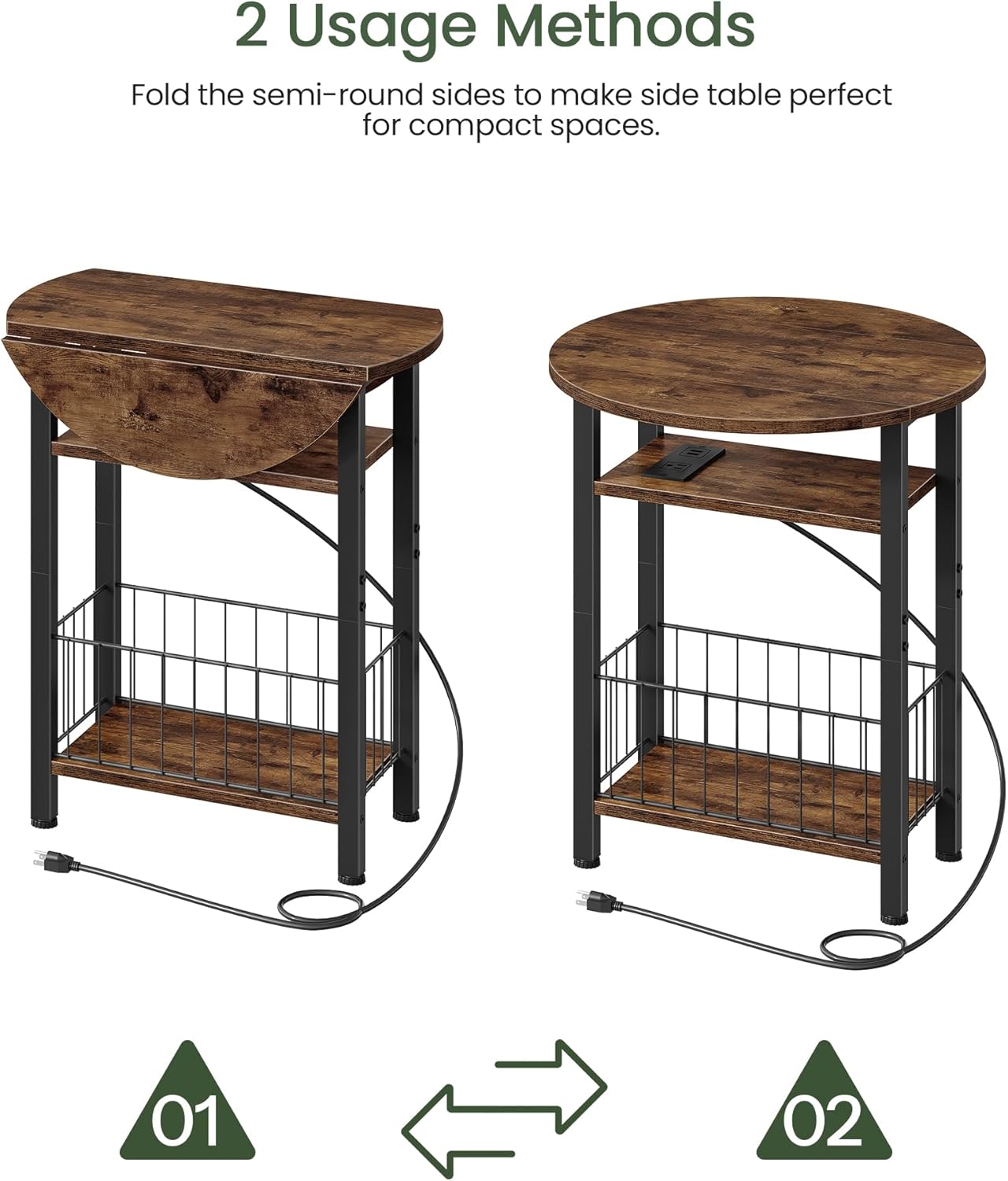
Image 5.2: Detailed view of the charging station, highlighting the AC outlet and two USB ports in use.
5.3. Storage Shelf
The wire-fenced storage shelf located at the bottom provides space for books, magazines, remote controls, or other small items, helping to keep your area organized.
Video 5.3: This video demonstrates the CHOEZON 3-Tier Narrow Side Table with Folding Top, showcasing its design, folding mechanism, and overall functionality in a home setting.
6. Maintenance
To maintain the appearance and longevity of your CHOEZON side table:
- Wipe the surfaces with a dry cloth regularly to remove dust and debris.
- Avoid using harsh chemicals or abrasive cleaners, as these may damage the finish.
- Periodically check and tighten all screws to ensure structural integrity.
- Keep the table away from direct sunlight and excessive moisture.
7. Troubleshooting
| Problem | Possible Cause | Solution |
|---|---|---|
| Table is wobbly | Uneven floor; loose screws | Adjust the leveling feet at the bottom of the legs. Tighten all assembly screws. |
| Folding top does not operate smoothly | Hinges are stiff or misaligned | Check hinge alignment. Apply a small amount of lubricant if hinges are stiff. Ensure no obstructions. |
| Charging station not working | Power cord not plugged in; faulty outlet; device issue | Ensure the power cord is securely plugged into a working wall outlet. Test the charging station with a different device. |
8. Specifications
| Feature | Detail |
|---|---|
| Brand | CHOEZON |
| Model Number | TBZ10UBF |
| Product Dimensions (D x W x H) | 15.7"D x 15.7"W x 24.6"H |
| Maximum Weight Recommendation | 22 Pounds |
| Color | Rustic Brown |
| Material Type | Engineered Wood, Iron |
| Power Outlet | 1 x 125V/12A AC Outlet |
| USB Ports | 2 x 5V/2A USB Ports |
| Power Cord Length | 4.9 Feet |
| Table Extension Mechanism | Drop Leaf |
| Is Foldable | Yes |
| Recommended Number of People for Assembly | 2 |
| Includes All Assembly Tools | Yes |

Image 8.1: Detailed dimensional diagram of the side table, illustrating measurements for both the folded and unfolded configurations, along with weight capacities.
9. Warranty and Support
For warranty information or technical support, please refer to the contact details provided with your purchase documentation or visit the official CHOEZON website. Please retain your proof of purchase for any warranty claims.