1. Introduction
This manual provides instructions for the safe and effective use of your Generic Pet Grooming Dryer. Please read this manual thoroughly before operating the device and retain it for future reference.
Key Features:
- Adjustable Temperature & Airflow: Features a 2800W pure copper motor with adjustable temperature control from 95 to 140°F and 5-speed wind settings from 15 to 75 m/s.
- Blow and Vacuum Combo: Offers both blow and vacuum modes for efficient drying and hair collection.
- Noise Reduction & Insulation: Designed for reduced noise levels (down to 50dB) and includes an ABS integrated shell with thickened insulation brackets for safety.
- Overheat Protection: Automatic shut-off system to prevent overheating.
- Versatile Nozzles & Hose: Includes four different nozzles and a flexible, expandable hose (2.5-7.5 ft) for various grooming needs.

Figure 1: Generic Pet Grooming Dryer with accessories.
2. Safety Precautions
To ensure safe operation and prevent injury or damage, please observe the following safety guidelines:
- Always ensure the power supply matches the voltage specified on the device.
- Do not operate the dryer with wet hands or near water.
- Keep the power cord away from heated surfaces.
- Do not block the air inlets or outlets during operation.
- Unplug the device when not in use and before cleaning or maintenance.
- Do not allow children or untrained individuals to operate the dryer.
- If the device shows signs of damage or malfunction, discontinue use immediately and contact customer support.
- The dryer is equipped with an overheat protection device that automatically shuts off the unit if the temperature becomes too high. Allow it to cool before resuming use.

Figure 2: Safety features including fan protection, overheat protection, and base silicone gasket.
3. Product Components
Package Contents:
- 1 x Pet Grooming Dryer Unit
- 1 x Flexible Hose
- 4 x Nozzles (Finger, Wide-Flat, Flat, Circular)
- 1 x User Manual
Nozzle Types:
- Finger Nozzle: Ideal for detangling and drying thick coats.
- Wide-Flat Nozzle: For fast drying of large areas.
- Flat Nozzle: For concentrated airflow on specific areas.
- Circular Nozzle: General purpose drying.

Figure 3: Pet Grooming Dryer with included hose and four nozzle attachments.
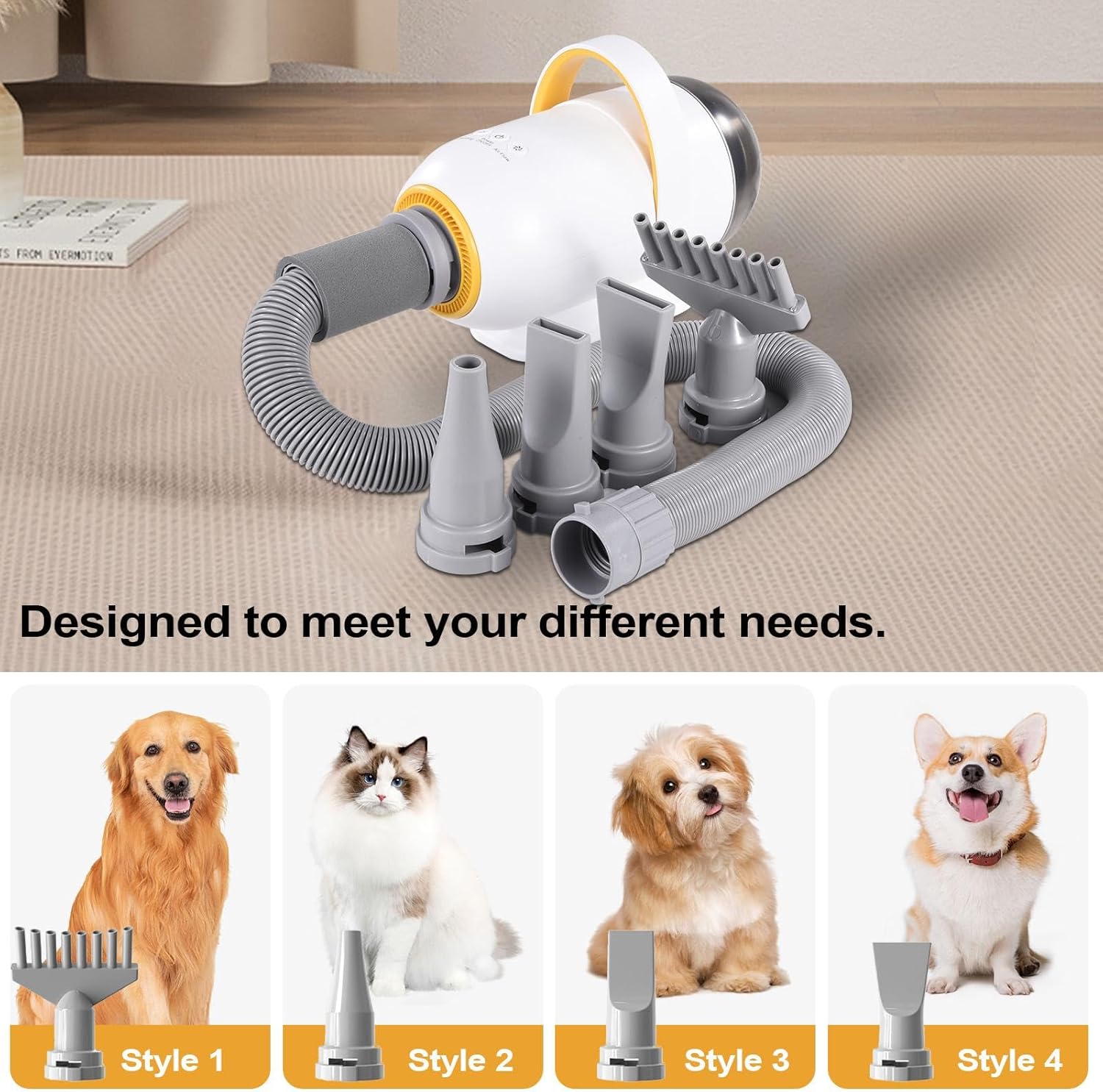
Figure 4: Different nozzle styles for varied grooming requirements.
4. Setup and Assembly
Attaching the Hose:
- Align the hose connector with the air outlet on the main dryer unit.
- Twist the connector clockwise until it is securely locked in place.
Attaching Nozzles:
- Select the desired nozzle for your grooming task.
- Push the nozzle firmly onto the end of the flexible hose until it clicks into place.
- To remove, pull the nozzle off while gently twisting.
Video 1: Demonstration of assembling the pet grooming dryer and attaching nozzles.
5. Operating Instructions
Powering On/Off:
Plug the power cord into a suitable electrical outlet. Press the power button to turn the unit on. Press it again to turn off.
Adjusting Airflow and Temperature:
Use the designated control knobs or buttons on the unit to adjust the wind speed and temperature. Start with lower settings and gradually increase as needed, observing your pet's comfort.
Using Blow Mode:
Ensure the hose is connected to the air outlet. Select the appropriate nozzle and direct the airflow towards your pet's coat, maintaining a safe distance to avoid discomfort or overheating.
Using Vacuum Mode:
To activate vacuum mode, attach the hose to the vacuum port on the dryer unit. This mode is designed to collect loose hair and debris, helping to keep your grooming area clean.
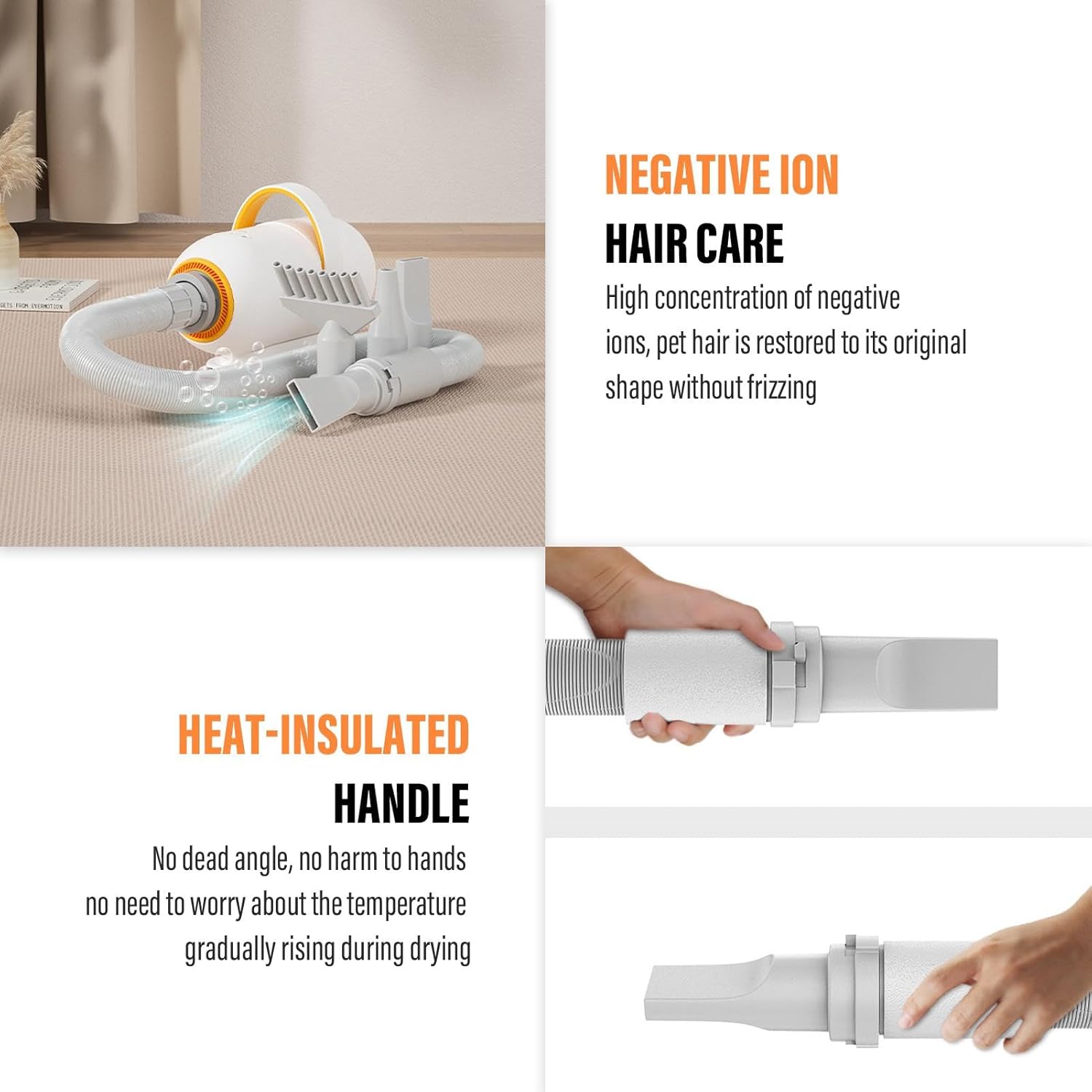
Figure 5: Features such as negative ion hair care and a heat-insulated handle for user comfort.

Figure 6: Pet grooming in progress using the dryer.
6. Care and Maintenance
Cleaning the Filter:
Regularly check and clean the air intake filter to maintain optimal performance. Unplug the unit, remove the filter cover, and clean any accumulated hair or debris. Reinstall the filter and cover securely.
Cleaning the Hose and Nozzles:
After each use, remove the hose and nozzles and clean them of any pet hair or residue. A damp cloth can be used for external cleaning. Ensure all parts are dry before reassembly or storage.
Storage:
Store the dryer in a cool, dry place, away from direct sunlight and moisture. Ensure the power cord is neatly wrapped and not kinked.
7. Troubleshooting Guide
| Problem | Possible Cause | Solution |
|---|---|---|
| Dryer does not turn on | No power supply; Power button not pressed; Overheat protection activated | Check power connection; Press power button firmly; Allow unit to cool down |
| Weak airflow | Clogged air filter; Blocked hose/nozzle | Clean air filter; Check hose and nozzles for obstructions |
| Unit overheats and shuts off | Blocked airflow; Prolonged use | Ensure air inlets/outlets are clear; Allow unit to cool before restarting |
| Unusual noise | Debris in fan; Loose components | Unplug and inspect for debris; Contact customer support if noise persists |
8. Product Specifications
| Specification | Detail |
|---|---|
| Power | 2800W (Actual: 730W) |
| Hose Length | Approx. 76-230 cm (29.92-90.55 inches) |
| Maximum Temperature | 60°C / 140°F (affected by ambient temperature) |
| Maximum Wind Speed | 72 m/s |
| Product Size | Approx. 30 x 15 x 20 cm (11.81 x 5.91 x 7.87 inches) |
| Product Net Weight | Approx. 2.65 kg (5.8 lbs) |
| Temperature Adjustment Range | 35-60°C / 95-140°F |
| Item Model Number | QOGW476Y6ZJDEL0OD |
| Product Dimensions | 12.99 x 7.28 x 12.99 inches; 7.45 Pounds |
| Manufacturer | Generic |

Figure 7: Detailed product specifications.
9. Warranty and Customer Support
Warranty Information:
Specific warranty details may vary. Please refer to your purchase documentation or contact the retailer for information regarding the warranty period and terms for this product.
Customer Support:
For any questions, technical assistance, or service inquiries, please contact the seller or manufacturer through the platform where the product was purchased.