
1. Introduction and Product Overview
Thank you for choosing the EnHomee Queen Bed Frame. This manual provides detailed instructions for assembly, operation, maintenance, and troubleshooting to ensure you get the most out of your new bed frame. This bed frame is designed to offer both comfort and functionality, featuring integrated LED lighting, a convenient charging station, and ample storage solutions.
Key features of your EnHomee Queen Bed Frame include:
- LED Lighting & Charging Station: Integrated LED light strip with remote/app control for adjustable color, brightness, and mode, along with built-in USB charging ports (Type B and Type C).
- Four Large Storage Drawers: Smooth-gliding drawers with wheels and clasps for secure, maximized under-bed storage.
- Smart Storage Headboard: A 47-inch tall headboard with five open compartments for books, decor, and electronics.
- Sturdy and Noise-Free Construction: Heavy-duty metal frame and reinforced wood slats support up to 900 lbs, designed for silent operation without a box spring.
- Easy Assembly: Clear, step-by-step instructions and labeled parts facilitate straightforward setup.

Figure 1.1: EnHomee Queen Bed Frame with LED lights, charging station, and storage drawers.
2. Safety Information
Please read and understand all safety warnings before assembly and use. Failure to follow these instructions may result in injury or damage to the product.
- Weight Capacity: Do not exceed the maximum weight capacity of 900 lbs (408 kg).
- Assembly Caution: Be cautious of sharp edges on components during assembly. It is recommended to assemble with at least two people.
- Stable Surface: Assemble the bed frame on a flat, stable, and clean surface to prevent scratching or damage to components.
- Secure Connections: Ensure all screws, bolts, and fasteners are securely tightened before use. Periodically check and re-tighten as necessary.
- Electrical Safety: Ensure the charging station and LED light connections are properly installed and not exposed to moisture. Do not overload the charging ports.
- Mattress Compatibility: Compatible with 8-11 inch mattresses for optimal comfort and fit.
3. Package Contents
Before beginning assembly, verify that all parts are present and undamaged. If any components are missing or damaged, please contact customer service for prompt assistance.
| Component | Quantity |
|---|---|
| Headboard Components (Upholstered, Shelves) | 1 Set |
| Side Rails | 2 |
| Footboard | 1 |
| Wooden Slats | Multiple |
| Storage Drawers (with wheels) | 4 |
| Hardware Kit (Screws, Bolts, Allen Wrench) | 1 Set |
| LED Light Strip | 1 |
| Charging Station Module | 1 |
| Remote Control for LED Lights | 1 |
| Assembly Instructions Manual | 1 |
4. Setup and Assembly Instructions
Follow these steps carefully for a smooth assembly process. All parts are labeled for easy identification.
- Unpack and Identify Parts: Lay out all components on a soft, clean surface. Refer to the parts list in your included assembly manual to ensure all pieces are present.
- Assemble the Headboard: Begin by assembling the headboard frame and attaching the upholstered section. Secure the headboard shelves as per the detailed diagrams in your manual.
- Attach Side Rails: Connect the assembled headboard to the side rails using the provided hardware. Ensure connections are firm and stable.
- Install Footboard: Attach the footboard to the side rails, completing the main frame structure.
- Insert Slats: Place the wooden slats across the bed frame. The reinforced wood slats provide robust support and eliminate the need for a box spring. Ensure the silent strip is correctly positioned to prevent squeaks.
- Assemble and Insert Drawers: Assemble the four storage drawers according to the instructions. Once assembled, slide them into the designated spaces under the bed frame. The drawers are equipped with wheels for smooth movement and clasps to prevent accidental slipping.
- Connect LED and Charging Station: Install the LED light strip into the headboard shelves and connect the charging station module. Follow the wiring diagrams in your manual to ensure correct electrical connections.

Figure 4.1: Headboard with integrated charging station and LED lighting.
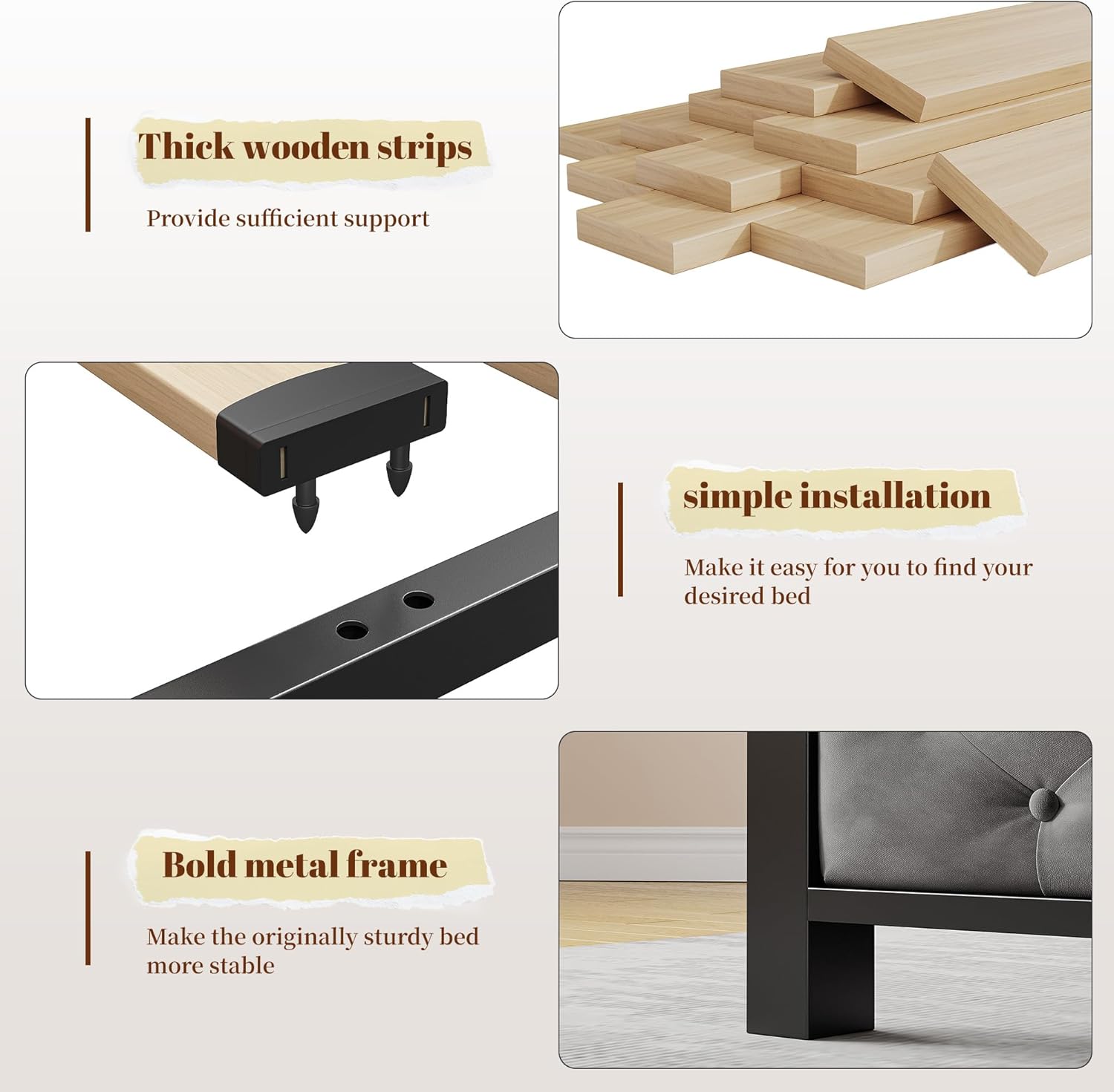
Figure 4.2: Noise-free design with silent strip for quiet nights.
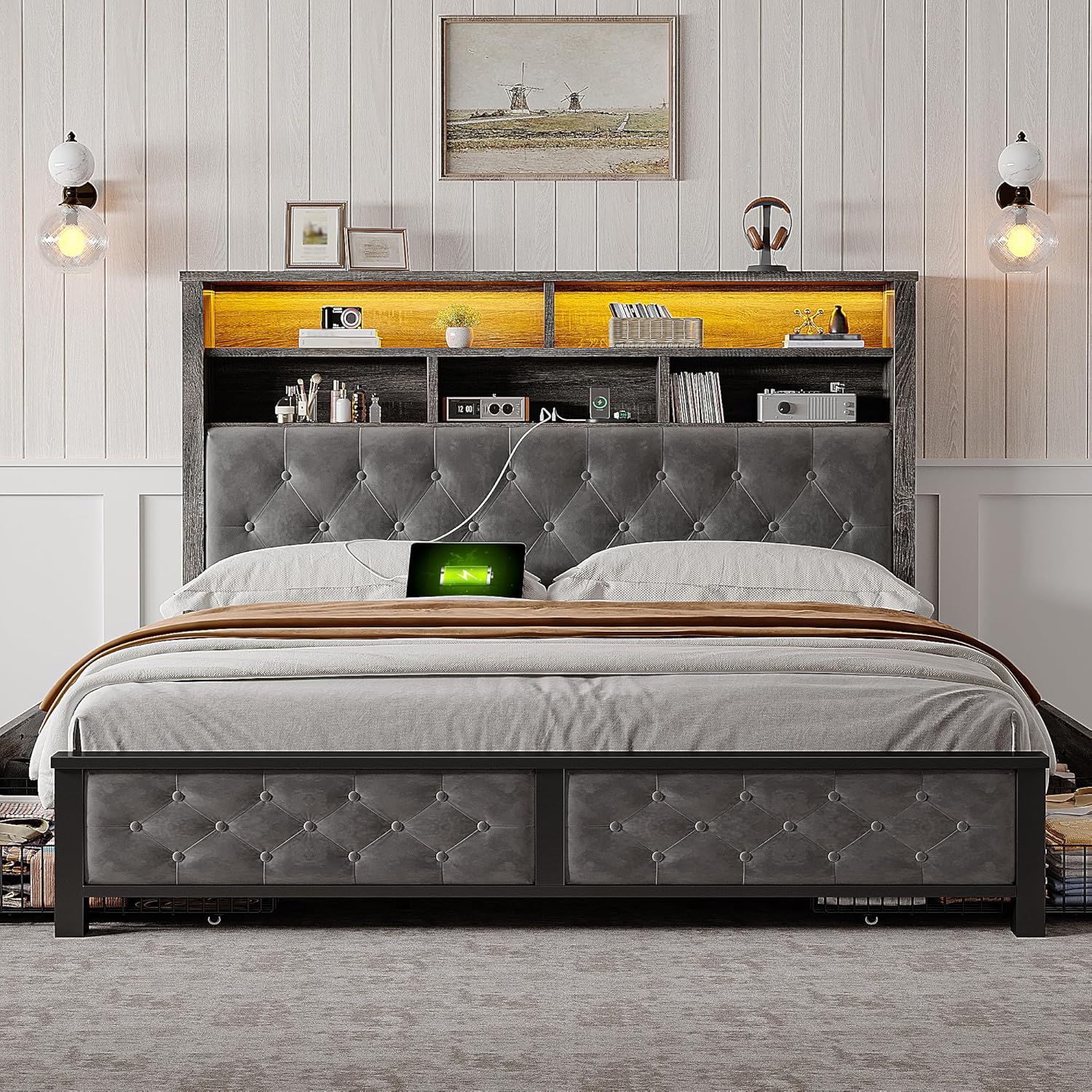
Figure 4.3: Construction details: thick wooden slats, simple installation, and bold metal frame.

Figure 4.4: Four large storage drawers for maximizing space.
5. Operating Instructions
5.1 LED Lighting System
The integrated LED lighting system can be controlled via the included remote control or a dedicated mobile application.
- Power On/Off: Use the power button on the remote or app to turn the lights on or off.
- Color Adjustment: Select from over 60,000 colors to match your mood or room decor.
- Brightness Control: Adjust the brightness level to create ambient lighting or provide practical illumination.
- Mode Selection: Choose from various dynamic modes (e.g., flash, fade, strobe) or activate the mic mode for lights to sync with sound.
- Timing Function: Set a timer for the lights to automatically turn off.

Figure 5.1: Multiple modes and control options for the LED lighting.
5.2 Charging Station
The headboard features a built-in charging station with Type B (USB-A) and Type C (USB-C) ports, providing 5V/2A output for convenient charging of your electronic devices.
- Connect Devices: Plug your USB-compatible devices (e.g., smartphones, tablets, smartwatches) into the appropriate Type B or Type C port.
- Power Source: Ensure the bed frame's power cord is plugged into a functional wall outlet for the charging station to operate.
5.3 Storage Drawers
The four large storage drawers are designed for easy access and organization.
- Opening/Closing: Gently pull or push the drawers to slide them in and out. The wheels ensure smooth operation on various floor types.
- Securing Drawers: Use the integrated clasps to secure the drawers in place when fully pushed in, preventing them from rolling out unintentionally.
- Storage Capacity: Utilize the ample space for storing bedding, clothes, books, or other personal items to keep your room tidy.
6. Maintenance and Care
Proper care will extend the life and appearance of your bed frame.
- Cleaning the Frame: Wipe the metal and wooden surfaces with a soft, damp cloth. Avoid harsh chemicals or abrasive cleaners that could damage the finish.
- Upholstered Headboard: For the upholstered fabric, gently vacuum with a brush attachment to remove dust. For spills, blot immediately with a clean, dry cloth. Do not rub. For stubborn stains, consult a professional upholstery cleaner.
- Drawer Maintenance: Periodically check the drawer wheels for any debris and clean if necessary to ensure smooth gliding.
- Hardware Check: Every 3-6 months, inspect all screws, bolts, and connections to ensure they are tight. Re-tighten any loose hardware to maintain stability and prevent squeaks.
- LED Lights: The LED lights are designed for long life and typically do not require maintenance. If issues arise, refer to the troubleshooting section.
7. Troubleshooting
If you encounter any issues with your EnHomee Queen Bed Frame, refer to the following common problems and solutions:
| Problem | Possible Cause | Solution |
|---|---|---|
| Bed frame squeaks or is unstable. | Loose hardware; uneven assembly; missing silent strip. | Check and tighten all screws and bolts. Ensure the bed frame is on a level surface. Verify the silent strip is correctly installed on the slats. |
| LED lights are not working. | Power connection issue; remote control battery dead; LED strip damaged. | Ensure the bed frame is plugged into a live outlet. Check all LED wiring connections. Replace remote control battery. If still not working, contact customer service. |
| Charging station is not functional. | Bed frame not plugged in; loose connection; device cable issue. | Verify the bed frame's power cord is securely plugged into a working outlet. Check the connection of the charging module to the bed frame's internal wiring. Try a different USB cable or device. |
| Drawers do not glide smoothly or fall out. | Debris in wheels; misaligned tracks; clasps not engaged. | Clean any debris from the drawer wheels. Ensure drawers are correctly aligned on their tracks. Verify the clasps are engaged when drawers are pushed in. |
If the problem persists after attempting these solutions, please contact EnHomee customer service for further assistance.
8. Specifications
| Feature | Detail |
|---|---|
| Size | Queen |
| Product Dimensions (L x W x H) | 89.9" x 62.4" x 47.1" |
| Color | Grey |
| Special Feature | Storage Drawer, LED Lighting, Charging Station |
| Included Components | Bed Frame, Headboard, 4 Drawers, LED Light Strip, Charging Station |
| Compatible Mattress Size | Queen (Recommended 8-11 inch height) |
| Material | Metal, Wood, Upholstered Fabric |
| Weight Capacity | 900 lbs |
| Assembly Required | Yes |
| Manufacturer | EnHomee |
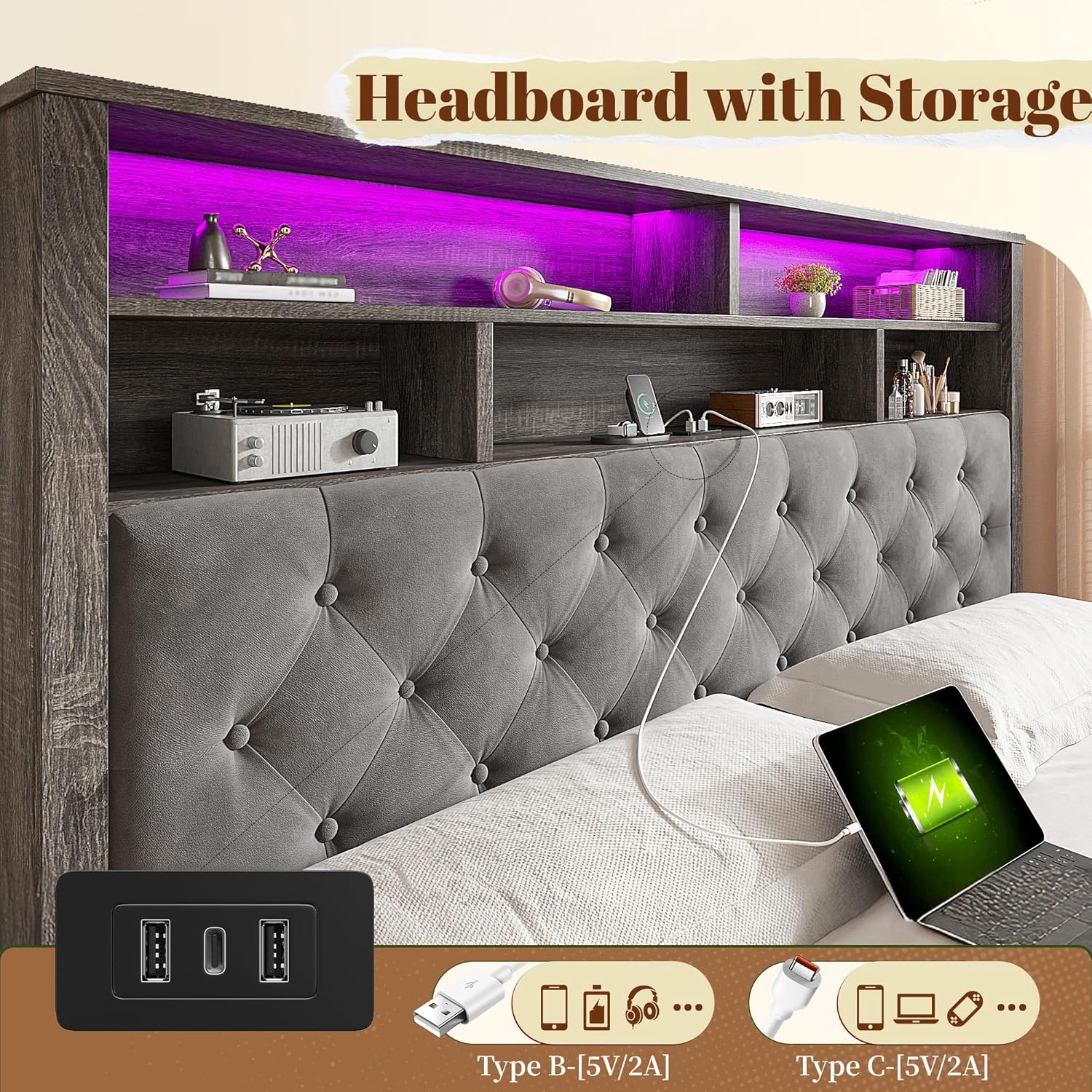
Figure 8.1: Detailed dimensions and specifications of the Queen bed frame.
9. Warranty and Support
EnHomee is committed to providing high-quality products and customer satisfaction. If you have any questions, require assistance with assembly, or if any components are missing or damaged, please do not hesitate to contact EnHomee customer service.
For support, please refer to the contact information provided with your purchase or visit the official EnHomee website. Please have your model number (B0DSL5J171) and purchase date ready when contacting support.