
Introduction
This manual provides detailed instructions for the installation, operation, and maintenance of your SMARTSTANDARD 72" x 80" Bifold Closet Door. Please read all instructions carefully before beginning installation to ensure proper assembly and safe use. Keep this manual for future reference.
Product Overview
The SMARTSTANDARD bifold closet door is designed for interior use, offering a space-saving solution for closets, laundry rooms, and other areas. It features a two-sided molded design and comes pre-drilled for easier assembly.
Key Features
- Two Sides Molded Design: Enhances aesthetics and structural integrity, providing a balanced look from both sides.
- Paintable White Primed Surface: Offers customization with paint to match your home's decor.
- Space-Saving Design: Ideal for small spaces, suitable for various rooms including closets, laundry rooms, living rooms, bedrooms, and bathrooms.
- Pre-drilled for Easy Assembly: Includes two assembled door panels, a hardware kit, and a knob for straightforward installation.
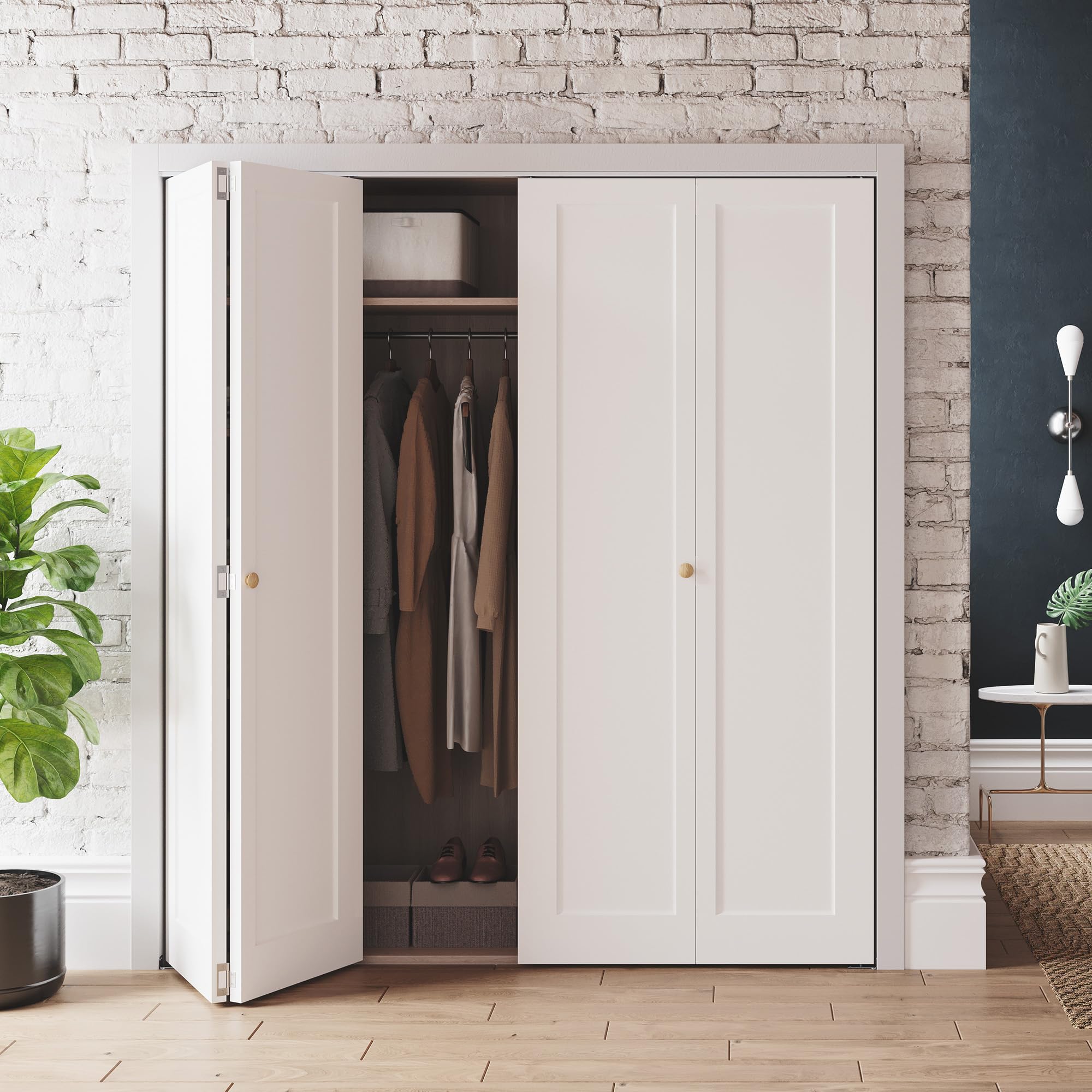
Image: The SMARTSTANDARD 72" x 80" bifold closet doors in a closed position, showcasing their design within a room setting.

Image: Illustration of the bifold door's paintable surface, showing a door partially painted blue and swatches for various paint colors, highlighting customization.

Image: A visual comparison demonstrating how bifold doors save more space compared to traditional barn doors for the same opening size.

Image: The SMARTSTANDARD bifold doors fully opened, providing a wide view into a well-organized closet interior.
Specifications
| Attribute | Detail |
|---|---|
| Brand | SMARTSTANDARD |
| Model Number | BFDPP1A18ZH |
| Color | White (Primed) |
| Material | Engineered Wood |
| Door Opening Size (W x H) | 72" x 80" |
| Single Panel Width | 17 3/4" (for 72" opening, 4 panels total) |
| Door Height | 78 2/5" |
| Door Thickness | 1.38" |
| Item Weight | 90 Pounds |
| Included Components | Hardware Kits, Knob |
| Assembly Required | Yes |

Image: Close-up showing the two-sided molded design of the door panels and the pre-drilled holes for hardware installation, emphasizing product quality.

Image: A diagram illustrating how to choose the correct bifold door size based on door opening width, single panel width, opening height, and door height.
Packing List
Before beginning installation, please verify that all components are present and undamaged. If any parts are missing or damaged, contact customer support.

Image: A visual representation of the complete packing list, including door panels, track, hinges, pivots, and knob, laid out for inspection.
Included Hardware:
- Bifold Door Panels (2 sets for 72" opening)
- Top Track
- Hinges
- Pivot Brackets and Pins
- Floor Guide
- Knob
- Fasteners and Screws
Setup and Installation
Follow these steps for proper installation of your bifold closet door. Ensure you have all necessary tools before starting.
Tools Required (Not Included):
- Measuring Tape
- Pencil
- Drill
- Screwdriver
- Level
Installation Steps:
- Install the Top Track: Secure the top track to the door frame header using the provided screws. Ensure it is level and centered within the door opening.
- Attach Hinges: Connect the bifold door panels using the provided hinges. The doors are pre-drilled for hinge placement.
- Hang Doors to Track and Lock Bracket: Insert the pivot pins into the top track and the floor guide. Lift the door assembly and engage the top pivot pin into the track. Then, secure the bottom pivot pin into the floor guide.
- Install Pivot Plate/Floor Guide: Ensure the bottom pivot plate or floor guide is properly aligned and secured to the floor, allowing the door to pivot smoothly.

Image: A composite image detailing the four main installation steps: 1. Installing the top track, 2. Attaching hinges, 3. Hanging doors to the track and locking the bracket, and 4. Installing the pivot plate.
After installation, test the door's operation to ensure it opens and closes smoothly. Adjust pivot pins as needed for proper alignment.

Image: Illustration demonstrating the flexibility to configure the bifold doors for either left or right-hand opening, adapting to room layout.
Operation
Your SMARTSTANDARD bifold door is designed for smooth and easy operation. To open or close the door, gently pull or push the knob located on the leading edge of the door panels.
- Opening: Pull the knob to fold the door panels inward, allowing access to the closet space.
- Closing: Push the knob to extend the door panels, closing the opening. Ensure the panels align properly when fully closed.
Image: A series of images demonstrating the bifold doors in various operational states: half-closed, fully opened, and fully closed.
Product Details:

Image: Detailed views of the door stop (B), floor guide (C), and flush pull knob (A) components of the bifold door system, highlighting their function.
Maintenance
Regular maintenance will ensure the longevity and smooth operation of your bifold doors.
- Cleaning: Wipe the door surfaces with a soft, damp cloth. Avoid abrasive cleaners that may damage the finish. For painted doors, use a mild soap solution if necessary.
- Hardware Check: Periodically inspect all hardware (track, hinges, pivots, screws) for tightness. Tighten any loose screws to prevent sagging or misalignment.
- Lubrication: If the door operation becomes stiff or noisy, apply a silicone-based lubricant to the top track and pivot points. Do not use oil-based lubricants as they can attract dust and debris.
- Painting: If you choose to paint the doors, ensure the surface is clean and lightly sanded (with >320 mesh fine sandpaper) before applying water-based paint or stain for optimal adhesion.
Troubleshooting
Refer to this section for common issues and their solutions.
| Problem | Possible Cause | Solution |
|---|---|---|
| Door does not close completely or is misaligned. | Loose pivot pins or track, uneven floor guide, door frame not plumb. | Adjust the pivot pins in the top track and bottom floor guide. Ensure the track is level and screws are tight. Check if the door frame is plumb. |
| Door is stiff or noisy when opening/closing. | Lack of lubrication, debris in the track, worn hardware. | Clean the top track and bottom floor guide. Apply a silicone-based lubricant to the track and pivot points. Inspect hardware for wear and replace if necessary. |
| Door panels rub against each other or the frame. | Misaligned hinges, incorrect door size for opening, loose hardware. | Check hinge alignment and tighten screws. Verify door dimensions against opening. Adjust pivot pins. |
Customer Support
If you encounter any issues not covered in this manual or require further assistance, please contact SMARTSTANDARD customer support. Our team is available to provide professional support within 24 hours.
For support, please refer to the contact information provided at the point of purchase or visit the official SMARTSTANDARD website.


