
1. Overview and Features
The GoAssemb RC ERA C138 Bell 206 No Aileron Helicopter is a 1/33 scale remote-controlled aircraft designed for stable and precise flight. It incorporates advanced technology to enhance the user experience, making it suitable for both beginners and experienced pilots.
Key features include:
- Advanced Flight Controls: Equipped with a 6CH design and 3 digital servos for precise control, enabling ascending, descending, moving forward, moving backward, flying left, flying right, rotating left, rotating right, and flight path flying.
- Stable Flight System: Features a 6-axis gyro system and aerodynamic propeller design for ultra-stable flight.
- Altitude Hold: Barometer altitude hold function maintains a steady altitude, simplifying flight control.
- Modular Battery System: Designed for quick installation, long-lasting power, and intelligent power management.
- Safety Features: Includes low voltage alarm, stuck protection, and loss control protection.
- User-Friendly Operations: One-key takeoff and landing for ease of use.
2. What's in the Box
Upon unboxing, please verify that all components are present and in good condition:
- RC helicopter model (C138 Bell 206)
- Remote control transmitter
- Lithium battery *1
- Main propeller *2
- Hex wrench *1
- Screwdriver *1
- USB cable *1
- Instructions *1
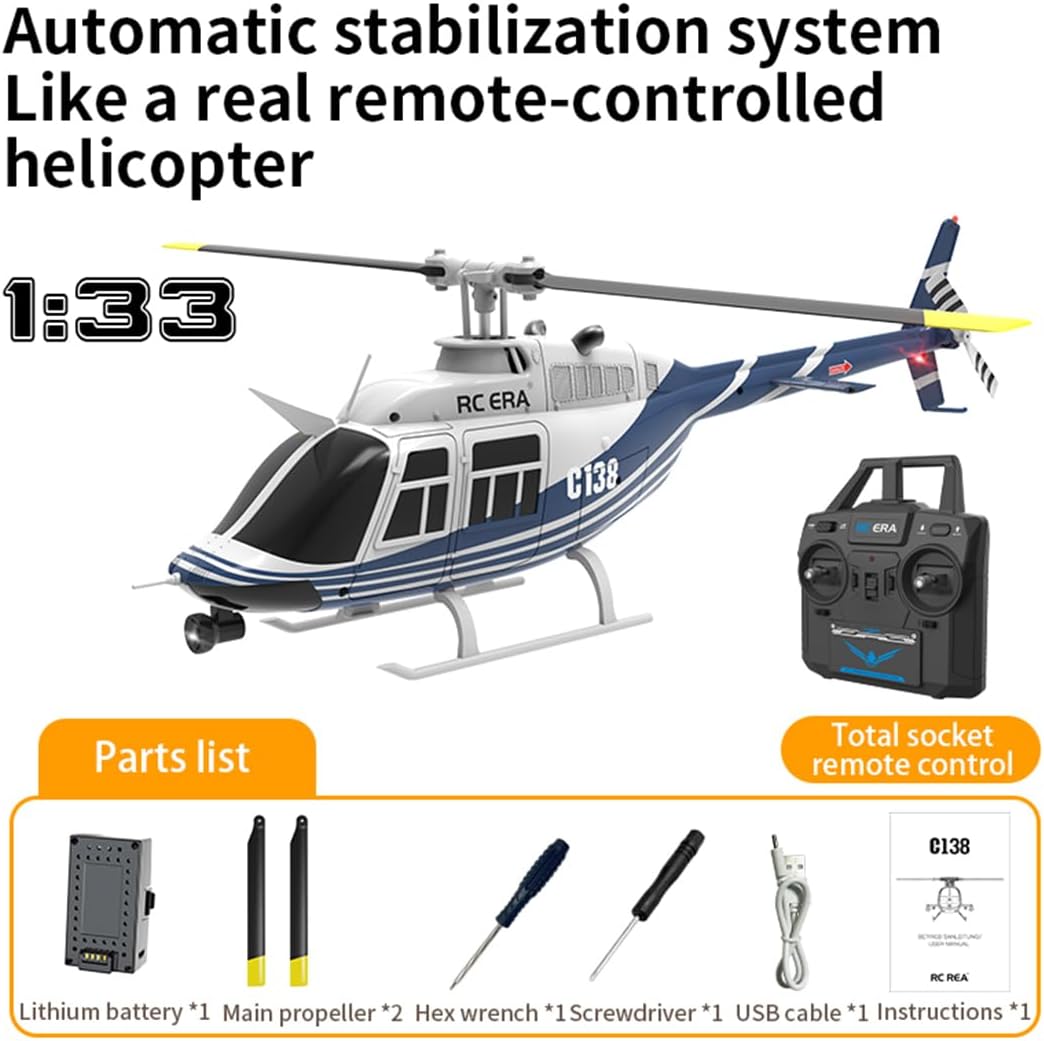
Image: RC ERA C138 Helicopter and its included parts: remote control, battery, propellers, tools, USB cable, and manual.
3. Setup
3.1 Battery Installation and Charging
The C138 features a modular battery system for easy installation. Ensure the battery is fully charged before first use.
- Insert the lithium battery into the helicopter's battery compartment. Ensure it clicks securely into place.
- Connect the provided USB charging cable to the battery and a suitable USB power source (e.g., computer, USB wall adapter).
- The charging indicator will show the charging status. Once fully charged, disconnect the battery.
Video: Demonstration of how to handle a loose battery casing for the RC helicopter. This video shows the proper way to secure the battery.

Image: Close-up of the modular battery system for the RC ERA C138 helicopter, showing its quick installation design.
3.2 Remote Control Setup
- Install the required batteries (not included) into the remote control transmitter.
- Power on the remote control.
- Power on the helicopter.
- Follow the binding procedure outlined in the included manual to pair the helicopter with the remote control. Typically, this involves moving the throttle stick up and then down.
4. Operating Instructions
4.1 Pre-Flight Check
- Ensure the helicopter battery is fully charged and securely installed.
- Verify the remote control batteries are sufficient.
- Check that all propellers are securely attached and undamaged.
- Perform a quick visual inspection for any loose parts or damage.
- Choose an open, clear area for flight, away from obstacles, people, and animals.
4.2 Takeoff and Landing
The C138 features a one-key takeoff and landing function for simplified operation.
- One-Key Takeoff: Place the helicopter on a flat surface. Press the one-key takeoff button on the remote control. The helicopter will automatically ascend to a stable hovering altitude.
- One-Key Landing: During flight, press the one-key landing button. The helicopter will automatically descend and land gently.

Image: The RC ERA C138 helicopter highlighting its one-click takeoff and landing feature, making it easy for beginners.
4.3 Flight Controls and Maneuvers
Utilize the 6-channel remote control for comprehensive flight maneuvers:
- Throttle Stick: Controls ascending (up) and descending (down).
- Directional Stick: Controls moving forward, backward, flying left, and flying right.
- Rudder Control: Controls rotating left and rotating right.
- Altitude Hold: The barometer altitude hold system automatically maintains the helicopter's height, allowing you to focus on directional control.
- Three-Speed Adjustment: The remote control allows you to switch between low, moderate, and high speeds to match your skill level and flight environment.

Image: The RC ERA C138 helicopter demonstrating its unrestricted multi-directional flight capabilities.

Image: The RC ERA C138 helicopter's three-speed adjustment feature, allowing pilots to select flight speeds based on proficiency.
Video: An RC ERA C187 helicopter (similar model) performing various flight maneuvers outdoors, demonstrating stability and control.
Video: An RC ERA C187 helicopter (similar model) demonstrating optical flow positioning and stable flight in an urban environment.
Video: The Silent Scout (similar model) performing outdoor flight, showcasing its agility and stability in various aerial movements.
4.4 Safety Guidelines
- Always operate the helicopter in an open area, away from people, buildings, and power lines.
- Do not fly in strong winds or adverse weather conditions.
- Keep hands and face clear of rotating propellers.
- Supervise children during operation.
- Regularly check the helicopter for any damage before and after each flight.
5. Maintenance
Proper maintenance ensures the longevity and optimal performance of your RC ERA C138 helicopter.
- Cleaning: After each flight, gently wipe down the helicopter with a soft, dry cloth to remove dust and debris. Avoid using water or harsh chemicals.
- Propeller Inspection: Regularly check the main and tail rotor blades for any cracks, bends, or damage. Replace damaged blades immediately to ensure stable flight.
- Battery Care: Store batteries in a cool, dry place. Do not overcharge or over-discharge the battery. If storing for an extended period, charge the battery to approximately 50% capacity.
- Motor and Gear Inspection: Periodically check the motors and gears for any signs of wear or obstruction. Ensure they spin freely.
- Storage: When not in use, store the helicopter and remote control in a safe place, away from direct sunlight and extreme temperatures.
6. Troubleshooting
This section addresses common issues you might encounter with your RC ERA C138 helicopter.
| Problem | Possible Cause | Solution |
|---|---|---|
| Helicopter does not respond to remote control. | Not bound, low battery in remote or helicopter, interference. | Re-bind the helicopter and remote. Check and replace batteries. Ensure no strong interference sources nearby. |
| Unstable flight or drifting. | Uncalibrated gyroscope, damaged propellers, strong wind. | Recalibrate the gyroscope (refer to manual). Inspect and replace damaged propellers. Fly in calm conditions. |
| Helicopter does not take off. | Low helicopter battery, propellers obstructed. | Charge the helicopter battery. Clear any obstructions from propellers. The intelligent anti-stuck protection will prevent motor damage if propellers are blocked. |
| Short flight time. | Battery not fully charged, aging battery. | Ensure battery is fully charged. Consider replacing the battery if it's old or frequently used. |
| Loss of control during flight. | Out of range, strong interference. | Fly within the specified range. Avoid areas with high electromagnetic interference. The loss control protection feature will attempt to land the helicopter safely. |

Image: The RC ERA C138 helicopter highlighting its intelligent anti-stuck protection feature, designed to prevent propeller damage.
7. Specifications
| Feature | Detail |
|---|---|
| Model Number | C138 |
| Scale | 1/33 |
| Product Dimensions | 12.28 x 3.11 x 3.98 inches |
| Item Weight | 14.1 ounces |
| RC System | 2.4G 6CH |
| Gyro System | 6-axis |
| Altitude Hold | Barometer Altitude Hold |
| Recommended Age | 16 years and up |
| Manufacturer | GoAssemb |
8. Warranty and Support
GoAssemb products are manufactured to high-quality standards. For warranty information, please refer to the specific warranty card included with your product or visit the official GoAssemb website.
For technical support, troubleshooting assistance, or replacement parts, please contact GoAssemb customer service through the retailer where the product was purchased or via the contact information provided in your product packaging.