
1. Important Safety Information
Please read and understand all instructions before assembling and using this product. Failure to follow these instructions may result in injury or damage.
- Keep all parts and packaging materials out of reach of children.
- Ensure all screws and fasteners are securely tightened before use. Periodically check and re-tighten as necessary.
- Do not overload the desk. Refer to the specifications section for weight limits.
- Use the desk on a flat, stable surface to prevent tipping.
- Avoid exposing the desk to excessive moisture or direct sunlight.
- When moving the desk, lift it carefully to avoid damage or injury. Do not drag.
2. Package Contents
Verify that all components are present before beginning assembly. If any parts are missing or damaged, contact customer support.
- Desktop Panel
- Monitor Stand/Pegboard Unit
- Desk Legs (4)
- Crossbars/Support Brackets
- Fabric Drawers (2)
- Charging Station Unit
- Assembly Hardware (screws, bolts, allen wrench)
- LED Light Strip and Remote Control
- Instruction Manual

Figure 2.1: Overview of the Flrrtenv Computer Desk, showing its main components including the pegboard, monitor stand, desktop, and fabric drawers.
3. Setup and Assembly Instructions
Tools Required: Phillips head screwdriver (not included), Allen wrench (included).
- Prepare the Area: Clear a spacious, clean area for assembly. Lay out all parts and hardware.
- Assemble the Frame: Attach the desk legs to the desktop panel using the provided screws. Ensure the legs are oriented correctly. Secure the crossbars between the legs for added stability.
- Install Monitor Stand/Pegboard: Secure the monitor stand and pegboard unit to the back of the desktop using the designated fasteners.
- Integrate Charging Station: Carefully insert the charging station unit into its designated slot on the monitor stand. Connect any necessary internal wiring as per the diagram.
- Insert Fabric Drawers: Slide the two fabric drawers into their respective compartments beneath the desktop.
- Attach LED Light Strip: Adhere the LED light strip to the underside of the monitor stand/pegboard unit. Connect it to the power source on the charging station.
- Final Check: Ensure all connections are secure and the desk is stable before placing any items on it.
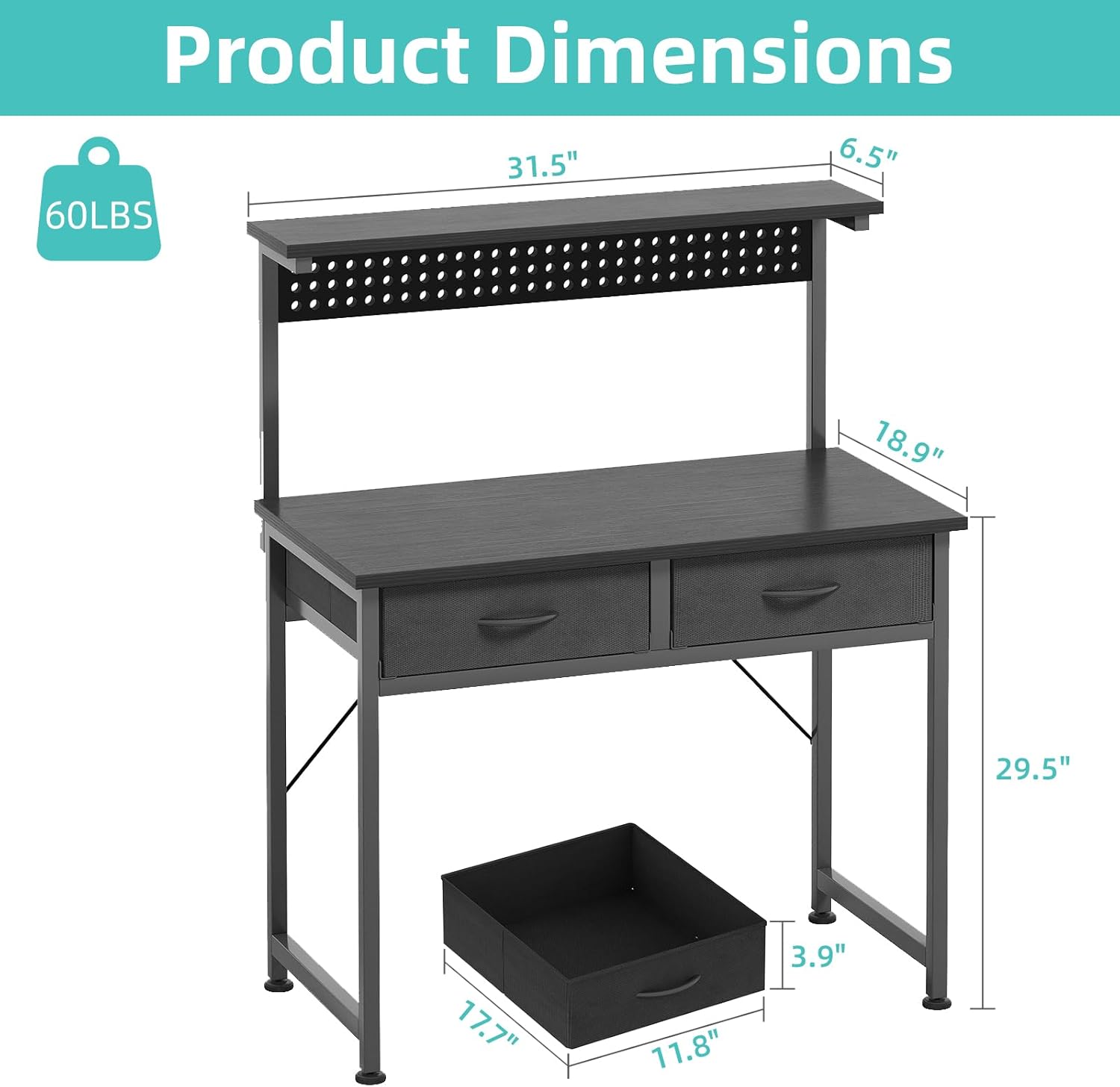
Figure 3.1: Product dimensions, useful for planning placement and assembly steps.
4. Operating Instructions
4.1 Adjustable LED Lighting
The desk features an integrated LED light strip with adjustable colors and modes. Use the provided remote control to operate the lighting.
- Power On/Off: Press the power button on the remote.
- Color Selection: Use the color palette buttons to choose from various static colors.
- Dynamic Modes: Select from 22 dynamic modes for various lighting effects.
- Brightness Adjustment: Use the brightness up/down buttons to adjust intensity.
- Music Sync: Activate music sync mode for lights to react to sound.
- Timing Function: Set a timer for the lights to automatically turn off.

Figure 4.1: The desk's adjustable LED lighting system, showcasing various color options and dynamic modes.
4.2 Charging Station
The integrated charging station provides convenient power access for your devices.
- AC Outlets: Two standard AC outlets are available for plugging in electronics.
- USB Ports: Two USB ports are provided for charging mobile devices, tablets, and other USB-powered accessories.
- Ensure the desk's main power cord is plugged into a wall outlet for the charging station to function.

Figure 4.2: Detail of the built-in charging station, featuring two AC outlets and two USB ports for convenient device charging.
4.3 Adjustable Monitor Stand
The elevated monitor stand helps maintain an ergonomic viewing height, reducing neck and eye strain.
- Place your monitor directly on the stand.
- The stand is fixed in height to provide optimal ergonomic positioning.

Figure 4.3: Visual guide illustrating the ergonomic benefits of the integrated monitor stand for improved posture.
4.4 Pegboard for Personalization
The integrated pegboard allows for customization and organization of accessories.
- Use standard pegboard hooks (not included) to hang headphones, controllers, small shelves, or decorative items.
- Ensure items hung on the pegboard do not obstruct the LED lighting or monitor view.
4.5 Fabric Drawers
The two fabric drawers provide convenient storage for office supplies, gaming accessories, or personal items.
- Pull the handles to open and push to close.
- Do not overload drawers beyond their capacity to ensure smooth operation and prevent damage.

Figure 4.4: The two fabric drawers offer discreet storage for various items, helping to keep the desktop organized.
4.6 Expandable Desktop Design
The desk features an expandable design, allowing for an increased surface area when needed.
- To expand, gently pull the side panels outwards. They are designed to slide out and provide additional workspace.
- To retract, push the side panels back inwards until they are flush with the main desktop.
- Ensure no items are obstructing the expansion mechanism during adjustment.

Figure 4.5: The desk's expandable feature, demonstrating how the side panels can be extended to create a wider surface for collaborative use.
5. Maintenance
Regular maintenance will help prolong the life and appearance of your desk.
- Cleaning: Wipe surfaces with a soft, damp cloth. Avoid abrasive cleaners or harsh chemicals that may damage the finish.
- Spills: Immediately wipe up any spills to prevent staining or damage to the wood finish.
- Hardware: Periodically check all screws and fasteners to ensure they remain tight. Re-tighten if necessary.
- Fabric Drawers: Spot clean fabric drawers with a mild detergent and damp cloth. Allow to air dry completely. Do not machine wash.
- Electrical Components: Ensure the charging station and LED lights are unplugged before cleaning. Do not immerse in water.
6. Troubleshooting
| Problem | Possible Cause | Solution |
|---|---|---|
| Desk is wobbly/unstable. | Loose fasteners; uneven floor. | Ensure all screws and bolts are tightened. Adjust leveling feet if present, or place shims under legs on uneven surfaces. |
| LED lights not turning on. | Not plugged in; remote battery dead; loose connection. | Check if the desk's power cord is plugged into a working outlet. Replace remote battery. Ensure LED strip is securely connected to the charging station. |
| Charging station not working. | Desk not powered; device not compatible. | Verify the desk's main power cord is plugged in. Test with a different device. Ensure devices are compatible with USB charging. |
| Drawers are difficult to open/close. | Overloaded; misaligned. | Reduce the weight in the drawers. Ensure drawers are inserted correctly and not jammed. |
7. Specifications
| Feature | Detail |
|---|---|
| Brand | Flrrtenv |
| Model Number | F-XY3101-BK-CA |
| Color | Black |
| Product Dimensions | 80D x 40W x 79H Centimetres (31.5"D x 15.7"W x 31.1"H) |
| Item Weight | 11.8 kg (26 lbs) |
| Desk Design | Computer Desk with Pegboard, Monitor Stand, Charging Station |
| Storage | 2 Fabric Drawers |
| Lighting | Adjustable LED Light (RGB, Dynamic Modes, Music Sync, Timing Function) |
| Power Outlets | 2 AC Outlets, 2 USB Ports |
| Assembly Required | Yes |
8. Warranty and Customer Support
Flrrtenv stands behind the quality of its products. For specific warranty information, please refer to the documentation included with your purchase or visit the official Flrrtenv website.
If you encounter any issues or have questions regarding your Flrrtenv Computer Desk, please contact our customer support team:
- Online Support: Visit the Flrrtenv store on Amazon or the official brand website for FAQs and contact options.
- Email: Refer to your purchase receipt for direct email support.
Please have your model number (F-XY3101-BK-CA) and purchase date ready when contacting support.