
1. Introduction
This manual provides detailed instructions for the proper use, installation, and maintenance of your Damolong Wallet Phone Case. This product is specifically designed for the OPPO Reno 13 F 5G CPH2699 model, offering comprehensive protection and enhanced functionality.
2. Product Features
The Damolong Wallet Phone Case is engineered with multiple features to enhance your mobile experience:
- Premium Material: Constructed from high-quality synthetic PU leather and durable TPU silicone gel for a soft, natural feel and robust protection.
- Multi-Purpose Design: Features a detachable card slot holder on the front, three built-in card slots, and one cash slot inside, eliminating the need for a separate wallet.
- Kickstand Function: A folding line on the back allows the case to convert into a kickstand for hands-free video calls, reading, and media viewing.
- All-Round Protection: Provides optimal shockproof protection against daily bumps, knocks, drops, and scratches.
- Magnetic Clasp: Ensures the case remains securely closed, protecting your device at all times.
- Adjustable Lanyard and Wrist Strap: Includes a nylon tear-resistant adjustable cell phone lanyard and an adjustable wrist strap for convenient carrying options, freeing your hands.

Image 1: Overview of the Damolong Wallet Phone Case in Red, showcasing the case, lanyard, and wrist strap.

Image 2: The wallet phone case opened, revealing the phone compartment and card slots.

Image 3: Illustration of the detachable card slot feature of the case.
3. Package Contents
Upon opening your package, please verify that all the following items are included:
- 1 × Magnetic Leather Flip Case
- 1 × Adjustable Cell Phone Lanyard
- 1 × Adjustable Wrist Strap
4. Setup and Installation
Follow these steps to properly install your phone into the case and attach the accessories:
- Prepare Components: Gather your OPPO Reno 13 F 5G CPH2699 phone, the Damolong Wallet Phone Case, the adjustable cell phone lanyard, the adjustable wrist strap, and the small pad for lanyard attachment.
- Insert Lanyard Pad: Place the small transparent pad into the charging port opening of your phone case. Ensure the loop of the pad extends slightly outside the charging port.
- Install Phone: Carefully insert your phone into the case, ensuring it is securely seated and the lanyard pad remains in position.
- Attach Lanyard/Wrist Strap: Hook the metal buckle of the adjustable cell phone lanyard or wrist strap to the loop of the transparent pad extending from the charging port. Ensure the connection is secure.

Image 4: Step-by-step guide for installing the phone into the case and attaching the lanyard.
5. Operating Instructions
Utilize the various functions of your wallet phone case:
- Using Card Slots: Insert your ID, credit cards, business cards, and cash into the designated slots. The detachable card slot can be used for quick access.
- Activating Kickstand: Fold the back of the case along the designated line to create a stand. This allows for horizontal viewing of your phone.
- Using Lanyard/Wrist Strap: Attach the lanyard to carry your phone around your neck or diagonally across your body. The wrist strap provides a secure grip and prevents accidental drops. Adjust the length of the lanyard as needed.
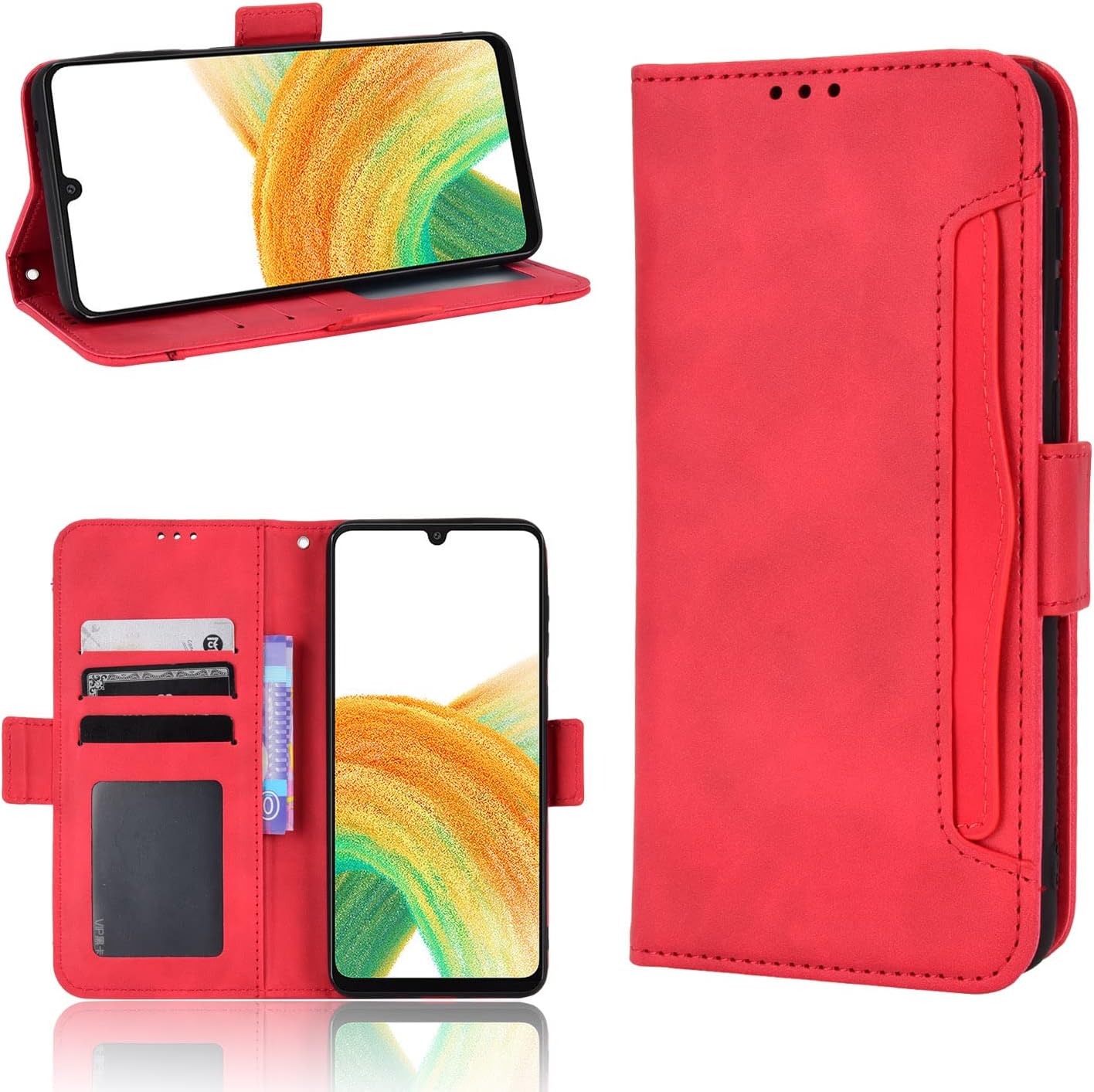
Image 5: Demonstrates the case in open position with a phone and its kickstand functionality.

Image 6: Examples of how to wear the phone case using the adjustable lanyard and wrist strap.
6. Maintenance and Care
To ensure the longevity and appearance of your Damolong Wallet Phone Case, follow these care guidelines:
- Cleaning: Wipe the PU leather surface with a soft, damp cloth. Avoid using harsh chemicals or abrasive cleaners, which can damage the material.
- Avoid Extreme Conditions: Do not expose the case to direct sunlight for prolonged periods or to extreme temperatures, as this may cause discoloration or material degradation.
- Storage: When not in use, store the case in a cool, dry place away from direct heat and moisture.
7. Troubleshooting
If you encounter any issues with your wallet phone case, consider the following common solutions:
- Case Fit: Ensure your phone model is indeed OPPO Reno 13 F 5G CPH2699. This case is designed for a precise fit and may not be compatible with other models.
- Magnetic Clasp Not Holding: Check if there are too many cards or items in the wallet section, which might prevent the magnetic clasp from closing properly. Remove some items if necessary.
- Lanyard/Strap Detachment: Verify that the metal buckle of the lanyard or wrist strap is securely hooked to the transparent pad's loop and that the pad is correctly positioned within the charging port opening.
8. Specifications
| Feature | Detail |
|---|---|
| Compatible Phone Model | OPPO Reno 13 F 5G CPH2699 (6.67 Inch) |
| Material | PU Leather, TPU Silicone Gel |
| Color | Red |
| Form Factor | Flip Case |
| Special Features | Card Slot, Cell Phone Lanyard, Heavy Duty Protection, Kickstand, Wrist Strap |
| Item Weight | 5.3 ounces (approximately 150 grams) |
| Package Dimensions | 8.66 x 7.09 x 0.59 inches |

Image 7: Detailed dimensions of the wrist strap, lanyard, and lanyard pad.
9. Warranty and Support
Damolong is committed to customer satisfaction. If you are not absolutely 100% thrilled with your case for any reason, we offer a refund or replacement. For further assistance, technical support, or warranty claims, please contact the seller directly through your purchase platform.
Thank you for choosing Damolong.