1. Introduction
The Jwthee Digital Peephole Door Viewer is designed to enhance your home security by providing a clear, wide-angle view of your doorstep. This device replaces traditional peepholes, offering a 2.4-inch LCD screen for easy viewing of visitors, packages, or the surrounding environment outside your door. It is particularly convenient for the elderly and children. This manual provides comprehensive instructions for the installation, operation, and maintenance of your digital peephole door viewer.
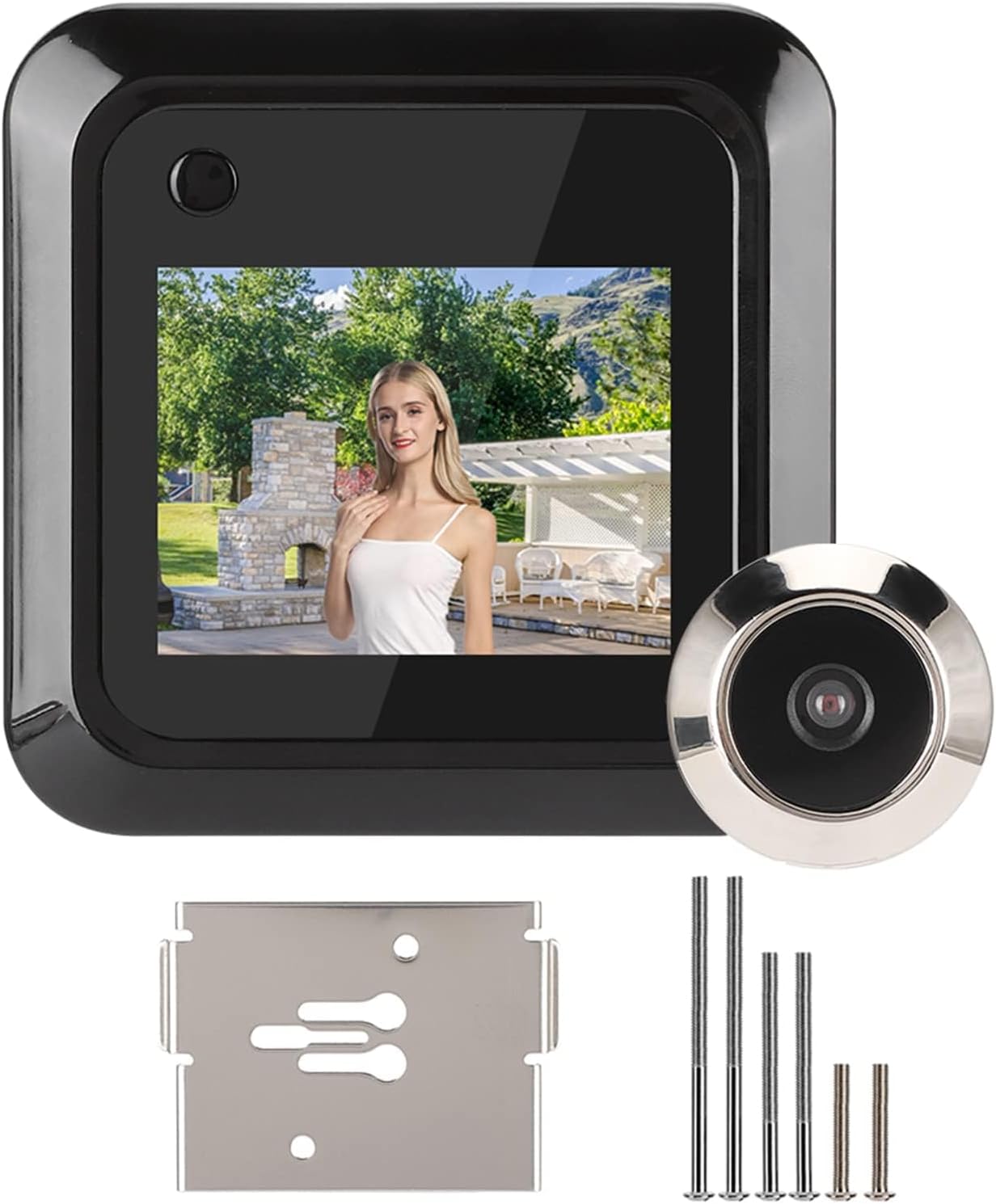
Figure 1: Jwthee Digital Peephole Door Viewer components.
2. Product Components
Before installation, please ensure all components are present and undamaged:

Figure 2: Included product components.
- Door Mounted Display (Indoor Unit) x 1
- Outdoor Cat's Eye (Peephole Camera) x 1
- Hanging Board x 1
- Screws x 6 (various lengths for different door thicknesses)
- Instruction Manual x 1
Note: 3 AAA batteries are required for operation and are not included in the package.
3. Setup and Installation
The Jwthee Digital Peephole Door Viewer is designed for easy installation, requiring no complex wiring or professional tools. It is compatible with standard door holes and thicknesses.
3.1 Compatibility Check
Ensure your door meets the following specifications:
- Applicable Door Hole Diameter: Approximately 15-50mm (0.6 - 2 inches)
- Applicable Door Thickness: Approximately 35-110mm (1.4 - 4.3 inches)

Figure 3: Door viewer dimensions and compatibility.
3.2 Installation Steps
Follow these steps to install your digital peephole door viewer:

Figure 4: Visual guide for installation steps.
- Prepare the Door Hole: If you have an existing traditional peephole, remove it. Ensure the door hole is clean and within the compatible diameter range (15-50mm).
- Install Outdoor Unit (Step 1): Insert the outdoor camera unit through the door hole from the outside. Ensure the ribbon cable passes through the hole to the inside of the door. Secure the outdoor unit with the appropriate screws from the inside, matching your door's thickness.
- Attach Hanging Board (Step 2): Position the metal hanging board on the inside of the door, aligning its holes with the screws from the outdoor unit. Secure the hanging board firmly.
- Connect Indoor Unit (Step 3): Connect the ribbon cable from the outdoor unit to the designated port on the back of the indoor display unit. Carefully align the connectors to avoid damage.
- Mount Indoor Unit: Align the indoor display unit with the hanging board and slide it downwards to secure it in place.
- Insert Batteries: Open the battery compartment on the indoor unit and insert 3 AAA batteries (not included), ensuring correct polarity.
4. Operating Instructions
Once installed and powered, the Jwthee Digital Peephole Door Viewer is ready for use.
4.1 Viewing Outside
To view outside, simply press the power/view button on the indoor display unit. The 2.4-inch color LCD screen will activate, displaying a clear, 95-degree wide-angle view from the outdoor camera.

Figure 5: Wide-angle view from the outdoor camera.

Figure 6: Indoor display showing the view from outside.
4.2 Photo Capture
The device supports manual photo capture. While viewing the outside, press the designated photo capture button (refer to the device's physical buttons for exact location, usually near the screen) to take a snapshot. The built-in storage can hold approximately 30 photos. For expanded storage, a 32GB external storage card (not included) can be inserted.
4.3 Important Notes
- This digital peephole door viewer does not support video recording, night vision, or doorbell functions.
- The device is designed for front doors of homes and apartments.
- It can withstand extreme temperatures ranging from -20°C to 55°C.
5. Maintenance
To ensure the longevity and optimal performance of your Jwthee Digital Peephole Door Viewer, follow these simple maintenance guidelines:
- Cleaning: Use a soft, dry cloth to gently wipe the indoor display screen and the outdoor camera lens. Avoid using abrasive cleaners or solvents, as they may damage the surfaces.
- Battery Replacement: When the display indicates low battery or fails to power on, replace the 3 AAA batteries with new ones. Ensure correct polarity during insertion.
- Environmental Protection: The outdoor unit is constructed from high-strength ABS plastic and zinc alloy, designed to withstand daily weather conditions. However, avoid direct exposure to extreme moisture or prolonged submersion.
6. Troubleshooting
If you encounter any issues with your digital peephole door viewer, refer to the following troubleshooting tips:
| Problem | Possible Cause | Solution |
|---|---|---|
| Device does not power on. | Batteries are dead or incorrectly inserted. | Replace with new AAA batteries, ensuring correct polarity. |
| No image on the screen. | Ribbon cable is loose or disconnected. Outdoor camera lens is obstructed. | Check the connection of the ribbon cable between the indoor and outdoor units. Ensure the outdoor camera lens is clean and unobstructed. |
| Image quality is poor or blurry. | Outdoor camera lens is dirty. | Gently clean the outdoor camera lens with a soft, dry cloth. |
| Cannot capture photos. | Internal storage is full. No external SD card inserted or card is full/corrupted. | Delete old photos from internal storage. Insert a new or empty 32GB external SD card. |
7. Specifications
| Feature | Specification |
|---|---|
| Model Number | Jwtheegoa0g9phsm |
| Manufacturer | Jwthee |
| Screen Size | 2.4 inches |
| Screen Resolution | 320 x 240 |
| Camera Resolution | 0.3 Megapixels |
| Viewing Angle | 95 degrees (Wide Angle) |
| Applicable Door Hole | Approx. 15-50mm (0.6 - 2 inches) |
| Applicable Door Thickness | Approx. 35-110mm (1.4 - 4.3 inches) |
| Power Source | 3 x AAA Batteries (Not Included) |
| Internal Storage | Approximately 30 photos |
| External Storage Support | Up to 32GB SD card (Not Included) |
| Operating Temperature | -20°C to 55°C |
| Material | High-strength ABS plastic and Zinc Alloy |
| Item Weight | 0.81 ounces |
| Package Dimensions | 6 x 5 x 1.5 inches |
8. Warranty and Support
Specific warranty information for the Jwthee Digital Peephole Door Viewer is not provided in the product details. For warranty claims or technical support, please refer to the retailer where the product was purchased or contact Jwthee customer service directly if contact information is available on the product packaging or official website.