
Introduction
Welcome to the WINMAU Ton Machine Electronic Dartboard Set. This manual provides essential information for the safe and efficient operation of your new dartboard. Please read these instructions carefully before setup and use to ensure optimal performance and longevity of the product. This electronic dartboard is designed for soft-tip darts and offers a variety of games for multiple players or solo practice against an AI opponent.
What's in the Box
Upon unpacking, please verify that all components listed below are present and in good condition.
- WINMAU Ton Machine Electronic Dartboard
- 2 Sets of Soft-Tip Darts (6 darts total)
- 10 Sets of Spare Soft Tips (30 tips total)
- Oche Throwing Line
- Instruction Manual
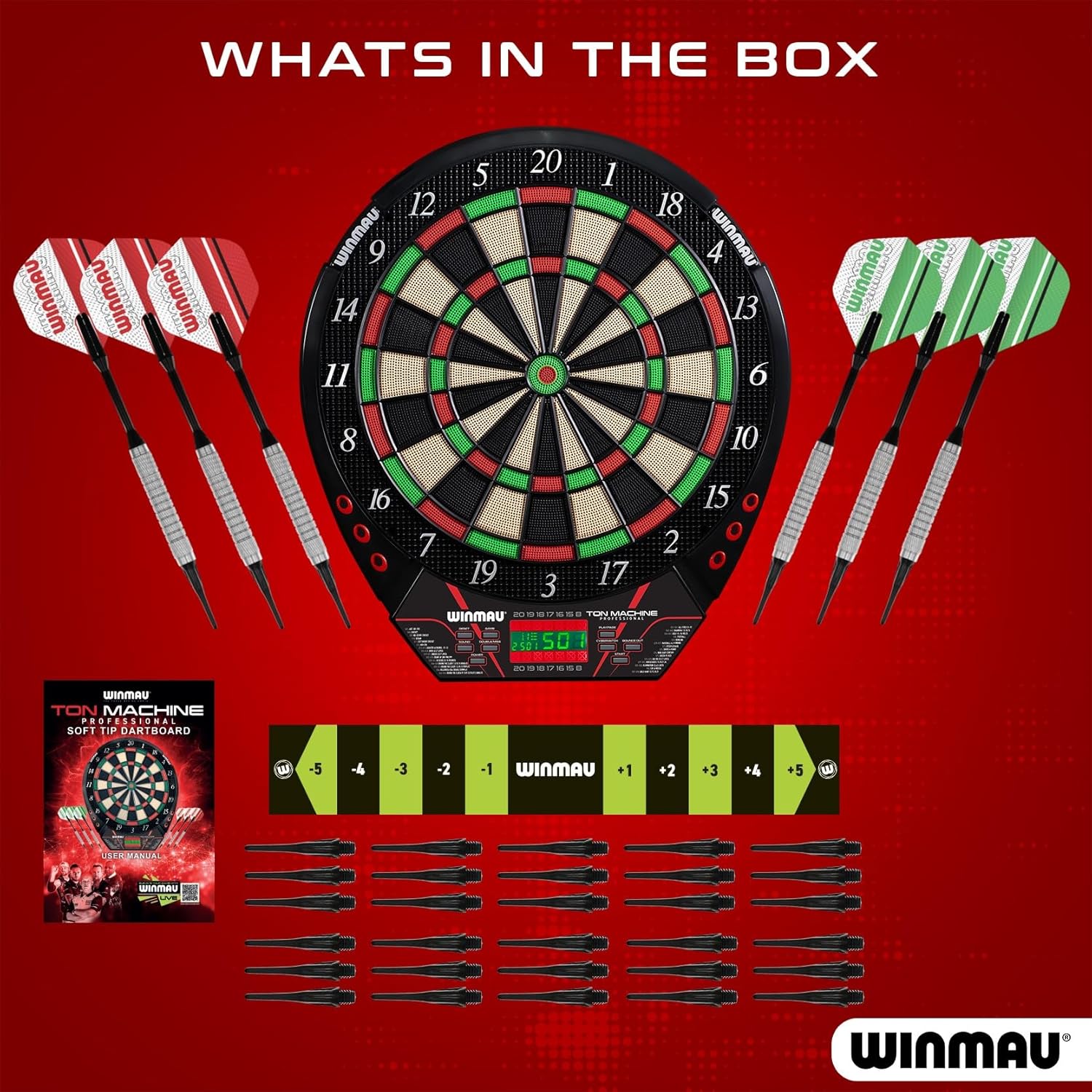
Image: All components included in the WINMAU Ton Machine Electronic Dartboard Set.
Setup
1. Mounting the Dartboard
Select a suitable location for mounting the dartboard. Ensure there is ample space around the dartboard for safe play and that the wall can support its weight. The center of the bullseye should be mounted 5 feet 8 inches (1.73 meters) from the floor. Use appropriate wall anchors and screws (not included) for secure installation.
2. Powering the Dartboard
The dartboard offers dual power options:
- AC Adapter (not included): Connect a compatible AC adapter to the dartboard's power input and plug it into a standard wall outlet.
- Batteries (not included): Insert four AA batteries into the battery compartment located on the back of the dartboard.
Ensure the power source is stable before turning on the unit.
3. Placing the Throw Line (Oche)
The included oche throwing line should be placed on the floor at a distance of 7 feet 9.25 inches (2.37 meters) from the face of the dartboard. This marks the standard throwing distance.
Operating Instructions
1. Power On/Off
Press the POWER button to turn the dartboard on or off. The digital display will illuminate upon power-on.
2. Game Selection
Press the GAME button repeatedly to cycle through the available game modes. The selected game number and name will appear on the digital display. Refer to the "Games List" section for a detailed overview of available games.
3. Player Selection
After selecting a game, use the PLAYER button to choose the number of players (up to 8). The dartboard supports individual play or team play.
4. AI Opponent (Solo Play)
For solo practice, select the AI opponent option. The dartboard features multiple AI difficulty levels to challenge players of varying skill. The AI's scores will be displayed alongside yours.

Image: The dartboard supports up to 8 players and includes a solo play mode with an AI opponent.
5. Starting a Game
Once the game and player settings are configured, press the START button to begin play.
6. Digital Scoring Display
The integrated digital display automatically tracks scores and game progress. It provides clear graphics and numbers for easy readability during gameplay.

Image: The digital display provides clear scoring and game information.
7. Game Controls
- RESET: Clears current game progress and returns to game selection.
- SOUND: Adjusts or mutes sound effects.
- DOUBLE/MISS: Used in specific games (e.g., 01 games) to register doubles or missed throws.
- CYBERMATCH: Activates AI opponent mode.
- BOUNCE OUT: Manually registers a dart that bounced out but should have scored.
8. Video Demonstration
Video: Overview of the Winmau Ton Machine Soft Tip Dartboard Set, demonstrating its features and gameplay.
Video: Short demonstration of the Winmau Electronic Dartboard - Ton Machine Soft Tip in action.
Games List
The WINMAU Ton Machine offers over 90 pre-programmed games. Some popular game modes include:
- Cricket
- 501, 301, 701, 801, 901 (and other '01 games)
- Shanghai
- Double Down
- Round-the-Clock
- All Fives
- Count Up
- Killer
- Golf
- Baseball
- Bowling
- And many more variations.
Consult the dartboard's display or the quick-reference guide for a complete list and specific game rules.
Maintenance
1. Cleaning
To clean the dartboard, wipe the surface with a soft, dry cloth. For stubborn marks, a slightly damp cloth can be used, followed by immediate drying. Avoid using abrasive cleaners, solvents, or excessive moisture, as these can damage the electronic components and playing surface.
2. Dart Tip Replacement
Soft-tip darts are designed to be durable, but tips can wear down or break over time. Replace damaged or worn tips promptly using the included spare tips. Simply unscrew the old tip and screw in a new one. Ensure tips are securely fastened before playing.
3. Storage
When not in use, store the dartboard in a dry environment, away from direct sunlight and extreme temperatures. If using batteries, remove them if the dartboard will not be used for an extended period to prevent leakage.
Troubleshooting
| Problem | Possible Cause | Solution |
|---|---|---|
| Dartboard does not power on. | No power, dead batteries, or faulty adapter. | Check power connection or replace batteries. Ensure AC adapter (if used) is functional. |
| Darts are not registering scores. | Worn or broken dart tips, dart not fully entering segment, or sensor issue. | Replace dart tips. Ensure darts are thrown with sufficient force to fully enter the segment. If problem persists, contact support. |
| Sound is not working or is too low. | Sound setting is off or volume is too low. | Press the SOUND button to adjust volume or unmute. |
| Digital display is blank or flickering. | Low power, loose connection, or display damage. | Check power source. If display is physically damaged (e.g., from a direct dart hit), contact manufacturer for repair options. |
| Dartboard registers incorrect scores. | Darts bouncing out, multiple darts registering, or segment malfunction. | Ensure darts are not bouncing out. If a segment consistently misregisters, gently check for debris or damage. Use the BOUNCE OUT button if applicable. |
Specifications
- Model Name: Ton Machine Pro
- Part Number: 3560
- Brand: Winmau
- Material: Plastic
- Color: Black
- Playing Area: 15.5 inches (regulation size)
- Power Options: AC Adapter (not included) or 4x AA Batteries (not included)
- Player Capacity: Up to 8 players
- Dimensions (LxWxH): Approximately 20 x 20 x 22.5 inches (Dartboard only)
- Package Dimensions (LxWxH): Approximately 23.5 x 21 x 2 inches
- Package Weight: Approximately 2.81 Kilograms
- Included Components: Dartboard, Soft Tip Darts, Oche Strip
Warranty and Support
This WINMAU Ton Machine Electronic Dartboard Set is covered by a manufacturer's warranty. For specific details regarding warranty coverage, duration, and terms, please refer to the warranty information provided with your purchase or visit the official Winmau website.
For technical assistance, troubleshooting beyond this manual, or warranty claims, please contact Winmau customer support through their official channels.