
Introduction
Thank you for choosing the Aecooly Touch Control Desk Fan. This manual provides essential information for the safe and efficient operation, maintenance, and troubleshooting of your new fan. Please read it thoroughly before use and retain it for future reference.
Product Overview
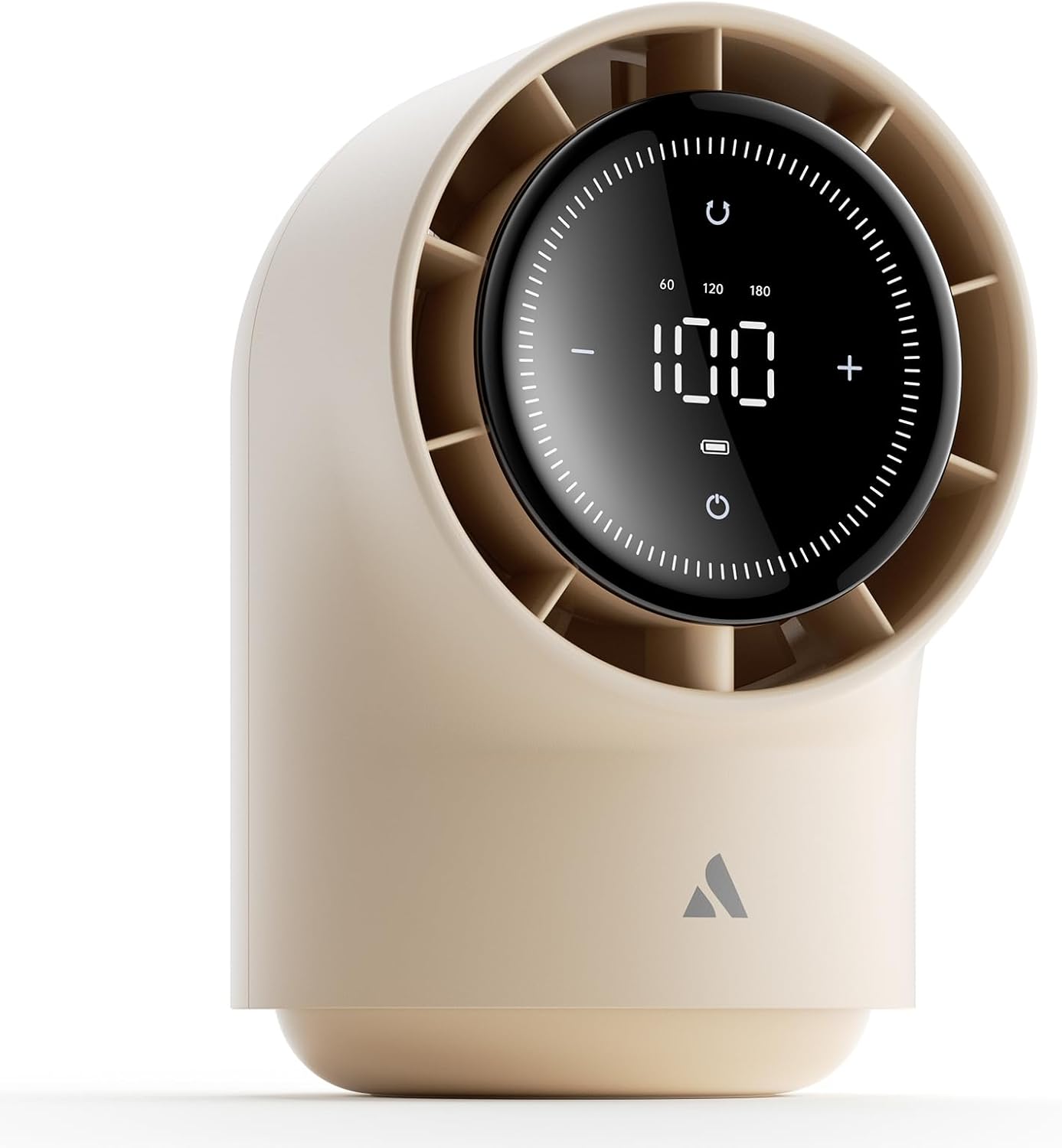
Figure 1: Front view of the Aecooly Touch Control Desk Fan, highlighting its digital display and sleek design.

Figure 2: The fan showcasing its ability to oscillate and tilt, providing flexible airflow direction.

Figure 3: The fan's portable design, suitable for various environments including outdoor settings.
The Aecooly Touch Control Desk Fan (Model TB01) is a portable, battery-powered fan designed for personal cooling in various indoor settings. It features a smart LED touch screen for intuitive control, offering 100 precise speed adjustments. Its quiet operation and long-lasting 8000mAh battery make it suitable for bedrooms, offices, and travel. The fan also provides flexible oscillation angles and tilt adjustments for customized airflow.
Safety Instructions
- Always place the fan on a stable, flat surface to prevent tipping.
- Do not insert fingers or any objects into the fan grille when it is operating.
- Keep the fan away from water or other liquids. Do not use in wet environments.
- Ensure the charging cable is not damaged and is properly connected during charging.
- Do not attempt to disassemble or repair the fan yourself. Contact qualified service personnel for repairs.
- Keep out of reach of children and pets.
Setup
Unpacking
- Carefully remove the fan and all accessories from the packaging.
- Verify that all components are present: Aecooly Desk Fan, USB-C charging cable, and this user manual.
- Inspect the fan for any signs of damage. If damaged, do not use and contact customer support.
Initial Charging
Before first use, fully charge the fan. Connect the provided USB-C charging cable to the fan's charging port (located on the stationary base) and plug the other end into a compatible USB power adapter (not included). The LED display will indicate charging status. A full charge typically takes several hours.

Figure 4: The fan's long-lasting battery, providing extended operation on a single charge.
Operating Instructions
Power On/Off
- To power on, touch the power icon on the LED display.
- To power off, touch the power icon again.
Adjusting Fan Speed (100 Levels)

Figure 5: User interacting with the fan's touch control panel to adjust settings.
- Fine Adjustment (100 Speeds): Long press the '+' or '-' icons on the LED display to adjust the fan speed by 1 level per step, from 1 to 100.
- Quick Adjustment (5 Speeds): Short press the '+' or '-' icons to adjust the fan speed by 20 levels per step (e.g., 20, 40, 60, 80, 100).
Oscillation Control

Figure 6: Visual representation of the fan's oscillation and tilt capabilities.
The fan offers three oscillation angles: 60°, 120°, and 180°. Touch the oscillation icon on the LED display to cycle through the available angles or to turn oscillation off.
Tilt Adjustment
The fan head can be manually tilted up by 7° and down by 10° to direct airflow precisely where needed. Gently adjust the fan head to the desired angle.
Quiet Operation

Figure 7: The fan operating quietly, suitable for use in bedrooms during sleep.
The fan is engineered for whisper-quiet operation at lower speeds, minimizing noise disturbances and creating a peaceful environment.
Natural Airflow Simulation

Figure 8: The fan's mixed-flow technology creating a gentle, natural breeze.
Utilizing mixed-flow technology, the fan is designed to simulate the soft, natural airflow of a tranquil environment, providing a smooth and soothing breeze.
Battery Life and Charging
The 8000mAh battery provides extended operation. The LED display shows the current battery level. When the battery is low, recharge the fan using the USB-C cable. The fan can be used while charging at speed levels below 40.
Maintenance
Cleaning
- Before cleaning, ensure the fan is powered off and unplugged from any power source.
- Use a soft, dry cloth to wipe the exterior surfaces of the fan.
- For stubborn dirt, a slightly damp cloth can be used, followed by a dry cloth.
- Do not use abrasive cleaners, solvents, or spray directly onto the fan.
- Periodically clean the fan grilles with a soft brush or vacuum cleaner to remove dust buildup.
Storage
When not in use for extended periods, store the fan in a cool, dry place, away from direct sunlight and extreme temperatures. It is recommended to fully charge the battery before storing to maintain battery health.
Troubleshooting
| Problem | Possible Cause | Solution |
|---|---|---|
| Fan does not turn on. | Battery is depleted. Power button not pressed correctly. | Charge the fan fully. Ensure a firm touch on the power icon. |
| Weak airflow. | Fan speed is too low. Grilles are obstructed by dust. | Increase fan speed using the '+' button. Clean the fan grilles. |
| Fan makes unusual noise. | Fan is not on a stable surface. Internal obstruction. | Place the fan on a flat, stable surface. Power off and inspect for any visible obstructions. If noise persists, contact customer support. |
| Oscillation not working. | Oscillation function is turned off. | Touch the oscillation icon on the display to activate. |
If the problem persists after attempting these solutions, please contact Aecooly customer support for assistance.
Specifications
- Model: TB01
- Brand: Aecooly
- Dimensions: 5.43"D x 5.62"W x 8.21"H
- Weight: 2.66 pounds
- Power Source: Battery Powered (2 Lithium Ion batteries included)
- Battery Capacity: 8000mAh
- Control Method: Touch
- Number of Speeds: 100
- Oscillation Angles: 60°, 120°, 180°
- Tilt Angles: Up 7°, Down 10°
- Usage: Indoor
- Certifications: FCC, CE, ROHS, UN38.3, KC
Warranty and Support
Aecooly products come with a standard manufacturer's warranty. For specific warranty details, including coverage period and terms, please refer to the warranty card included with your product or visit the official Aecooly website. For technical support, troubleshooting assistance, or warranty claims, please contact Aecooly customer service:
- Website: Visit the Aecooly Store on Amazon
- Email: [Please refer to product packaging or official website for direct email support]
- Phone: [Please refer to product packaging or official website for direct phone support]
Please have your model number (TB01) and purchase date ready when contacting support.


