
Product Overview
The WSDCAM Smart Bike Tail Light is a versatile 5-in-1 device designed to enhance cycling safety and security. It integrates a rear bike light, turn signals, an automatic brake light, an electric horn, and an anti-theft vibration alarm into a single unit. This manual provides detailed instructions for installation, operation, and maintenance.
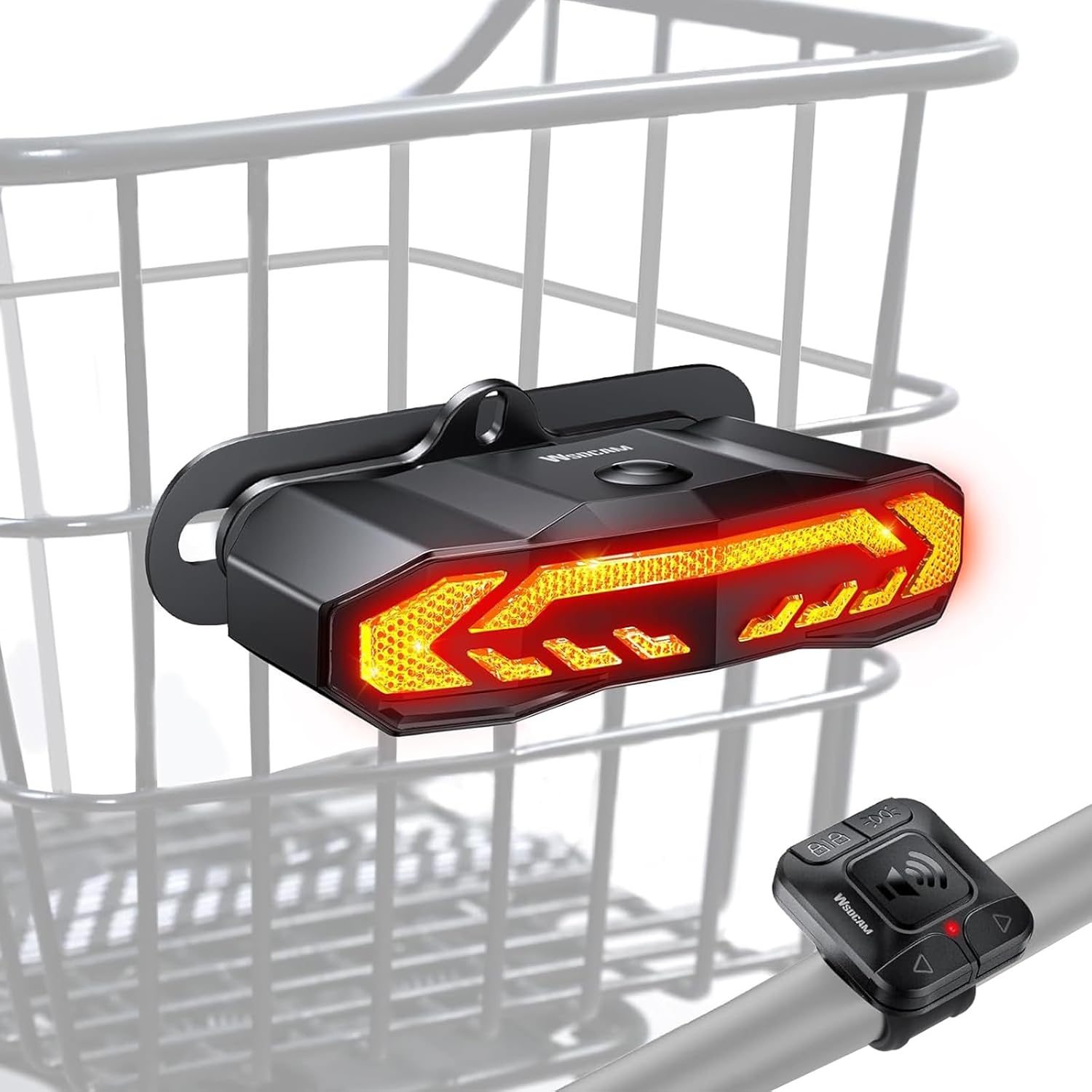
Figure 1: WSDCAM Smart Bike Tail Light and its wireless remote control.
Package Contents
Verify that all items are present in the package:
- WSDCAM Smart Bike Tail Light (1 unit)
- Wireless Remote Control (1 unit)
- Bracket Mount (for bike basket) (1 unit)
- Hex Cap Bolts, Nuts, Washers (set)
- Hex Key (1 unit)
- No-slip Mats (set)
- USB-C Charging Cable (1 unit)
- User Manual (this document)
Setup and Installation
1. Installing the Tail Light on a Bike Basket
The tail light is designed for mounting on a bike basket with grids or holes. Use the provided bracket mount, hex cap bolts, nuts, and washers to securely attach the tail light to your bike basket. Ensure the light is facing directly backward for optimal visibility.

Figure 2: Step-by-step installation of the tail light bracket onto a bike basket.

Figure 3: The tail light securely mounted on a bike basket, demonstrating its rear visibility.
2. Installing the Wireless Remote Control
The remote control features a universal silicone holder suitable for bike handlebars with a diameter of 0.93-1.26 inches. The silicone holder is durable, flexible, and allows for tool-free installation. Position the remote control within easy reach on your handlebar.

Figure 4: The wireless remote control, showing its various function buttons.
Operating Instructions
Power On/Off
Press and hold the main button on the tail light for approximately 3 seconds to power it on or off. The light will emit an audible confirmation.
Light Modes
The tail light features 6 distinct light modes, selectable via the remote control:
- Slow Flashing: Red slow flashing light.
- Breathing: Red breathing light.
- Fast Blinking: Red fast blinking light.
- Steady Light: Red steady light.
- Emergency Light: Yellow flashing light.
- OFF: Light is off.

Figure 5: Visual representation of the six available light modes.
Turn Signals
To activate turn signals, press the corresponding 'R' (Right) or 'L' (Left) button on the remote control. The light will flash yellow in the selected direction and emit an audible clicking sound. Press the button again to deactivate the turn signal.
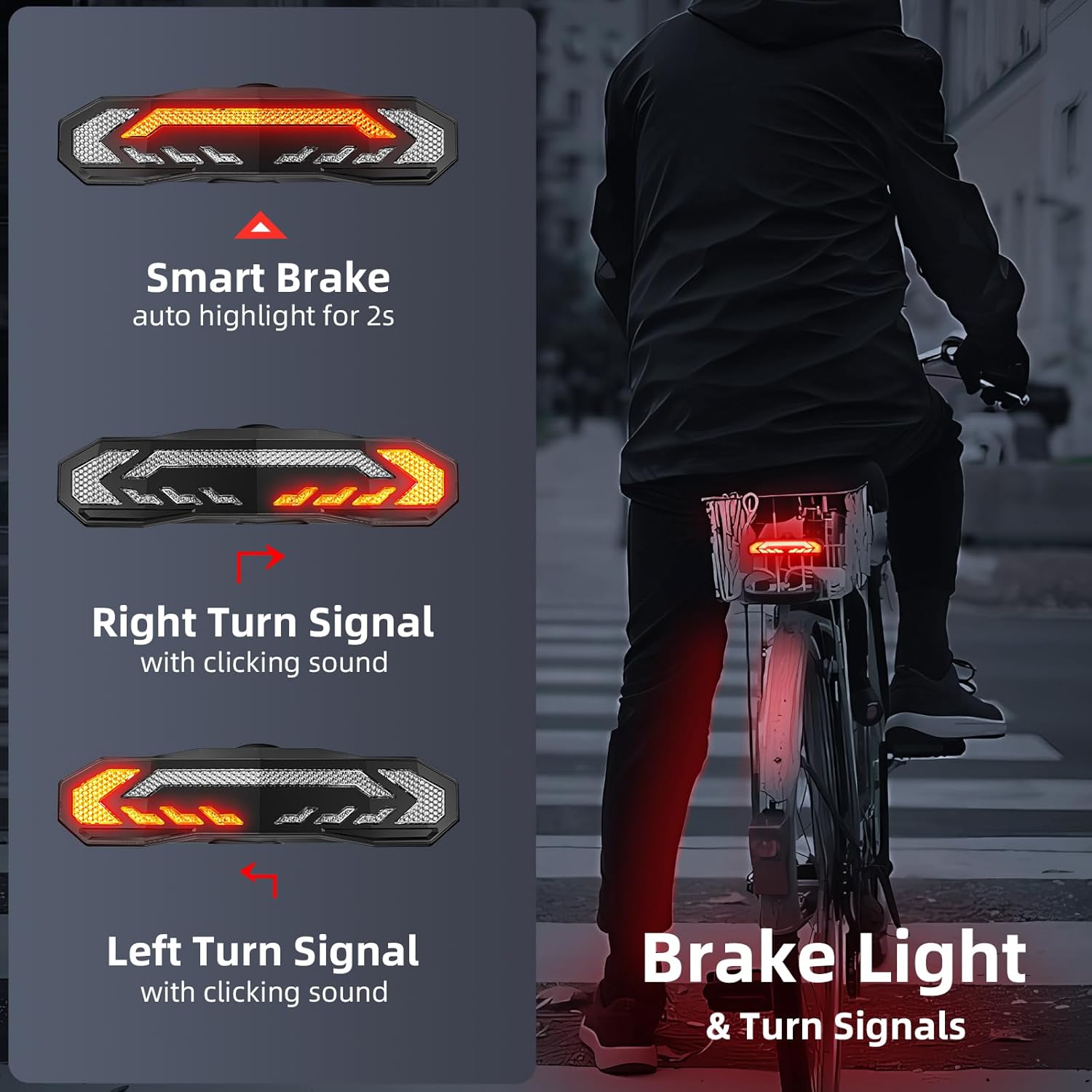
Figure 6: Illustration of the smart brake light and turn signal functionality.
Smart Brake Light
The tail light features a built-in G-sensor that automatically detects when you brake. Upon braking, the rear light will auto-highlight for 2 seconds to alert drivers behind you. This function is active in Slow Flashing, Breathing, Fast Blinking, and Steady Light modes. It is not active in Emergency Light mode.
Bike Horn Function
Press the horn button on the remote control to activate the 110dB horn. There are 3 built-in horn sounds: electric car horn, standard horn, and birdcall. These can be cycled through by repeatedly pressing the horn button.
Anti-theft Vibration Alarm
To arm the alarm, press the lock button on the remote control. The alarm is triggered by vibration and has 7 adjustable sensitivity levels, from a gentle touch to a strong impact. This feature provides additional security when your bike is parked outdoors. To disarm, press the unlock button on the remote.
Smart Auto ON/OFF
The tail light incorporates light and motion sensors for intelligent operation. In Slow Flashing and Breathing modes, the tail light automatically turns off after 30 seconds of inactivity in dark environments and turns on when motion is detected. In bright environments, it automatically turns off to conserve power. If daytime visibility is desired, select Fast Blinking or Steady Light modes, as these do not utilize the smart auto ON/OFF function.
Charging and Battery Life
The tail light is rechargeable via USB-C. A USB-C charging cable is included. For optimal charging, use a 3A charger adapter.
- Full Charging Time: Approximately 6 hours.
- Tail Light Battery Life: Up to 70 hours (in fast blinking mode), up to 30 hours (on steady mode).
- Remote Battery: CR2032 battery (included).
- Remote Battery Life: Up to 3 years (based on 30 uses per day).
The tail light has a charging level indicator to show battery status.
Maintenance
To ensure the longevity and optimal performance of your WSDCAM Smart Bike Tail Light, follow these maintenance guidelines:
- Cleaning: Wipe the light and remote with a soft, damp cloth. Avoid using abrasive cleaners or solvents.
- Water Resistance: The device is IP65 waterproof, meaning it is protected against dust and low-pressure water jets. Do not submerge the device in water.
- Storage: Store the device in a cool, dry place when not in use. If storing for extended periods, ensure the battery is partially charged (around 50%) to preserve battery health.
- Battery Replacement (Remote): The CR2032 battery in the remote control can be replaced when depleted. Refer to the remote control's casing for instructions on opening the battery compartment.
Troubleshooting
If you encounter issues with your WSDCAM Smart Bike Tail Light, refer to the following common problems and solutions:
| Problem | Possible Cause | Solution |
|---|---|---|
| Light does not turn on. | Low battery; device is off. | Charge the tail light using the USB-C cable. Press and hold the power button for 3 seconds to turn on. |
| Remote control not responding. | Remote battery depleted; remote not paired. | Replace the CR2032 battery in the remote. If still unresponsive, re-pair the remote (refer to pairing instructions in a separate guide if available, or contact support). |
| Smart brake light not activating. | Incorrect light mode selected; G-sensor interference. | Ensure the light is in Slow Flashing, Breathing, Fast Blinking, or Steady Light mode. Avoid mounting in positions that might restrict sensor movement. |
| Alarm sensitivity too high/low. | Alarm sensitivity setting needs adjustment. | Adjust the 7-level sensitivity setting via the remote control (refer to specific alarm setting instructions). |
Specifications
- Model Name: KS-SF31 & WL10C
- Max Light Output: 160 Lumens
- Number of LEDs: 31
- Alarm/Horn Noise Level: Up to 110dB
- Waterproof Rating: IP65
- Mounting Type: Bike Basket
- Material: Polycarbonate
- Item Weight: 0.35 Kilograms
- Remote Holder: Universal Silicone for Bike Handlebars
- Taillight Holder Diameter: 0.98-1.38 Inch
- Remote Range: Up to 98ft (up to 196ft in open air)
- Taillight Battery: Rechargeable Lithium Battery (included)
- Remote Battery: CR2032 Battery (included)
- Rechargeability: Tail light only (USB Type-C rechargeable)
Warranty and Support
The WSDCAM Smart Bike Tail Light comes with a 1 Year Warranty from the date of purchase. This warranty covers manufacturing defects and malfunctions under normal use. It does not cover damage caused by misuse, accidents, unauthorized modifications, or improper installation.
For warranty claims, technical support, or further inquiries, please contact WSDCAM customer service through the retailer's platform or the official WSDCAM website. Please retain your proof of purchase for warranty validation.


