1. Introduction
Thank you for choosing the Generic GTS-1191 Wireless HD Sound Speaker. This portable speaker is designed to deliver clear, high-definition audio with versatile playback options, including Bluetooth, USB, Micro SD card, and FM radio. Its compact design and dynamic LED lighting make it suitable for various environments. This manual provides essential information for setting up, operating, and maintaining your speaker to ensure optimal performance.
2. Safety Information
- Do not expose the speaker to water, moisture, or extreme temperatures.
- Avoid dropping or subjecting the speaker to strong impacts.
- Do not attempt to disassemble, repair, or modify the speaker yourself. Contact qualified service personnel.
- Keep the speaker away from heat sources and direct sunlight.
- Use only the provided charging cable or a certified equivalent.
- Dispose of the product and its battery responsibly according to local regulations.
3. Package Contents
Please check the package for the following items:
- GTS-1191 Wireless HD Sound Speaker
- Charging Cable
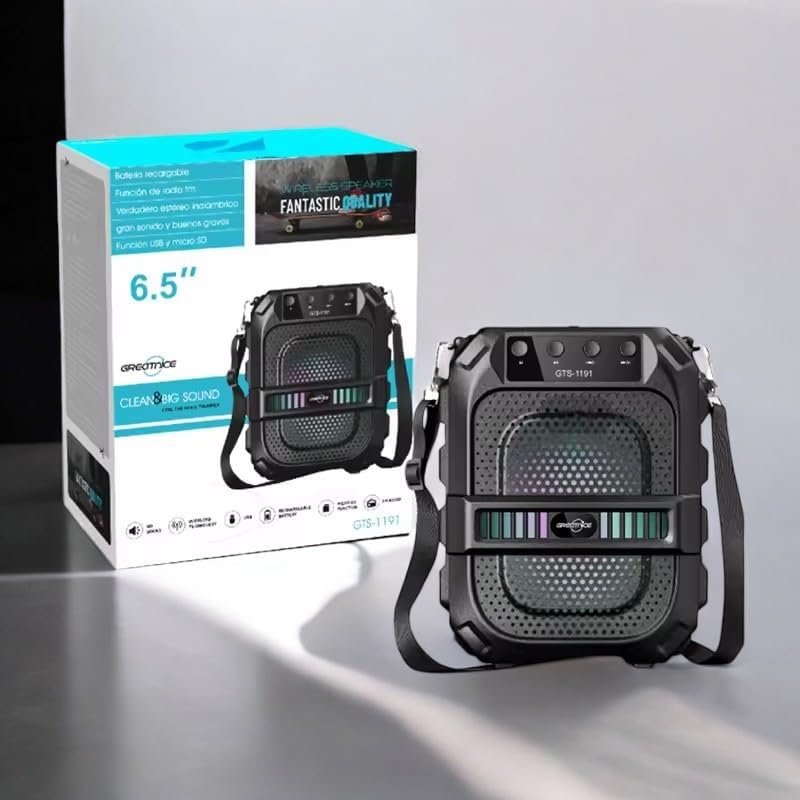
Image: The GTS-1191 speaker shown alongside its retail packaging, highlighting the included shoulder strap for portability.
4. Product Overview
Familiarize yourself with the speaker's controls and ports:
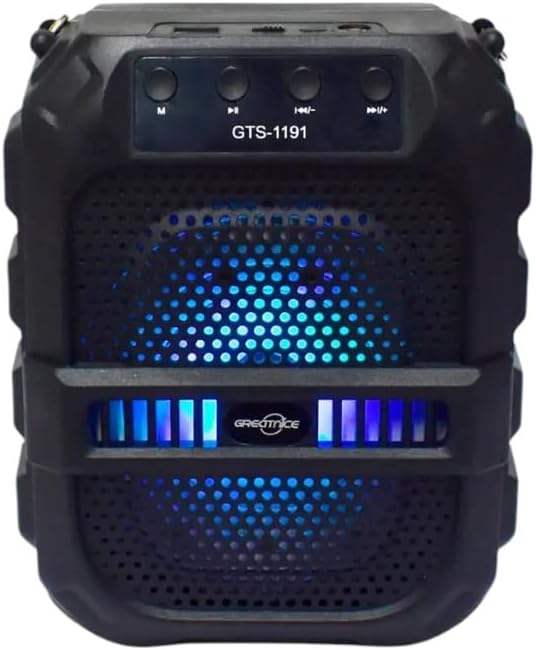
Image: Front view of the GTS-1191 speaker, displaying the control panel at the top, the speaker grille, and active blue LED lighting.
Control Panel (Top)
- M (Mode) Button: Press to switch between Bluetooth, USB, Micro SD, and FM radio modes.
- Previous Track / Volume Down Button: Short press for previous track (in music modes), long press to decrease volume.
- Play/Pause Button: Press to play or pause audio. In FM mode, long press to auto-scan and save stations.
- Next Track / Volume Up Button: Short press for next track (in music modes), long press to increase volume.
Ports (Top/Rear)
- USB Port: For USB flash drive playback.
- Micro SD Card Slot: For Micro SD card playback.
- Charging Port: For connecting the charging cable.
5. Setup
5.1 Charging the Speaker
- Connect the small end of the charging cable to the charging port on the speaker.
- Connect the large end of the charging cable to a USB power adapter (not included) or a computer's USB port.
- The charging indicator light will illuminate, typically red, during charging.
- Once fully charged, the indicator light may change color or turn off. A full charge provides up to 12 hours of playtime.
5.2 Power On/Off
- To power on, locate the power switch (usually on the back or side) and slide it to the 'ON' position. You will hear an audible prompt.
- To power off, slide the power switch to the 'OFF' position.
6. Operating Instructions
6.1 Bluetooth Pairing
- Ensure the speaker is powered on and in Bluetooth mode. If not, press the 'M' (Mode) button until you hear a Bluetooth pairing prompt. The LED lights may flash to indicate pairing mode.
- On your mobile device (smartphone, tablet, etc.), enable Bluetooth and search for available devices.
- Select 'GTS-1191' from the list of devices.
- Once paired, you will hear a confirmation sound, and the LED lights may change their pattern.
- You can now play audio from your device through the speaker.
6.2 USB Playback
- Insert a USB flash drive containing MP3 audio files into the USB port.
- Press the 'M' (Mode) button to switch to USB mode. The speaker will automatically begin playing audio files from the USB drive.
- Use the 'Previous Track' and 'Next Track' buttons to navigate through songs.
6.3 Micro SD Card Playback
- Insert a Micro SD card containing MP3 audio files into the Micro SD card slot.
- Press the 'M' (Mode) button to switch to Micro SD card mode. The speaker will automatically begin playing audio files from the card.
- Use the 'Previous Track' and 'Next Track' buttons to navigate through songs.
6.4 FM Radio
- Press the 'M' (Mode) button to switch to FM radio mode.
- Long press the 'Play/Pause' button to initiate an automatic scan for FM stations. The speaker will scan and save available stations.
- Once scanning is complete, use the 'Previous Track' and 'Next Track' buttons to switch between saved FM stations.
6.5 Volume Control
- To increase volume, long press the 'Next Track / Volume Up' button.
- To decrease volume, long press the 'Previous Track / Volume Down' button.
6.6 Dynamic LED Light Display
The GTS-1191 speaker features dynamic LED lights that enhance the listening experience. These lights typically activate automatically when the speaker is powered on and may change patterns based on the audio playback. There is no specific control button for the LED lights; they operate as an integrated visual feature.

Image: The GTS-1191 speaker positioned next to its retail box, showcasing its active red LED light display.
7. Maintenance
- Cleaning: Use a soft, dry cloth to clean the speaker's exterior. Do not use abrasive cleaners or solvents.
- Storage: When not in use for extended periods, store the speaker in a cool, dry place, away from direct sunlight and extreme temperatures.
- Battery Care: To prolong battery life, avoid fully discharging the speaker frequently. Charge it regularly, even if not in constant use.
8. Troubleshooting
| Problem | Possible Cause | Solution |
|---|---|---|
| Speaker does not turn on. | Battery is depleted. | Charge the speaker for at least 2-3 hours. |
| No sound from speaker. | Volume is too low or muted. Device not paired. Incorrect mode. | Increase volume. Ensure Bluetooth device is paired. Switch to correct mode (Bluetooth, USB, SD, FM). |
| Bluetooth pairing fails. | Speaker not in pairing mode. Device too far. Interference. | Ensure speaker is in Bluetooth mode and discoverable. Move device closer. Turn off other Bluetooth devices. |
| USB/Micro SD playback not working. | Incorrect file format. Drive/card not inserted correctly. | Ensure files are MP3 format. Reinsert USB drive/Micro SD card. Press 'M' to select correct mode. |
9. Specifications
| Feature | Detail |
|---|---|
| Model Name | GTS-1191 |
| Speaker Type | Portable Speaker |
| Connectivity | Bluetooth, USB, Micro SD, FM Radio |
| Color | Black |
| Battery Life | Up to 12 hours (continuous playtime) |
| Product Dimensions | 10D x 8W x 20H centimetres |
| Package Dimensions | 23.6 x 19.2 x 12.4 cm |
| Package Weight | 920 g |
| Included Components | Speaker, Charging Cable |
10. Warranty and Support
The Generic GTS-1191 Wireless HD Sound Speaker comes with a manufacturer's warranty of 6 months from the date of purchase. This warranty covers manufacturing defects under normal use. It does not cover damage caused by misuse, accidents, unauthorized modifications, or normal wear and tear.
For warranty claims or technical support, please contact your retailer or the point of purchase with your proof of purchase.


