
1. Introduction
Thank you for choosing the JEDOUBAL Stylus Pen. This manual provides essential information for setting up, operating, and maintaining your stylus pen. Designed for seamless integration with compatible iPad models, this stylus offers advanced features such as tilt sensitivity, palm rejection, and fast charging to enhance your digital writing and drawing experience.
2. Package Contents
Please verify that all items are present in the package:
- 1 x Stylus Pen
- 1 x USB-C Cable
- 3 x Replaceable Tips
- 1 x User Manual

3. Product Features
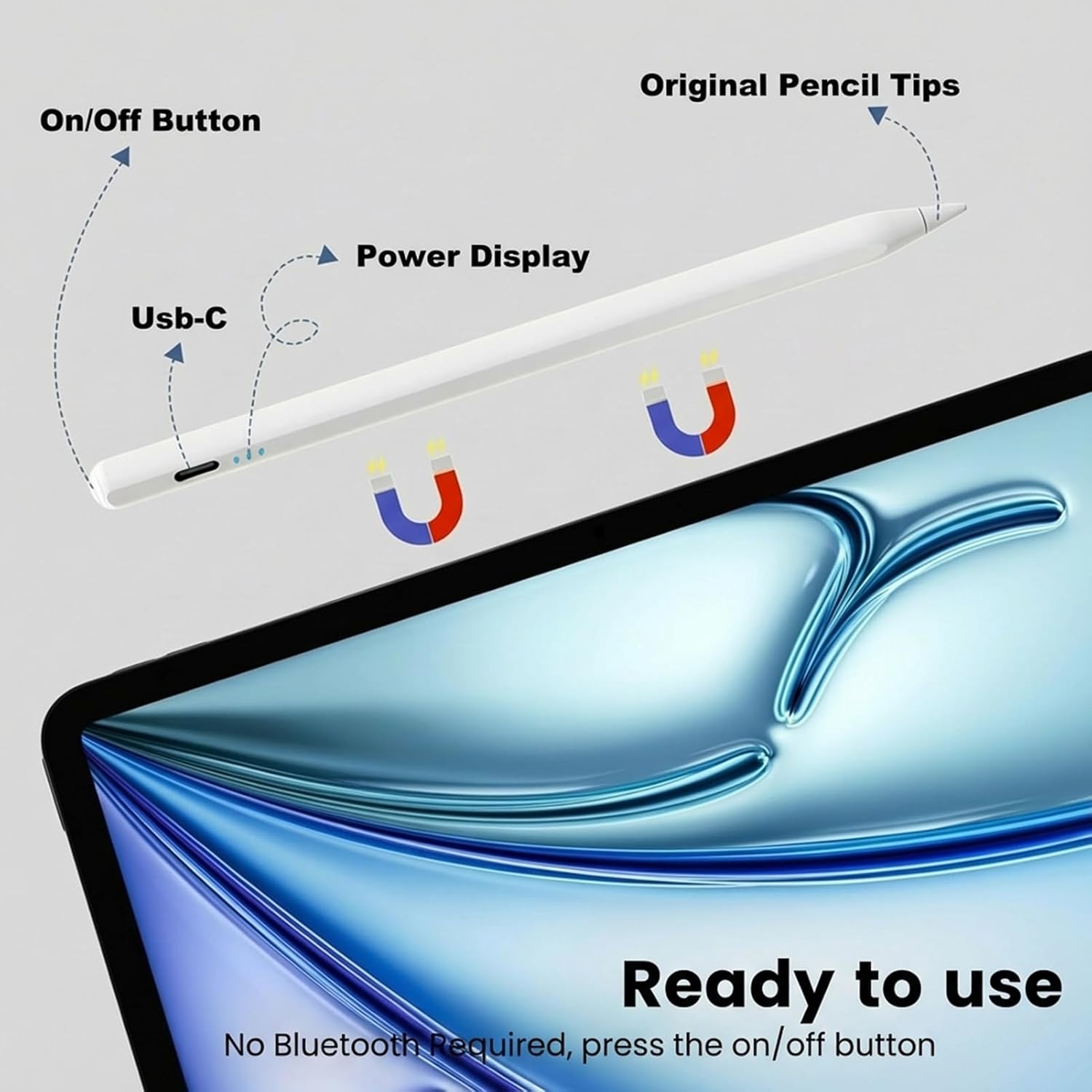
- On/Off Button & Power Display: The stylus features an intuitive on/off button and LED indicators to show real-time power status.
- USB-C Charging Port: Conveniently located for easy charging.
- Original Pencil Tips: Engineered with high-performance polymer material, these tips are designed for durability and smooth performance.
- Magnetic Adsorption: Allows the stylus to firmly attach to compatible iPad models for secure storage.
- Tilt Sensitivity: Adjusts line thickness based on the angle of the pen, enabling natural shading and drawing.
- Palm Rejection: Allows users to rest their hand on the iPad screen without interfering with the stylus's input.
- High Accuracy & No Lag: Provides precise and responsive input for writing and drawing.


4. Compatibility
The JEDOUBAL Stylus Pen is compatible with iPad models released from 2018 to 2025. This includes:
- iPad 11th/10th/9th/8th/7th/6th Gen
- iPad Air 7th/6th/5th/4th/3rd/M3/M2
- iPad Pro 13"/12.9"/11"/M4
- iPad Mini 7th/6th/5th
Note: For optimal performance, ensure your iPadOS is version 13.4 or above. If you have previously paired an Apple Pencil with your iPad, please unbind it before using the JEDOUBAL Stylus Pen.

5. Setup
- Charge the Stylus: Before first use, fully charge the stylus pen using the provided USB-C cable. Refer to the 'Charging and Battery' section for details.
- Unpair Previous Apple Pencil (if applicable): If you have an Apple Pencil previously paired with your iPad, go to iPad Settings > Bluetooth, find your Apple Pencil, and tap 'Forget This Device'.
- Turn On the Stylus: Double-tap the top end of the stylus pen to turn it on. The LED indicators will light up.
- Automatic Connection: The stylus pen should automatically connect to your compatible iPad. No Bluetooth pairing is typically required after initial setup.
6. Operating Instructions
General Use:
- Hold the stylus as you would a traditional pen.
- The fine tip allows for precise writing, drawing, and navigation on your iPad screen.
- Palm rejection technology ensures that only the stylus input is registered, allowing you to rest your hand comfortably on the screen.
Tilt Sensitivity:
Vary the angle at which you hold the stylus against the screen to achieve different line thicknesses and shading effects, similar to using a real pencil.
Quick Actions:
- Quick Screenshot: Swipe the stylus from the bottom left to the top right of the screen.
- Quick Memo: Double-tap the screen with the stylus to open a new memo.
7. Charging and Battery
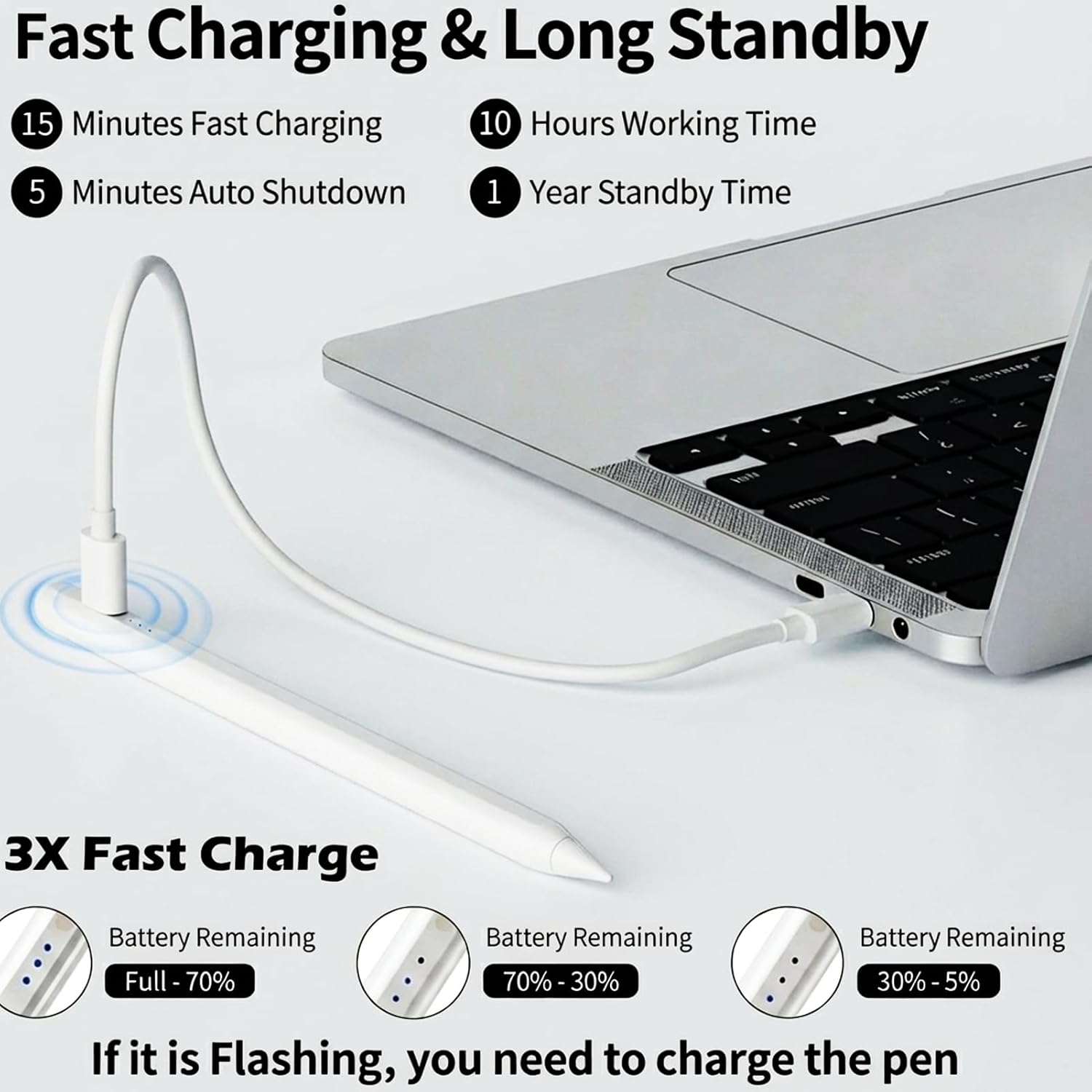
- Fast Charging: The stylus supports 3X fast charging, allowing for approximately 10 hours of continuous use after just 13 minutes of charging. A full charge takes about 30 minutes.
- Battery Indicators: The LED lights on the stylus indicate the battery level:
- 3 lights: Full - 70%
- 2 lights: 70% - 30%
- 1 light: 30% - 5%
- Flashing light: Battery is low and needs charging.
- Auto-Sleep Function: The stylus will automatically enter sleep mode after 5 minutes of inactivity to conserve battery life.
- Standby Time: The stylus offers an impressive standby time of up to 365 days.
8. Maintenance
Replacing Tips:
The stylus comes with 3 additional replaceable tips. To replace a tip:
- Gently twist the old tip counter-clockwise to remove it.
- Align the new tip and twist it clockwise until it is securely fastened.
The high-performance polymer tips are designed to withstand extensive use, offering twice the durability of standard tips.
9. Troubleshooting
- Stylus not connecting: Ensure the stylus is charged and turned on. Verify that any previously paired Apple Pencils are disconnected from your iPad's Bluetooth settings.
- Inaccurate or unresponsive input: Check if the stylus tip is securely attached. If the tip is worn, replace it with a new one. Ensure your iPadOS is updated to version 13.4 or later.
- Magnetic attachment issues: The magnetic feature is available for specific iPad Pro and iPad Air models. Ensure your iPad supports this feature. Note that magnetic attachment does not support wireless charging for this model.
10. Specifications
| Brand | JEDOUBAL |
| Model Number | 716 |
| Color | Blue |
| Material | Aluminum |
| Item Weight | 2.08 ounces |
| Package Dimensions | 7.44 x 2.4 x 0.67 inches |
| Batteries | 1 Lithium Polymer battery required (included) |
| Charging Time | 30 minutes |
| Battery Average Life Standby | 365 days |
| Compatible Devices | iPad & iPad Pro 2018-2024, iPad (6/7/8/9/10th Gen), iPad Pro (11"/12.9"/M4), iPad Air (3/4/5/M2), iPad Mini 5/6 |
| Minimum Required Operating System | iPadOS 13.4 |
11. Warranty and Support
For warranty information or technical support, please refer to the contact details provided with your product packaging or visit the official JEDOUBAL website. Keep your purchase receipt for any warranty claims.