
1. Important Safety Instructions
To reduce the risk of fire, electric shock, or injury, always follow these basic precautions:
- Read all instructions before using the dehumidifier.
- Do not operate the unit with a damaged cord or plug. If the supply cord is damaged, it must be replaced by the manufacturer or a qualified service agent.
- Ensure the dehumidifier is placed on a stable, level surface to prevent tipping and water spillage.
- Do not block air inlets or outlets. Maintain at least 20 cm (8 inches) clearance from walls or furniture.
- Never insert fingers or foreign objects into the air vents.
- Unplug the dehumidifier before cleaning, performing maintenance, or when not in use.
- Do not use the appliance in wet rooms such as bathrooms or laundry rooms where it may come into contact with water.
- Keep the appliance away from heat sources and direct sunlight.
- This appliance is for household use only.
2. Product Overview
The SOICARE 3.2L Home Dehumidifier is designed to efficiently remove excess moisture from the air, improving air quality and comfort in your living spaces. It features a large water tank, a HEPA filter, ambient lighting, a timer, and an automatic shut-off function.
Package Contents:
- SOICARE 3.2L Home Dehumidifier Unit
- Water Tank (pre-installed)
- HEPA Filter (pre-installed)
- User Manual (this document)
Key Features:
- Large Capacity Water Tank: 3.2 liters (108 oz) for extended operation.
- HEPA Air Filter: Captures airborne particles for improved air purity.
- Ambient Lights: Provides a decorative touch and visual indication.
- Timer Function: Allows scheduled operation for 1, 2, 3, 4, 5, 6, or 7 hours.
- Auto-Off Function: Automatically shuts off when the water tank is full or the timer expires.
- Defrosting Function: Prevents ice build-up on internal components.
- Portable Design: Compact with an integrated handle for easy relocation.
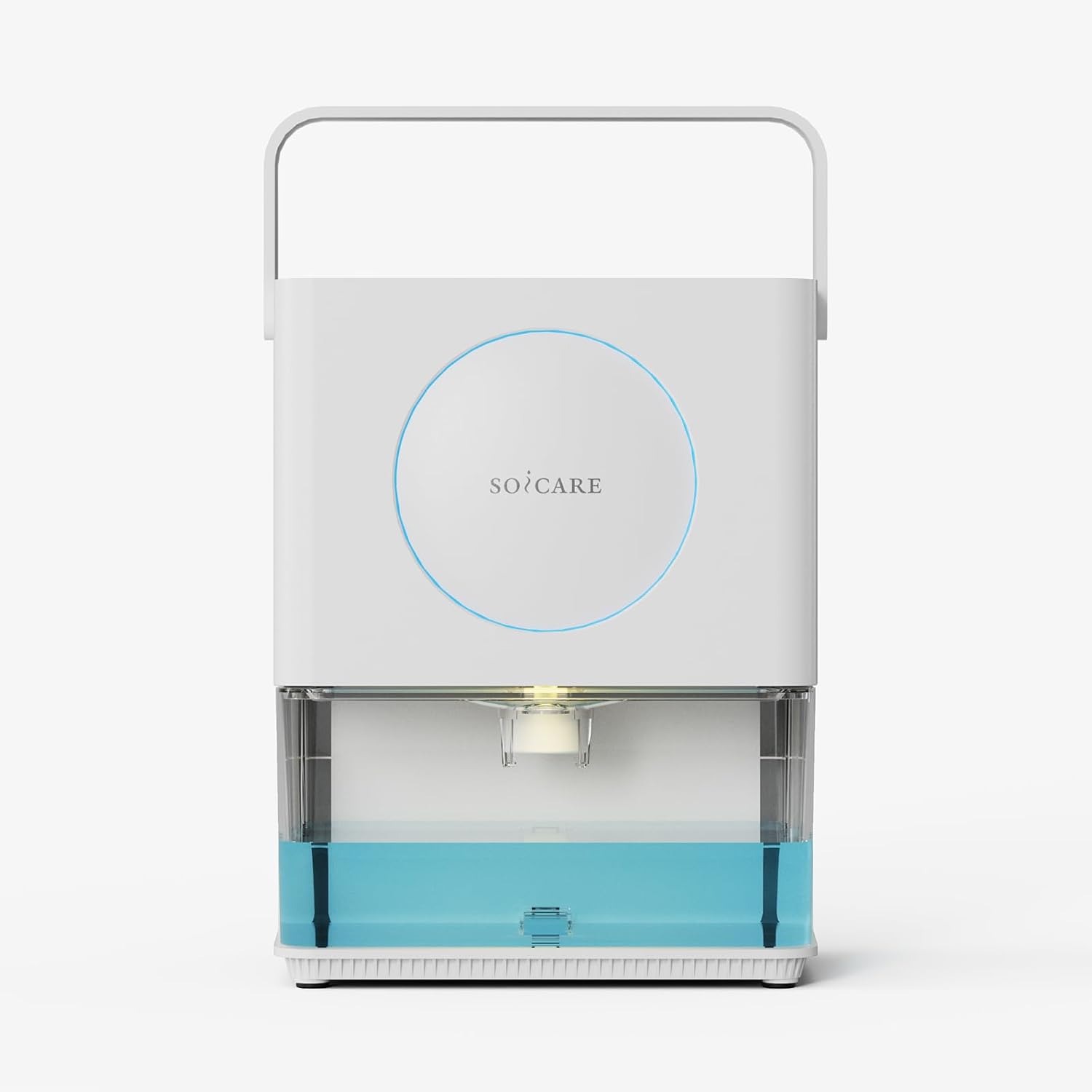
Figure 2.1: Front view of the SOICARE 3.2L Home Dehumidifier, showcasing its compact design and visible water tank.
3. Setup
3.1 Unpacking
- Carefully remove the dehumidifier from its packaging.
- Remove all packing materials, including any tape or protective films.
- Inspect the unit for any signs of damage. If damaged, do not operate and contact customer support.
3.2 Placement
Proper placement is crucial for optimal performance and safety.
- Place the dehumidifier on a firm, level surface in the area where moisture removal is desired.
- Ensure there is at least 20 cm (8 inches) of clear space around all sides of the unit to allow for proper airflow. Do not place it against a wall or in a confined space.
- Avoid placing the unit near heat-generating appliances or in direct sunlight.
- Do not place the unit directly on carpet or rugs that may obstruct airflow.

Figure 3.1: The SOICARE Dehumidifier is suitable for various small to medium spaces such as bathrooms, bedrooms, RVs, living rooms, wardrobes, and basements.
3.3 Power Connection
Plug the power cord into a grounded electrical outlet. Ensure the voltage matches the specifications of the dehumidifier.
4. Operating Instructions
4.1 Control Panel Overview

Figure 4.1: The control panel is located on the top of the unit, featuring intuitive buttons for power, mode, timer, and light control.
4.2 Power On/Off
- Press the Power Button once to turn the unit on. The default mode is usually low dehumidification.
- Press the Power Button again to turn the unit off.
4.3 Dehumidification Modes
The unit offers two dehumidification levels:
- Low Dehumidification: Indicated by one LED light. Suitable for maintaining humidity levels.
- High Dehumidification: Indicated by two LED lights. For faster moisture removal in more humid conditions.
- To cycle between modes, press the Mode Button. Note that an 'air filter only' mode may also be available, which circulates air without active dehumidification.
4.4 Timer Function
The timer allows you to set the unit to operate for a specific duration before automatically shutting off.
- Press the Timer Button to activate the timer.
- Each press cycles through available timer settings: 1 hour, 2 hours, 4 hours. Combinations of these lights indicate 3 hours (1+2), 5 hours (1+4), 6 hours (2+4), and 7 hours (1+2+4).
- Once the desired time is selected, the unit will operate for that duration and then power off.
- To cancel the timer, cycle through all settings until no timer lights are illuminated, or turn the unit off and on again.
4.5 Ambient Lights Control
The dehumidifier features ambient lighting for aesthetic appeal and a white light to illuminate the water tank.
- Press the Light Button to cycle through ambient light modes (e.g., color-changing, static color, off).
- A separate control may be available to turn the internal white light for the water tank on or off.

Figure 4.2: The ambient light feature adds a decorative element, with various color options to suit your preference.
4.6 Water Tank Full and Auto-Off
The dehumidifier is equipped with an automatic shut-off feature to prevent overflow.
- When the water tank is full, the unit will automatically stop operating.
- A red warning light will typically illuminate or flash to indicate the tank is full.
- Empty the water tank as described in the Maintenance section to resume operation.

Figure 4.3: The unit indicates normal operation with a blue light and a full water tank with a red light, triggering auto shut-off.
5. Maintenance
Regular maintenance ensures the longevity and efficient operation of your dehumidifier.
5.1 Emptying the Water Tank
- When the water tank is full, the unit will stop and indicate a full tank.
- Gently pull out the water tank from the front of the unit.
- Carefully carry the tank to a sink or drain. The integrated handle on the main unit can assist in moving the entire unit if needed.
- Pour out the collected water.
- Slide the empty water tank back into the dehumidifier until it clicks into place. The unit will resume operation if it was running before the tank became full.
5.2 Cleaning the Water Tank
Clean the water tank regularly (e.g., every 2-4 weeks) to prevent mold and mildew growth.
- Remove the water tank as described above.
- Wash the tank with mild soap and warm water. Rinse thoroughly.
- Ensure the tank is completely dry before reinserting it into the unit.
5.3 HEPA Filter Cleaning/Replacement
The HEPA filter helps maintain air quality and should be cleaned regularly. The manufacturer recommends cleaning the filter every 2 months.

Figure 5.1: Internal diagram showing the location of the HEPA air filter and the double dehumidification condenser.
- Turn off and unplug the dehumidifier.
- Locate the filter compartment (usually at the back or side of the unit).
- Remove the HEPA filter.
- Clean the filter using a vacuum cleaner hose to remove dust and debris. Do not wash the HEPA filter with water, as this can damage the filter material.
- Reinsert the clean filter into its compartment.
- Replacement filters may be required periodically. Contact SOICARE customer support for information on purchasing replacement filters.
5.4 Exterior Cleaning
- Wipe the exterior of the unit with a soft, damp cloth.
- Do not use abrasive cleaners, solvents, or harsh chemicals, as these can damage the surface.
5.5 Storage
- If storing the unit for an extended period, ensure the water tank is empty and clean, and the filter is clean.
- Store the dehumidifier in a cool, dry place, away from direct sunlight and extreme temperatures.
- The power cord can be neatly tucked into the back of the unit for storage.
6. Troubleshooting
Before contacting customer support, please refer to the following troubleshooting guide for common issues.
| Problem | Possible Cause | Solution |
|---|---|---|
| Unit does not turn on | No power supply Power button not pressed | Ensure power cord is securely plugged into a working outlet. Press the Power Button firmly. |
| No water collected | Humidity level is too low Water tank not properly inserted Air filter is blocked | The unit will not collect water if the ambient humidity is below its operating threshold. Ensure the water tank is fully and correctly inserted. Clean the HEPA filter. |
| Unit stops operating unexpectedly | Water tank is full Timer has expired Temperature too low (defrosting) | Empty the water tank. Check timer settings. The unit may be in defrost mode. It will resume operation automatically. |
| Unit is noisy | Unit not on a level surface Air filter is dirty | Place the unit on a firm, level surface. Clean the HEPA filter. |
7. Specifications
Technical specifications for the SOICARE 3.2L Home Dehumidifier (Model SP-DH01).
| Feature | Specification |
|---|---|
| Brand | SOICARE |
| Model Name | 3.2 L Dehumidifier (SP-DH01) |
| Capacity | 3.2 Liters (108 OZ) |
| Dehumidification Capacity | 0.5 Liters per Day (at 86°F and 85% RH) |
| Wattage | 50 watts |
| Product Dimensions (D x W x H) | 7.48" x 10.39" x 12.6" (190mm x 264mm x 320mm) |
| Item Weight | 2.95 Kilograms (6.49 pounds) |
| Material | Plastic |
| Special Features | Automatic Defrost, Portable, Removable Tank, HEPA Filter, Ambient Lights, Timer, Auto Off |
| Recommended Uses | Residential (Bedroom, Bathroom, Basement, RV, Closet) |
8. Warranty and Support
SOICARE products are manufactured to high-quality standards and are warranted against manufacturing defects. Please refer to the warranty card included with your purchase for specific terms and conditions.
Customer Support:
For any questions, technical assistance, or warranty claims, please contact SOICARE customer support:
- Email: info@soicarearoma.com
Please have your model number (SP-DH01) and purchase information ready when contacting support.