
Klobel Klobel 4-Leg Electric Standing Desk (71x30)
Klobel 71" x 30" Gaming Standing Desk User Manual
Model: Klobel 4-Leg Electric Standing Desk (71x30)
Brand: Klobel
Introduction
Welcome to the user manual for your Klobel 71" x 30" Gaming Standing Desk. This manual provides essential information for the setup, operation, maintenance, and troubleshooting of your new electric height-adjustable desk. Designed for ergonomic comfort and versatile functionality, this desk features a robust 4-leg system, dual motors for smooth height adjustments, integrated LED lighting, and a carbon fiber textured surface.

Image: The Klobel 71" x 30" Gaming Standing Desk, showcasing its large carbon fiber textured surface, four sturdy legs, and various accessories like monitor stands, speakers, and a headphone holder. The image highlights the desk's capacity for a multi-monitor gaming setup.
Setup and Assembly
Before beginning assembly, ensure all components are present. Refer to the included assembly guide for detailed step-by-step instructions.
Package Contents:
- Desk components (desktop, legs, frame)
- Dual motor lift system
- Memory control panel
- LED lighting strips and acrylic LED side panels
- Headphone holder
- Cup holder
- Cable management tray
- Cable clips
- USB controller holder
- USB LED light strip
- Locking wheels
- X-WIN sticker
- Large mouse pad
- Assembly hardware and tools
Assembly Tips:
- Assemble the desk on a soft, clean surface to prevent scratches.
- Ensure all screws are tightened securely before use.
- Connect all electrical components (motors, control panel, LED lights) according to the wiring diagram in the separate assembly guide.
- Attach the locking wheels for mobility or use the fixed feet for stationary placement.
Image: A detailed view of the Klobel 71" x 30" Gaming Standing Desk, accompanied by its various included accessories such as a large mouse pad, headphone holder, cup holder, cable management solutions, USB controller holder, and locking wheels, illustrating the comprehensive package contents.
Operating Instructions
Height Adjustment:
The desk features a dual motor lift system for smooth and quiet height adjustments.

Image: A close-up of the smart control panel for the Klobel standing desk, featuring a digital display and buttons for up/down adjustment, sit/stand memory presets, sedentary reminder, and child lock functionality.
- Up/Down Buttons: Use the ▲ (Up) and ▼ (Down) buttons on the memory control panel to manually adjust the desk height.
- Memory Presets: The control panel allows you to save preferred sitting and standing heights. To save a preset, adjust the desk to your desired height, then press and hold one of the memory buttons (e.g., ↵) until the display confirms the setting is saved.
- Sedentary Reminder: Activate the sedentary reminder feature to prompt you to change positions at regular intervals. Refer to the control panel's specific instructions for setting this reminder.
- Child Lock: Engage the child lock feature (🔒) to prevent accidental height adjustments.
LED Lighting:
The desk includes built-in LED lighting and acrylic LED side panels with multiple dynamic modes.
- Mode Selection: Use the dedicated controls (usually on the control panel or a separate remote) to cycle through the 8 dynamic lighting modes.
- Power On/Off: Turn the LED lights on or off as desired.
Cable Management:
Utilize the innovative flip-top design and included cable management tray and clips to keep your workspace neat and organized. Route cables through the designated openings and secure them to prevent tangles.
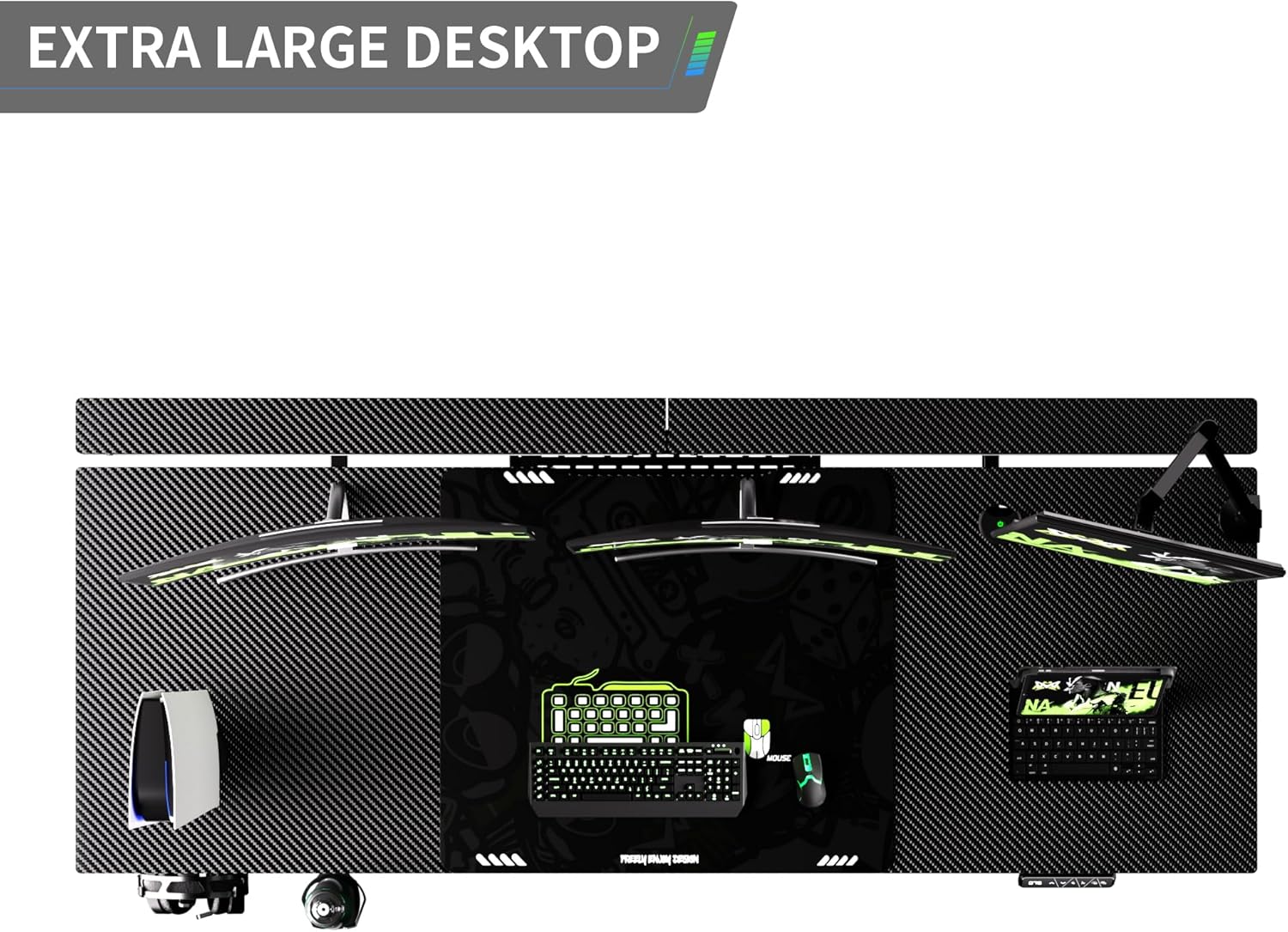
Image: An overhead view of the Klobel desk's extra-large desktop, highlighting its carbon fiber texture and integrated flip-top design for efficient cable management, allowing for a clean and organized setup with multiple devices.
Maintenance
- Cleaning: Wipe the desk surface and legs with a soft, damp cloth. Avoid abrasive cleaners or harsh chemicals that may damage the carbon fiber texture or finish.
- Motor Care: The dual motors are designed for long-term use. Avoid overloading the desk beyond its maximum weight capacity (220 lbs dynamic load, 440 lbs static load).
- Cable Inspection: Periodically check all power cords and connections for any signs of wear or damage.
- Lubrication: No regular lubrication is required for the lifting mechanism.
Troubleshooting
| Problem | Possible Cause | Solution |
|---|---|---|
| Desk does not move. | Power cable disconnected; Child lock engaged; Overload protection activated. | Check power connection; Disengage child lock; Reduce weight on desk. |
| Uneven lifting/wobbling. | Uneven weight distribution; Loose connections; Obstruction. | Distribute weight evenly; Check all assembly screws; Remove any obstructions. |
| LED lights not working. | Power connection issue; LED strip damage. | Check LED power connection; Contact customer support if damaged. |
| Control panel unresponsive. | Power issue; Internal error. | Unplug and replug the desk after 30 seconds; Contact customer support. |
Specifications
- Brand: Klobel
- Product Dimensions: 30"D x 71"W x 29.53"H
- Color: Black
- Style: Modern
- Base Material: Metal
- Top Material Type: Carbon Fiber Textured
- Finish Type: Powder Coated
- Special Features: Wheel, Adjustable Height, Ergonomic, Electric, Scratch Resistant
- Room Type: Office, Bedroom, Living Room, Studio
- Furniture Leg Material: Metal
- Dynamic Load Capacity: Up to 220 lbs (100 kg)
- Static Load Capacity: Up to 440 lbs (200 kg)
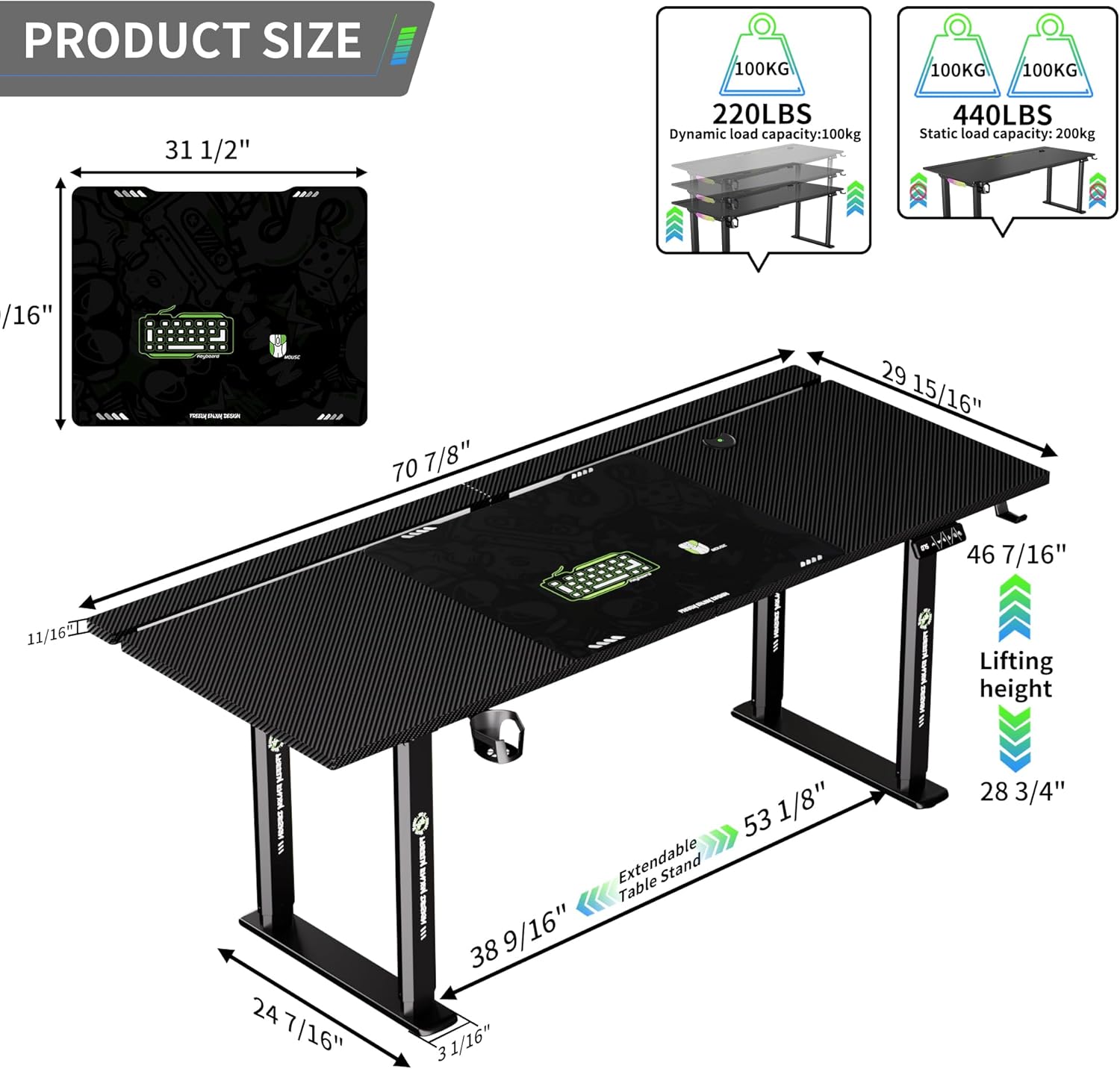
Image: A diagram illustrating the key dimensions of the Klobel 71" x 30" Gaming Standing Desk, including its length, width, and adjustable height range. It also shows the dynamic and static load capacities of 220 lbs and 440 lbs respectively.

Image: A visual representation of the Klobel desk's four-leg balanced support system, emphasizing how the four table legs provide even force distribution to prevent tilting or shaking, ensuring stability during use.
Warranty and Support
Klobel offers comprehensive after-sales support for your standing desk.
- Return Policy: Enjoy a 30-day free unconditional return and exchange service from the date of purchase.
- Parts Replacement/Repair: A 24-month parts replacement or repair service is provided for manufacturing defects or functional issues.
- Customer Support: For any inquiries, suggestions, or issues not covered in this manual, please feel free to contact Klobel customer service. Your feedback is valuable for future product enhancements.
- Contact Information: Refer to the product packaging or the official Klobel website for the most current customer support contact details.
Related Documents - Klobel 4-Leg Electric Standing Desk (71x30)
 |
UPLIFT 2-Leg Height Adjustable Standing Desk Assembly and User Manual Comprehensive assembly instructions and user guide for the UPLIFT 2-Leg Height Adjustable Standing Desk, including safety, usage, programming, and technical specifications for optimal ergonomic setup. |
 |
VonHaus 3000169 Adjustable Height Sit-Stand Desk Manual Comprehensive instructions for assembling and using the VonHaus 3000169 adjustable height sit-stand desk. Learn about safe operation, maintenance, and product specifications. |
 |
Ergomaker SM205-120 Electric Height Adjustable Standing Desk Installation and Operation Manual This manual provides comprehensive instructions for the assembly, operation, and troubleshooting of the Ergomaker SM205-120 electric height adjustable standing desk. It includes safety warnings, a parts list, step-by-step assembly guides, feature explanations, and error code solutions. |
 |
FEZIBO Standing Desk Assembly Instructions and User Manual Comprehensive assembly instructions and user guide for FEZIBO electric height-adjustable standing desks, covering installation, operation, troubleshooting, and technical specifications. Includes BOM, step-by-step assembly, control panel functions, and warranty information. |
 |
VIVO 72" x 30" Dual Motor Electric 4-Leg Desk Instruction Manual This manual provides assembly instructions and operational guidance for the VIVO 72" x 30" Dual Motor Electric 4-Leg Desk, including setup, controller usage, and troubleshooting. |
 |
Jceet L59 Electric Height Adjustable Standing Desk: User Manual and Assembly Guide Detailed user manual and assembly guide for the Jceet L59 electric height-adjustable standing desk. Covers component identification, step-by-step assembly, controller operation, maintenance, and safety guidelines. |
Ask a question about this manual
Ask about setup, troubleshooting, compatibility, parts, safety, or missing instructions. Manuals+ will review the question and use this page’s manual context to help answer it.