
1. Introduction
This manual provides detailed instructions for the installation, operation, and maintenance of your YAVIS XF2+NC Kit WiFi TUYA Access Control System. This comprehensive kit includes a waterproof access control keypad with fingerprint and RFID capabilities, an electric NC lock, a power supply, a wired doorbell, and RFID key fobs. Please read this manual thoroughly before installation and use to ensure proper functionality and safety.
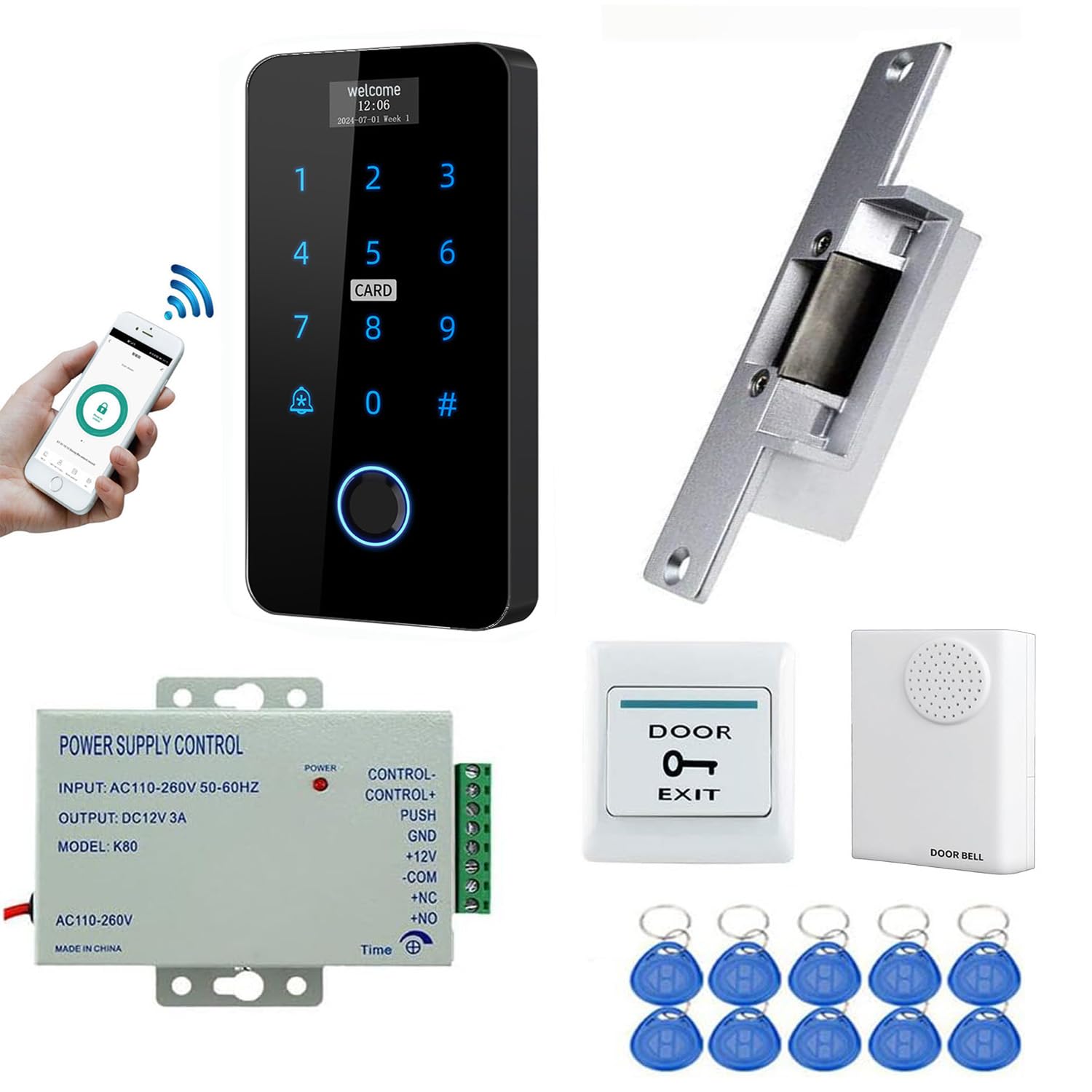
Image 1.1: Overview of the YAVIS Access Control System Kit.
2. Product Components
The YAVIS XF2+NC Kit includes the following components:
- 1 x RFID Access Control Keypad with Fingerprint and Touch Screen (XF2G)
- 1 x Electric NC Lock
- 1 x K80 Power Supply (3A)
- 1 x Wired Doorbell
- 1 x Exit Button
- 10 x 125KHz RFID Key Fobs
- 1 x User Manual
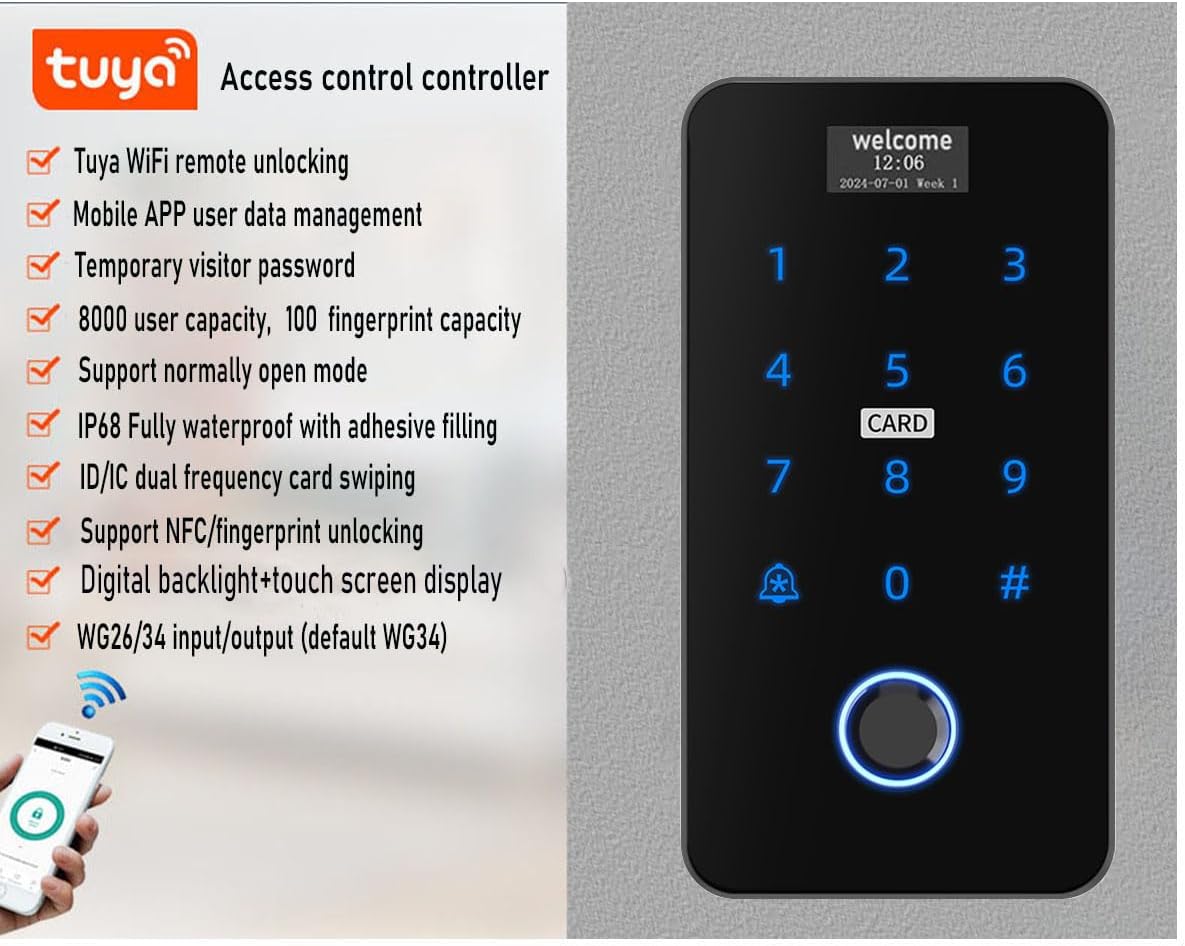
Image 2.1: Key features of the YAVIS Access Control Keypad, including Tuya WiFi remote unlocking, user management, temporary passwords, 8000 user capacity, 100 fingerprint capacity, normally open mode support, IP68 waterproof rating, ID/IC dual frequency card swiping, NFC/fingerprint unlocking, digital backlight and touch screen display, and WG26/34 input/output.

Image 2.2: The K80 Access Control Power Supply, showing its dimensions and connection terminals. It features standard AC100V-240V input, DC12V/3A output, adjustable timing circuit for release (0-15 seconds), and NC/NO/COM outputs for various electric locks.

Image 2.3: The Electric Strike Lock (NC type), illustrating its dimensions and construction. This lock is made of stainless steel, has a holding force of 500kg, operates on DC 12V, and is a fail-safe NC model (locked when powered on, unlocked when power is off).

Image 2.4: The wired doorbell, showing its front and back with wiring connections. It features a chord ringtone, 90dB sound, operates on DC12V, and is suitable for various indoor environments.
3. Setup and Installation
Careful installation is crucial for the proper functioning of the access control system. Ensure all power is disconnected before beginning installation.
3.1 Wiring Diagram
Refer to the following wiring diagram for connecting the access control keypad, electric lock, power supply, exit button, and doorbell.

Image 3.1: Detailed wiring diagram showing connections between the access control keypad, electric NC lock, K80 power supply, exit button, and wired doorbell. Pay close attention to the 12V, GND, NO, COM, NC, BELL1, BELL2, D1, and D0 terminals.
3.2 Power Supply Configuration
The K80 power supply allows adjustment of the lock release time from 0 to 15 seconds. When connecting to an electric lock, ensure the opening time is set to 0 seconds initially to prevent damage to the electric lock. Adjust the delay only after verifying basic functionality.
3.3 Keypad Mounting
The keypad is designed for wall mounting. Use the provided screws and follow the dimensions for accurate placement.

Image 3.2: Dimensions of the YAVIS Access Control Keypad (136mm height, 70mm width, 18mm depth) and mounting hole spacing (98mm vertical, 50mm horizontal).
4. Operating Instructions
The YAVIS Access Control System offers multiple methods for unlocking and user management.
4.1 Unlocking Methods
The system supports 7 unlocking methods:
- RFID Card: Present a registered RFID card to the keypad.
- Password: Enter a registered password on the touchscreen keypad.
- RFID Card + Password: Present a registered RFID card, then enter the associated password.
- NFC: Use a compatible Android smartphone with NFC functionality (requires Tuya app setup).
- Fingerprint: Place a registered fingerprint on the sensor.
- Tuya App: Remotely unlock via the Tuya WiFi application.
- Temporary Tuya Password: Generate and use temporary passwords through the Tuya app for visitors.

Image 4.1: Visual representation of various unlocking methods: RFID card, password entry, NFC via Android phone, fingerprint, and remote unlocking/temporary password generation via the Tuya app.

Image 4.2: Illustration of the semiconductor fingerprint recognition technology, supporting 360-degree membrane-free and blind spot collection with a capacity for 100 fingerprints.
4.2 User Management
All programming, including adding users (RFID cards, fingerprints, passwords), can be performed directly on the keypad or through the Tuya application. The system supports up to 8000 users and 100 fingerprints.
- Adding Users via Keypad: Refer to the keypad's on-screen menu for instructions on adding/deleting users, fingerprints, and RFID cards.
- Tuya App Integration: Download the Tuya app from your smartphone's app store. Follow the in-app instructions to connect your access control system. The app allows remote unlocking, adding/managing users, and viewing door opening logs.
5. Maintenance
To ensure the longevity and optimal performance of your YAVIS Access Control System, follow these maintenance guidelines:
- Cleaning: Wipe the keypad and other components with a soft, dry cloth. Avoid abrasive cleaners or solvents that could damage the surface or screen.
- Environmental Protection: The keypad is IP68 waterproof, suitable for outdoor installation. However, avoid direct exposure to extreme weather conditions if possible, and ensure all connections are properly sealed during installation.
- Regular Checks: Periodically check all wiring connections for security and integrity. Ensure the electric lock operates smoothly.
6. Troubleshooting
If you encounter issues with your access control system, refer to the following common problems and solutions:
- System Not Powering On:
- Check the power supply connection to the main power source.
- Verify the K80 power supply output voltage (DC 12V).
- Ensure all wiring from the power supply to the keypad and lock is correct and secure.
- Electric Lock Not Engaging/Disengaging:
- Confirm the lock type (NC) matches the power supply output setting.
- Check the wiring between the keypad, power supply, and electric lock.
- Ensure the power supply's delay time is correctly configured (0 seconds for immediate action, or desired delay). Incorrect delay can prevent proper lock operation.
- Inspect the lock mechanism for any physical obstructions.
- RFID Card/Fingerprint Not Recognized:
- Ensure the card/fingerprint has been properly registered in the system.
- Clean the fingerprint sensor and ensure your finger is clean and dry.
- Verify the RFID card frequency (125KHz or 13.56MHz) is compatible with the keypad.
- Tuya App Connectivity Issues:
- Ensure your keypad is connected to a stable 2.4GHz WiFi network.
- Check your smartphone's internet connection.
- Restart the Tuya app and try reconnecting.
7. Specifications
7.1 Access Control Keypad (XF2G)
| Cards Compatible | EM, IC 1K M1 |
| Material | Flame-retardant ABS |
| Current | <1200mA |
| User Capacity | 8000 users |
| Fingerprint Capacity | 100 Pcs |
| Waterproof Level | IP68 |
| Normally Open Mode | Supported |
| Application | Tuya WiFi |
| Wiegand Support | 26 / 34 input/output (WG34 by default) |
| Proximity Reader Frequency | 125 kHz / 13.56 MHz |
| Card Reading Distance | 3 - 12cm |
| Dimensions | 136 x 70 x 18 mm |
| Operating Temperature | -40°C ~ 60°C |
7.2 K80 Power Supply
| AC Input | Standard 100V - 240V 50 - 60HZ 36W |
| DC Output | DC 12V / 3A |
| Delay Time | 0 - 15 seconds (adjustable) |
| Dimensions | 140 x 67 x 33 mm |
7.3 Electric NC Lock
| Input Voltage | DC 12V |
| Structure | Zinc alloy |
| Max Load | 500 kg |
| Current | 200mA |
| Operating Mode | NC Mode (Unlocked when power off, locked when power on) |
| Dimensions | 150 x 39.5 x 34 mm |
7.4 Wired Doorbell
| Sound | Chord ringtone |
| Sound Level | 90dB |
| Power Mode | DC12V |
| Operating Temperature | -10°C - 80°C |
| Operating Humidity | <80% |
| Dimensions | 88 x 62 x 24 mm |
8. Warranty and Support
The YAVIS XF2+NC Kit comes with a 1-year warranty and lifetime support. If you require assistance, have questions, or need instructions in your local language, please contact YAVIS customer support. Refer to your purchase documentation for contact details.