
1. Introduction
Thank you for choosing the FEICE FK817 Chronograph Watch. This manual provides detailed instructions for the proper setup, operation, and maintenance of your new timepiece. Please read this manual thoroughly to ensure optimal performance and longevity of your watch.
2. Product Overview
The FEICE FK817 is a versatile digital-analog quartz wristwatch featuring a chronograph, dual time zones, alarm, backlight, and 3ATM water resistance. Its robust stainless steel construction ensures durability for daily wear.
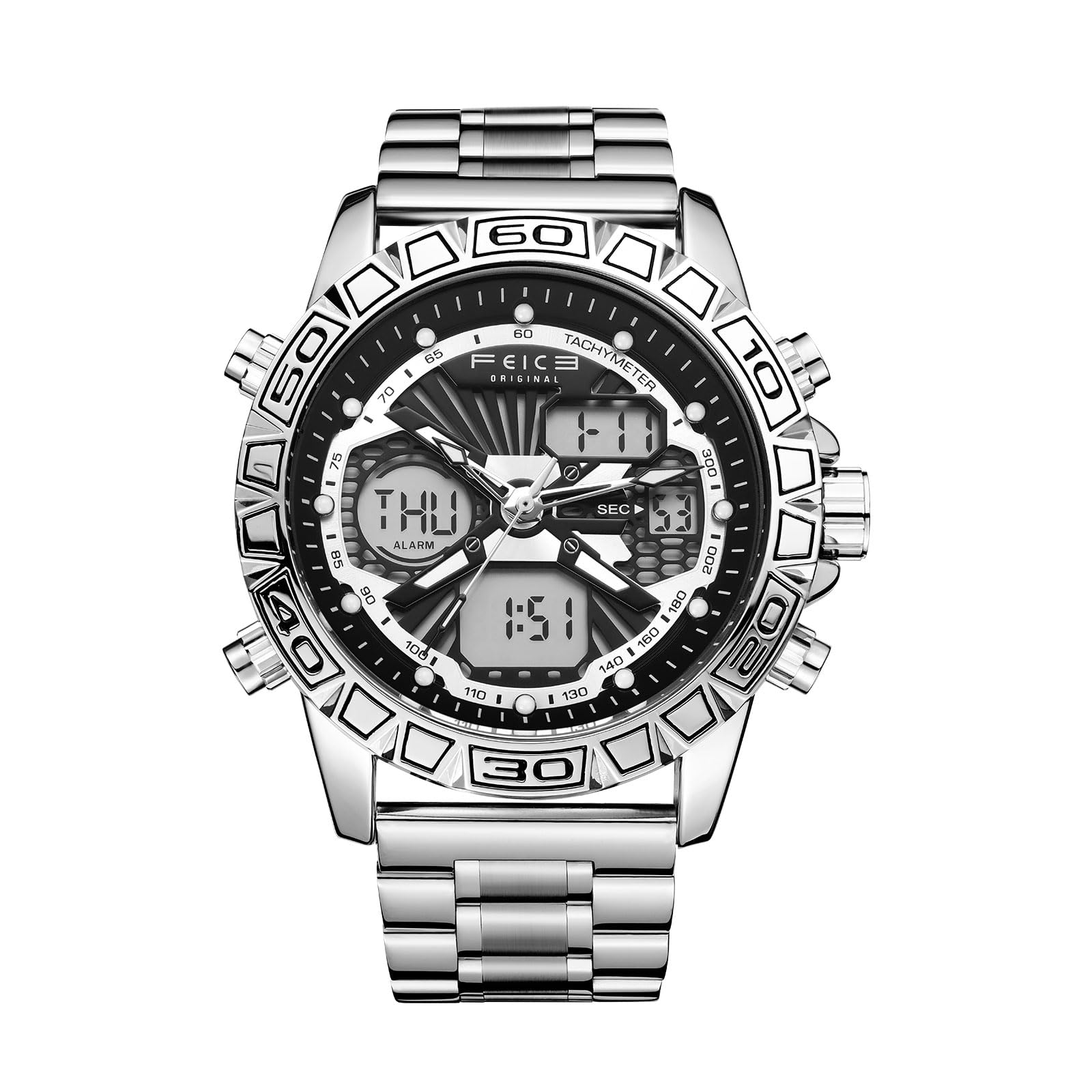
Image 2.1: Front view of the FEICE FK817 watch with key features labeled, including timing start/pause, stopwatch display, timer reset, dates, backlight key, week/alarm clock, and time display.

Image 2.2: Diagram illustrating the watch buttons (KEY A, B, C, D) and their functions for setting time, calendar, stopwatch, and backlight.
3. Setup Instructions
3.1 Initial Time Setting (Analog)
- Pull the crown (center knob) out to the first position.
- Rotate the crown to adjust the analog hands to the correct time.
- Push the crown back in to secure the time setting.
3.2 Digital Time and Date Setting
Refer to Image 2.2 for button identification (KEY A, B, C, D).
- Time Mode: Press 'B' once to enter Time Mode. Long press 'D' (2 seconds) to enter setting mode. Press 'B' to switch items (e.g., hours, minutes, 12/24H format). Press 'C' to increase the value, 'D' for fast adjustment. Press 'D' to save and exit.
- Calendar Setting: In Time Mode, the date is displayed. To adjust, follow the Time Mode setting procedure, as date adjustment is typically integrated.
3.3 Band Adjustment
The stainless steel band can be adjusted to fit your wrist. This typically involves removing or adding links. For precise adjustment, it is recommended to consult a professional watch repair service.
4. Operating Instructions
Refer to Image 2.2 for button identification (KEY A, B, C, D).
4.1 Time Mode (Display)
- The default display shows the current time, day of the week, and date.
- Press 'A' to activate the backlight for visibility in low light conditions.
4.2 Alarm Mode
- Press 'B' once to enter Alarm Mode.
- Long press 'D' (2 seconds) to enter alarm setting mode. The hour digits will flash.
- Press 'B' to switch between hour and minute settings.
- Press 'C' to increase the value.
- Press 'D' to save and exit.
- To toggle the alarm/chime ON/OFF, press 'D' in Alarm Mode (without long pressing).
4.3 Stopwatch Mode
- Press 'B' twice to enter Stopwatch Mode.
- Press 'C' to start/pause the stopwatch.
- Press 'D' to reset the stopwatch to zero.
4.4 Countdown Mode
- Press 'B' three times to enter Countdown Mode.
- Long press 'D' (2 seconds) to enter setting mode.
- Press 'B' to switch items (e.g., hours, minutes).
- Press 'C' to adjust the value.
- Press 'D' to save and exit.
- Press 'C' to start/pause the countdown.
- Press 'D' to reset the countdown.
4.5 Dual Time Mode
- Press 'C' to view the foreign time.
- Long press 'D' (2 seconds) to enter setting mode.
- Press 'B' to switch items (e.g., hours, minutes).
- Press 'C' to adjust the value.
- Press 'D' to save and exit.
4.6 Backlight
Press KEY A to activate the backlight for a few seconds, illuminating the digital displays for easy reading in the dark.
5. Maintenance
5.1 Water Resistance
This watch is rated for 3ATM (30 meters) water resistance. This means it is suitable for daily use, such as hand washing, face washing, and incidental splashes of water. It is not suitable for showering, bathing, swimming, diving, or any activities involving prolonged water immersion or high-pressure water exposure.

Image 5.1: The watch demonstrating its 30-meter water resistance, suitable for splashes and hand washing.
5.2 Crystal Care
The watch features a mineral glass crystal, which is designed to be abrasion-resistant and scratch-resistant. To maintain clarity, clean the crystal with a soft, damp cloth. Avoid harsh chemicals or abrasive materials.

Image 5.2: Close-up view of the watch's mineral reinforced mirror, emphasizing its transparent, clear, anti-scratch, and wear-resistant properties.
5.3 Cleaning
Wipe the watch case and band regularly with a soft, dry cloth to remove dirt and sweat. For the stainless steel band, a slightly damp cloth can be used, followed by drying thoroughly. Avoid direct contact with solvents, detergents, perfumes, and cosmetics, as these can damage the watch's finish and seals.
5.4 Battery Replacement
The watch is powered by a battery. When the display dims or the watch stops functioning, the battery may need replacement. It is recommended to have the battery replaced by a qualified watch technician to ensure proper sealing and water resistance.
6. Troubleshooting
- Watch not running or digital display blank: The battery may be depleted. Replace the battery.
- Incorrect time/date: Re-set the time and date according to the instructions in Section 3. If the analog and digital times do not synchronize, ensure both are set correctly.
- Water condensation inside the watch: This indicates a breach in the water resistance. Avoid further contact with water and seek professional service immediately to prevent internal damage.
- Buttons not responding: Ensure the buttons are not stuck or obstructed. If the issue persists, contact customer support.
7. Specifications
| Product Model | FK817 (FWK817YHY) |
| Movement Type | Multifunctional Quartz Movement |
| Display Type | Analog-Digital |
| Water Resistance | 3ATM (30 Meters) |
| Case Material | Stainless Steel |
| Band Material | Stainless Steel |
| Crystal Type | Mineral Glass |
| Case Diameter | 45 mm |
| Case Thickness | 18 mm |
| Functions | Timekeeping, Calendar, Day, Alarm, Luminous, GMT/Dual Time, Countdown, Stopwatch |
8. Official Product Video
Video 8.1: An official product video showcasing the FEICE Men's Sports Chronograph Watch FK817, demonstrating its features, design, and water resistance.
9. Warranty and Support
9.1 Warranty Information
This FEICE watch comes with a limited warranty. Please refer to the warranty card included with your purchase for specific terms and conditions. The warranty typically covers manufacturing defects but does not cover damage resulting from improper use, accidents, or unauthorized repairs.
9.2 Customer Support
For any questions, technical assistance, or warranty claims, please contact FEICE customer support through the official FEICE Store on Amazon or through the contact information provided in your watch packaging.