
1. Introduction
The EGO POWER+ Nexus Escape 400W Inverter is designed to provide portable, clean power for a variety of electronic devices and small appliances. This inverter delivers 400 watts of continuous power and an 800-watt peak power, ensuring compatibility with sensitive electronics due to its Pure Sine Wave output. It features multiple charging ports, including USB-C, USB-C PD, and USB-A, along with a standard 120V AC outlet. The integrated LED lights offer convenient illumination during power outages or in low-light conditions. This manual provides essential information for the safe and efficient operation of your EGO POWER+ Portable Inverter.

Figure 1: EGO POWER+ Portable Inverter with included 4.0Ah battery and 100W PD charger.
2. Safety Information
Always read and understand all safety warnings and instructions before operating this product. Failure to follow the warnings and instructions may result in electric shock, fire, and/or serious injury.
- General Safety: Keep the inverter away from water, moisture, and flammable materials. Do not operate in explosive atmospheres.
- Electrical Safety: Do not overload the inverter. Ensure the total power consumption of connected devices does not exceed 400W continuous. Use only with EGO 56V ARC Lithium batteries.
- Battery Safety: Use only the specified charger for the EGO 56V ARC Lithium battery. Do not short-circuit battery terminals. Do not expose batteries to extreme temperatures or direct sunlight.
- Ventilation: Ensure adequate ventilation around the inverter during operation to prevent overheating. Do not block ventilation openings.
- Maintenance: Disconnect the battery before performing any maintenance or cleaning. Refer to the maintenance section for proper care.
3. Package Contents
Verify that all items are present upon opening the package:
- EGO POWER+ Nexus Escape 400W Inverter (Model: PAD5003)
- EGO 56V 4.0Ah ARC Lithium Battery
- 100W USB-C PD Charger
- User Manual
4. Product Features
- 400W Continuous Power: Provides stable power for various devices, with an 800W peak power for initial startup demands.
- Pure Sine Wave Output: Delivers high-quality, clean power suitable for sensitive electronics like laptops and medical equipment.
- Multiple USB Ports: Includes one USB-C port, one USB-C PD (Power Delivery) port, and one USB-A port for simultaneous charging of up to three USB-compatible devices. The USB-C PD port supports up to 100W for larger devices or charging EGO 56V ARC Lithium batteries.
- 120V AC Outlet: A standard household outlet for powering AC devices.
- Pass-Through Charging: Allows an EGO 56V ARC Lithium battery to charge via the 100W USB-C PD port while simultaneously powering devices through other available ports.
- Built-in LED Lights: Provides ambient lighting, useful during power outages or in dark environments.
- EGO 56V ARC Lithium Battery Compatibility: Utilizes advanced battery technology for optimal power and performance.

Figure 2: The inverter provides 400W of continuous power.
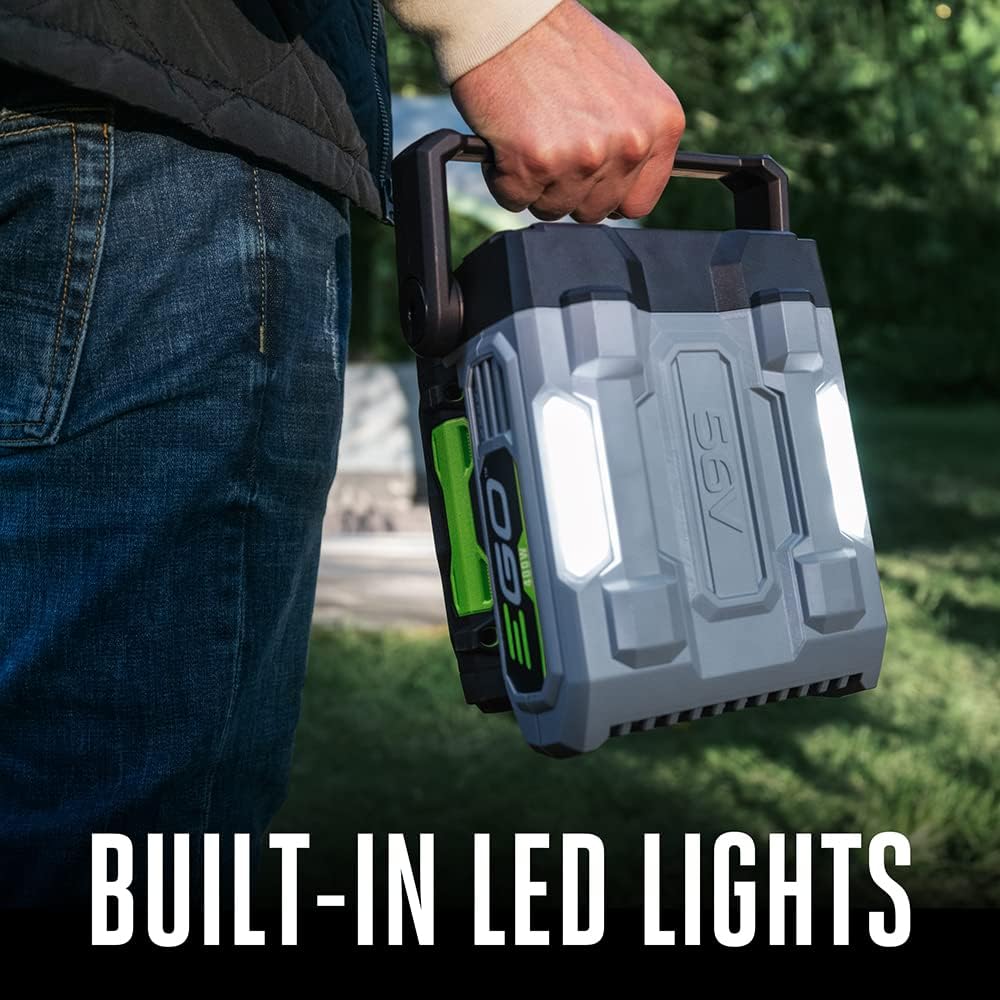
Figure 3: Pure Sine Wave output ensures compatibility with sensitive electronics.

Figure 4: Connect up to three USB devices simultaneously.

Figure 5: The EGO 56V ARC Lithium battery features innovative design and intelligent power management.
5. Setup
5.1 Charging the Battery
- Connect the 100W USB-C PD charger to a standard wall outlet.
- Connect the USB-C cable from the charger to the USB-C PD port on the EGO 56V ARC Lithium battery.
- Allow the battery to fully charge before first use. The battery indicator lights will show charging status.

Figure 6: EGO batteries are designed for fast charging.
5.2 Inserting the Battery into the Inverter
- Ensure the inverter is powered off.
- Align the battery with the battery slot on the inverter.
- Slide the battery into the slot until it clicks securely into place.
6. Operating Instructions
6.1 Powering On/Off the Inverter
- To power on: Press and hold the power button on the inverter until the indicator light illuminates.
- To power off: Press and hold the power button again until the indicator light turns off.
6.2 Connecting Devices
- AC Devices: Plug your 120V AC device into the standard AC outlet on the inverter. Ensure the device's power consumption does not exceed 400W.
- USB Devices: Connect your USB-compatible devices to the USB-A, USB-C, or USB-C PD ports using appropriate cables.
6.3 Using the LED Lights
- Press the light button to turn the LED lights on or off.
- The LED lights provide ambient illumination.
7. Maintenance
Regular maintenance ensures optimal performance and longevity of your inverter.
- Cleaning: Disconnect the battery before cleaning. Use a soft, damp cloth to wipe down the exterior of the inverter. Do not use harsh chemicals or abrasive cleaners.
- Storage: Store the inverter and battery in a cool, dry place, away from direct sunlight and extreme temperatures. For long-term storage, ensure the battery is partially charged (around 50%) to maintain battery health.
- Battery Care: Avoid fully discharging the battery frequently. Recharge the battery after each use.
8. Troubleshooting
If you encounter issues with your EGO POWER+ Portable Inverter, refer to the following common problems and solutions:
| Problem | Possible Cause | Solution |
|---|---|---|
| Inverter does not turn on | Battery not inserted correctly; Battery discharged; Inverter malfunction | Ensure battery is fully seated; Charge the battery; Contact customer support if issue persists |
| No power output from AC outlet | Overload; Battery low; Device not compatible | Reduce connected load; Recharge battery; Verify device power requirements and compatibility |
| USB ports not charging | Cable issue; Device not compatible; Inverter off | Try a different USB cable; Ensure device is USB-compatible; Turn on the inverter |
| Inverter shuts down unexpectedly | Overload; Overheating; Low battery voltage | Reduce load; Allow inverter to cool down; Recharge battery |
9. Specifications
| Feature | Specification |
|---|---|
| Model Name | Nexus Escape 400W Inverter |
| Model Number | PAD5003 |
| Continuous Power | 400W |
| Peak Power | 800W |
| Output Waveform | Pure Sine Wave |
| AC Output | 120V |
| USB-C PD Port | 100W In/Out |
| USB-C Port | 18W |
| USB-A Port | 18W |
| Battery Compatibility | EGO 56V ARC Lithium Batteries |
| Product Dimensions | 8.24 x 7.72 x 4.57 inches |
| Item Weight | 9.77 pounds (with battery) |
| Manufacturer | EGO Power+ |
10. Warranty and Support
10.1 Warranty Information
The EGO POWER+ Portable Inverter (tool) is covered by a 5-year limited warranty. The included EGO 56V ARC Lithium battery and charger are covered by a 3-year limited warranty. Please retain your proof of purchase for warranty claims. Warranty terms and conditions apply.
10.2 Customer Support
For technical assistance, warranty claims, or to purchase replacement parts, please contact EGO Power+ customer support. Refer to the official EGO Power+ website for the most current contact information and support resources.

Figure 7: The EGO POWER+ system offers universal battery compatibility across 90+ tools.