
1. Product Overview
The Misolant Gaming Chair is designed for comfort and support during extended periods of sitting, whether for gaming, work, or relaxation. It features an ergonomic design, breathable fabric, adjustable components, and a massage function.

Figure 1: The Misolant Gaming Chair in green, featuring a high back, adjustable headrest, lumbar support, and retractable footrest.

Figure 2: The Misolant Gaming Chair positioned in a modern home office environment, ready for use.
2. Safety Information
- Ensure all screws and bolts are tightened securely before use.
- Do not stand on the chair or use it as a step stool.
- Avoid placing heavy objects on the chair.
- Keep children and pets away from the chair during assembly.
- Do not use the chair if any parts are damaged or missing.
3. Package Contents
Verify that all components are present before beginning assembly. Refer to the assembly instructions for a detailed list of parts.
Video 1: This video demonstrates the unboxing and initial setup of the Misolant Gaming Chair, showing the various components included in the package.
4. Setup and Assembly
Assembly typically takes approximately 30 minutes. Follow the detailed instructions provided in the included manual. Ensure all connections are secure for stability and safety.

Figure 3: An illustration highlighting the SGS certified, secure, and strong metal base with quiet and wear-resistant casters, crucial for stable assembly.
5. Operating Instructions
- Height Adjustment: Use the lever located under the seat to adjust the chair's height. Pull the lever up while seated to lower, or pull up while standing to raise.
- Recline Function: The chair reclines from 90° to 155°. Use the recline lever on the side to adjust the backrest angle and lock it into your desired position.
- Retractable Footrest: Pull the footrest out from under the seat for leg support. Push it back in when not in use.
- Lumbar Massage: The lumbar pillow features a massage function. Connect the USB cable to a power source (e.g., computer, power bank) and use the integrated switch to activate.
- 360° Swivel: The chair is designed for full 360-degree rotation.

Figure 4: Detailed diagram illustrating the dimensions of the Misolant Gaming Chair, including height, width, and depth measurements, which can be adjusted for optimal comfort.

Figure 5: An illustrative image detailing the adjustable linkage armrests, designed to provide elbow support and improve stability during use.

Figure 6: A detailed view of the adjustable lumbar pillow with integrated massage function, designed to relieve lower back fatigue.

Figure 7: An image showcasing the retractable footrest, providing comfort for cross-legged seating or full extension.
6. Key Features
- Ergonomic Design: Provides support for the lower back, head, and buttocks, promoting comfort during long sessions.
- Breathable Fabric: Made with skin-friendly, breathable fabric for increased air permeability, keeping you cool.
- High Elasticity Cushion: The seat cushion is constructed with high elastic spring and memory foam for a soft and supportive feel.
- Adjustable Headrest and Lumbar Support: Both pillows can be adjusted for height and position. The lumbar pillow includes a massage function.
- Sturdy Construction: Passed BIFMA testing and SGS certified for safety and durability.

Figure 8: A close-up view highlighting the wide and comfortable seat cushion of the Misolant Gaming Chair, designed for extended use.
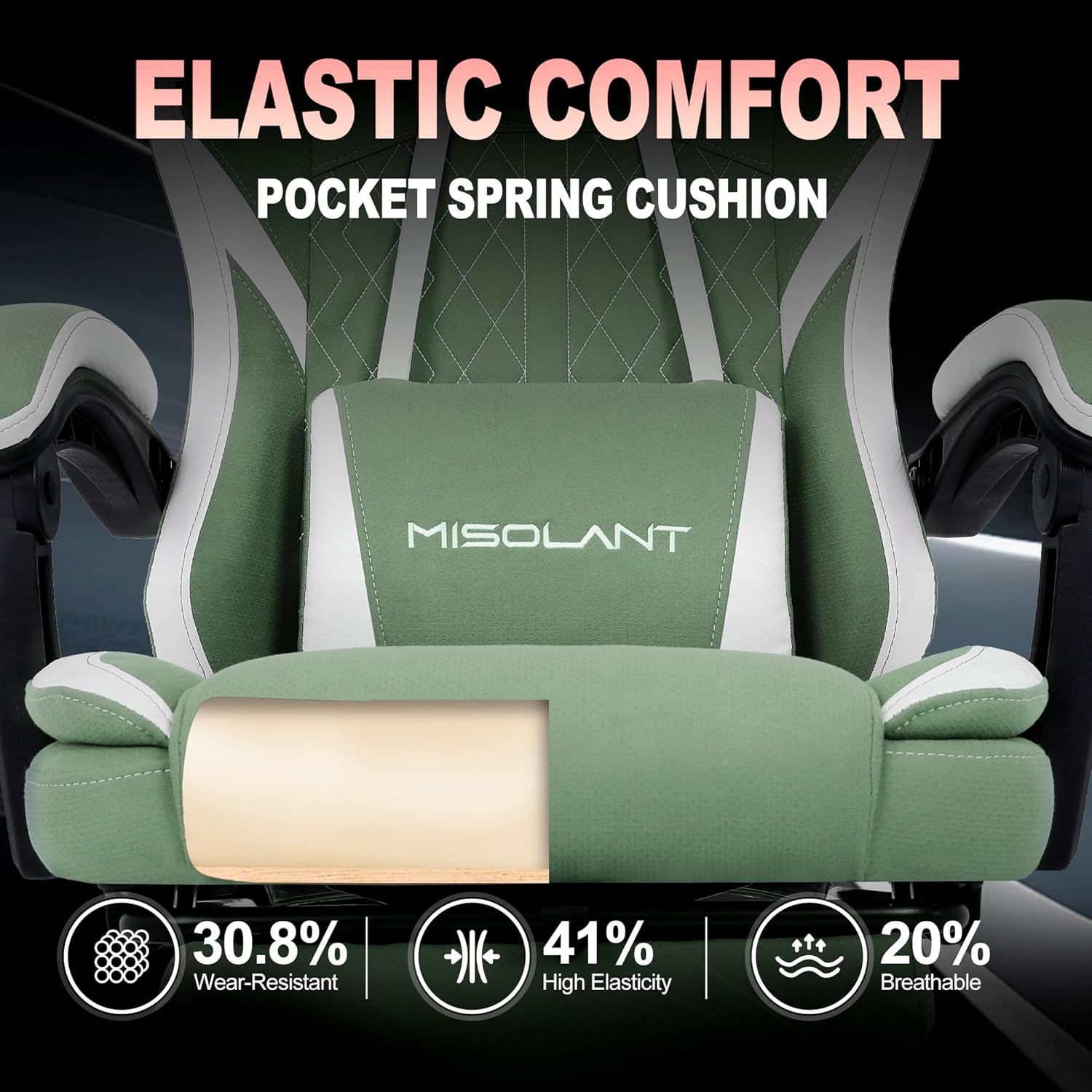
Figure 9: An illustration showing the internal structure of the seat cushion, emphasizing its high elasticity, breathability, and wear-resistant properties for lasting comfort.
7. Specifications
| Feature | Detail |
|---|---|
| Brand | Misolant |
| Model | B0DSF8NXD4 |
| Color | Green |
| Material | Textile, Memory Foam |
| Product Dimensions (D x W x H) | 24.1" x 25.2" x 40" |
| Item Weight | 46.3 Pounds |
| Reclining Position Range | 90° - 155° |
| Additional Features | Adjustable Height, Massage Lumbar Support, Retractable Footrest, 360° Swivel |
8. Maintenance
- Regularly wipe the fabric with a soft, damp cloth to remove dust and spills.
- Avoid using harsh chemicals or abrasive cleaners, as these can damage the fabric.
- Check all screws and bolts periodically and tighten if necessary to maintain stability.
- Keep the chair away from direct sunlight and heat sources to prevent material degradation.
9. Troubleshooting
- Chair Squeaks: Apply a small amount of lubricant to moving parts, especially around the base and recline mechanism.
- Difficulty Adjusting Height: Ensure the gas lift lever is fully engaged. If the issue persists, check for obstructions or contact support.
- Unstable Chair: Verify that all assembly screws are tightened. Ensure the chair is on a flat, even surface.
- Massage Function Not Working: Check the USB connection to the power source and ensure the switch on the cable is turned on.
10. Warranty and Support
The Misolant Gaming Chair comes with a one-year quality guarantee. For any questions, replacement parts, or assistance, please contact our dedicated customer service team. We are committed to providing proactive solutions and support before and after your purchase.
Contact information can be found on our official website or through your purchase platform.