
LISEN EVS604
LISEN Portable Vacuum Magnetic Phone Holder Stand User Manual
Model: EVS604
Introduction
Thank you for choosing the LISEN Portable Vacuum Magnetic Phone Holder Stand. This manual provides essential information for the proper setup, operation, and maintenance of your device. Please read it thoroughly before use.
This innovative phone holder features an electric vacuum suction cup for enhanced stability and a strong magnetic ring for secure phone attachment. It is designed for convenience and reliability.
Package Contents
Please verify that all items are present in the package:
- LISEN Portable Vacuum Magnetic Phone Holder Stand
- Manganese steel plate (for non-MagSafe compatible phones/cases)
- USB-C charging cable
- Cleaning kit & Transparent pad (for leather dashboards)
- After-sales card
- Instruction manual (this document)
Product Overview
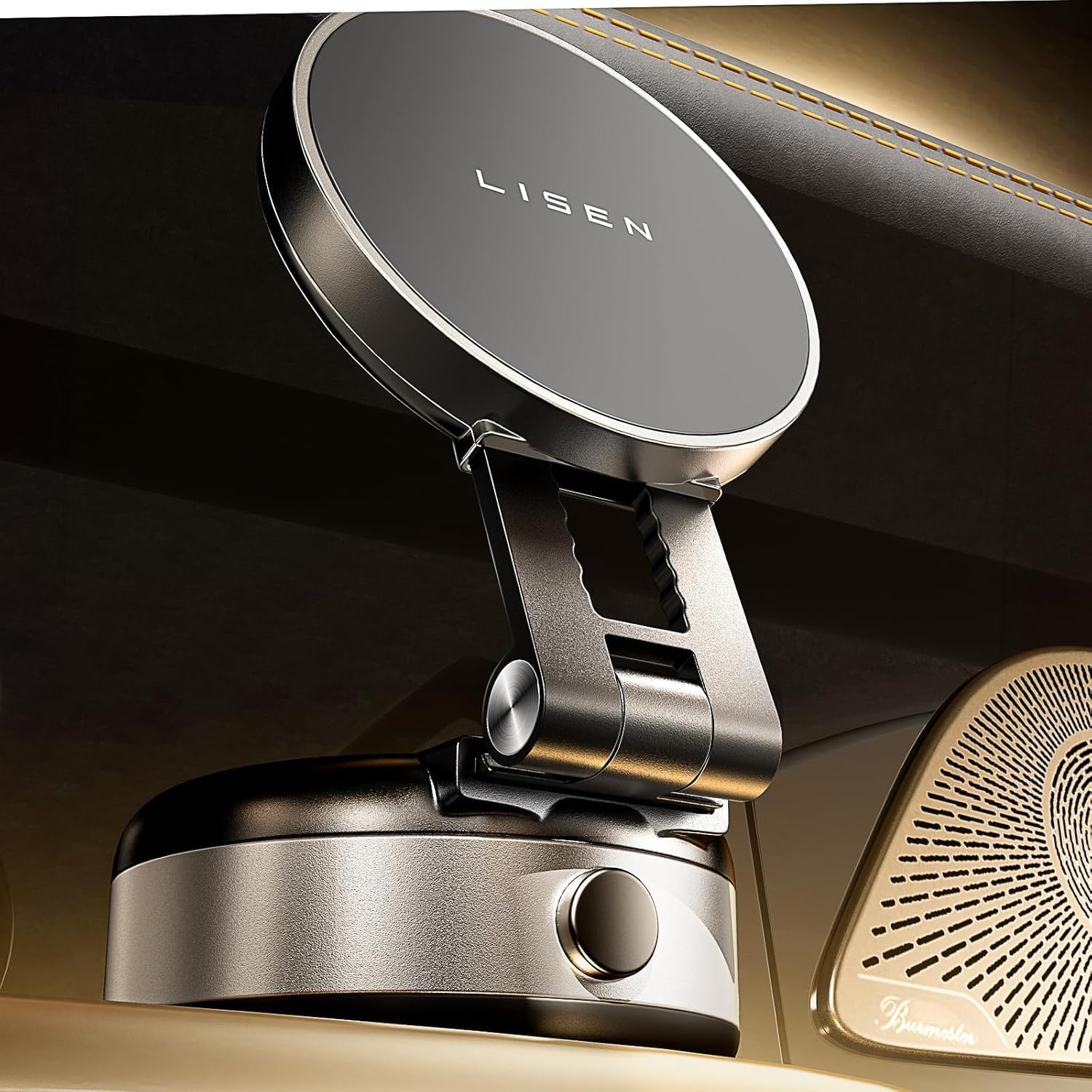
Figure 1: LISEN Portable Vacuum Magnetic Phone Holder Stand

Figure 2: Product Dimensions
The LISEN phone holder features a foldable design for portability and an electric vacuum suction base for strong adhesion. It is equipped with a magnetic surface compatible with MagSafe-enabled iPhones.
Setup and Installation
1. Charging the Device
Before first use, ensure the device is fully charged. Connect the provided USB-C cable to the charging port on the side of the holder and to a power source. A red light indicates charging. Once fully charged, the light will change (or turn off, depending on model). A full charge typically lasts approximately one month with normal use. Frequent movement of the holder may drain the battery faster.

Figure 3: Charging the LISEN Phone Holder
2. Preparing the Mounting Surface
The vacuum suction cup works best on smooth, flat, and non-porous surfaces such as metal, glass, or smooth plastic. It is not suitable for curved, uneven, or seam areas. Remove any protective film from the suction cup before initial use.
For leather dashboards, it is crucial to attach the provided transparent pad first to ensure proper suction and prevent damage to the dashboard. Clean the surface thoroughly with the cleaning kit before applying the pad or the holder directly.

Figure 4: Surface Compatibility for Suction Cup
3. Attaching the Magnetic Ring (for non-MagSafe cases)
This holder is designed for iPhones 12-16 series that support MagSafe. If your iPhone has a case that is not MagSafe compatible, or if you are using a non-MagSafe phone (though compatibility is primarily for iPhones), you can attach the provided manganese steel plate (magnetic ring) to the back of your phone case to enable magnetic attachment.

Figure 5: iPhone Compatibility and Magnetic Ring Use
Operating Instructions
1. Attaching the Holder to a Surface
Place the suction cup base firmly onto the prepared smooth surface. The electric vacuum mechanism will automatically activate, sucking out 100% of the air to create a strong, secure seal. This process may produce a slight "pssst" sound, which is normal and indicates the air is being expelled. The holder will automatically re-engage the vacuum approximately once per hour to maintain suction, especially on bumpy roads.

Figure 6: Electric Vacuum Suction Operation
2. Attaching Your Phone
Align your MagSafe-compatible iPhone (or phone with the attached magnetic ring) with the magnetic surface of the holder. The strong N55 magnets will securely hold your phone in place. The double-layer safety magnetic ring design ensures stable attachment and prevents magnetic interference with your device.

Figure 7: Magnetic Phone Attachment
3. Adjusting the Viewing Angle
The holder features a foldable and stretchable arm, allowing for 220-degree angle adjustments and 360-degree rotation of the magnetic head. Adjust the holder to your preferred viewing angle for optimal visibility and comfort.

Figure 8: Adjusting the Holder Angle
4. Removing the Holder
To release the vacuum seal, press the button located on the side of the suction cup base. This will allow air to re-enter, and you can then easily remove the holder from the surface.
Figure 9: Releasing the Suction
Maintenance
- Cleaning: Regularly wipe the suction cup and the magnetic surface with a soft, damp cloth. Use the provided cleaning kit for thorough cleaning of the suction surface before re-application.
- Charging: Monitor the red indicator light on the side of the device. When it appears, charge the device promptly to maintain optimal suction performance.
- Storage: When not in use, store the holder in a clean, dry place. Avoid exposing it to extreme temperatures or direct sunlight for prolonged periods.
- Water Exposure: The product is not waterproof. Avoid contact with water or other liquids.
Troubleshooting
| Problem | Possible Cause | Solution |
|---|---|---|
| Holder does not stick firmly. |
|
|
| "Pssst" sound is heard. | Normal operation of the vacuum pump. | This is normal and indicates the vacuum is working. It does not mean the battery is dead. |
| Phone does not attach magnetically. |
|
|
| Red light on side is visible. | Low battery indicator. | Charge the device using the USB-C cable. |
Specifications
- Model: EVS604
- Dimensions: 4.84 x 3.94 x 2.13 inches (Package)
- Item Weight: 6.7 ounces
- Compatibility: iPhone 12, 13, 14, 15, 16 series (including Pro, Pro Max, Plus models) with MagSafe or magnetic ring.
- Mounting Type: Dashboard (suitable for smooth, flat surfaces)
- Special Features: Electric Vacuum Suction, Magnetic Attachment, Foldable, Hand-Free
- Power Source: Rechargeable via USB-C
Warranty and Support
LISEN offers a 2-year warranty for this product. If you encounter any issues or require assistance, please contact LISEN customer service. We are committed to providing fast and efficient support within 24 hours to ensure your satisfaction.
For support, please refer to the contact information provided on the After-sales card included in your package or visit the official LISEN store on Amazon: LISEN Store.
Ask a question about this manual
Ask about setup, troubleshooting, compatibility, parts, safety, or missing instructions. Manuals+ will review the question and use this page’s manual context to help answer it.