
SHHJCO KPS6020D
SHHJCO KPS6020D Laboratory DC Power Supply User Manual
Model: KPS6020D | Brand: SHHJCO
1. Introduction
This user manual provides comprehensive instructions for the safe and efficient operation of the SHHJCO KPS6020D Laboratory DC Stabilized Power Supply. This adjustable variable digital regulated power supply is designed for laboratory use, offering precise and stable output for various applications. Please read this manual thoroughly before operating the device and retain it for future reference.
2. Safety Instructions
To ensure safe operation and prevent damage to the device or injury to personnel, please observe the following safety precautions:
- Ensure the input voltage matches the specified AC110V/220V rating of your unit before connecting to power.
- Do not operate the power supply in wet or damp conditions.
- Avoid blocking ventilation openings. Adequate airflow is essential for proper heat dissipation.
- Do not open the casing of the power supply. There are no user-serviceable parts inside, and opening it may expose you to dangerous voltages.
- Always connect the ground terminal to a proper earth ground.
- Disconnect power before making any connections or disconnections to the output terminals.
- Use appropriate test leads and ensure they are in good condition.
- In case of abnormal operation, smoke, or unusual odors, immediately disconnect the power supply from the mains and contact qualified service personnel.
3. Product Overview
The SHHJCO KPS6020D is a high-performance DC power supply featuring a clear digital display and intuitive controls. Below are detailed views of the unit's components and features.
3.1 Front View
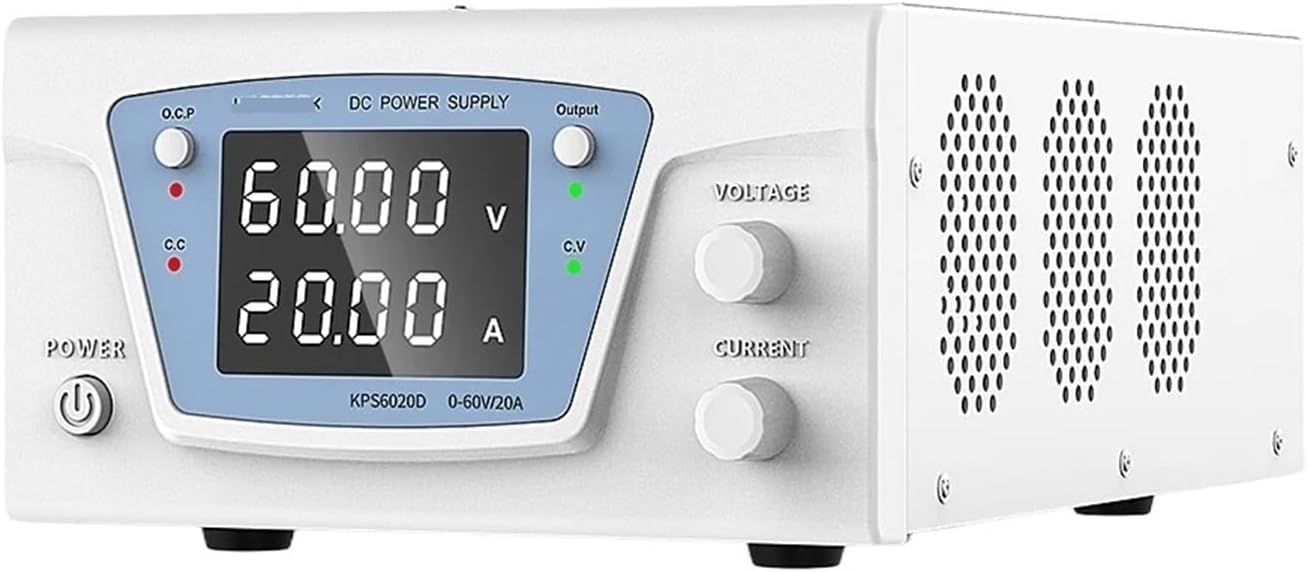
This image displays the front panel of the KPS6020D power supply. Prominently featured are the large digital displays for voltage (V) and current (A), the power button, O.C.P (Over Current Protection) and C.C (Constant Current) indicators, and the Voltage and Current adjustment knobs on the right side. The overall design is compact and user-friendly.
3.2 Encoder Adjustment

This image highlights the encoder adjustment mechanism for setting voltage and current. Pressing the encoder switch allows shifting to the left to adjust different digits. Rotating the knob clockwise increases the value, while counter-clockwise rotation decreases it. This precise control allows for fine-tuning of output parameters, including preset functions and easy current adjustment without requiring a short circuit.
3.3 Front and Rear Panel Components
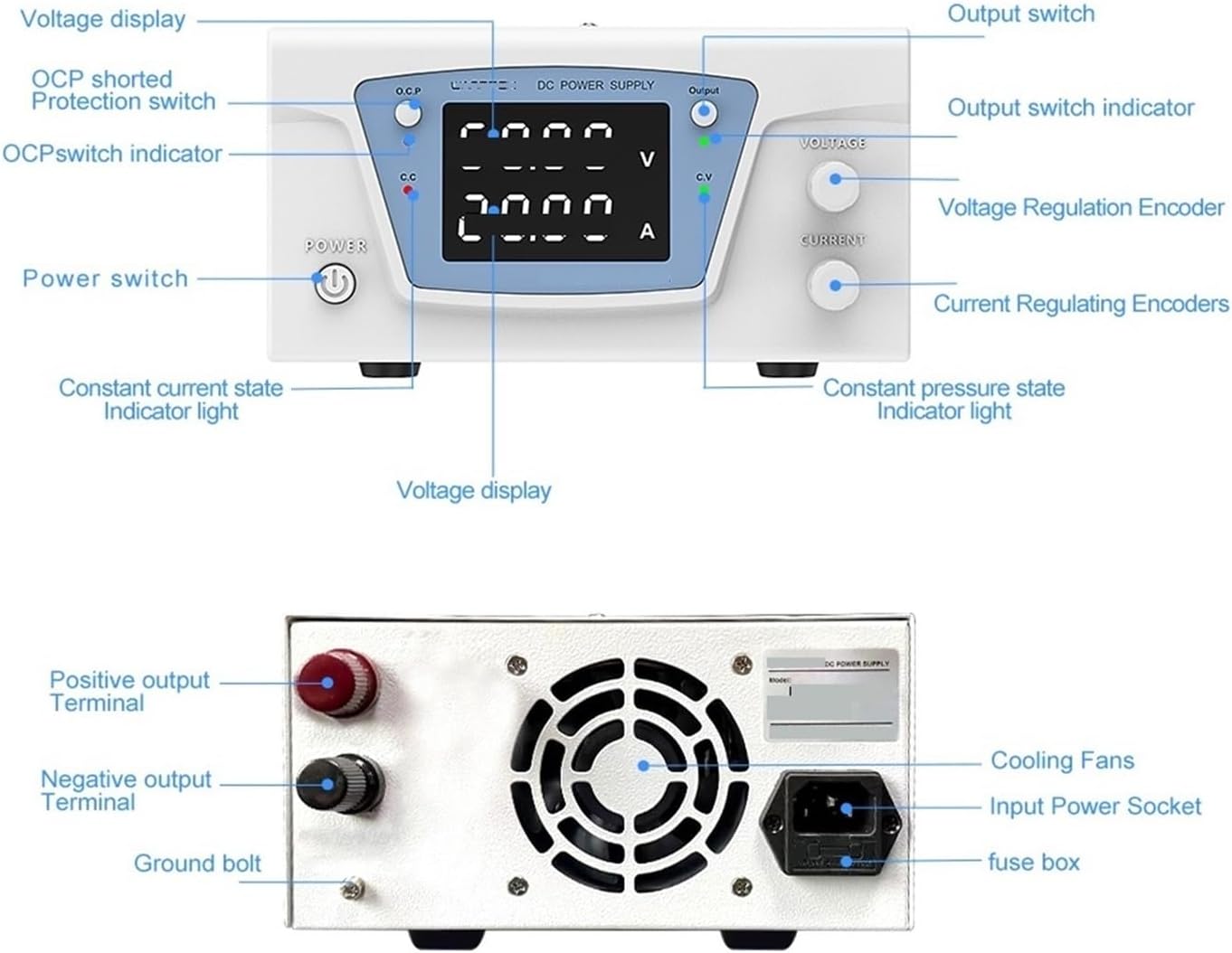
This diagram provides a detailed breakdown of the KPS6020D's components. The front panel includes the Voltage display, OCP shorted Protection switch, OCP switch indicator, Power switch, Constant current state indicator light, Voltage Regulation Encoder, Current Regulating Encoders, Constant pressure state indicator light, Output switch, and Output switch indicator. The rear panel shows the Positive output Terminal, Negative output Terminal, Ground bolt, Cooling Fans, Input Power Socket, and fuse box.
3.4 Protection Features

The KPS6020D is equipped with multiple protective functions to ensure safe operation and longevity. These include OVP (Overvoltage Protection), OCP (Overcurrent Protection), OPP (Overpower Protection), and OTP (Overtemperature Protection). Other features highlighted are milligram show, constant pressure/constant current modes, intelligent fan control, encoder reconciliation, fully loaded work capability, and low ripple/low noise output.
3.5 Intelligent Temperature Control Cooling

This image illustrates the intelligent temperature control cooling system. The internal fan automatically activates when the machine reaches a certain temperature, ensuring efficient heat dissipation. This system contributes to low noise operation and extends the lifespan of the cooling fan and the unit itself, making it suitable for continuous laboratory use.
4. Setup
- Unpacking: Carefully remove the power supply from its packaging and inspect it for any signs of damage. Retain the packaging for future transport or storage.
- Placement: Place the power supply on a stable, level surface with adequate ventilation around all sides. Ensure no objects obstruct the cooling fan vents on the rear panel.
- Power Connection: Connect the provided power cord to the Input Power Socket on the rear panel and then to a grounded AC outlet. Ensure the outlet voltage matches the unit's specified input voltage (AC110V or AC220V).
- Grounding: For safety, ensure the ground bolt on the rear panel is properly connected to an earth ground if required by your setup.
- Output Connections: Connect your load to the Positive output Terminal (red) and Negative output Terminal (black) on the rear panel using appropriate test leads. Ensure correct polarity.
5. Operating Instructions
- Power On: Press the Power switch on the front panel to turn on the unit. The digital displays will illuminate.
- Setting Voltage:
- Rotate the Voltage Regulation Encoder to adjust the desired output voltage.
- Press the encoder switch to select which digit to adjust for fine-tuning.
- Setting Current Limit:
- Rotate the Current Regulating Encoder to set the maximum output current limit. This acts as a safety feature to protect your load.
- Press the encoder switch to select which digit to adjust for fine-tuning.
- Enabling Output: After setting the desired voltage and current limits, press the OUTPUT switch to enable the power output to your load. The Output switch indicator will illuminate.
- Constant Voltage (CV) and Constant Current (CC) Modes:
- The unit automatically switches between CV and CC modes depending on the load.
- The C.V indicator illuminates when the unit is operating in Constant Voltage mode.
- The C.C indicator illuminates when the unit is operating in Constant Current mode (output current has reached the set limit).
- Over Current Protection (OCP):
- The OCP shorted Protection switch can be used to activate or deactivate the overcurrent protection feature.
- When OCP is active and the output current exceeds the set limit, the power supply will shut down its output to protect the connected device. The OCP switch indicator will illuminate.
- Power Off: Press the Power switch again to turn off the unit. Always disable the output first before powering off.
6. Maintenance
Proper maintenance ensures the longevity and reliable operation of your power supply.
- Cleaning: Disconnect the power supply from the mains before cleaning. Use a soft, dry cloth to wipe the exterior. Do not use abrasive cleaners or solvents.
- Ventilation: Regularly check that the cooling fan vents are free from dust and debris. Use compressed air to clear any blockages if necessary.
- Storage: When not in use for extended periods, store the power supply in a cool, dry environment, away from direct sunlight and extreme temperatures.
- Fuse Replacement: If the unit fails to power on, check the fuse located in the fuse box near the Input Power Socket on the rear panel. Replace it only with a fuse of the same type and rating.
7. Troubleshooting
This section addresses common issues you might encounter. For problems not listed here, contact customer support.
| Problem | Possible Cause | Solution |
|---|---|---|
| Unit does not power on. | No power from outlet; Power cord loose; Blown fuse. | Check wall outlet with another device; Ensure power cord is securely connected; Replace fuse with correct type and rating. |
| No output voltage/current. | Output switch off; OCP activated; Load short-circuited or open-circuited. | Press the OUTPUT switch; Check OCP indicator and reset if necessary; Verify load connections and integrity. |
| Output voltage/current unstable. | Poor load connection; Overheating. | Ensure all connections are secure; Check for proper ventilation and clear fan vents. |
| Fan runs constantly or loudly. | Normal operation (temperature-controlled); Dust in fan. | This is often normal for intelligent cooling; Clean fan vents if excessive dust is present. |
8. Specifications
Detailed technical specifications for the KPS6020D power supply:
- Model: KPS6020D
- Output Voltage: 0-60V
- Output Current: 0-20A
- Output Power: 1200W
- Input Voltage: AC110V/220V (User selectable/model dependent)
- Set Value Resolution (Voltage): 0.01V
- Set Value Resolution (Current): 0.01A
- Readback Value Resolution (Voltage): 0.01V
- Readback Value Resolution (Current): 0.001A
- Display Accuracy: 0.5% ±3 words
- Regulated State CV (Voltage Stability): 0.5% ±20mV
- Regulated State CV (Load Stability): 0.5% ±20mV
- Regulated State CV (Ripple Voltage): 0.5%Vp-p
- Steady Flow State CC (Current Stability): 0.5% ±20mA
- Steady Flow State CC (Load Stability): 0.5% ±20mA
- Steady Flow State CC (Ripple Current): 0.5%Vp-p
- Temperature Coefficient: 100ppm/°C
- Rise Time (No load): 15ms
- Rise Time (Fully loaded): 30ms
- Dynamic Response Time: 2ms
- Protective Functions: OVP (Overvoltage Protection), OCP (Overcurrent Protection), OPP (Overpower Protection), OTP (Overtemperature Protection)
- Item Weight: 4.41 pounds (2000 Grams)
- Manufacturer: SHHJCO
9. Warranty and Support
For warranty information or technical support, please contact SHHJCO customer service through the retailer where the product was purchased. Please have your model number (KPS6020D) and purchase date available when contacting support.
Manufacturer: SHHJCO
Model: KPS6020D
Ask a question about this manual
Ask about setup, troubleshooting, compatibility, parts, safety, or missing instructions. Manuals+ will review the question and use this page’s manual context to help answer it.