
CAMMOO Workbench-W2000
CAMMOO 48" Heavy Duty Work Bench User Manual
Model: Workbench-W2000
Introduction
This manual provides comprehensive instructions for the assembly, operation, maintenance, and troubleshooting of your CAMMOO 48" Heavy Duty Work Bench. Designed for durability and versatility, this workbench features a robust rubberwood tabletop, adjustable height, integrated power strip, and a pegboard for organized storage. Please read this manual thoroughly before assembly and use to ensure safe and efficient operation.
Product Features
- Heavy-Duty Construction: Features a Max Load 2000 LBS Rubberwood Tabletop and an H-shaped frame with 1.5mm-thick steel legs for enhanced stability and load-bearing capacity.
- Adjustable Height: Boasts a 10-level height adjustment function with 360° Tool-free Knobs, allowing customization of the work surface height from 25.4 inches to 38.7 inches to suit standing or sitting preferences.
- Integrated Power Strip: ETL Certified built-in power strip with 4 AC outlets, 2 USB-A ports, and a 6.5 FT cable for convenient access to power tools and charging devices.
- Pegboard with LED Light: A No Drilling Pegboard increases storage space and includes an integrated LED light for ample illumination, ensuring safe operation in low-light conditions.
- Space-Saving Storage Shelf: A metal storage shelf can be secured under the tabletop, offering 13.4 inches of adjustable space for customized storage.
- Easy Assembly: Pre-installed components and structures without drilling significantly reduce installation time. Detailed instructions are included.

Figure 1: Overview of the CAMMOO 48" Heavy Duty Work Bench.
Setup and Assembly
The CAMMOO Work Bench is designed for quick and easy assembly with pre-installed components. Follow the steps below for a smooth setup.
- Unpack Components: Carefully remove all parts from the packaging. Verify that all components listed in the packing list are present and undamaged.
- Assemble Frame: Connect the steel legs and crossbar supports to form the H-shaped frame. Ensure all connections are secure.
- Attach Tabletop: Place the rubberwood tabletop onto the assembled frame. Secure it using the provided fasteners.
- Install Pegboard: Mount the No Drilling Pegboard to the designated points on the workbench frame.
- Position Storage Shelf: Attach the metal storage shelf to any metal hole on the legs, adjusting its height to your desired position.
- Connect Power Strip and LED Light: Integrate the built-in power strip and LED light as per the detailed instructions provided in the package.
- Adjust Feet: Use the adjustable metal feet to level the workbench on uneven ground and ensure stability.

Figure 2: Exploded view illustrating the quick and easy installation process.
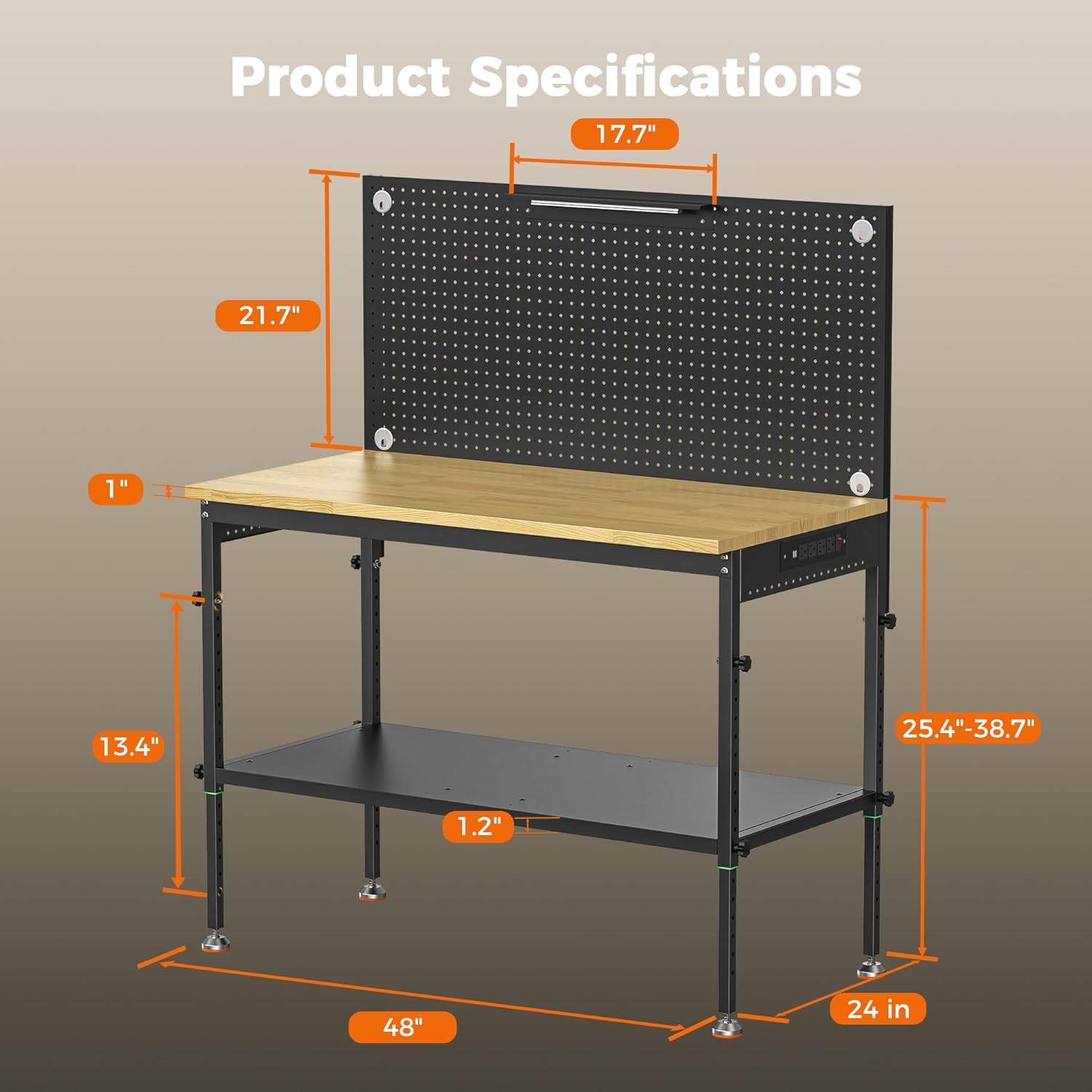
Figure 3: Dimensions and adjustable features of the workbench, including height and shelf placement.
Operating Instructions
Adjusting Workbench Height
The workbench features a 10-level height adjustment. To adjust the height:
- Locate the 360° Tool-free Knobs on the legs of the workbench.
- Loosen the knobs to allow the legs to slide.
- Adjust the tabletop to your desired height. Each level provides a 1.34-inch lift.
- Once the desired height is achieved, tighten the knobs securely to lock the position.
Using the Built-in Power Strip
The workbench includes an ETL Certified power strip for convenient access to electrical outlets.
- Plug the workbench's main power cable (6.5 FT) into a standard wall outlet.
- Utilize the 4 AC outlets for power tools and other electrical devices.
- Use the 2 USB-A ports for charging mobile devices or other USB-powered accessories.
- Ensure the power strip's switch is in the 'ON' position to supply power.

Figure 4: Detail of the integrated power strip, highlighting its outlets and USB ports.
Utilizing the Pegboard and LED Light
The integrated pegboard and LED light enhance organization and visibility.
- Hang tools and accessories on the pegboard using compatible pegboard hooks (some included, others sold separately).
- Turn on the LED light to illuminate your workspace, especially useful in dimly lit environments.

Figure 5: The pegboard with LED lighting, demonstrating organized tool storage.
Maintenance
Regular maintenance will ensure the longevity and optimal performance of your CAMMOO Work Bench.
- Cleaning: Wipe down the rubberwood tabletop and metal surfaces with a damp cloth. Avoid abrasive cleaners that may damage the finish.
- Fastener Check: Periodically check all bolts and fasteners to ensure they remain tight. Re-tighten as necessary to maintain stability.
- Tabletop Care: The rubberwood tabletop is durable, but it is recommended to use cutting mats or protective surfaces when working with sharp tools or chemicals to prevent damage.
- Electrical Components: Inspect the power strip and LED light for any signs of wear or damage. Do not use if wires are frayed or outlets are loose.
Troubleshooting
| Problem | Possible Cause | Solution |
|---|---|---|
| Workbench wobbles or is unstable. | Loose fasteners; uneven ground. | Tighten all assembly bolts. Adjust the metal feet to level the workbench on uneven surfaces. |
| Power strip not working. | Not plugged in; power strip switch off; tripped circuit breaker. | Ensure the main power cable is securely plugged into a live outlet. Check if the power strip's ON/OFF switch is engaged. Reset the circuit breaker if necessary. |
| LED light not illuminating. | Not connected; faulty light. | Verify the LED light is properly connected to the power source. If issues persist, contact customer support. |
| Difficulty adjusting height. | Knobs not fully loosened; excessive weight on tabletop. | Ensure the 360° Tool-free Knobs are completely loosened. Remove heavy items from the tabletop before adjusting. |
Specifications
- Brand: CAMMOO
- Model Number: Workbench-W2000
- Material: Metal Shelf, Steel Legs, Rubberwood Tabletop
- Product Dimensions (L x W x H): 48"D x 24"W x 38.7"H (Adjustable height from 25.4" to 38.7")
- Color: Wood (Tabletop), Black (Frame)
- Load Capacity: 2000 Pounds (Tabletop)
- Shelf Load Capacity: 500 Pounds
- Power Strip: 4 AC Outlets, 2 USB-A Ports, 6.5 FT Cable, ETL Certified
- Pegboard: No Drilling, Integrated LED Light
- Assembly Required: Yes
- Item Weight: 89.5 pounds
- Country of Origin: China

Figure 6: Illustration of the workbench's heavy-duty load capacities for both the tabletop and the storage shelf.

Figure 7: Comparison highlighting the superior features of the CAMMOO Heavy Duty Workbench, including load capacity and material.
Warranty and Support
CAMMOO is committed to providing reliable and durable products. For warranty information, technical support, or any inquiries regarding your workbench, please refer to the warranty card included with your purchase or visit the official CAMMOO website. You may also contact customer service through the retailer where the product was purchased.
Customer Support: For assistance, please contact CAMMOO customer service via the contact information provided on the product packaging or the official brand website.
Ask a question about this manual
Ask about setup, troubleshooting, compatibility, parts, safety, or missing instructions. Manuals+ will review the question and use this page’s manual context to help answer it.