1. Introduction
This manual provides detailed instructions for the installation, setup, and operation of your YiToo 7-inch Wired Video Door Phone Intercom System. This system is designed to enhance home security and communication, featuring a high-definition indoor monitor and an infrared outdoor doorbell unit. Please read this manual thoroughly before installation and use to ensure proper function and safety.

Figure 1: YiToo 7-inch Wired Video Door Phone Intercom System overview, showing the indoor monitor, outdoor doorbell, and a smartphone displaying the app interface.
2. Safety Information
- Ensure all power is disconnected before performing any installation or wiring.
- Only use the provided power adapter (12VDC) for the indoor unit.
- Do not expose the indoor monitor to excessive moisture or extreme temperatures.
- The outdoor unit is designed to be waterproof (IP65), but avoid direct high-pressure water jets.
- Keep the product away from strong magnetic fields.
- Refer to a qualified electrician for complex wiring or if you are unsure about any installation steps.
3. Package Contents
Verify that all items are present in the package:
- 1 x Indoor Unit (with pre-inserted 32G TF card)
- 1 x Outdoor Unit
- 1 x 10m RVV4-core white cable
- 1 x Installation Tools (screws, anchors, mounting bracket)
- 1 x User Manual
- 1 x 12VDC Power Adapter

Figure 2: Contents of the product package.
4. Product Overview
4.1 Indoor Monitor (Model: V7024B-AHD-M6)
The indoor monitor features a 7-inch IPS touch screen for clear visual communication and system control. It supports various functions including monitoring, intercom, media playback, and settings adjustments.

Figure 3: Indoor unit rear panel connections and outdoor unit components.
- Indoor Unit Wiring Port: Connects to the outdoor unit.
- DC15V 1.2A Power Port: For connecting the power adapter.
- Binary Signal: For specific control signals.
- Speaker: Audio output.
- Camera Wiring Port: For connecting additional CCTV cameras.
- TF Card Slot: Supports up to 128GB for video recording and image storage.
4.2 Outdoor Doorbell Unit (Model: AHD-M6)
The outdoor unit is equipped with an HD camera and infrared night vision for clear visuals day and night. It is designed to be waterproof (IP65) for outdoor installation.
- Rain Cover: Provides protection from weather elements.
- HD Camera: Captures video footage.
- Infrared Night Vision Lamp: Enables clear vision in low-light conditions.
- Call Button: Initiates a call to the indoor monitor.
- Speaker: Audio output for two-way communication.
- 4P Indoor Unit Connector Socket: Main connection to the indoor monitor.
- 2P Port (Output 12V voltage signal): For connecting to electronic locks.
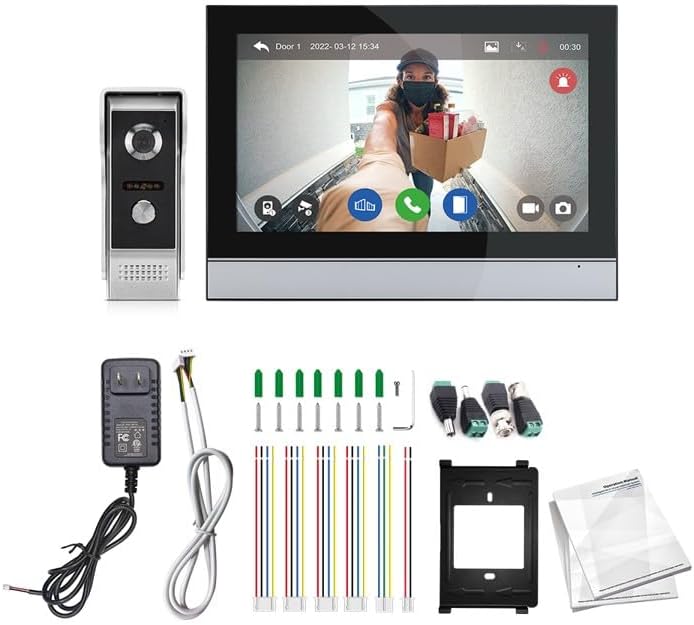
Figure 4: Outdoor unit showcasing its IP65 waterproof and temperature resistance features.
5. Installation
5.1 Wiring Diagram
Follow the wiring diagram carefully to connect the outdoor unit, indoor monitor, and optional electronic locks. Ensure all connections are secure before applying power.

Figure 5: 1 to 1 Double Locking Wiring Diagram. This diagram illustrates how to connect the outdoor unit to the indoor monitor, and how to integrate two electric locks and exit buttons with separate power supplies.
Important: The diagram shows connections for electric locks and exit buttons, which are not included in the standard package. If you plan to use these features, ensure you have compatible accessories and consult the diagram for correct wiring.
5.2 Mounting
- Outdoor Unit: Choose a suitable location near your entrance, ensuring the camera has a clear view. Mount the rain cover first, then secure the outdoor unit inside it using the provided screws. The recommended height is approximately 1.5 meters (5 feet) from the ground.
- Indoor Monitor: Select a convenient indoor location, such as a wall in your living area or hallway. Use the mounting bracket and screws to securely attach the monitor to the wall. Ensure it is within reach of a power outlet and the wiring from the outdoor unit.
6. Setup
6.1 Initial Power-Up
- After completing all wiring, connect the 12VDC power adapter to the indoor monitor.
- The monitor will power on and display the initial setup screen.
6.2 Wi-Fi and Tuya App Connection
Connecting the indoor unit to your Wi-Fi network and the Tuya Smart app enables remote monitoring, communication, and control.
- Download Tuya App: Download and install the "Tuya Smart" or "Smart Life" app from your mobile device's app store. Register or log in to your account.
- Activate QR Code on Indoor Unit: On the indoor monitor, navigate to the Wi-Fi settings or app connection menu. Activate the QR code display function.
- Scan QR Code: Open the Tuya app on your smartphone, select "Add Device," and choose the option to scan a QR code. Scan the QR code displayed on the indoor monitor.
- Connect to Wi-Fi: Follow the on-screen prompts in the Tuya app to connect the indoor unit to your 2.4GHz Wi-Fi network. Ensure your Wi-Fi password is correct.
- Confirmation: Once connected, the app will confirm the successful pairing, and the indoor unit will indicate a successful Wi-Fi connection.
Note: The system supports 2.4GHz Wi-Fi networks only. Ensure your router is configured accordingly.
7. Operating Instructions
7.1 Visual Intercom and Two-Way Communication
- When a visitor presses the call button on the outdoor unit, the indoor monitor will ring and display the visitor's image.
- Tap the "Answer" icon on the indoor monitor to initiate two-way audio communication.
- From the Tuya app, you will receive a push notification. Tap the notification to view the visitor and communicate remotely.

Figure 6: Dual-way communication and call transfer functionality.
7.2 Remote Monitoring and Unlocking
- Monitoring: From the indoor monitor or the Tuya app, select the "Monitor" function to view the live feed from the outdoor camera at any time.
- Unlocking: If an electronic lock is connected, tap the "Unlock" icon on the indoor monitor or in the Tuya app during a call or monitoring session to remotely open the door/gate.
7.3 PIR Motion Detection
The outdoor unit features PIR motion detection to alert you to activity near your entrance.
- When motion is detected, the system will automatically capture images or record video (if enabled) and send a push notification to your Tuya app.
- You can adjust motion detection sensitivity and recording settings in the indoor monitor's menu.

Figure 7: Motion Detection functionality with real-time notifications.
7.4 Night Vision
The outdoor unit's infrared night vision lamps automatically activate in low-light conditions, providing clear black-and-white video footage.
7.5 Working Modes
The system offers different working modes to suit your needs:
- At Home Mode: Standard operation with full notifications and intercom.
- Leave Home Mode: May activate specific recording or notification settings when you are away.
- Sleep Mode: Mutes indoor monitor notifications for undisturbed rest.
You can select and customize these modes via the indoor monitor's interface.

Figure 8: Different working modes and their effects on system behavior.
7.6 Media Playback
The indoor monitor stores recorded videos and captured images on the inserted TF card.
- Navigate to the "Media" section on the indoor monitor to browse and play back recorded events.
- You can also access these recordings through the Tuya app.

Figure 9: Media playback interface on the indoor monitor.
7.7 System Settings
Access the system settings on the indoor monitor to customize various parameters:
- Display: Adjust screen brightness, contrast, and saturation.
- Audio: Set intercom volume and ringtone.
- Language: Select your preferred display language.
- Date & Time: Set the current date and time.
- Recording: Configure motion detection recording, video duration, and snapshot settings.
- Network: View Wi-Fi status and reconfigure network settings.
8. Maintenance
- Cleaning: Use a soft, dry cloth to clean the indoor monitor screen and outdoor unit lens. Avoid abrasive cleaners or solvents.
- Firmware Updates: Periodically check for firmware updates through the Tuya app or the indoor monitor's settings to ensure optimal performance and security.
- TF Card Management: Regularly back up important recordings and format the TF card to maintain storage efficiency.
- Outdoor Unit Inspection: Ensure the outdoor unit's camera lens and infrared lights are clear of obstructions (dirt, spiderwebs) for optimal performance.
9. Troubleshooting
| Problem | Possible Cause | Solution |
|---|---|---|
| No image on indoor monitor. | Power issue, loose wiring, outdoor unit malfunction. | Check power adapter connection. Verify all wiring between indoor and outdoor units is secure. Ensure outdoor unit is powered. |
| No audio during intercom. | Microphone/speaker issue, volume too low. | Check volume settings on indoor monitor. Ensure microphone and speaker ports on both units are clear. |
| Cannot connect to Wi-Fi/Tuya App. | Incorrect Wi-Fi password, 5GHz network, weak signal, app pairing issue. | Ensure correct 2.4GHz Wi-Fi network and password. Move router closer or improve signal. Re-attempt app pairing process. |
| Motion detection not working. | Settings disabled, sensitivity too low, obstructions. | Check motion detection settings in the indoor monitor. Adjust sensitivity. Ensure camera view is clear. |
| Remote unlock not functioning. | Incorrect wiring to lock, lock malfunction, power supply issue for lock. | Verify wiring to the electronic lock according to the diagram. Test the lock independently. Ensure the lock's power supply is working. |
10. Specifications
| Feature | Detail |
|---|---|
| Brand | YiToo |
| Model Number | V7024B-AHD-M6 |
| Indoor Monitor Screen | 7-inch IPS Touch Screen |
| Outdoor Camera Resolution | 2-megapixel HD |
| Night Vision | Infrared (4 enhanced IR lights) |
| Connectivity | Wired (RVV4-core cable), Wi-Fi (2.4GHz) |
| App Compatibility | Tuya Smart / Smart Life |
| Storage | TF Card (up to 128GB, 32GB included) |
| Power Source | 12VDC power adapter |
| Outdoor Unit Waterproof Rating | IP65 |
| Operating Temperature | -30°C to +60°C |
| Product Dimensions (Indoor Monitor) | 7.69 x 5.2 x 0.59 inches (195 x 132 x 15 mm) |
| Product Dimensions (Outdoor Unit) | Approx. 5.0 x 2.0 x 1.8 inches (128 x 51 x 45 mm) |
| Item Weight | 2.87 Pounds (total package) |
11. Warranty and Support
YiToo products are designed for reliability and performance. For warranty information, technical support, or service inquiries, please refer to the contact information provided with your purchase or visit the official YiToo website. Keep your purchase receipt as proof of purchase for warranty claims.