
ZLPLSUPEX ME435
ZLPLSUPEX ME435 Three Phase Power Data Logger User Manual
Model: ME435
Introduction
The ZLPLSUPEX ME435 is a sophisticated Three Phase Power Data Logger and Digital Energy Meter designed for accurate measurement and analysis of electrical parameters. It is equipped with NRC150 Rogowski coils, allowing for a wide measurement range of 10A-3000A with an inner diameter of 150mm. This device offers an accuracy class of IEC 62053-22 Class 0.5, making it suitable for professional industrial and scientific applications requiring precise energy measurement and power quality recording.
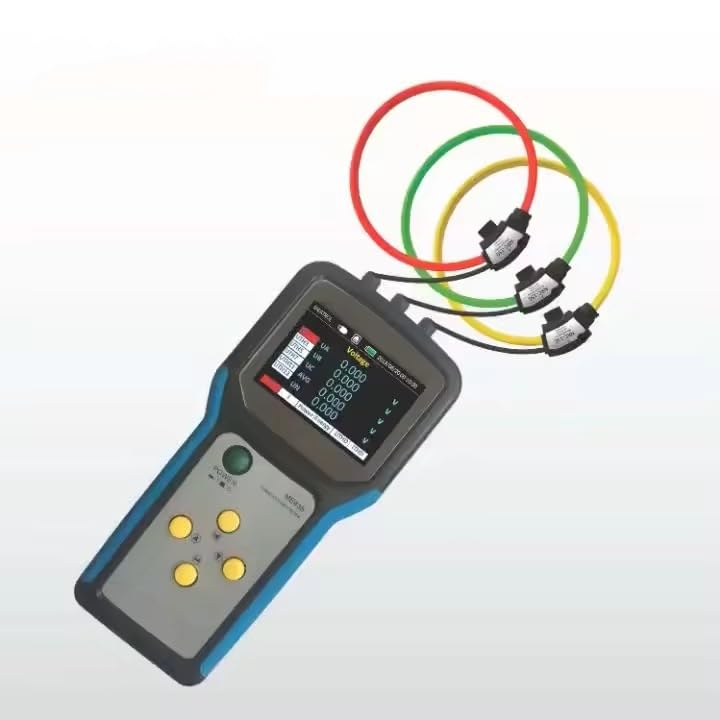
What's in the Box
Upon opening the package, please verify that all components are present and undamaged:
- ME435 Handheld Power Meter Unit
- 3 x NRC150 Rogowski Coils (Measurement Range: 10A-3000A, Inner Diameter 150mm)
- Test Leads
- User Manual (this document)
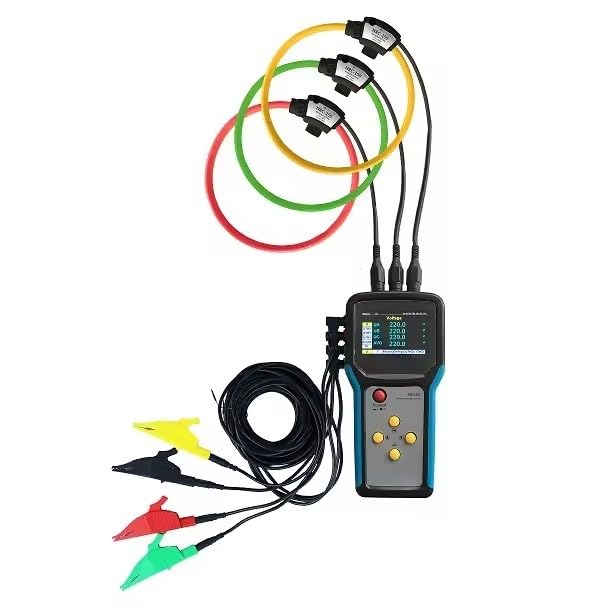
Setup
Follow these steps for the initial setup of your ME435 Power Data Logger:
- Charge the Device: Before first use, ensure the ME435 unit is fully charged. Connect the appropriate power adapter (not supplied with the product, but typically required for charging) to the charging port.
- Connect Rogowski Coils: Identify the three Rogowski coils. Each coil has a connector that plugs into the corresponding input ports on the top of the ME435 unit. The ports are typically labeled for phase connections (e.g., UA, UB, UC).

Figure 3: Rogowski coils connected to the top input ports of the ME435 unit. - Connect Voltage Test Leads: Connect the provided test leads to the voltage input terminals on the ME435. Ensure correct polarity and phase connection for accurate voltage measurement.

Figure 4: Side view of the ME435 unit displaying the various input jacks for measurement connections. - Power On: Press and hold the power button (usually labeled "POWER") to turn on the device. The display will illuminate, showing the main menu or default measurement screen.
Operating Instructions
The ME435 is designed for intuitive operation. Here are basic steps for common measurements:
Navigating the Menu
Use the directional arrow buttons (up, down, left, right) to navigate through menu options and adjust settings. The central button typically acts as an "Enter" or "Select" key.

Performing Measurements
- Select Measurement Mode: From the main screen, use the arrow keys to select the desired measurement mode (e.g., Voltage, Current, Power, Energy, Harmonics).
- Connect to Circuit:
- For current measurement, open the Rogowski coils and clamp them around the respective phase conductors. Ensure the coils are fully closed and properly positioned.
- For voltage measurement, connect the test leads to the circuit points where voltage needs to be measured.
- View Readings: Once connected, the ME435 will display real-time readings on its screen. The screen typically shows values for voltage (UA, UB, UC, UN), current, power (active, reactive, apparent), energy, and harmonic distortion (THD).

Figure 6: Detail of the Rogowski coil connectors, highlighting their secure connection points. - Data Logging: The ME435 can log data over time. Refer to the on-screen menu for options to start, stop, and configure data logging intervals. Logged data can typically be downloaded to a computer via a USB connection.
Maintenance
Proper maintenance ensures the longevity and accuracy of your ME435 Power Data Logger:
- Cleaning: Use a soft, dry cloth to clean the device. Do not use abrasive cleaners or solvents.
- Storage: Store the ME435 in a cool, dry place away from direct sunlight and extreme temperatures.
- Battery Care: If the device has a rechargeable battery, avoid fully discharging it frequently. Charge it regularly, even if not in use, to maintain battery health.
- Coil Inspection: Periodically inspect the Rogowski coils and their connectors for any signs of wear, damage, or fraying.
Troubleshooting
If you encounter issues with your ME435, refer to the following common problems and solutions:
| Problem | Possible Cause | Solution |
|---|---|---|
| Device does not power on. | Low battery or power button not pressed correctly. | Charge the device fully. Press and hold the power button for several seconds. |
| Inaccurate readings. | Improper coil placement, damaged coils/leads, or incorrect settings. | Ensure coils are fully closed around conductors. Check for visible damage to coils and leads. Verify measurement settings. |
| Data logging not working. | Insufficient memory, incorrect logging configuration, or device error. | Check available memory. Review logging settings. Restart the device. |
| Screen is blank or frozen. | Software glitch or critical error. | Perform a hard reset (if applicable, consult the full product manual for specific instructions). If problem persists, contact support. |
Specifications
| Feature | Detail |
|---|---|
| Model | ME435 |
| Measurement Type | Three Phase Power Data Logger, Digital Energy Meter |
| Current Sensors | 3 x NRC150 Rogowski Coils |
| Current Measurement Range | 10A-3000A (with NRC150 coils) |
| Coil Inner Diameter | 150mm |
| Accuracy Class | IEC 62053-22 Class 0.5 |
| Product Dimensions | 5.51 x 3.15 x 1.57 inches |
| Product Weight | 6.61 Pounds |
| Manufacturer | ZLPLSUPEX |
| ASIN | B0DSBW3W57 |
| Date First Available | January 6, 2025 |
Note: Specifications are subject to change without prior notice.
Warranty and Support
For warranty information and technical support, please refer to the documentation provided with your purchase or contact ZLPLSUPEX customer service directly. Keep your purchase receipt as proof of purchase for warranty claims.
Manufacturer: ZLPLSUPEX
Product Serial Number (example, check device label): 3118401001

Related Documents - ME435
 |
ME435 Power Meter Setup and Installation Guide Comprehensive setup and installation checklist for the Meatrol ME435 power meter and energy logger, including Rogowski coil ratio settings, configuration, and accuracy specifications. |
 |
ME435 Einrichtungs- und Installationscheckliste Detaillierte Checkliste für die Einrichtung und Installation des ME435 Energie-Loggers und Analysators, um eine korrekte Konfiguration für genaue Protokollierung sicherzustellen. |
 |
ME435 Setup and Installation Checklist A comprehensive checklist for setting up and installing the ME435 energy logger and analyzer to ensure correct logging and avoid re-logging. |
 |
Meatrol Data Analysis Template: Step-by-Step Instructions and Guide Comprehensive instructions for using the Meatrol Data Analysis Template with Microsoft Excel's Power Query Editor. Learn how to import CSV data from energy meters (Mi550, ME440, ME435), transform it, and visualize results. Includes prerequisites, detailed steps, and troubleshooting tips. |
 |
Meatrol Data Analysis Template Instructions Instructions for using the Meatrol Data Analysis Template in Excel, including prerequisites, importing data from CSV files, and viewing the data. |
 |
Modern Masters Metallic Paint Collection Technical Data Sheet Technical data sheet for Modern Masters Metallic Paint Collection, detailing non-tarnishing, water-based, low-VOC metallic paint colors, application methods, surface preparation, product specifications, and safety information. |
Ask a question about this manual
Ask about setup, troubleshooting, compatibility, parts, safety, or missing instructions. Manuals+ will review the question and use this page’s manual context to help answer it.