
1. Introduction
This manual provides essential information for the proper installation, operation, and maintenance of the Auto Engineering ALC708 Lighting Tower Controller. The ALC708 is designed for automation and monitoring of single light tower units, offering advanced control features for various applications. Please read this manual thoroughly before using the device to ensure safe and efficient operation.
2. Product Overview
The ALC708 series controllers are sophisticated, networked, and intelligent devices utilizing micro-processor technology. They integrate automation control with flashlight sequence control, making them suitable for both AC and DC light tower sets. Key functionalities include scheduled start/stop, sunrise and sunset activation, and remote control via SMS messages or dedicated input ports. The controller features an LCD display with selectable language options (Chinese/English), a modular design, and simplified connections for ease of use.
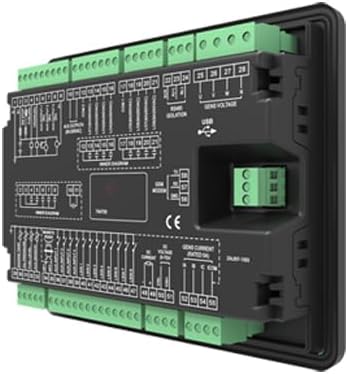
Figure 2.1: Angled view of the ALC708 Lighting Tower Controller, showing its compact design and multiple connection terminals.
3. Key Features
- Automation and monitoring control systems for single light tower units.
- Supports scheduled start/stop, sunrise and sunset start/stop functions.
- Remote start/stop capabilities via SMS messages and remote input ports.
- Controls flashlight sequences for proper illumination order.
- Compatible with both AC and DC light tower sets.
- Digital, smart, and networked design for precise data measurement.
- Integrated alarm protection functions.
- Remote control, remote measuring, and remote communication capabilities.
- Micro-processor technology combining automation and flashlight control.
- LCD display with selectable Chinese/English language interface.
- Modular design, compact structure, and simple connections.
4. Setup
4.1 Mounting
The ALC708 controller is designed for panel mounting. Ensure adequate space for ventilation and access to wiring terminals. The installation dimensions are 186mm x 141mm. Secure the controller firmly using appropriate fasteners.
4.2 Wiring
All wiring connections must be performed by qualified personnel in accordance with local electrical codes and safety regulations. Refer to the detailed wiring diagram on the back of the unit and in Figure 4.1 for correct terminal connections.

Figure 4.1: Rear view of the ALC708 controller, illustrating the comprehensive wiring diagram for various inputs, outputs, and power connections.
- Power Supply: Connect the DC power supply (8-35V) to the designated terminals. Observe polarity.
- Generator Connections: Connect generator start/stop, sensing, and other control lines as per the diagram.
- Lighting Outputs: Connect the lighting tower's AC or DC circuits to the appropriate output terminals for sequential control.
- Remote Inputs: Connect external switches or communication modules for remote start/stop functionality.
- Communication Ports: Utilize the USB port for configuration and data access, and other communication ports for remote monitoring.
5. Operating Instructions
5.1 Power On/Off
Once wired correctly, apply power to the controller. The LCD display will illuminate, indicating the system status. To power off, disconnect the DC power supply.
5.2 Navigating the LCD Interface
Use the navigation buttons (typically Up, Down, Enter, Esc) to browse through menus and adjust settings on the LCD display. The interface supports both Chinese and English languages, which can be selected in the system settings menu.
5.3 Setting Schedules
The ALC708 allows for precise scheduling of light tower operations:
- Timed Start/Stop: Access the 'Schedule' menu to set specific times for the light tower to turn on and off daily.
- Sunrise/Sunset Control: Configure the controller to automatically activate/deactivate based on local sunrise and sunset times. This feature may require initial geographical data input.
5.4 Remote Control
The controller supports remote operation through multiple channels:
- SMS Message: If equipped with a compatible communication module, the controller can receive SMS commands for remote start/stop functions. Refer to the communication module's manual for specific command formats.
- Remote Input Port: External devices can trigger start/stop commands via dedicated remote input terminals.
5.5 Flashlight Sequence Control
The ALC708 manages the sequential activation and deactivation of flashlights on the tower. This ensures proper illumination patterns. Configuration options for sequences can be found in the 'Lighting Control' menu.
6. Maintenance
Regular maintenance ensures the longevity and reliable operation of your ALC708 controller.
- Cleaning: Periodically clean the exterior of the controller and the LCD screen with a soft, dry cloth. Avoid using abrasive cleaners or solvents.
- Connection Inspection: Annually inspect all wiring connections for tightness and signs of corrosion. Re-tighten any loose terminals.
- Environmental Check: Ensure the operating environment remains within specified temperature and humidity ranges to prevent damage.
- Firmware Updates: Check the manufacturer's website for any available firmware updates. Follow the provided instructions carefully for any update procedures.
7. Troubleshooting
This section addresses common issues you might encounter with the ALC708 controller.
| Problem | Possible Cause | Solution |
|---|---|---|
| Controller does not power on. | No power supply or incorrect wiring. | Verify DC power supply (8-35V) is connected correctly and providing power. Check wiring connections. |
| Light tower does not start/stop as scheduled. | Incorrect schedule settings or time synchronization issues. | Review schedule settings in the LCD menu. Ensure the controller's internal clock is accurate. |
| Remote start/stop not working. | Communication module issue, incorrect SMS command, or faulty remote input. | Check the status of the communication module. Verify SMS command syntax. Inspect remote input wiring and external trigger device. |
| LCD display is blank or unreadable. | Power issue, extreme temperature, or display fault. | Check power supply. Ensure operating temperature is within (-25~+70)℃. If problem persists, contact support. |
For issues not listed here, or if solutions do not resolve the problem, please contact technical support.
8. Specifications
| Parameter | Value |
|---|---|
| Working Power Range | DC (8-35)V |
| Overall Dimensions (L x W x D) | 197mm x 152mm x 47mm |
| Installation Dimensions (L x W) | 186mm x 141mm |
| Working Temperature | (-25~+70)℃ |
| Weight | 0.71 kg |
| Color | Black |
| Included Components | 1X controller |
9. Warranty Information
Warranty terms and conditions for the ALC708 Lighting Tower Controller are provided by the manufacturer, Auto Engineering, or the authorized seller at the time of purchase. Please retain your proof of purchase. For detailed warranty information, including coverage period and claims process, refer to the documentation included with your product or contact your point of purchase.
10. Support
For technical assistance, product inquiries, or support regarding the ALC708 controller, please contact your authorized dealer or the manufacturer directly. Ensure you have your product model number (ALC708) and any relevant purchase details available when seeking support.